
cloudcostwise






Find AWS waste from your terminal or your AI assistant. cloudcostwise runs CloudWise's free waste
checks on your own machine, with your own read-only AWS credentials.
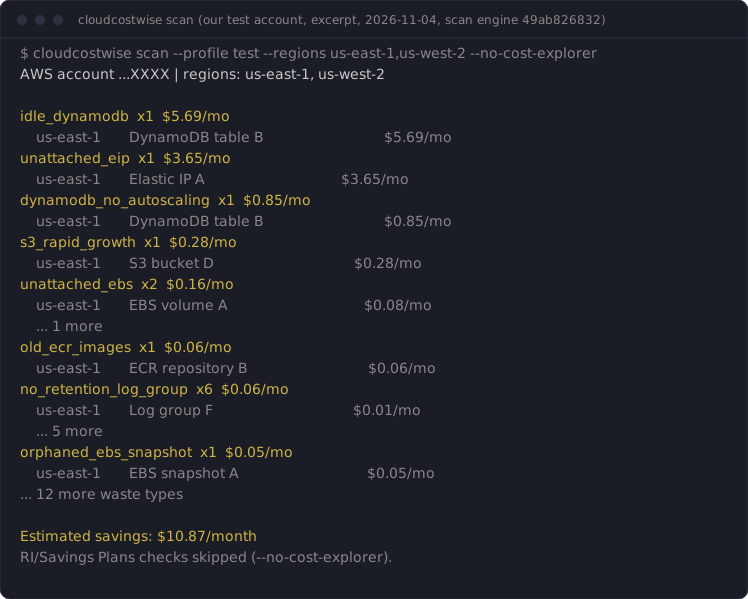
See it first: a real scan of our own test account, with its findings, fixes and dollars, and nothing to install: cloudcostwise.io/sample-scan.
- Nothing is sent to CloudWise unless you choose to share a summary at the end. The only network calls are AWS API calls in your account, plus that one optional POST. No signup, no IAM role for a third party, no tracking. Used through an AI assistant (MCP), the findings go to that assistant like any tool output. See Sharing a summary.
- It cannot change anything. Every AWS call goes through a guard that
refuses any operation that isn't a
Describe,List,Get,SearchorLookup, whatever your credentials allow. - 20 of CloudWise's 46 service checks: EC2, Lambda, SageMaker, WorkSpaces, Lightsail, EBS, S3, EFS, ECR, RDS, DynamoDB, ElastiCache, Elastic IPs, NAT gateways and load balancers, VPC endpoints, dangling DNS records, CloudWatch logs and dashboards, security posture, RI/Savings Plans opportunities, and Compute Optimizer.
Install and run
pipx install cloudcostwise          # or: uvx cloudcostwise scan
cloudcostwise scan                      # us-east-1 plus your profile's region
cloudcostwise scan --profile prod --regions all
cloudcostwise scan --format json > waste.json
Options:
| Option | Meaning |
|---|---|
--profile NAME |
AWS profile; otherwise the standard credential chain (env vars, SSO, instance role) |
--regions LIST |
Comma-separated regions, or all for every enabled region. Account-level checks (CloudWatch dashboards, orphaned DNS records, RI/Savings Plans) run once, in us-east-1, and are skipped with a warning if it is not listed |
--format table|markdown|json |
Output format |
--no-cost-explorer |
Make no Cost Explorer call. AWS bills those at $0.01 per request and a scan makes about 8. Skips the RI/Savings Plans checks |
--parallel N |
Regions scanned at once, each in its own process (default 4; --regions all takes ~2–3 min instead of ~10) |
--verbose |
Show data warnings (checks that could not read a metric report it as missing, never as zero) |
What AWS's free tools don't flag
This tool has 53 proven checks (L2 or above in VALIDATION.md: each fired on a real AWS resource built to trigger it and stayed silent on a healthy twin). 19 of them flag waste that none of AWS's own tools flag, and 11 more go further than the closest AWS check, going by AWS's lists of what its tools cover (Trusted Advisor, Cost Optimization Hub, Compute Optimizer; checked 2026-10-11).
| Check | What it finds | Closest AWS check |
|---|---|---|
ami_orphaned_snapshot |
EBS snapshots left behind by an AMI that was deregistered | None |
classic_lb_migration |
Classic Load Balancers that would cost less as an ALB or NLB | None |
elasticache_data_tiering_opportunity |
Redis OSS or Valkey replication groups on r6g/r7g nodes that would cost less on data-tiering r6gd nodes | None |
elasticache_engine_migration |
Redis OSS or Memcached clusters that would cost about 20% less on Valkey | None |
elasticache_extended_support_cost |
ElastiCache engine versions billed the Extended Support surcharge | None |
empty_log_group |
CloudWatch log groups that have stored nothing for 30+ days | None |
idle_lightsail |
Stopped or idle Lightsail instances that still bill their bundle price | None |
lambda_arm64_migration |
Lambda functions that would cost about 20% less on arm64 (Graviton) | None |
lambda_provisioned_concurrency_idle |
Lambda provisioned concurrency that is paid for and barely used | None |
lightsail_idle_load_balancer |
Idle Lightsail load balancers | None |
lightsail_unattached_disk |
Lightsail disks attached to nothing | None |
lightsail_unattached_static_ip |
Lightsail static IPs attached to nothing | None |
low_traffic_alb |
Application Load Balancers carrying almost no traffic | None |
multiple_eips_per_instance |
Extra Elastic IPs on one instance, each billed as a public IPv4 address | None |
no_lifecycle_efs |
Large EFS file systems with no Infrequent Access or Archive tiering | None |
orphaned_ebs_snapshot |
EBS snapshots whose source volume no longer exists | None |
previous_gen_sagemaker_instance |
SageMaker instances on a previous generation with a cheaper current one | None |
s3_empty_bucket |
Empty S3 buckets left behind for 30+ days | None |
stopped_sagemaker_notebook_storage |
Stopped SageMaker notebook instances whose ML storage volume keeps billing | None |
elasticache_replication_waste |
Replicas kept on non-production ElastiCache replication groups, each billed like a full node | Amazon ElastiCache Multi-AZ clusters: Trusted Advisor's check looks at the same clusters with the opposite aim, alerting when Multi-AZ is inactive and recommending at least one replica per shard. Compute Optimizer, the source of Cost Optimization Hub's idle recommendations, calls a Redis or Valkey cluster idle only when all its nodes are idle over 14 days. None of the three tools documents a check for replicas on a non-production group that is in use (checked 2026-11-02). |
excessive_retention_log_group |
Log groups keeping a year or more of data they are billed to store | Amazon CloudWatch Log Group Retention Period: Trusted Advisor checks log group retention but flags retention shorter than a minimum (365 days by default) for compliance, so long, costly retention passes it. |
idle_efs |
EFS file systems with no mount targets: nothing can read them, and they still bill | Amazon EFS no mount target redundancy: Trusted Advisor checks EFS mount targets for multi-AZ redundancy, not file systems with no mount targets at all, and EFS is not among the resources Compute Optimizer or Cost Optimization Hub cover. |
idle_load_balancer |
Idle Application and Network Load Balancers | Idle Load Balancers: Trusted Advisor flags idle Classic Load Balancers only (Business Support+ or higher); its documentation says Application and Network Load Balancers are not included. |
incomplete_multipart |
Incomplete S3 multipart uploads whose stored parts keep billing | Amazon S3 Incomplete Multipart Upload Abort Configuration: Trusted Advisor flags buckets whose lifecycle configuration lacks a rule to abort incomplete multipart uploads after 7 days; it does not find the incomplete uploads that are already stored and billing. |
lambda_excessive_timeout |
Lambda timeouts set far above what the function needs | AWS Lambda functions with excessive timeouts: Trusted Advisor flags functions where more than 10% of invocations time out; it does not flag a configured timeout set far above the function's real duration. |
no_retention_log_group |
Log groups set to never expire, so they grow every month | Amazon CloudWatch Log Group Retention Period: Trusted Advisor checks log group retention but flags retention below a minimum, so a log group set to never expire passes it. |
old_ecr_images |
Old ECR images still billed for storage | Amazon ECR Repository without lifecycle policy configured: Trusted Advisor checks that an ECR repository has a lifecycle policy; it does not flag the old images already stored. |
oversized_sagemaker_endpoint |
SageMaker endpoints serving traffic on bigger instances than they need | Idle recommendation for SageMaker endpoints: Compute Optimizer flags SageMaker endpoints with zero invocations over 14 days but gives no rightsizing for endpoints that serve traffic on oversized instances. |
s3_rapid_growth |
S3 buckets whose Standard storage at least doubled in 30 days and grew by 10 GB or more | Amazon S3 Bucket Lifecycle Policy Configured: Trusted Advisor's S3 cost checks (lifecycle policy configured, incomplete multipart upload abort, version-enabled buckets without a lifecycle policy) look at bucket configuration, not at how fast a bucket is growing. Neither Compute Optimizer nor Cost Optimization Hub lists S3 among its resource types, so none of the three tools documents a check for a bucket that grows quickly (checked 2026-11-03). |
untagged_ecr_images |
Untagged ECR images still billed for storage | Amazon ECR Repository without lifecycle policy configured: Trusted Advisor checks that an ECR repository has a lifecycle policy; it does not flag the untagged images already stored. |
For idle EC2, RDS and NAT gateways, rightsizing and Savings Plans, AWS's tools cover the same ground: use them too. Trusted Advisor's cost checks need a Business, Enterprise or Unified Operations support plan; Cost Optimization Hub and Compute Optimizer are free.
The hosted CloudWise product adds 22 more proven checks that none of AWS's tools flag, across AWS Backup, AppSync, CloudFront, Elastic Beanstalk, FSx, Glue, KMS, Kinesis, Route 53, Step Functions.
Excerpt of a real scan of our test account (cloudcostwise 0.1.15, us-east-1, 2026-10-27). The resources there are deliberately tiny, which is why the amounts are cents:
no_retention_log_group  x6  $0.06/mo
    us-east-1       /aws/lambda/cwfx-clo464-docdb-connect                               $0.01/mo
    us-east-1       /aws/lambda/cwfx-ec-hold-driver                                     $0.01/mo
    us-east-1       /aws/sagemaker/Endpoints/cwfx-w8b-ep-big                            $0.01/mo
    us-east-1       /aws/sagemaker/Endpoints/cwfx-w8b-ep-big-control                    $0.01/mo
    us-east-1       /aws/sagemaker/Endpoints/cwfx-w8b-ep-idle                           $0.01/mo
    us-east-1       /aws/sagemaker/Endpoints/cwfx-w8b-ep-idle-control                   $0.01/mo
old_ecr_images  x1  $0.06/mo
    us-east-1       cwfx-old-ecr-images                                                 $0.06/mo
untagged_ecr_images  x1  $0.02/mo
    us-east-1       cwfx-untagged-ecr-images                                            $0.02/mo
idle_efs  x1  $0.01/mo
    us-east-1       fs-090bfb32bd49de8b7                                                $0.01/mo
Use it from Claude Code, Codex or any MCP client
cloudcostwise mcp runs the same scan as an MCP server (stdio). Then ask your
assistant: "Where am I wasting money on AWS?"
The plugin and registry entries start the server with uvx, so install
uv first (brew install uv or pipx install uv).
Claude Code, as a plugin (asks for your AWS profile):
/plugin marketplace add cloudwise-app/cloudcostwise
/plugin install cloudcostwise@cloudcostwise
Claude Code, as a plain MCP server:
claude mcp add cloudcostwise -- uvx cloudcostwise mcp
# a specific profile:
claude mcp add cloudcostwise -e AWS_PROFILE=prod -- uvx cloudcostwise mcp
Codex (~/.codex/config.toml):
[mcp_servers.cloudcostwise]
command = "uvx"
args = ["cloudcostwise", "mcp"]
env = { AWS_PROFILE = "prod" }
Tools, all read-only: scan, list_findings, explain_finding,
fix_guidance. fix_guidance returns the steps and AWS CLI command as text
for you to review; nothing is ever executed. The assistant is told about the
Cost Explorer cost before it scans, and include_cost_explorer=false skips it.
Permissions
ReadOnlyAccess (AWS managed) is enough. The minimal policy the checks use is
in docs/iam-policy.json. It was derived from a scan of
an account with most supported resource types; if a check lacks a permission,
the scan says so in its data warnings instead of failing.
One of those reads, lambda:ListFunctions, returns each function's environment variables as plain text. The scan reads only
sizing and configuration fields and none of those values reaches a finding, a report or a file, but anyone holding the role can read them.
Sharing a summary (optional)
The default is no. After a scan prints, and only when both your input and output are a terminal, the CLI may ask once whether to share a summary with CloudWise. It prints exactly what it would send before it asks: the CLI version, the number of findings, the estimated monthly savings and the number of checks run. Never account IDs, resource IDs or names, regions, ARNs or tags.
Two further, separate yeses, asked only at that interactive prompt and only if you type an email address:
"please email me about this report" (nothing from the report is uploaded; you can produce it yourself with
--format markdown) and "tell me when new checks land" (marketing email; Rick confirms by hand reply before
adding you to anything, and every message has an unsubscribe link). Answer once and it does not ask again on
that machine.
cloudcostwise share --status       # what is set
cloudcostwise share --off          # never ask, never send
cloudcostwise share --on           # send a summary after each scan
cloudcostwise share --reset        # forget the answer and ask once more
Without a terminal (a pipe, CI, a script) nothing is asked and nothing is sent unless you set
CLOUDCOSTWISE_SHARE=yes (or no) yourself, or write ~/.config/cloudcostwise/share.json. Those settings
carry the four summary numbers only, never an email address. The MCP server
never prompts, its scan tool has no sharing parameter, and it sends only when one of those settings says yes.
A failed or slow connection is ignored (about 3 seconds at most, after the results are printed).
How the numbers are counted
Each finding shows an estimated monthly saving. Advisory waste types, ones CloudWise could not validate against a real AWS resource, are listed but never added to the total.
For consultancies and MSPs
The partner licence runs on your own machine like this tool: the other 26 service checks, one scan across every client account, and a client report under your firm's name. One price per firm, unlimited client accounts: https://cloudcostwise.io/partners?utm_source=cloudcostwise&utm_medium=readme.
What the hosted product adds
The other 26 service checks (Glue, ECS, Step Functions, Backup, CloudFront, commitments and more), history and trends, alerts, and safe automated fixes: https://cloudcostwise.io/connect?utm_source=cloudcostwise&utm_medium=cli.
Tell us where it's wrong
A false positive, a miss, or a dollar figure that looks off: post it in issue #1, or email cloudwise@cloudcostwise.io if you'd rather not post in public. The waste types and counts from your scan are enough. Leave out account IDs and resource names. Every report gets a reply, and a confirmed false positive gets fixed in the next release.
License
Open source under the Apache License 2.0 (see LICENSE.md). 0.1.18 and later are Apache-2.0. 0.1.17 and earlier are FSL-1.1-ALv2 (each becomes Apache-2.0 two years after it ships).
How we know it's right
See VALIDATION.md: the validation level of every waste type this tool reports, from L0 (unit-tested) to L2 (fired on a real AWS resource and stayed silent on a healthy twin) and beyond.
1 maintainer

Metadata
1 maintainer
Release files for cloudcostwise 0.1.18
For a detailed explanation of source distributions (sdists) and built distributions (wheels), please see the package formats documentation.
Source distribution (sdist)
| File | Size | Uploaded | Provenance | Actions |
|---|---|---|---|---|
| cloudcostwise-0.1.18.tar.gz | 553.1 kB | With provenance | Details for cloudcostwise-0.1.18.tar.gz |
Built distribution (wheel)
| File | Interpreter | ABI | Platform | Actions Reset |
|---|---|---|---|---|
| cloudcostwise-0.1.18-py3-none-any.whl | Python 3 | none | any | Details for cloudcostwise-0.1.18-py3-none-any.whl |
Total release size: 1.1 MB
Release files / cloudcostwise-0.1.18.tar.gz
| Download URL | cloudcostwise-0.1.18.tar.gz |
|---|---|
| Size | 553.1 kB |
| Tags | Source |
|
SHA-256 checksum How to use checksums |
93ae14126b76d5d1d3510f9bcfb433309c487e91dee9558480edce8f144ad55d
|
|
BLAKE2b-256 checksum How to use checksums |
75c2a18890244d5c268822a9fc81a539840a3bf2dd596ea0e3ddd53e27e4d6dd
|
| Upload date | |
|
Uploaded using Trusted Publishing? What is trusted publishing? |
Yes |
| Uploaded via |
twine/7.0.0 CPython/3.13.16
|
Provenance
Provenance describes where a file came from. On PyPI, provenance is shared via attestations, which provide a verifiable record of the build or publishing details. View details, limitations and caveats.


PyPI Publish Attestation
PyPI verified that this artifact, at this checksum, originated from the publisher listed below.
Signed by GitHub Actions, verified by PyPI on Nov 4, 2026.
Transparency logRelease files / cloudcostwise-0.1.18-py3-none-any.whl
| Download URL | cloudcostwise-0.1.18-py3-none-any.whl |
|---|---|
| Size | 560.8 kB |
| Tags | Python 3 |
|
SHA-256 checksum How to use checksums |
51e5012f3808f5977e8b0819110b0925c0e1e493147891a10252a6c5382f8529
|
|
BLAKE2b-256 checksum How to use checksums |
1a4bfd60b31083e6a5555f09e1421b985209e9f37d5ee158dd0c7d5b8ce52a7c
|
| Upload date | |
|
Uploaded using Trusted Publishing? What is trusted publishing? |
Yes |
| Uploaded via |
twine/7.0.0 CPython/3.13.16
|
Provenance
Provenance describes where a file came from. On PyPI, provenance is shared via attestations, which provide a verifiable record of the build or publishing details. View details, limitations and caveats.
PyPI Publish Attestation
PyPI verified that this artifact, at this checksum, originated from the publisher listed below.
Signed by GitHub Actions, verified by PyPI on Nov 4, 2026.
Transparency logSecurity for cloudcostwise 0.1.18
Provenance
Provenance describes where a file came from. On PyPI, provenance is shared via attestations, which provide a verifiable record of the build or publishing details. View details, limitations and caveats.
Full provenance
Both files in this release have been uploaded with provenance metadata.
Attestation for cloudcostwise-0.1.18.tar.gz
PyPI Publish Attestation
PyPI verified that this artifact, at this checksum, originated from the publisher listed below.
Signed by GitHub Actions, verified by PyPI on Nov 4, 2026.
Transparency logA note on package security
PyPI is a repository for distributing packages, not a service for auditing them. While third-party security researchers and our staff do their best to detect and remove malicious packages, PyPI cannot guarantee the quality, security or suitability of any given package.
To learn more about protecting yourself from malicious actors, visit our package security documentation.














