
Options for integrating the HTTP client with Allure



English | Русский
The library adds options to the HTTP client that wrap each request in a separate Allure step and attach request and response data.
Use it to see which requests were sent, their bodies, and service responses in automated test reports, without manual allure.step and allure.attach calls in tests.
Installation
Requires Python 3.13 or later.
pip install cloudru-qa-http-client-allure
Import the library as the http_client_allure module.
Skills for AI agents
The package includes the http-client-allure-usage skill
with examples and usage rules for AI agents. Install the library
in your project environment, then run this from its root (requires uv):
uvx library-skills install --skill http-client-allure-usage --yes
For Claude Code, add --claude. The instructions are shipped with the library version.
Quick start
Pass the option to the client constructor: all requests then appear in the report automatically:
from http_client import HttpClient
from http_client_allure import wrap_requests_and_responses_in_steps

client = HttpClient(
    "https://example.com",
    wrap_requests_and_responses_in_steps(),
)

client.get("/sample")
Options
wrap_requests_in_steps
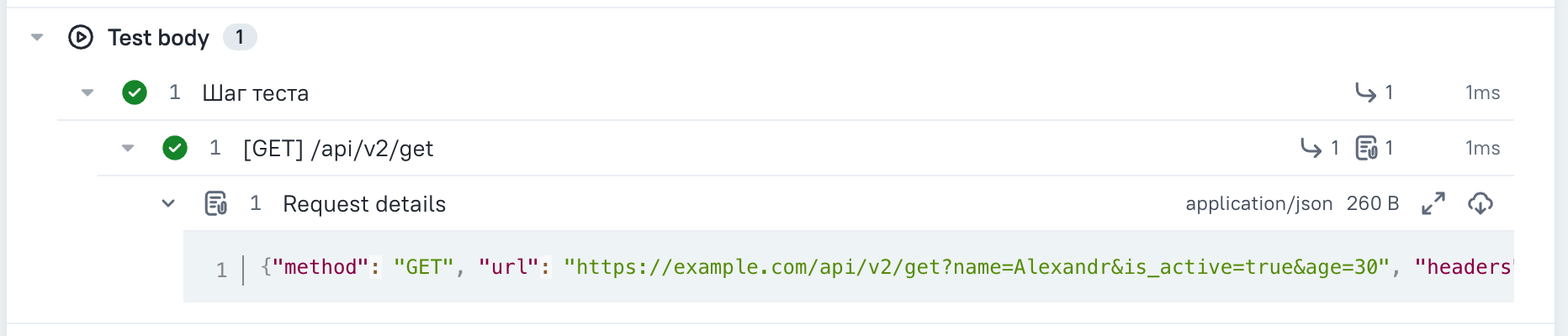
Wraps each request in an Allure step and attaches the request data.
from http_client import HttpClient
from http_client_allure import wrap_requests_in_steps

client = HttpClient("https://example.com", wrap_requests_in_steps())
The step shows the request duration. If the service does not respond because of a lost connection or timeout, the step still appears in the report and is marked as failed.
wrap_requests_and_responses_in_steps
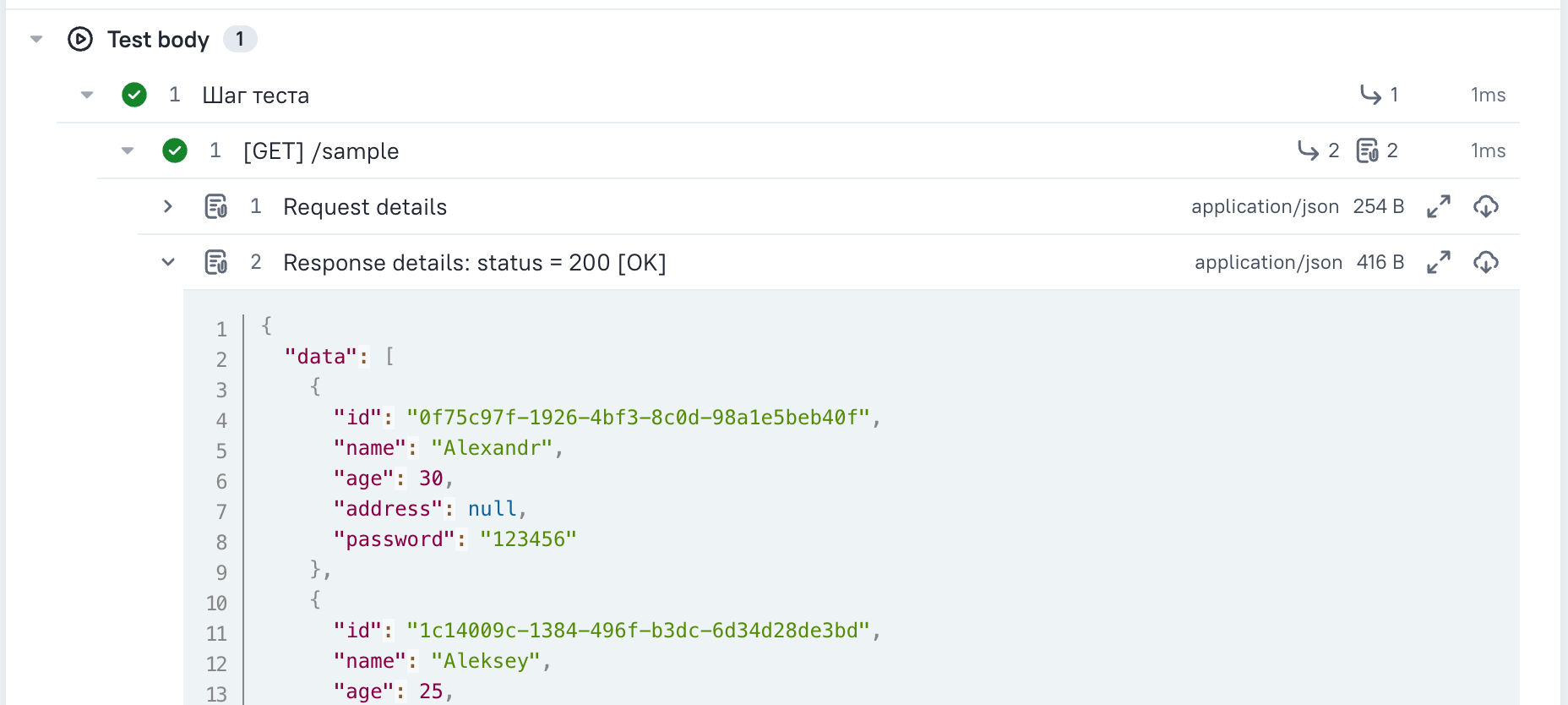
The same, but also attaches response data to the step.
from http_client import HttpClient
from http_client_allure import wrap_requests_and_responses_in_steps

client = HttpClient("https://example.com", wrap_requests_and_responses_in_steps())
Parameters
Both options accept the same parameters.
| Parameter | Default | Behavior |
|---|---|---|
show_host |
False |
show the request host in the step title |
show_query_params |
False |
show query parameters in the step title |
attach_request |
True |
attach request data to the step |
attach_response |
True |
attach the response body (only with wrap_requests_and_responses_in_steps) |
attach_response_headers |
True |
attach response headers (only with wrap_requests_and_responses_in_steps) |
serialize_request_to_curl |
False |
attach the request as a curl command instead of JSON |
sanitize_keys |
None |
keys in glom format whose values should be hidden |
use_default_sanitize_keys |
True |
extend sanitize_keys with the secret list from http_client |
json_dumps_kwargs |
None |
json.dumps parameters for JSON display |
max_attach_length |
None |
maximum attachment length in characters; longer attachments are truncated |
Response headers
Response headers and body are attached to the step separately:
Response headers: status = 200 [OK]— response headers with secrets masked,Response content— response body.
The separate header attachment is visible even without a body, such as for 204 No Content, and for streaming responses whose bodies are not included in the report.
Attachments are independent, so you can keep only the headers:
wrap_requests_and_responses_in_steps(attach_response=False)
The response status appears only in the header attachment's name. Disabling it with attach_response_headers=False removes the status from the report: the step title is built before sending the request, so the status is not yet known.
Masking secrets
Secrets in headers, query parameters, and bodies are hidden automatically: authorization, cookie, x-api-key, token, password, and other common keys.
Add your own keys:
wrap_requests_in_steps(sanitize_keys=["data.password", "items.*.token"])
Keep only your own keys without the defaults:
wrap_requests_in_steps(sanitize_keys=["data.password"], use_default_sanitize_keys=False)
Requests as curl commands
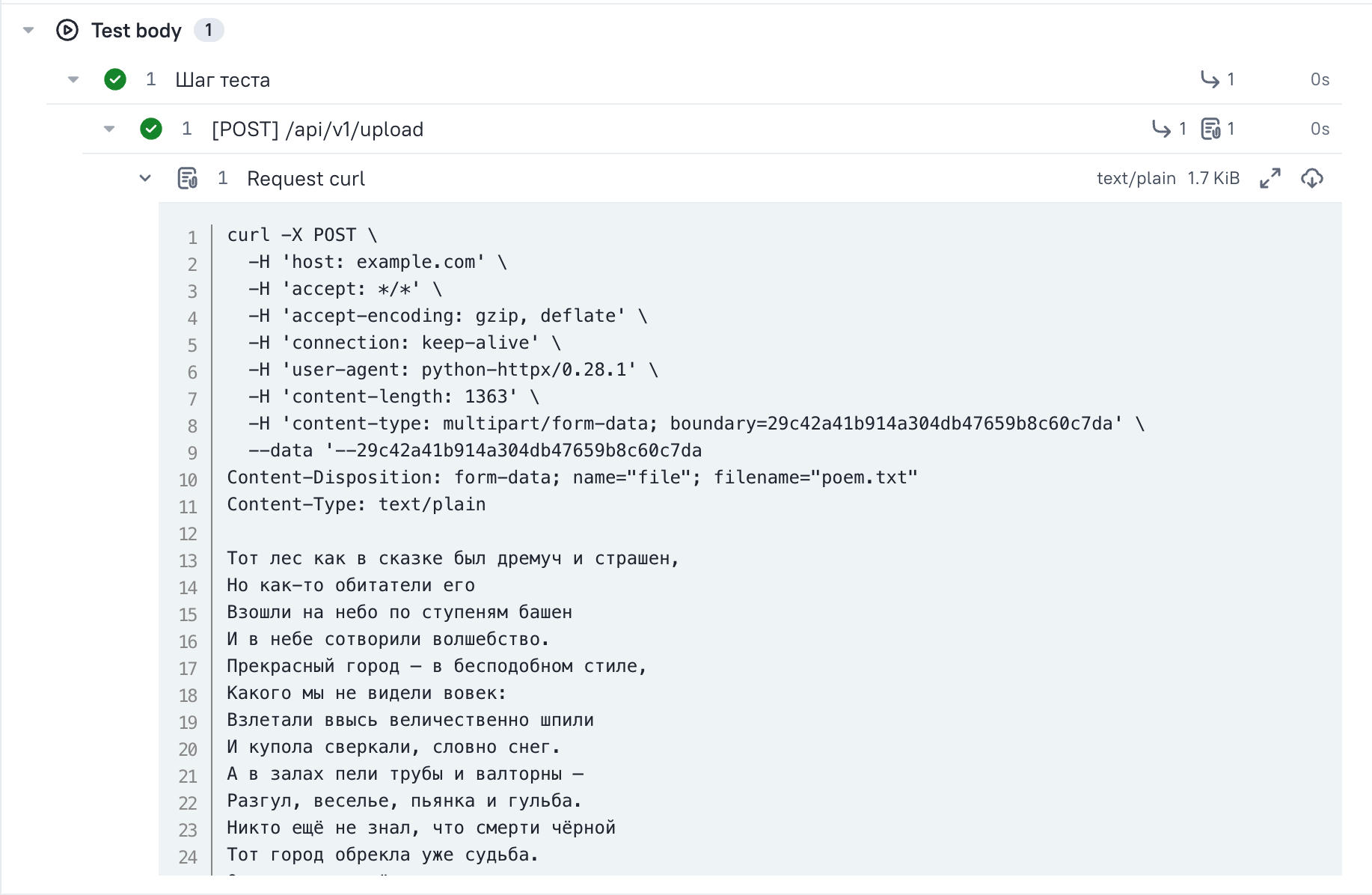
To copy a request from the report and rerun it in a terminal:
wrap_requests_in_steps(serialize_request_to_curl=True)
Asynchronous client
Both options also work with AsyncHttpClient and are configured the same way:
from http_client import AsyncHttpClient
from http_client_allure import wrap_requests_and_responses_in_steps

async with AsyncHttpClient("https://example.com", wrap_requests_and_responses_in_steps()) as client:
    await client.get("/sample")
Concurrent requests through asyncio.gather are supported: each gets its own step and data. Unlike synchronous steps, asynchronous steps do not show request duration.
Streaming requests
client.stream(...), client.stream_request(...), and client.send(request, stream=True) also appear in the report.
The stream body is not included in the report; it uses the <streamed content> placeholder. If you read the body yourself inside the step, the report includes it.
Development
The library is developed in the qa-libraries monorepo
alongside the other cloudru-qa-* libraries. You need uv, GNU Make,
and checkmake.
Run commands from the repository root:
make sync                            # install dependencies for all libraries from uv.lock
make test-http-client-allure         # tests for this library
make typecheck-http-client-allure    # mypy for this library
make check                           # formatting, ruff, mypy, and tests for the entire workspace
Tests run on Python 3.13 and 3.14. Create a separate environment for another version:
make sync test-http-client-allure PYTHON_VERSION=3.14.
A demo project with real requests and a generated Allure report is in examples/.
Publish a release with the git tag http-client-allure/v<version>. The tag version must match
the version in packages/http-client-allure/pyproject.toml.
1 maintainer

Metadata
1 maintainer
Release files for cloudru-qa-http-client-allure 1.0.0
For a detailed explanation of source distributions (sdists) and built distributions (wheels), please see the package formats documentation.
Source distribution (sdist)
| File | Size | Uploaded | Provenance | Actions |
|---|---|---|---|---|
| cloudru_qa_http_client_allure-1.0.0.tar.gz | 297.9 kB | With provenance | Details for cloudru_qa_http_client_allure-1.0.0.tar.gz |
Built distribution (wheel)
| File | Interpreter | ABI | Platform | Actions Reset |
|---|---|---|---|---|
| cloudru_qa_http_client_allure-1.0.0-py3-none-any.whl | Python 3 | none | any | Details for cloudru_qa_http_client_allure-1.0.0-py3-none-any.whl |
Total release size: 323.9 kB
Release files / cloudru_qa_http_client_allure-1.0.0.tar.gz
| Download URL | cloudru_qa_http_client_allure-1.0.0.tar.gz |
|---|---|
| Size | 297.9 kB |
| Tags | Source |
|
SHA-256 checksum How to use checksums |
16157a24de817aca5ced286576604ca1721b64d523f1c53282ef72687fd3a74b
|
|
BLAKE2b-256 checksum How to use checksums |
d84e22cd457d0188230472dcc211d1c81c12189f504303ba49dea0108fd9b52a
|
| Upload date | |
|
Uploaded using Trusted Publishing? What is trusted publishing? |
Yes |
| Uploaded via |
twine/7.0.0 CPython/3.13.16
|
Provenance
Provenance describes where a file came from. On PyPI, provenance is shared via attestations, which provide a verifiable record of the build or publishing details. View details, limitations and caveats.


PyPI Publish Attestation
PyPI verified that this artifact, at this checksum, originated from the publisher listed below.
Signed by GitHub Actions, verified by PyPI on Nov 14, 2026.
Transparency logRelease files / cloudru_qa_http_client_allure-1.0.0-py3-none-any.whl
| Download URL | cloudru_qa_http_client_allure-1.0.0-py3-none-any.whl |
|---|---|
| Size | 26.0 kB |
| Tags | Python 3 |
|
SHA-256 checksum How to use checksums |
21112942c2637160d1bdecbd6423679d6eded560a61a5f07d5e19938e7f6ba7a
|
|
BLAKE2b-256 checksum How to use checksums |
3fc606fbc83241a0784e2cf4c71cc3fd78a176fd22fb00fb015a511d895c02d4
|
| Upload date | |
|
Uploaded using Trusted Publishing? What is trusted publishing? |
Yes |
| Uploaded via |
twine/7.0.0 CPython/3.13.16
|
Provenance
Provenance describes where a file came from. On PyPI, provenance is shared via attestations, which provide a verifiable record of the build or publishing details. View details, limitations and caveats.
PyPI Publish Attestation
PyPI verified that this artifact, at this checksum, originated from the publisher listed below.
Signed by GitHub Actions, verified by PyPI on Nov 14, 2026.
Transparency logSecurity for cloudru-qa-http-client-allure 1.0.0
Provenance
Provenance describes where a file came from. On PyPI, provenance is shared via attestations, which provide a verifiable record of the build or publishing details. View details, limitations and caveats.
Full provenance
Both files in this release have been uploaded with provenance metadata.
Attestation for cloudru_qa_http_client_allure-1.0.0.tar.gz
PyPI Publish Attestation
PyPI verified that this artifact, at this checksum, originated from the publisher listed below.
Signed by GitHub Actions, verified by PyPI on Nov 14, 2026.
Transparency logA note on package security
PyPI is a repository for distributing packages, not a service for auditing them. While third-party security researchers and our staff do their best to detect and remove malicious packages, PyPI cannot guarantee the quality, security or suitability of any given package.
To learn more about protecting yourself from malicious actors, visit our package security documentation.













