
Logging context for automated tests



English | Русский
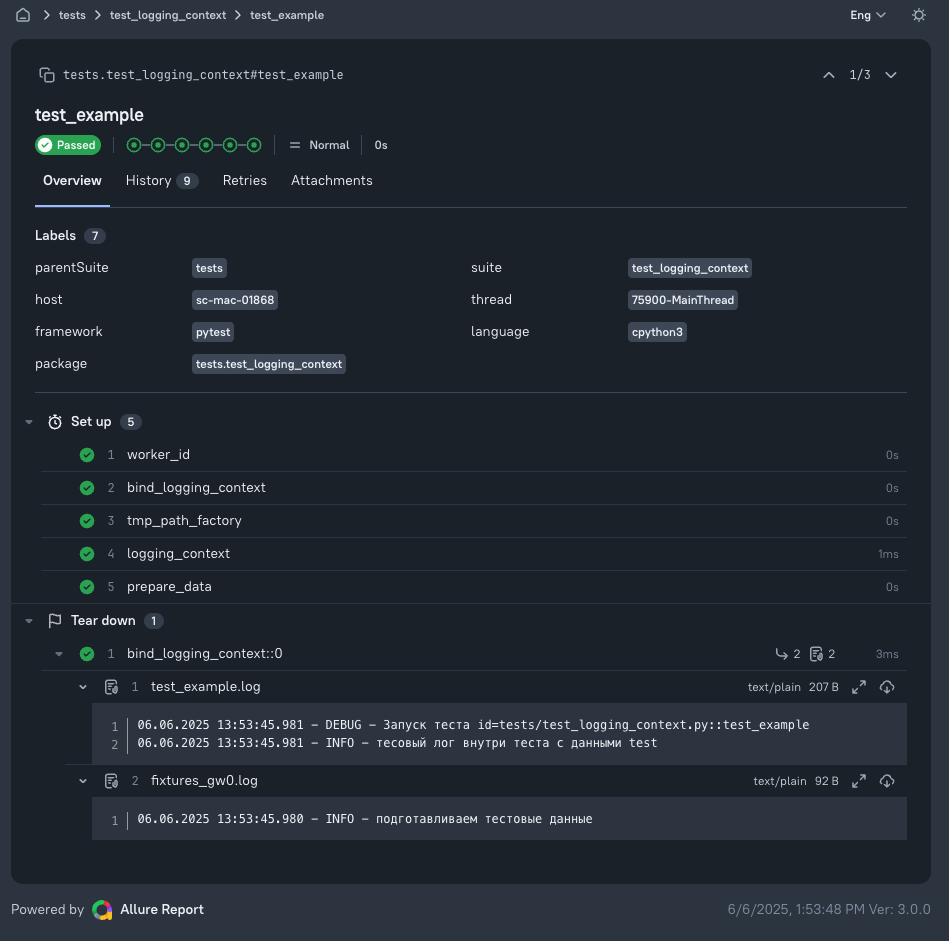
A pytest plugin that writes each test's logs to a separate file and attaches them to the Allure report.
Each test report should contain only that test's logs. With a regular
FileHandler, all tests append to one file, so attached logs include
messages from other tests. Parallel execution with
pytest-xdist also means
multiple processes writing to the same file. This plugin handles both cases.
- Installation
- Skills for AI agents
- Quick start
- Demo projects
- Where to find logs
- Settings
- Allure
- structlog
- Other loggers and custom formats
- Development
Installation
Requires Python 3.13 or later.
pip install cloudru-qa-logging-context
Import the plugin as logging_context.
Skills for AI agents
This library does not have its own skill yet. If your project uses other
libraries from this suite with skills for AI agents,
select and enable them from your project root (requires uv):
uvx library-skills
For Claude Code, add --claude.
Quick start
The plugin loads automatically when installed, but does nothing until you set a log directory. One line is enough:
# pyproject.toml
[tool.pytest.ini_options]
logging_context_dir = "logs"
A custom conftest.py is needed only for formatters that cannot be expressed as an ini string,
such as structlog or JSON (see below). For this test:
import logging

import pytest

logger = logging.getLogger("test-logger")


@pytest.fixture
def user():
    logger.info("creating a user")
    yield {"id": 1}
    logger.info("deleting a user")


def test_login(user):
    logger.info("logging in as id=%s", user["id"])


@pytest.mark.parametrize("role", ["admin", "guest"])
def test_roles(role):
    logger.info("checking role %s", role)
running pytest produces:
logs/test_login.log
logs/test_roles[48fb048115c186ec].log
logs/test_roles[a81f6f2ab448a918].log
The plugin-generated headers retain their original Russian text:
--- logs/test_login.log
30.07.2026 15:21:40.776 - INFO - Запуск теста id=test_demo.py::test_login
30.07.2026 15:21:40.776 - INFO - creating a user
30.07.2026 15:21:40.778 - INFO - logging in as id=1
30.07.2026 15:21:40.780 - INFO - deleting a user

--- logs/test_roles[a81f6f2ab448a918].log
30.07.2026 15:21:40.790 - INFO - Запуск теста id=test_demo.py::test_roles[a81f6f2ab448a918] с параметрами {"role": "admin"}
30.07.2026 15:21:40.792 - INFO - checking role admin
Logs are attached to the Allure report automatically when allure-pytest is installed.
Demo projects
examples/ contains two ready-to-run projects with the plugin enabled. Both use
the same sample shop client and tests, with fixtures, parametrization,
an intentionally failing test, and retries. Only their log formats differ:
| Example | Log file contents |
|---|---|
examples/logging |
Standard library logging, with lines such as INFO shop.client товар SKU-TEA — Чай листовой |
examples/structlog |
structlog, using JSON Lines |
Run commands from the example directory, such as packages/logging-context/examples/logging:
uv sync
rm -rf logs
uv run pytest -v --clean-alluredir --alluredir=allure-results
npx allure awesome allure-results --single-file --output allure-report
Each test's logs remain in logs/, and the report is in allure-report/index.html. For parallel
runs with pytest-xdist, add -n 4 to pytest. Building the report requires Node.js.
One test in each example fails intentionally, showing that a failing test's report contains its own logs and that those logs explain the failure.
Where to find logs
| File | Contents |
|---|---|
<test name>.log |
Test logs, including setup and teardown of all its fixtures |
fixtures_<worker_id>.log |
Logs outside tests, such as pytest_sessionstart or conftest.py imports |
Test parameters in filenames are replaced with hashes to keep names short and safe regardless of parameter values. The parameters themselves appear in the first log line.
If a filename repeats, such as when retrying a failed test with
pytest-rerunfailures or when test functions in different modules share a name,
a numeric suffix is added. Each rerun attempt has its own file, so the report
shows the logs of the failed attempt:
logs/test_login.log     <- first attempt
logs/test_login.2.log   <- second attempt
logs/test_login.3.log   <- third attempt
Parallel runs add a worker identifier to filenames, so tests with the same function name running on different workers do not write to the same file:
pytest            ->  logs/test_login.log
pytest -n 2       ->  logs/test_login.gw0.log
No log file is overwritten.
Settings
Set all options in pytest configuration (pyproject.toml, pytest.ini, or tox.ini).
| Setting | Default | Description |
|---|---|---|
logging_context_dir |
— | Log directory. The plugin is inactive until this is set. Relative paths are resolved from rootdir. |
logging_context_launch_id |
— | Subdirectory within logging_context_dir, such as a CI run identifier. Must be a single path component. Can be overridden by a CLI option or environment variable; see below. |
logging_context_loggers |
root | Loggers to collect records from. Defaults to root, including third-party libraries. |
logging_context_level |
INFO |
Minimum record level, as a name (DEBUG) or number. |
logging_context_format |
%(asctime)s.%(msecs)03d - %(levelname)s - %(message)s |
Log line format. |
logging_context_date_format |
%d.%m.%Y %H:%M:%S |
Timestamp format. |
logging_context_attach_allure |
true |
Attach log files to the Allure report. |
logging_context_attach_fixtures_log |
true |
Attach fixtures_<worker_id>.log to each test. |
logging_context_log_test_header |
true |
Start each file with the test identifier and parameters. |
logging_context_params_indent |
-1 |
JSON indentation for parameters. -1 means a single line. |
Collect logs only from your own loggers:
[tool.pytest.ini_options]
logging_context_dir = "logs"
logging_context_loggers = ["test-logger", "api-client"]
logging_context_level = "INFO"
By default, logs include third-party libraries (httpx, urllib3,
playwright), which often help explain test failures. To exclude this noise,
list your own loggers in logging_context_loggers.
The default mode also captures loggers with propagate = False, even if created
after the run starts. With logging_context_loggers set, however,
you must list these loggers explicitly; they are not discovered automatically.
Test parameters appear in the header as supplied. If they contain tokens or passwords,
disable the header: logging_context_log_test_header = false.
Launch identifier
launch_id often comes from CI, so you can set it outside ini configuration:
pytest --logging-context-launch-id="$CI_PIPELINE_ID"
LOGGING_CONTEXT_LAUNCH_ID="$CI_PIPELINE_ID" pytest
Priority: command-line option → LOGGING_CONTEXT_LAUNCH_ID environment variable →
logging_context_launch_id in ini. Logs are stored in <logging_context_dir>/<launch_id>/.
Allure
No extra setup is needed: when allure-pytest is installed and --alluredir is set,
the plugin attaches the test log and fixtures log to each test. Disable this with
logging_context_attach_allure = false, or disable only the fixtures log with
logging_context_attach_fixtures_log = false.
allure-pytest also attaches its own log attachment to each test.
To avoid duplicate log attachments, disable one using --allure-no-capture or
logging_context_attach_allure = false.
structlog
Route structlog through standard library logging and set the formatter with the
pytest_logging_context_configure:
# conftest.py
import structlog

structlog.configure(
    processors=[
        structlog.stdlib.add_logger_name,
        structlog.stdlib.add_log_level,
        structlog.stdlib.ProcessorFormatter.wrap_for_formatter,
    ],
    logger_factory=structlog.stdlib.LoggerFactory(),
    wrapper_class=structlog.stdlib.BoundLogger,
    cache_logger_on_first_use=True,
)


def pytest_logging_context_configure(handler):
    handler.setFormatter(
        structlog.stdlib.ProcessorFormatter(
            processor=structlog.processors.JSONRenderer(ensure_ascii=False),
            foreign_pre_chain=[
                structlog.stdlib.add_logger_name,
                structlog.stdlib.add_log_level,
            ],
        ),
    )
# pyproject.toml
[tool.pytest.ini_options]
logging_context_dir = "logs"
logging_context_log_test_header = false
logging_context_log_test_header = false keeps the file valid
JSON Lines.
The hook also accepts config; add it to the signature if needed. A complete working example
is in examples/structlog.
Test:
import structlog

log = structlog.get_logger("test-logger")


def test_creates_shipment():
    log.info("shipment created", shipment_id=77)
logs/test_creates_shipment.log:
{"shipment_id": 77, "event": "shipment created", "logger": "test-logger", "level": "info"}
Bound context is preserved:
def test_retries_request():
    log = structlog.get_logger("test-logger").bind(request_id="req-51")
    log.warning("unexpected response")
{"request_id": "req-51", "event": "unexpected response", "logger": "test-logger", "level": "warning"}
With foreign_pre_chain, third-party logs using standard library logging go to
the same file in the same format:
def test_mixes_loggers():
    structlog.get_logger("test-logger").info("from structlog")
    logging.getLogger("legacy.client").warning("from stdlib")
logs/test_mixes_loggers.log:
{"event": "from structlog", "logger": "test-logger", "level": "info"}
{"event": "from stdlib", "logger": "legacy.client", "level": "warning"}
Other loggers and custom formats
Any logger that writes through standard library logging works. For loguru, use its
standard InterceptHandler; the rest is the same.
Use pytest_logging_context_configure for any formatter that cannot be expressed
as an ini string:
# conftest.py
import json
import logging


class JsonFormatter(logging.Formatter):
    def format(self, record: logging.LogRecord) -> str:
        return json.dumps(
            {
                "time": self.formatTime(record),
                "level": record.levelname,
                "logger": record.name,
                "message": record.getMessage(),
            },
            ensure_ascii=False,
        )


def pytest_logging_context_configure(handler):
    handler.setFormatter(JsonFormatter())
Development
This library is developed in the qa-libraries monorepo
alongside the other cloudru-qa-* libraries. You need uv, GNU Make
and checkmake;
run the commands from the repository root:
make sync                        # dependencies for all libraries from uv.lock
make test-logging-context        # tests for this library
make typecheck-logging-context   # mypy for this library
make check                       # formatting, Ruff, mypy, and tests for the whole suite
All checks must pass without errors or warnings. Tests run on Python 3.13 and 3.14.
Each version uses a separate environment: make sync test-logging-context PYTHON_VERSION=3.14.
Create a release with the Git tag logging-context/v<version>. The tag version must match the version
in packages/logging-context/pyproject.toml.
1 maintainer

Metadata
1 maintainer
Release files for cloudru-qa-logging-context 1.0.0
For a detailed explanation of source distributions (sdists) and built distributions (wheels), please see the package formats documentation.
Source distribution (sdist)
| File | Size | Uploaded | Provenance | Actions |
|---|---|---|---|---|
| cloudru_qa_logging_context-1.0.0.tar.gz | 30.0 kB | With provenance | Details for cloudru_qa_logging_context-1.0.0.tar.gz |
Built distribution (wheel)
| File | Interpreter | ABI | Platform | Actions Reset |
|---|---|---|---|---|
| cloudru_qa_logging_context-1.0.0-py3-none-any.whl | Python 3 | none | any | Details for cloudru_qa_logging_context-1.0.0-py3-none-any.whl |
Total release size: 51.0 kB
Release files / cloudru_qa_logging_context-1.0.0.tar.gz
| Download URL | cloudru_qa_logging_context-1.0.0.tar.gz |
|---|---|
| Size | 30.0 kB |
| Tags | Source |
|
SHA-256 checksum How to use checksums |
a64bf70e52dcff75d8246c74d7ad67025cfb9ccbe8efdb197fbd0d6e0c5d4cd8
|
|
BLAKE2b-256 checksum How to use checksums |
6f9d58590d1e656f04a3481087fc5743d988013e82e44e0e7db178b3bfb12e62
|
| Upload date | |
|
Uploaded using Trusted Publishing? What is trusted publishing? |
Yes |
| Uploaded via |
twine/7.0.0 CPython/3.13.16
|
Provenance
Provenance describes where a file came from. On PyPI, provenance is shared via attestations, which provide a verifiable record of the build or publishing details. View details, limitations and caveats.


PyPI Publish Attestation
PyPI verified that this artifact, at this checksum, originated from the publisher listed below.
Signed by GitHub Actions, verified by PyPI on Nov 14, 2026.
Transparency logRelease files / cloudru_qa_logging_context-1.0.0-py3-none-any.whl
| Download URL | cloudru_qa_logging_context-1.0.0-py3-none-any.whl |
|---|---|
| Size | 21.0 kB |
| Tags | Python 3 |
|
SHA-256 checksum How to use checksums |
7225f33915d117b7c7802439cd71e5527601e088bc6375831a8b0ac82d679717
|
|
BLAKE2b-256 checksum How to use checksums |
d6a19d3501fba69217c8fa5de4528d88be961faeea4368a6cfc9c26fbc7c8120
|
| Upload date | |
|
Uploaded using Trusted Publishing? What is trusted publishing? |
Yes |
| Uploaded via |
twine/7.0.0 CPython/3.13.16
|
Provenance
Provenance describes where a file came from. On PyPI, provenance is shared via attestations, which provide a verifiable record of the build or publishing details. View details, limitations and caveats.
PyPI Publish Attestation
PyPI verified that this artifact, at this checksum, originated from the publisher listed below.
Signed by GitHub Actions, verified by PyPI on Nov 14, 2026.
Transparency logSecurity for cloudru-qa-logging-context 1.0.0
Provenance
Provenance describes where a file came from. On PyPI, provenance is shared via attestations, which provide a verifiable record of the build or publishing details. View details, limitations and caveats.
Full provenance
Both files in this release have been uploaded with provenance metadata.
Attestation for cloudru_qa_logging_context-1.0.0.tar.gz
PyPI Publish Attestation
PyPI verified that this artifact, at this checksum, originated from the publisher listed below.
Signed by GitHub Actions, verified by PyPI on Nov 14, 2026.
Transparency logA note on package security
PyPI is a repository for distributing packages, not a service for auditing them. While third-party security researchers and our staff do their best to detect and remove malicious packages, PyPI cannot guarantee the quality, security or suitability of any given package.
To learn more about protecting yourself from malicious actors, visit our package security documentation.













