
Adds features to Click: option groups, constraints, subcommand sections and help themes.

Project description






Cloup — originally from “Click + option groups” — enriches Click with several features that make it more expressive and configurable:
option groups and an (optional) help section for positional arguments
constraints, like mutually_exclusive, that can be applied to option groups or to any group of parameters, even conditionally
subcommand aliases
subcommands sections, i.e. the possibility to organize the subcommands of a Group in multiple help sections
a themeable HelpFormatter that:
has more parameters for adjusting widths and spacing, which can be provided at the context and command level
use a different layout when the terminal width is below a certain threshold in order to improve readability
suggestions like “did you mean <subcommand>?” when you mistype a subcommand.
Moreover, Cloup improves on IDE support providing decorators with detailed type hints and adding the static methods Context.settings() and HelpFormatter.settings() for creating dictionaries of settings.
Cloup is extensively tested and documented. Tests are run against multiple versions of Python (>=3.6) and Click (>=7.2).
A simple example
from cloup import (
    HelpFormatter, HelpTheme, Style,
    command, option, option_group
)
from cloup.constraints import RequireAtLeast, mutually_exclusive

# Check the docs for all available arguments of HelpFormatter and HelpTheme.
formatter_settings = HelpFormatter.settings(
    theme=HelpTheme(
        invoked_command=Style(fg='bright_yellow'),
        heading=Style(fg='bright_white', bold=True),
        constraint=Style(fg='magenta'),
        col1=Style(fg='bright_yellow'),
    )
)

# In a multi-command app, you can pass formatter_settings as part
# of your context_settings so that they are propagated to subcommands.
@command(formatter_settings=formatter_settings)
@option_group(
    "Cool options",
    option('--foo', help='This text should describe the option --foo.'),
    option('--bar', help='This text should describe the option --bar.'),
    constraint=mutually_exclusive,
)
@option_group(
    "Other cool options",
    "This is the optional description of this option group.",
    option('--pippo', help='This text should describe the option --pippo.'),
    option('--pluto', help='This text should describe the option --pluto.'),
    constraint=RequireAtLeast(1),
)
def cmd(**kwargs):
    """This is the command description."""
    pass

if __name__ == '__main__':
    cmd(prog_name='invoked-command')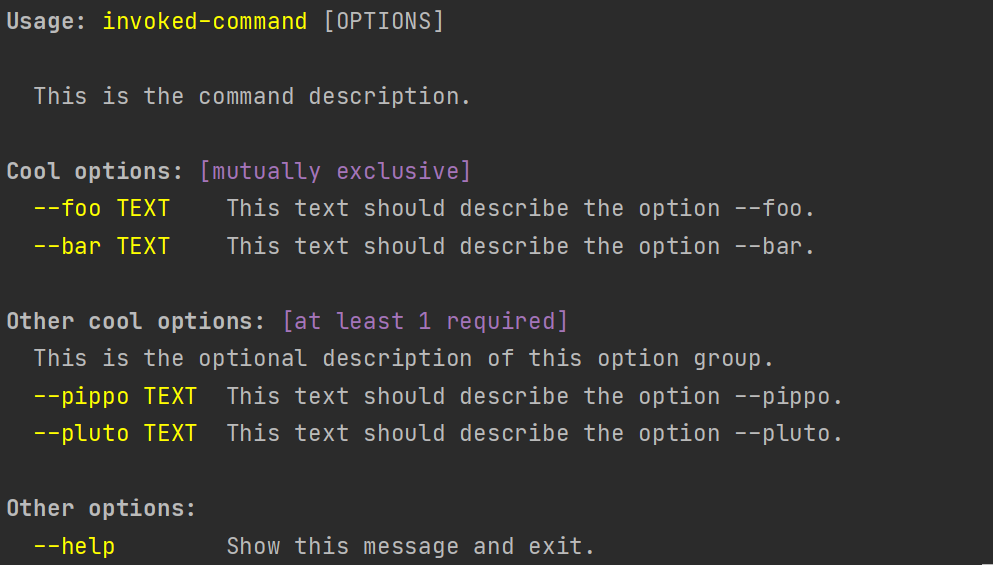
If you don’t provide --pippo or --pluto:
Usage: invoked-command [OPTIONS]
Try 'invoked-command --help' for help.

Error: at least 1 of the following parameters must be set:
  --pippo
  --pluto
This simple example just scratches the surface. Read more in the documentation (links below).
Supporting the project
Designing, testing and documenting a library takes a lot of time. The most concrete way to show your appreciation and to support future development is by donating. Any amount is appreciated.
Apart from that, you can help the project by starring it on GitHub, reporting issues, proposing improvements and contributing with your code!
Links
Documentation (release | development)
Thanks
A big thank to JetBrains for providing me with a free license for their IDEs. If you’re developing a non-commercial open-source project, you may consider applying for a free license too. You find all details at this link. Note that this license can be used only to develop non-commercial projects. |

Release history Release notifications | RSS feed


Download files
Download the file for your platform. If you're not sure which to choose, learn more about installing packages.
Source Distribution
Built Distribution
Filter files by name, interpreter, ABI, and platform.
If you're not sure about the file name format, learn more about wheel file names.
Copy a direct link to the current filters
File details
Details for the file cloup-0.15.0.tar.gz.
File metadata
- Download URL: cloup-0.15.0.tar.gz
- Upload date:
- Size: 223.9 kB
- Tags: Source
- Uploaded using Trusted Publishing? No
- Uploaded via: twine/4.0.1 CPython/3.9.13
File hashes
| Algorithm | Hash digest | |
|---|---|---|
| SHA256 |
32aef7f7536228def13f9651b2f63b5ef9d5afebeefda15c0f6d686eb8ca6c71
|
|
| MD5 |
65e671564c4b6c1a8c5d20f34f1e2cbe
|
|
| BLAKE2b-256 |
77d4aea886e01f53421e8939ba03d0d959e89453e2831b8c243079ffd73a9fa0
|
File details
Details for the file cloup-0.15.0-py2.py3-none-any.whl.
File metadata
- Download URL: cloup-0.15.0-py2.py3-none-any.whl
- Upload date:
- Size: 53.4 kB
- Tags: Python 2, Python 3
- Uploaded using Trusted Publishing? No
- Uploaded via: twine/4.0.1 CPython/3.9.13
File hashes
| Algorithm | Hash digest | |
|---|---|---|
| SHA256 |
3eeeb0de92b181dad379a5cce3d747272961dc4cf3753ebdd7e2fd6ea994bdcc
|
|
| MD5 |
5076cba67b7d75298c08db741589a6bb
|
|
| BLAKE2b-256 |
310d8a2b80698452a49ff6b2be510fd1a6bdb7fafd3e85a0107007983494e8bc
|






