
Wrapper around Playwright to help launch Camoufox

Project description
Camoufox Python Interface
Lightweight wrapper around the Playwright API to help launch Camoufox.
[!NOTE] All the the latest documentation is avaliable here.
What is this?
This Python library wraps around Playwright's API to help automatically generate & inject unique device characteristics (OS, CPU info, navigator, fonts, headers, screen dimensions, viewport size, WebGL, addons, etc.) into Camoufox.
It uses BrowserForge under the hood to generate fingerprints that mimic the statistical distribution of device characteristics in real-world traffic.
In addition, it will also calculate your target geolocation, timezone, and locale to avoid proxy protection (see demo).
Installation
First, install the camoufox package:
pip install -U camoufox[geoip]
The geoip parameter is optional, but heavily recommended if you are using proxies. It will download an extra dataset to determine the user's longitude, latitude, timezone, country, & locale.
Next, download the Camoufox browser:
Windows
camoufox fetch
MacOS & Linux
python3 -m camoufox fetch
To uninstall, run camoufox remove.
Installing multiple Camoufox versions & from other repos
UI Manager
Manage installed browsers, active version, IP geolocation databases, and package info. Basically a Qt front end for the Python CLI tool.
More updates on it will be coming soon.
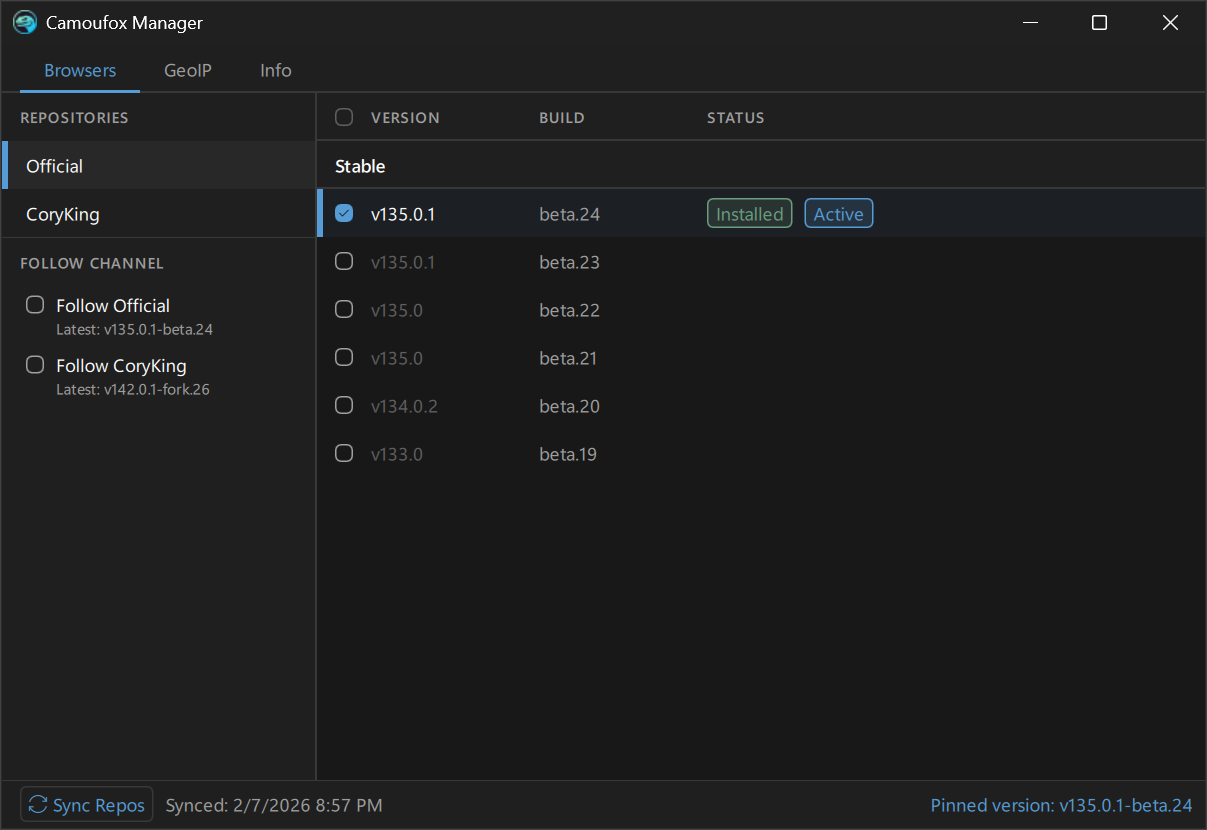
To use the gui, install Camoufox with the [gui] extra:
pip install 'camoufox[gui]'
To launch:
camoufox gui
CLI Mananger
Demonstration
https://github.com/user-attachments/assets/992b1830-6b21-4024-9165-728854df1473
See help message
$ python -m camoufox --help

 Usage: python -m camoufox [OPTIONS] COMMAND [ARGS]...

╭─ Options ─────────────────────────────────────────────────────────────────────────────╮
│ --help  Show this message and exit.                                                   │
╰───────────────────────────────────────────────────────────────────────────────────────╯
╭─ Commands ────────────────────────────────────────────────────────────────────────────╮
│ active    Print the current active version                                            │
│ fetch     Install the active version, or a specific version                           │
│ gui       Launch the Camoufox Manager GUI (requires PySide6)                          │
│ list      List Camoufox versions                                                      │
│ path      Print the install directory path                                            │
│ remove    Remove downloaded data. By default, this removes everything.                │
│           Pass --select to pick a browser version to remove.                          │
│ server    Launch a Playwright server                                                  │
│ set       Set the active Camoufox version to use & fetch.                             │
│           By default, this opens an interactive selector for versions and settings.   │
│           You can also pass a specifier to activate directly:                         │
│           Pin version:                                                                │
│               camoufox set official/stable/134.0.2-beta.20                            │
│           Automatically find latest in a channel source:                              │
│               camoufox set official/stable                                            │
│ sync      Sync available versions from remote repositories                            │
│ test      Open the Playwright inspector                                               │
│ version   Display version, package, browser, and storage info                         │
╰───────────────────────────────────────────────────────────────────────────────────────╯
sync
Pull a list of release assets from GitHub.
> camoufox sync
Syncing repositories...
  Official... 24 versions
  CoryKing... 2 versions

Synced 26 versions from 2 repos.
set
Choose a version channel or pin a specific version. Can also be called with a specifier to activate directly.
Interactive selector:
> camoufox set
You can also pass a specifier to pin a specific version or choose a channel to follow directly. This will pull the latest stable version from the official repo on camoufox fetch.
> camoufox set official/stable # Default setting
Follow latest prerelease version from the official repo, if applicable:
> camoufox set official/prerelease
Pin a specific version:
> camoufox set official/stable/134.0.2-beta.20
active
Prints the current active version string:
> camoufox active  # Default channel is active
official/stable
> camoufox set coryking/stable/142.0.1-fork.26
Pinned: coryking/stable/142.0.1-fork.26
Run 'camoufox fetch' to install.

> camoufox active  # A specific version is pinned
coryking/stable/142.0.1-fork.26 (not installed)
fetch
Install the latest version from the active channel. By default, this is official/stable. This will also automatically sync repository assets.
> camoufox fetch # Install the latest in the channel
To download the latest from a different channel, or pin a version:
> camoufox set coryking/stable
> camoufox fetch  # Will download the latest release from CoryKing's repo for now on
Or pass in the identifier to download directly without activating it:
> camoufox fetch official/stable/135.0-beta.25 # Install a specific version
list
List installed or all available Camoufox versions as a tree.
> camoufox list          # show installed versions
> camoufox list all      # show all available versions from synced repos
> camoufox list --path   # show full install paths
remove
By default, removes the entire camoufox data directory.
> camoufox remove
> camoufox remove -y  # skip confirmation prompt
Remove a specific version:
> camoufox remove official/stable/134.0.2-beta.20
Interactively select a version to remove:
> camoufox remove --select
version
Display the Python package version, active browser version, channel, and update status.
> camoufox version
Python Packages
  Camoufox                    v0.5.0
  Browserforge                v1.2.4
  Apify Fingerprints          v0.10.0
  Playwright                  v1.57.1.dev0+g732639b35.d20251217
Browser
  Active                      official/stable/135.0.1-beta.24
  Current browser             v135.0.1-beta.24
  Installed                   Yes
  Latest in official/stable?  Yes
  Last Sync                   2026-03-07 00:23
GeoIP
  Database                    MaxMind GeoLite2
  Updated                     2026-03-07 00:24
Storage
  Install path                /home/name/.cache/camoufox
  Browser(s) directory size   1.2 GB
  GeoIP database size         40.7 MB
  Config file                 /home/name/.cache/camoufox/config.json
  Repo cache                  /home/name/.cache/camoufox/repo_cache.json
path
Print the install directory path.
> camoufox path
/home/name/.cache/camoufox
test
Open Camoufox with the Playwright inspector for debugging.
> camoufox test
> camoufox test https://example.com
server
Launch a remote Playwright server.
> camoufox server
Usage
All of the latest stable documentation is avaliable at camoufox.com/python.


Download files
Download the file for your platform. If you're not sure which to choose, learn more about installing packages.
Source Distribution
Built Distribution
Filter files by name, interpreter, ABI, and platform.
If you're not sure about the file name format, learn more about wheel file names.
Copy a direct link to the current filters
File details
Details for the file cloverlabs_camoufox-0.5.0.tar.gz.
File metadata
- Download URL: cloverlabs_camoufox-0.5.0.tar.gz
- Upload date:
- Size: 1.4 MB
- Tags: Source
- Uploaded using Trusted Publishing? No
- Uploaded via: poetry/2.3.2 CPython/3.14.3 Darwin/25.3.0
File hashes
| Algorithm | Hash digest | |
|---|---|---|
| SHA256 |
5e5b312e3381a88caf89ab79187b91762ae3a724daa9790a559aefd941be5137
|
|
| MD5 |
01f9c3c8988509b65b1712508584a4f2
|
|
| BLAKE2b-256 |
e80e1ea0130ebdf0752e7b718d9df6edb3989544805ac1085f4e01e79b8739c2
|
File details
Details for the file cloverlabs_camoufox-0.5.0-py3-none-any.whl.
File metadata
- Download URL: cloverlabs_camoufox-0.5.0-py3-none-any.whl
- Upload date:
- Size: 1.4 MB
- Tags: Python 3
- Uploaded using Trusted Publishing? No
- Uploaded via: poetry/2.3.2 CPython/3.14.3 Darwin/25.3.0
File hashes
| Algorithm | Hash digest | |
|---|---|---|
| SHA256 |
4421f065f8a1df22ef087301370db1683016b78ca9e7442863b4c8b8aa77c25b
|
|
| MD5 |
521cddb8178a5a31be834e64edfc3f38
|
|
| BLAKE2b-256 |
a232036d3e7bd6317c9255df9e60413d9f6866eff0ab5fa6f6b0262bc7768a6b
|







