









ClusterTool
A single umbrella CLI (clustertool) that centralizes the Slurm cluster
scripts used by both researchers and the admin team, so common tasks live
in one place with consistent help and behavior. It is built at the Kempner
Institute, Harvard University, and adapts to other clusters through a site
config.
Every task is a subcommand under a group (for example clustertool gpu ...).
Each command has --help explaining what it does, its use cases, and its
inputs.
What it runs
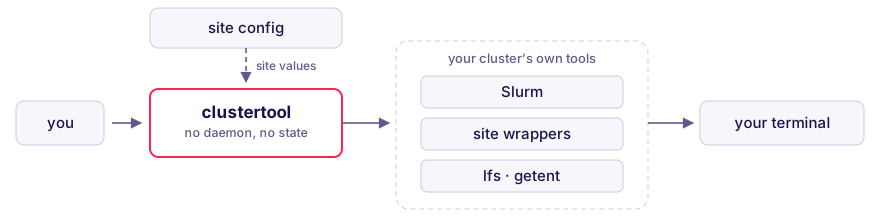
Nothing runs as a service and nothing is cached: each command shells out to the tools your cluster already provides and formats what they return. Every cluster-specific value comes from a site config, so the same commands work at another center (see Configuration).
Requirements
To install: Python 3.10 or newer, plus one of uv
(used throughout this README), pipx, or pip.
To run: a login node of a Slurm cluster. Nothing is computed locally. Every command shells out to the host's own tools and reports what that cluster says, so a command needs only the tools it actually calls:
- Slurm, for most commands:
squeue,sacct,sacctmgr,sinfo,sshare,sprio,sstat,sdiag,scontrol,salloc,sbatch,scancel,srun. - Site tools, for the commands that wrap them. At the Kempner Institute these
are the FASRC wrappers
showq,spart,lsload,stotalandseff-account, plusjobstatsandquota. A command whose tool is missing hides itself from help instead of failing, and another site can point each one at its own equivalent (see Configuration). The Lustre and account membership commands calllfsandgetentdirectly. - Extras, for a handful of commands: passwordless
sshto compute nodes runningnvidia-smi(the live monitors,diag ib,gpu pulse --node),tmuxandnvtop(gpu nvtop),nvccand NCCL (diag nvlink),torch(diag nccl), andncdu(storage home --ncdu).tmux,nvtopandncdu, plussdiagabove, are[tools]keys as well, so a site can rename them:gpu nvtopanddiag schedulerhide withouttmuxandsdiag, whilencdugates onlystorage home --ncduandnvtopis checked on the remote node.
Two tools ship with clustertool and install automatically. jobs scope uses
jobscope, whose GPU views also read a Prometheus endpoint discovered from the
cluster's jobstats install. gpu pulse uses kempnerpulse; run it on a GPU
node, where it reads counters through dcgmi, or from a dcgm-exporter Prometheus
endpoint with --backend prometheus.
Install
uv tool install 'clustertool[tui]' # or: pipx install 'clustertool[tui]'
The tui extra is what brings in the me dashboard. Without
it every command still works and me prints its text summary instead, so plain
uv tool install clustertool is enough if you do not want the dashboard.
The install name is singular. Unrelated projects hold clustertools and
cluster-tools on PyPI, so check the spelling. The command it puts on your PATH
is clustertool, along with the bundled jobscope and kempnerpulse tools.
To track the development version instead:
uv tool install 'clustertool[tui] @ git+https://github.com/KempnerInstitute/clustertool'
The extra goes on the package name, not the URL: a bare git+... carries no name to
attach it to, so it installs without the dashboard.
Or work from a clone:
git clone https://github.com/KempnerInstitute/clustertool
cd clustertool
uv sync
uv run clustertool --help
Enable tab completion for your shell (bash, zsh, fish), then restart it:
clustertool completion --install
Usage
# Discover
clustertool --help      # list command groups
clustertool gpu --help  # list a group's commands
clustertool search fairshare  # find a command by keyword (also: find, lookup)
clustertool me                # interactive dashboard: jobs, storage, standing
clustertool me --plain        # the same as text, for a log or a pipe
clustertool me --access       # also: accounts, partitions, and QoS you can submit under

# GPU
clustertool gpu usage                   # rank every lab by base-partition GPU usage
clustertool gpu usage kempner_sham_lab  # one lab's usage, by user and partition
clustertool gpu avail kempner_h100      # nodes with allocatable GPUs (ratio-capped)
clustertool gpu session a100 -A LAB     # interactive single-GPU shell (a100/h100/h200/rtx)
clustertool gpu monitor-job 1234567     # live per-node GPU/CPU/memory/network table
clustertool gpu pulse                   # live per-GPU dashboard (on a GPU node)
clustertool gpu pulse --node holygpu123 # ...or launch it on a remote GPU node

# Jobs
clustertool jobs list           # your queued and running jobs
clustertool jobs why 1234567    # why a job is pending, and its priority
clustertool jobs debug 1234567  # why a finished job failed, with a suggested fix
clustertool jobs stats 1234567  # utilization for a job
clustertool jobs scope -D 3     # efficiency of your completed jobs (last 3 days)
clustertool jobs new            # build a correct GPU sbatch script (prompts, or --submit)

# Accounts and nodes
clustertool account fairshare            # your fairshare and priority standing
clustertool account members kempner_dev  # users in a fairshare account
clustertool nodes partitions -f kempner  # partitions, GPUs, and limits
clustertool nodes list kempner_h100      # nodes and states in a partition

# Storage
clustertool storage quota netscratch  # your quota on a filesystem (-g LAB for a lab)
clustertool storage quota --all       # every lab dir you belong to, as a usage table
clustertool storage scratch           # scratch usage and the site's purge reminder
clustertool storage home              # home directory usage and quota
Commands
Most commands live in a group; a few are top-level (search, completion, and
me, which opens an interactive dashboard in a terminal).
The table below lists each group's commands. For the full reference of
what each does, its use cases, and inputs, see the linked
docs/commands/<group>.md file, or run
clustertool <group> <command> --help.
A flat, greppable index of every command, with its scope (user or admin) and the
host tool it wraps, is in
clustertool-commands-index.md.
Not sure which command you need? clustertool search <words> (also find or
lookup) ranks commands by relevance, for example clustertool search fairshare or clustertool search gpu reservation.
| Group | Commands | Scope |
|---|---|---|
gpu |
usage, util, status, avail, session, monitor-partition, monitor-job, nvtop, pulse |
GPU usage, availability, and sessions |
jobs |
list, queue, show, why, top, stats, scope, history, log, script, priorities, violators, wait-times, failures, cancel, hold, release, requeue, set-priority, submit, new, debug |
Job queue, status, history, logs, and control |
account |
members, fairshare, balance, usage, limits, top-users, qos, add-user, remove-user, set-fairshare |
Account membership, fairshare, usage, limits, QoS |
nodes |
list, partitions, down, load, frag, reservations, resume |
Node, partition, and reservation status |
storage |
quota, home, vast-usage, scratch, lfs-stripe, lfs-inodes |
Filesystem quotas, usage, and striping |
diag |
gpu-health, ib, ib-affinity, ib-counters, ib-snapshot, ib-verify, io-probe, nccl, nvlink, scheduler |
Diagnostics and benchmarks |
qos |
holders, create, modify, delete, grant, revoke, retire, sync |
QoS holders and (admin) provisioning and assignment |
Configuration
clustertool defaults to the Kempner AI Cluster. The site config is the only
place a cluster's specifics live (partitions, per-GPU limits, GPU types,
account conventions, storage paths), so another center points those keys at its
own values and keeps the same commands. That makes adoption mostly a matter of
description rather than integration. A command whose site wrapper is missing
hides itself from help instead of failing, so a center that has no showq
simply has no jobs queue.
See docs/configuration.md for the config reference and
docs/porting.md for a step-by-step adoption guide.
Project layout
src/clustertool/
  entry.py            # console-script entry point
  cli.py              # umbrella group, registers command groups
  site.py             # site config; every cluster-specific value is read here
  grouping.py         # help layout, group markers, tool-backed command class
  process.py          # subprocess helpers (capture / stream)
  slurm.py            # read-only Slurm query and parse helpers
  storage.py          # storage quota command construction
  monitor.py          # shared live per-node monitor (monitor-partition/-job)
  gpuhealth.py        # nvidia-smi parsing and GPU health verdict (diag gpu-health)
  ioprobe.py          # filesystem write/read/metadata probe (diag io-probe)
  fabric.py           # InfiniBand topology/affinity/snapshot helpers (diag ib-*)
  qos.py              # read-only Slurm QoS queries and limit-spec builder
  search.py           # command ranking for 'clustertool search'
  completion.py       # shell completion and dynamic value completion
  data/               # bundled payloads (monitor sample, nccl test, nvlink .cu)
  commands/           # one package per group; one file per command
    gpu/              # usage, util, status, avail, session, monitor_partition, monitor_job, nvtop, pulse
    jobs/             # list, queue, show, why, top, stats, scope, history, log, script, priorities, violators, wait-times, failures, cancel, hold, release, requeue, set-priority, submit, new, debug
    account/          # members, fairshare, balance, usage, limits, topusers, qos, adduser, removeuser, setfairshare
    nodes/            # list, partitions, down, load, frag, reservations, resume
    storage/          # quota, home, vast-usage, scratch, lfs-stripe, lfs-inodes
    diag/             # gpu_health, ib, ib_affinity, ib_counters, ib_snapshot, ib_verify, io_probe, nccl, nvlink, scheduler
    qos/              # holders, create, modify, delete, grant, revoke, retire, sync
tests/                # unit tests
docs/commands/        # extended per-group command reference (gpu.md, jobs.md, ...)
Contributing
New commands are added by pull request. See CONTRIBUTING.md.
License
MIT. See LICENSE. Copyright (c) 2026 Kempner Institute, Harvard University.
Download files
Download the file for your platform. If you're not sure which to choose, learn more about installing packages.
Source Distribution
Built Distribution
Filter files by name, interpreter, ABI, and platform.
If you're not sure about the file name format, learn more about wheel file names.
Copy a direct link to the current filters
File details
Details for the file clustertool-0.1.1.tar.gz.
File metadata
- Download URL: clustertool-0.1.1.tar.gz
- Upload date:
- Size: 459.9 kB
- Tags: Source
- Uploaded using Trusted Publishing? No
- Uploaded via: twine/7.0.0 CPython/3.12.11
File hashes
| Algorithm | Hash digest | |
|---|---|---|
| SHA256 |
9e50850ccc13b691d0e3df7b07e88c7b6feb1794a1b4fa1092a1dc233162cbc7
|
|
| MD5 |
ac6ad88e81f5a508d5561deca7af8187
|
|
| BLAKE2b-256 |
b103dc8a2bf868ee1550e22333dad835f5a47e4f1ec39bbd14a67bc9975999f2
|
File details
Details for the file clustertool-0.1.1-py3-none-any.whl.
File metadata
- Download URL: clustertool-0.1.1-py3-none-any.whl
- Upload date:
- Size: 234.8 kB
- Tags: Python 3
- Uploaded using Trusted Publishing? No
- Uploaded via: twine/7.0.0 CPython/3.12.11
File hashes
| Algorithm | Hash digest | |
|---|---|---|
| SHA256 |
b69325711af576438ba02805ec091c9ec557c8714b5538e2e880453f99322165
|
|
| MD5 |
7c7affb13d78ac705dde81c407d2013a
|
|
| BLAKE2b-256 |
0dc13bb1e82c84d44307f80b78c6b2a4262ca82615815edbc0f5f33f369a3dbf
|







