
Use Matplotlib colormaps with OpenCV in Python.


Project description
cmapy
Use Matplotlib colormaps with OpenCV in Python.
Matplotlib provides a lot of nice colormaps. Cmapy exposes these colormaps as lists of colors that can be used with OpenCV to colorize images or for other drawing tasks in Python.
| Original image |  |
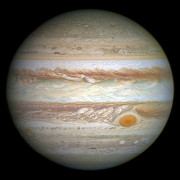 |
 |
|---|---|---|---|
| viridis |  |
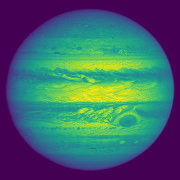 |
 |
See all of the available colormaps as of Matplotlib 2.2.3 in this all colormaps example.
Requirements
- Python 3.
- Matplotlib.
- OpenCV >= 3.3.0 (to use cv2.applyColorMap()).
Installation
pip3 install cmapy
How to use
Colorize images
Colorize means to apply a colormap to an image. This is done by getting the colormap with cmapy.cmap() and then applying cv2.applyColorMap(), like this:
img_colorized = cv2.applyColorMap(img, cmapy.cmap('viridis'))
Alternatively, you can use cmapy.colorize() directly:
img_colorized = cmapy.colorize(img, 'viridis')
See the full colorize example.
Draw with colors
Use the cmapy.color() function and an index between 0 and 255 to get a color from a colormap. Cmapy.color() returns a list of BGR (or RGB) values that can be used with OpenCV drawing functions.
# Get color in BGR order (default) by index.
bgr_color = cmapy.color('viridis', 127)

# Get color in RGB order with a float value.
rgb_color = cmapy.color('viridis', 0.5, rgb_order=True)
See a complete drawing with colors example.
Release history Release notifications | RSS feed


Download files
Download the file for your platform. If you're not sure which to choose, learn more about installing packages.
Source Distribution
File details
Details for the file cmapy-0.2.tar.gz.
File metadata
- Download URL: cmapy-0.2.tar.gz
- Upload date:
- Size: 3.6 kB
- Tags: Source
- Uploaded using Trusted Publishing? No
- Uploaded via: twine/1.11.0 pkginfo/1.4.2 requests/2.18.4 setuptools/40.2.0 requests-toolbelt/0.8.0 tqdm/4.25.0 CPython/3.6.4
File hashes
| Algorithm | Hash digest | |
|---|---|---|
| SHA256 |
3b6f9b4202ed65fef36b5677d69edff8a569cc03cd0d7f0b8f52b89a0f66173c
|
|
| MD5 |
702621fab5aa1040cc16395a7bb3abbf
|
|
| BLAKE2b-256 |
ccdf31553ddbdaef95847186eb2d5b43d06de16e4cc7b7a06874a2aa537e69d5
|






