
Scientific colormaps for making accessible, informative and 'cmashing' plots


Project description







CMasher: Scientific colormaps for making accessible, informative and cmashing plots
The CMasher package provides a collection of scientific colormaps to be used by different Python packages and projects, mainly in combination with matplotlib, showcased in the online documentation. The colormaps in CMasher are all designed to be perceptually uniform sequential using the viscm package; most of them are color-vision deficiency friendly; and they cover a wide range of different color combinations to accommodate for most applications. It offers several alternatives to commonly used colormaps, like chroma and rainforest for jet; sunburst for hot; neutral for binary; and fusion and redshift for coolwarm. If you cannot find your ideal colormap, then please open an issue, provide the colors and/or style you want, and I will try to create one to your liking! Let’s get rid of all bad colormaps in the world together!
If you use CMasher for your work, then please star the repo, such that I can keep track of how many users it has and more easily raise awareness of bad colormaps.
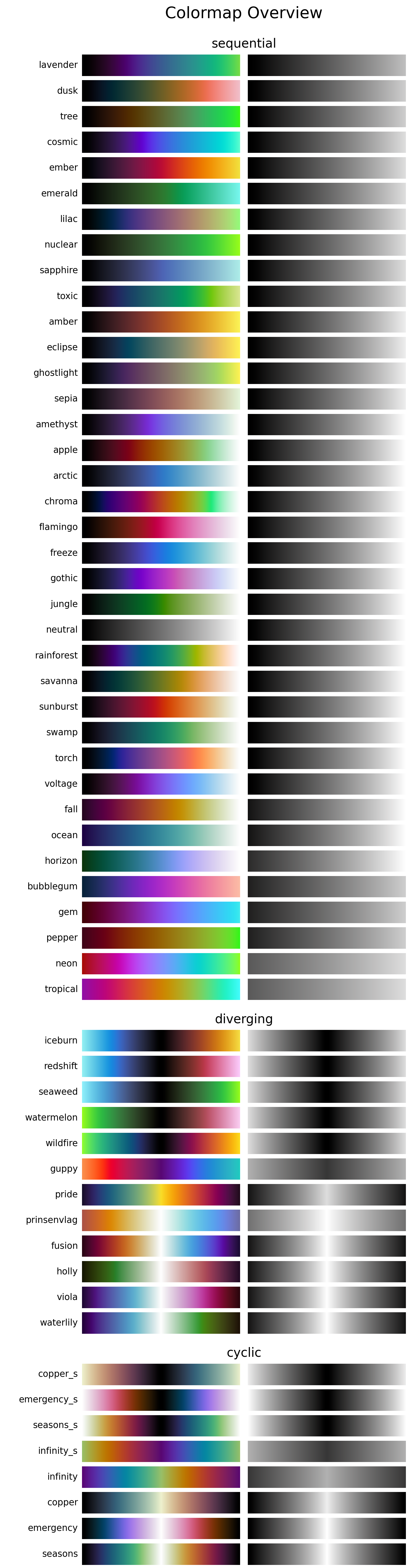
Colormap overview
Below is an overview of all the colormaps that are currently in CMasher (made with the cmr.create_cmap_overview() function). For more information, see the online documentation.
Installation & Use
How to install
CMasher can be easily installed by either cloning the repository and installing it manually:
$ git clone https://github.com/1313e/CMasher
$ cd CMasher
$ pip install .
or by installing it directly from PyPI with:
$ pip install cmasher
CMasher can now be imported as a package with import cmasher as cmr.
Example use
The colormaps shown above can be accessed by simply importing CMasher. This makes them available in the cmasher module, in addition to registering them in matplotlib’s cm module (with added 'cmr.' prefix to avoid name clashes). So, for example, if one were to use the rainforest colormap, this could be done with:
# Import CMasher to register colormaps
import cmasher as cmr

# Import packages for plotting
import matplotlib.pyplot as plt
import numpy as np

# Access rainforest colormap through CMasher or MPL
cmap = cmr.rainforest                   # CMasher
cmap = plt.get_cmap('cmr.rainforest')   # MPL

# Generate some data to plot
x = np.random.rand(100)
y = np.random.rand(100)
z = x**2+y**2

# Make scatter plot of data with colormap
plt.scatter(x, y, c=z, cmap=cmap, s=300)
plt.show()
Accessing the colormaps in other packages than matplotlib would require reading in the text files in the cmasher/colormaps directory, which contain the normalized RGB values (multiply by 255 for regular 8-bit values) of every colormap, and registering them in the package manually. For those that are interested, the viscm source files that were used for creating the colormaps can also be found in the cmasher/colormaps directory in the repo (the source files are not provided with the package distribution).
Using custom colormaps
CMasher allows for custom colormaps to be imported with the cmr.import_cmaps function (which is executed automatically on the cmasher/colormaps directory when CMasher is imported). This function takes the path to a colormap file named cm_<cmap_name> (or the path to a directory containing such files); creates a matplotlib Colormap object using the data in the file; and registers it in matplotlib with the name 'cmr.<cmap_name>' (it will also be available in CMasher as cmr.cm.<cmap_name>). A colormap file can either be a JSCM-file as created by viscm or a text file that contains the normalized RGB values of the colormap (see the text files in the cmasher/colormaps directory for the structure of such files).
Note that colormaps imported this way cannot be accessed through CMasher using cmr.<cmap_name>, unlike CMasher’s own colormaps, but solely using cmr.cm.<cmap_name> (access through matplotlib is unchanged). This is to keep official and unofficial colormaps separated in CMasher.
Release history Release notifications | RSS feed


Download files
Download the file for your platform. If you're not sure which to choose, learn more about installing packages.
Source Distribution
Built Distributions
Filter files by name, interpreter, ABI, and platform.
If you're not sure about the file name format, learn more about wheel file names.
Copy a direct link to the current filters
File details
Details for the file cmasher-1.2.3.tar.gz.
File metadata
- Download URL: cmasher-1.2.3.tar.gz
- Upload date:
- Size: 256.5 kB
- Tags: Source
- Uploaded using Trusted Publishing? No
- Uploaded via: twine/1.15.0 pkginfo/1.5.0.1 requests/2.23.0 setuptools/44.0.0 requests-toolbelt/0.9.1 tqdm/4.43.0 CPython/2.7.15
File hashes
| Algorithm | Hash digest | |
|---|---|---|
| SHA256 |
5f7a953f2f40a43e550c5c812aaf4c2d232b1ccffadac22a44464841dc1cb625
|
|
| MD5 |
ad7c24615087f337053ef14179e394de
|
|
| BLAKE2b-256 |
6a3f59e3e7222dd74abf49e179d92ae1a08de44c8513e339c38a81a525280815
|
File details
Details for the file cmasher-1.2.3-py3-none-any.whl.
File metadata
- Download URL: cmasher-1.2.3-py3-none-any.whl
- Upload date:
- Size: 261.4 kB
- Tags: Python 3
- Uploaded using Trusted Publishing? No
- Uploaded via: twine/3.1.1 pkginfo/1.5.0.1 requests/2.23.0 setuptools/45.2.0 requests-toolbelt/0.9.1 tqdm/4.43.0 CPython/3.7.1
File hashes
| Algorithm | Hash digest | |
|---|---|---|
| SHA256 |
bde17bd53a04339a245dc6396a973b4194f304fbd613b8bc88659f2460bc49d1
|
|
| MD5 |
3afa33394408cb719474ffb990b29196
|
|
| BLAKE2b-256 |
6f5260202aef7fd12192d90f0d9ed5a28f3298ecb4097d34ce49795a536f434e
|
File details
Details for the file cmasher-1.2.3-py2-none-any.whl.
File metadata
- Download URL: cmasher-1.2.3-py2-none-any.whl
- Upload date:
- Size: 261.4 kB
- Tags: Python 2
- Uploaded using Trusted Publishing? No
- Uploaded via: twine/1.15.0 pkginfo/1.5.0.1 requests/2.23.0 setuptools/44.0.0 requests-toolbelt/0.9.1 tqdm/4.43.0 CPython/2.7.15
File hashes
| Algorithm | Hash digest | |
|---|---|---|
| SHA256 |
95b9af67fb14daa78c3c629fcb0b9fcdb2bdf5974eca82d6586bd7f6fa808666
|
|
| MD5 |
ea2da32988babe3015915f45d2044827
|
|
| BLAKE2b-256 |
d54bf2a04af28db75d11951db71480e2034ca50a198aff543c265886fda63c7e
|






