
PyTest Commander

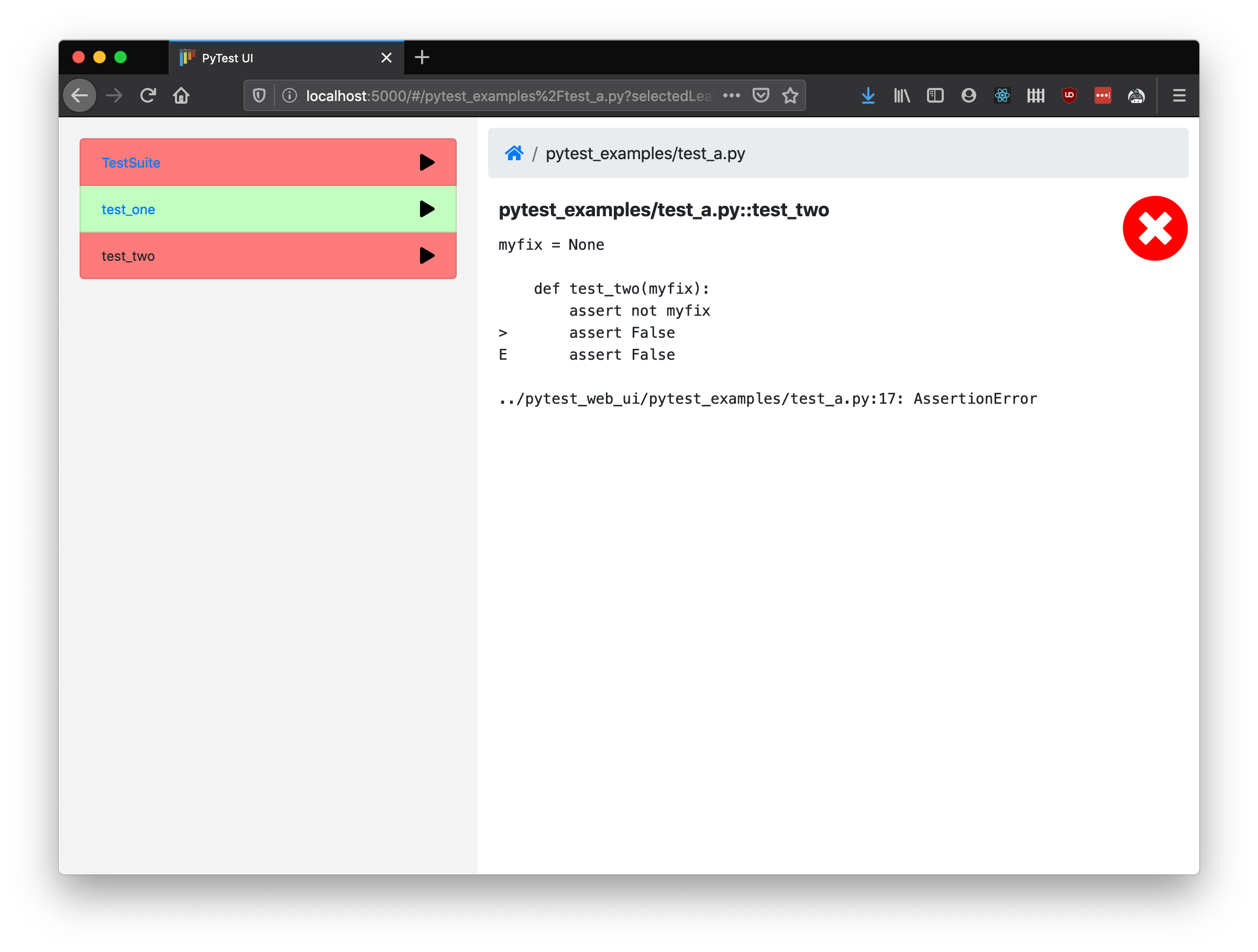
A UI for controlling PyTest interactively. With it, you can explore your test hierarchy (test packages/modules/classes/methods etc.), run tests at the click of a button and see the results presented in your web browser.
Features
- Run tests by group (module, class etc.) or individually.
- Clear pass/fail labelling so you can dig down and find what failed quickly, instead of having to scroll up through many screens of terminal output.
- Test files and dependencies are reloaded every time so you can run, tweak your code, then run again in a fast iteration cycle.
- Runs on any modern OS and browser (tested on Win10, macOS and Ubuntu with Chrome, Firefox and Safari). IE is not supported.
- Automatically start and stop docker services while running if specified in a
docker-compose.ymlfile in the root test directory. - Tests are run in separate processes and reloaded for each invocation, allowing tests to be tweaked and re-run without restarting the main process.
Prerequisites
- Requires Python3.6+ and pip.
Quickstart
Install and get started running your own PyTest tests:
pip install pytest-commander
pytest_commander /path/to/your/tests
I recommend installing into an activated virtual environment. You will want to make sure that all additional dependencies required to run your tests are installed into the same virtual environment.
When you run with default options, the web app to browse and run tests should be
opened automatically in your default browser. To view full docs for the
command-line parameters, run pytest_commander --help.
Build from source
Alternatively you may build from source. In addition to the prerequisites above, you must ensure you have installed pipenv and npm.
git clone https://github.com/ryanc414/pytest_commander.git
cd pytest_commander
python build.py
python test.py
You may then install the local directory into an activated virual environment, along with other dependencies installed to run your tests:
pip install .
pytest_commander /path/to/your/tests
PyTest Configuration
Configuration for PyTest such as extra command-line arguments may be specified by adding a pytest.ini file in the same directory. See https://docs.pytest.org/en/latest/reference/customize.html#pytest-ini for more details.
Note that there is a known issue when using pytest_commander along with the xdist plugin, used to parallelise tests among multiple processes. You will have to remove xdist config options from your pytest.ini in order to use pytest-commander.
Renaming
Previously this project was called "pytest_web_ui". I felt that this name gave too much emphasis to the implementation detail of the UI being a web app, when it could easily have been implemented in some other way (e.g. as an electron app) and still serve the same purpose. I chose the name "pytest_commander" to reflect the true purpose of this project: giving a friendly and intuitive interface for developers to take command of their tests.
Happy testing!
1 maintainer

Release files for cmb-webui 0.0.4
For a detailed explanation of source distributions (sdists) and built distributions (wheels), please see the package formats documentation.
Source distribution (sdist)
| File | Size | Uploaded | |
|---|---|---|---|
| cmb_webui-0.0.4.tar.gz | 962.3 kB | Details |
Built distribution (wheel)
| File | Interpreter | ABI | Platform | Reset |
|---|---|---|---|---|
| cmb_webui-0.0.4-py3-none-any.whl | Python 3 | none | any | Details |
Total release size: 1.9 MB
Release files / cmb_webui-0.0.4.tar.gz
| Download URL | cmb_webui-0.0.4.tar.gz |
|---|---|
| Size | 962.3 kB |
| Tags | Source |
|
SHA-256 checksum How to use checksums |
f007754d8ab120ab7b751abf0e9b7ffb9057e8518b8fbf8c9995eb7b3fb4e696
|
|
BLAKE2b-256 checksum How to use checksums |
196a9545e9e03cf4e11fbf6c650739a58a2fda70a0eb7ea91f1ede1b72322369
|
| Upload date | |
|
Uploaded using Trusted Publishing? What is trusted publishing? |
No |
| Uploaded via |
twine/4.0.1 CPython/3.9.15
|
Release files / cmb_webui-0.0.4-py3-none-any.whl
| Download URL | cmb_webui-0.0.4-py3-none-any.whl |
|---|---|
| Size | 974.8 kB |
| Tags | Python 3 |
|
SHA-256 checksum How to use checksums |
a860626e2eb596663b45d3e987fc3933b44e29b2cd02f247e13a6dd5537bb2fe
|
|
BLAKE2b-256 checksum How to use checksums |
fa7a30756e5aaf84f2b8da19a8018bec9fe96e1a6a04591ee74efed8c2c37cf7
|
| Upload date | |
|
Uploaded using Trusted Publishing? What is trusted publishing? |
No |
| Uploaded via |
twine/4.0.1 CPython/3.9.15
|













