
No project description provided

Project description
docsum AI chat tool





A command-line AI chat tool that lets you have conversations with your codebase. Point it at any project and ask questions. It can read files, search for patterns, list directories, and write files automatically.
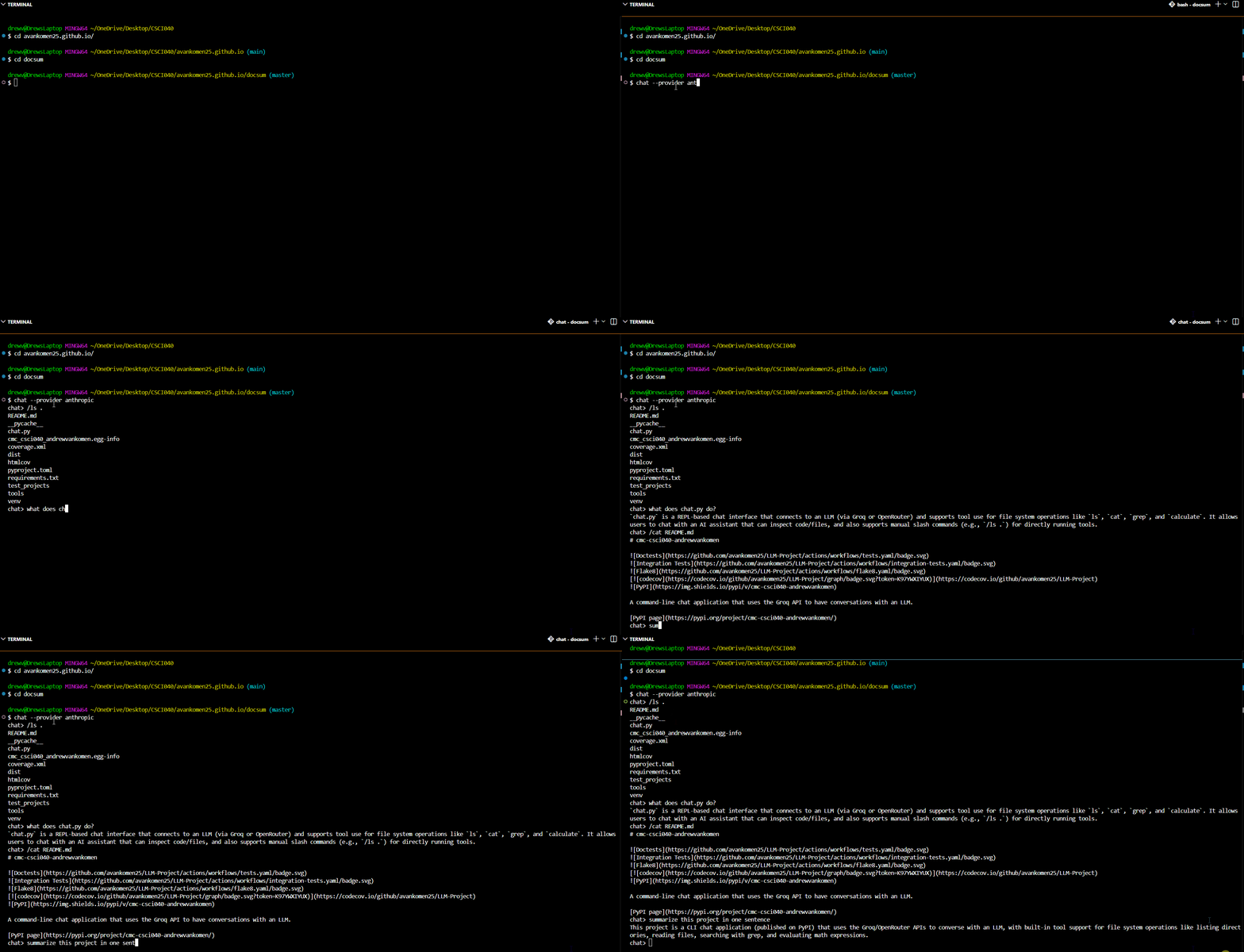
Examples
The examples below show how to use chat with real projects. Run chat --help for a full list of options.
eBay Scraper
This example shows how /ls loads the file list into context so the LLM can answer questions without making an extra tool call.
$ cd test_projects/ebay_scraper
$ chat
chat> /ls .
__pycache__
ebay-dl.py
hammer.csv
hammer.json
laptop.csv
laptop.json
stuffed_animal.csv
stuffed_animal.json
chat> what does this project scrape?
The script scrapes eBay search result pages, extracting each listing's name, price, status, shipping cost, free-returns flag, and number of items sold. It outputs the collected data to JSON (or CSV).
Markdown Compiler
This example shows automatic tool use where the LLM reads the README on its own to answer the question.
$ cd test_projects/markdown_compiler
$ chat
chat> what does this project do?
It's a simple command-line tool that reads a Markdown file and compiles it into an HTML document, optionally adding a CSS stylesheet for nicer formatting.
Webpage
This example shows automatic tool use where the LLM calls grep on its own to answer the question.
$ cd test_projects/webpage
$ chat
chat> what pages does this website link to?
- **style.css** (stylesheet)
- **index.html** (the fanpage itself)
- **nfcwest.html** (NFC West Guide)
- **2021superbowl.html** (2021 Superbowl)
- **https://github.com/mikeizbicki/cmc-csci040** (CSCI040 course webpage)
- **https://izbicki.me/** (Mike Izbicki's personal webpage)
- **https://sophia09zheng13.github.io/** (Sophia's webpage)
Agent Examples
The examples below demonstrate the agent's ability to create, modify, and delete files, with all changes automatically committed to git.
Creating a file
The session below shows the agent creating a new Python file and automatically committing it to git.
$ chat
chat> create a python file called hello.py that prints "hello world"
File `hello.py` has been created and prints "hello world".
$ ls
chat.py  hello.py  README.md  tools/  test_files/  ...
$ git log --oneline -3
2ca9828 (HEAD -> project4) [docchat] Add hello.py that prints hello world
77aba2f finalize project4
d440d0c [docchat] test
Modifying a file
The session below shows the agent modifying an existing file and committing the change.
$ chat
chat> update hello.py to also print "goodbye world"
hello.py now prints both "hello world" and "goodbye world".
$ cat hello.py
print("hello world")
print("goodbye world")
$ git log --oneline -3
1300693 (HEAD -> project4) [docchat] Add goodbye world print
2ca9828 [docchat] Add hello.py that prints hello world
77aba2f finalize project4
Deleting a file
The session below shows the agent deleting a file and committing the deletion.
$ chat
chat> delete hello.py
File `hello.py` has been deleted.
$ ls
chat.py  README.md  tools/  test_files/  ...
$ git log --oneline -3
fbb4b27 (HEAD -> project4) [docchat] rm hello.py
1300693 [docchat] Add goodbye world print
2ca9828 [docchat] Add hello.py that prints hello world
Running doctests with the agent
The session below shows the agent running doctests on a file and reporting the results.
$ chat
chat> run the doctests on tools/utils.py
All doctests in `tools/utils.py` passed successfully.
Release history Release notifications | RSS feed


Download files
Download the file for your platform. If you're not sure which to choose, learn more about installing packages.
Source Distribution
Built Distribution
Filter files by name, interpreter, ABI, and platform.
If you're not sure about the file name format, learn more about wheel file names.
Copy a direct link to the current filters
File details
Details for the file cmc_csci040_andrewvankomen-0.2.1.tar.gz.
File metadata
- Download URL: cmc_csci040_andrewvankomen-0.2.1.tar.gz
- Upload date:
- Size: 8.4 kB
- Tags: Source
- Uploaded using Trusted Publishing? No
- Uploaded via: twine/6.2.0 CPython/3.14.2
File hashes
| Algorithm | Hash digest | |
|---|---|---|
| SHA256 |
4ba253d5486163aff1185021801ce9a7067e4aa01f050144032b5f09f4e6953c
|
|
| MD5 |
6a8807ec542bc73c14d91bbdee57aeaf
|
|
| BLAKE2b-256 |
7b2f58d36d5c7c9c18a2e7bdc7a46f3abf86389fb538c2cdf9ac0da4480142f4
|
File details
Details for the file cmc_csci040_andrewvankomen-0.2.1-py3-none-any.whl.
File metadata
- Download URL: cmc_csci040_andrewvankomen-0.2.1-py3-none-any.whl
- Upload date:
- Size: 12.0 kB
- Tags: Python 3
- Uploaded using Trusted Publishing? No
- Uploaded via: twine/6.2.0 CPython/3.14.2
File hashes
| Algorithm | Hash digest | |
|---|---|---|
| SHA256 |
6abba3e6e43957678cd6ab9907621a3322aa74f81fcd690b19dc4e15c30bd15e
|
|
| MD5 |
1c77791a30debffe6edac3b530b406cc
|
|
| BLAKE2b-256 |
470903e13409c94e920a1dd069623dac02ad8523f3bfa86ffcd130acf0e17a7b
|






