
CMDBsyncer
A rule-based and modular system to synchronize hosts between Checkmk, Netbox, and other systems. The main goal is the complete organization of hosts based on CMDB systems with flexible rules and automation.
🔗 Links
- 🌐 Homepage
- 📖 Documentation
- 🚀 Releases & Versioning — how to pick a stable version for production
📋 Table of Contents
- Overview
- Features
- Quick Start
- Supported Systems
- Installation
- Main Functions
- Screenshots
- Contributing
- License
- Trademarks
🎯 Overview
CMDBsyncer is a powerful, web-based tool designed to solve the complex challenge of managing host inventories across multiple IT management systems. Whether you're synchronizing between Checkmk, Netbox, I-DOIT, or other platforms, CMDBsyncer provides a unified approach with rule-based automation.
Key Benefits
- Centralized Management: Single interface for all your CMDB synchronization needs
- Rule-Based Logic: Flexible rules for host organization and attribute management
- Multi-Platform: Support for 15+ systems including Checkmk, Netbox, Ansible, and more
- Scalable: Tested with 140,000+ hosts
- Secure: Built-in authentication, 2FA, and encryption of sensitive data
⚡ Quick Start
Every release is published as a container image — nothing to clone, nothing to build:
# Fetch the compose file and start CMDBsyncer together with its MongoDB
curl -O https://raw.githubusercontent.com/kuhn-ruess/cmdbsyncer/main/docker-compose.registry.yml
docker compose -f docker-compose.registry.yml up -d

# Create your first user
docker compose -f docker-compose.registry.yml exec api \
    ./cmdbsyncer sys create_user 'your-email@example.com'

# Open http://your-host:8080 in your browser
The compose file tracks latest. Replace the tag with 4.3.3 to pin a release
or with 4.3 to stay on a minor line; the images cover linux/amd64 and
linux/arm64. Full walkthrough — configuration volume, upgrades, reverse proxy
— in Installation with Docker.
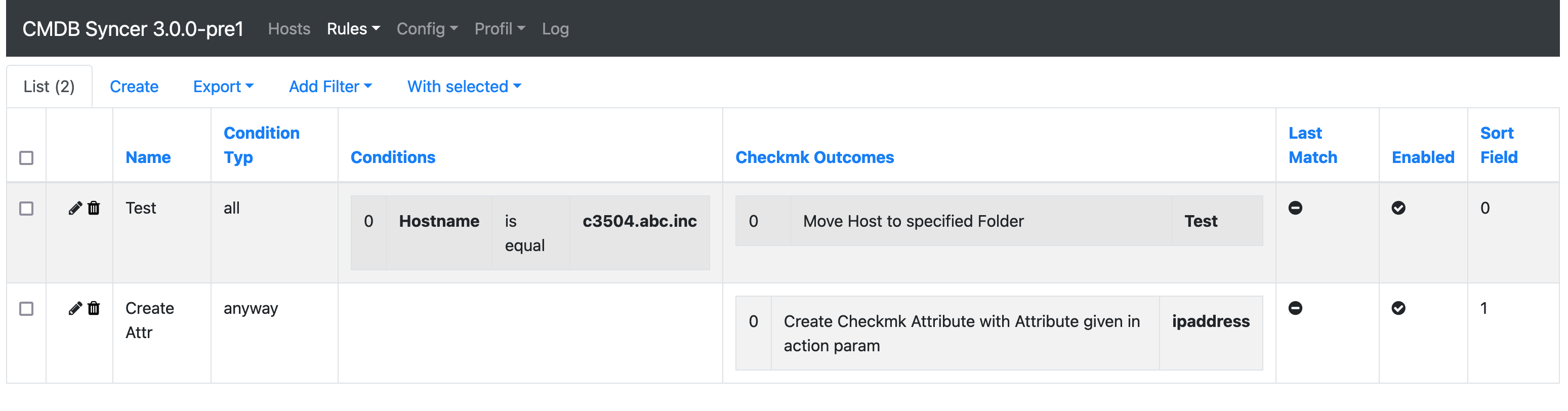
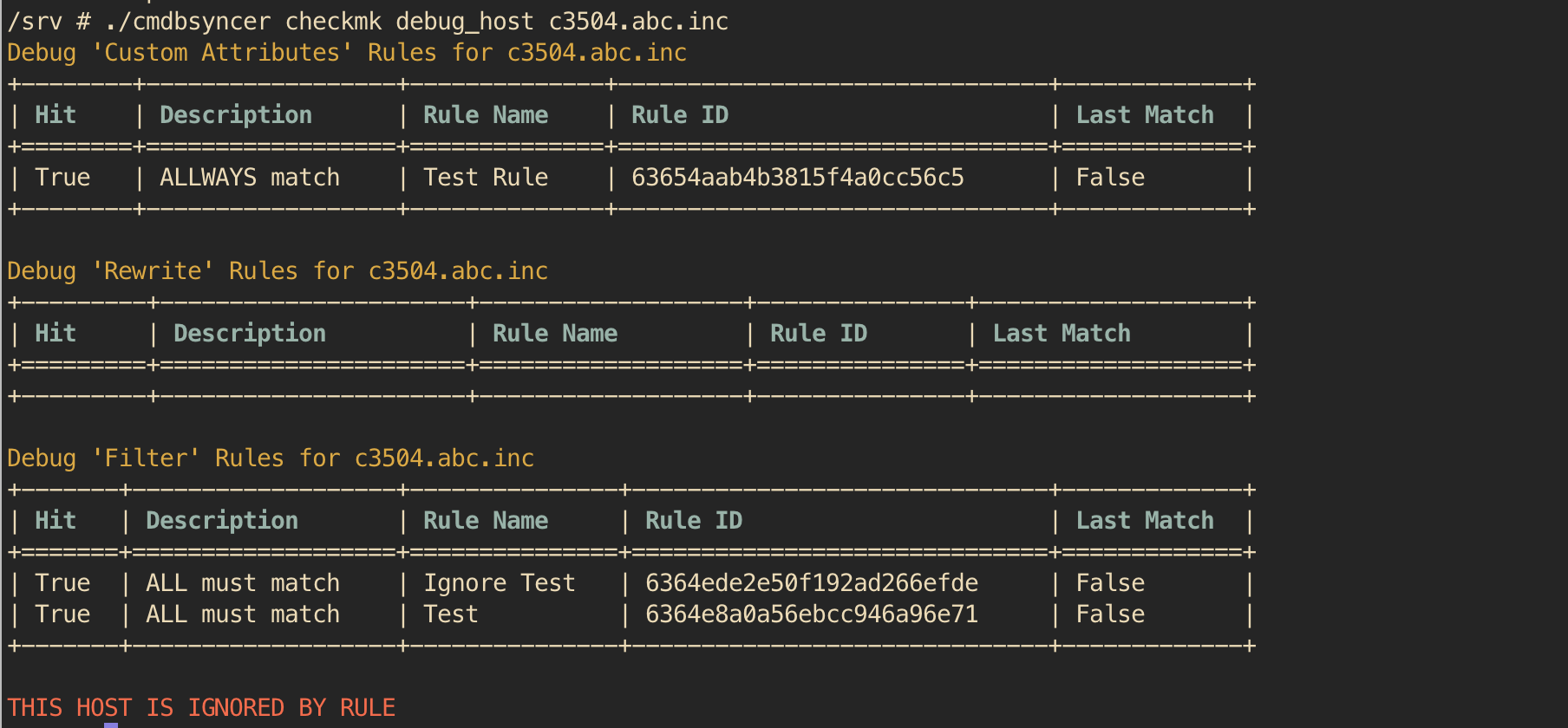
📸 Screenshots
🚀 Main Functions
Core Features
- 🌐 Web Interface - Complete web-based management with login, 2FA, and user management
- ⚙️ Configuration Management - All configuration handled through the web interface (except initial installation)
- 🔌 Plugin API - Simple API to integrate custom data sources
- 🐛 Debug Tools - Various debug options available via the
./cmdbsyncercommand - 🔐 Security - Encryption of secrets and secure credential management
- ⏰ Scheduling - Built-in cron management for automated synchronization
- 📊 Monitoring - Integration with monitoring systems
- 🎯 Template Support - Jinja2 templating for configuration and rules
- 🔄 REST API - Full REST API for automation and integration
- 🤖 MCP Server - Model Context Protocol server for Claude Desktop, Cursor, Cline & co. — expose hosts, accounts, rules and cron over
cmdbsyncer-mcp
Rule Engine
- 📝 Attribute Control - Rules based on host attributes
- ✏️ Attribute Rewrites - Dynamic modification of host attributes
- 🔍 Filters - Advanced filtering for hosts and attributes
- ⚡ Action Rules - Automated actions in Ansible, Checkmk, Netbox, etc.
Ansible Integration
- 📋 Inventory Source - Use CMDBsyncer as dynamic Ansible inventory
🔧 Supported Systems
Checkmk
Complete lifecycle management for monitoring systems
- ✅ Host Management - Full host lifecycle (creation, labels, folders, deletion, rules)
- 📈 Scalability - Tested with more than 140,000 hosts
- 🏷️ Attribute Sync - Sync and update all host attributes, tags, and labels
- ⚡ Performance - Full support of API bulk operations and multiprocessing
- 📁 Folder Management - Complete Checkmk folder management with pool features
- 👥 Groups - Creation of host, contact, and service groups
- 🎯 Tags - Create host tags and host tag groups
- 📊 BI Integration - Create BI aggregations
- 📋 Rules - Create all types of setup rules
- 🔄 Updates - Smart update controls to prevent excessive changes
- 🤖 Agents - Commands to activate configuration, bake and sign agents
- 👤 User Management - Manage Checkmk users (create/delete/reset password)
- 📦 Inventory - Host attributes inventory for Ansible integration
- 🔐 Password Store - Create and manage encrypted password entries
- 🎯 DCD Rules - Create Data Collection Rules
- 🔍 Version Detection - Automatic Checkmk version detection for correct API usage
Ansible
Automation and configuration management
- 📋 Inventory - Rule-based inventory source
- 🖥️ Agent Management - Complete Checkmk agent management (Linux & Windows)
- Installation and TLS registration
- Bakery registration
- 🏗️ Site Management - OMD site management (updates, creation)
- Automatic Checkmk version downloads
Netbox
Network infrastructure management
- 🔄 Bidirectional Sync - Rule-based export and import of devices and VMs
- 🏗️ Auto-Creation - Automatic category creation
- 🗺️ Infrastructure - Export sites, interfaces, IPAM data
- 👥 Contacts - Contact management
- 📍 Location Management - Comprehensive location handling
I-DOIT
IT documentation and CMDB
- 📊 Template-Based - Rule-based export and import using templates
- 🔄 Bidirectional - Full import/export capabilities
Other Integrations
PRTG - Network monitoring
- 📥 Object Import - Import monitoring objects to sync with Checkmk
BMC Remedy - IT Service Management
- 📊 Limited Import - Basic import functionality
Cisco DNA - Network management
- 🌐 Device Import - Import devices and interface information
CSV Files - Data management
- 📄 Host Management - Manage hosts based on CSV files
- ➕ Data Enhancement - Add additional information from CSV files
LDAP - Directory services
- 👥 Object Import - Import objects from LDAP directories
REST APIs - Custom integrations
- 🔌 Custom APIs - Import from custom REST API endpoints
JSON - File-based data
- 📄 File Import - Import JSON file structures
Jira CMDB - Atlassian integration
- ☁️ Cloud & On-Prem - Support for both deployment types
- 📥 Object Import - Import CMDB objects
JDISC - Network discovery
- 🔍 Discovery Import - Import discovered objects
ServiceNow - IT Service Management
- 📥 CMDB Import - Import hosts from the ServiceNow Table API (e.g. cmdb_ci_server)
VMware - Virtualization
- 📊 Attribute Management - Import and export VM attributes
- 🔄 Bidirectional - Full import/export to VMware VMs
Database Systems
- MySQL - Import and inventory database tables
- MSSQL/FreeTDS/ODBC - Support for all ODBC-based database connections
🛠️ Installation
Prerequisites
- Docker and Docker Compose
- Python 3.11+ (for development)
- Web browser (for the management interface)
Production Installation
-
Fetch the compose file
curl -O https://raw.githubusercontent.com/kuhn-ruess/cmdbsyncer/main/docker-compose.registry.yml
-
Pick a version
Edit the
image:line.ghcr.io/kuhn-ruess/cmdbsyncer:latestfollows every release,:4.3.3pins one,:4.3stays on a minor line. See RELEASE.md for the full branching/versioning policy. -
Start the application
docker compose -f docker-compose.registry.yml up -d
-
Create admin user
docker compose -f docker-compose.registry.yml exec api \
    ./cmdbsyncer sys create_user 'admin@your-domain.com'
The config volume in that file holds local_config.py, and with it the key
every stored account password is encrypted with. Keep it across upgrades and
back it up together with the database.
Building the image yourself
For a fork, a custom base image or a preinstalled plugin:
git clone https://github.com/kuhn-ruess/cmdbsyncer.git
cd cmdbsyncer
git checkout lts/3.12        # or a release tag: git checkout v4.3.3
docker compose up -d
Development Installation
For development and testing purposes:
# Start development environment
./helper up

# Access container shell
./helper shell

# Create test user
./helper create_user 'test@example.com'

# Access at http://localhost:5003
MCP (Model Context Protocol)
CMDBsyncer ships an MCP server that lets LLM clients (Claude Desktop, Cursor,
Cline, …) read and write syncer state directly. It boots in CLI mode (no web
stack) and authenticates with HTTP Basic; access is gated by the mcp
api_role on the user. SSE/HTTP transport authenticates per request and
requires HTTPS (mirrors the REST API's gate).
# 1. Install the MCP SDK — ships in the [extras] pip extra
pip install 'cmdbsyncer[extras]'

# 2. Run the server — usually configured into your MCP client, but you can
#    also pipe it manually:
cmdbsyncer-mcp --user admin@your-domain.com --password '****'

# 3. Or pass credentials via env vars (handy for client config):
export CMDBSYNCER_API_USER=admin@your-domain.com
export CMDBSYNCER_API_PASSWORD='****'
cmdbsyncer-mcp
Example claude_desktop_config.json snippet:
{
  "mcpServers": {
    "cmdbsyncer": {
      "command": "cmdbsyncer-mcp",
      "env": {
        "CMDBSYNCER_API_USER": "admin@your-domain.com",
        "CMDBSYNCER_API_PASSWORD": "****"
      }
    }
  }
}
Inside Docker the server is preinstalled — set MCPSERVER_ENABLED=1
(optionally MCPSERVER_PORT=8765) in your compose file and the container
entrypoint starts the SSE listener for you. Map port 8765 if you want to
expose it. Per-request Basic Auth applies the same way.
Tools exposed: host CRUD, inventory write, account read, rule export/import, autorules trigger, cron status & trigger, log read. See docs.cmdbsyncer.de — MCP for the full catalog.
📋 Requirements
System Requirements
- Memory: Minimum 2GB RAM, recommended 4GB+
- Storage: Minimum 10GB free space
- Network: HTTPS access to target systems (Checkmk, Netbox, etc.)
Supported Target Systems
- Checkmk: All current versions (automatic detection)
- Netbox: v2.8+
- Ansible: v2.9+
- I-DOIT: v1.12+
- And many more - see full compatibility matrix
🤝 Contributing
We welcome contributions! Please follow these steps:
- Fork the repository
- Create a feature branch (
git checkout -b feature/amazing-feature) - Commit your changes (
git commit -m 'Add amazing feature') - Push to the branch (
git push origin feature/amazing-feature) - Open a Pull Request
Development Guidelines
- Follow existing code style
- Add tests for new features
- Update documentation as needed
- Test with multiple target systems
Git Hooks
The repository ships a pre-commit hook in .githooks/ that refreshes
application/buildinfo.txt, runs pylint on staged Python files, and executes
the unit-test suite before each commit. Activate it once per clone:
git config core.hooksPath .githooks
📄 License
This project is licensed under the MIT License - see the LICENSE file for details.
™️ Trademarks
Checkmk, Netbox, Ansible, i-doit, Jira, ServiceNow, VMware, PRTG, JDisc, Cisco DNA, BMC Remedy and all other product names mentioned in this project are trademarks or registered trademarks of their respective owners. They are used here solely to describe which systems CMDBsyncer can exchange data with.
CMDBsyncer is an independent project and is not affiliated with, endorsed by, or
sponsored by any of these vendors. No vendor logo is bundled with this software —
the module icons in application/static/vendor/ are neutral in-house marks.
🆘 Support
- 📖 Documentation: docs.cmdbsyncer.de
- 🌐 Homepage: cmdbsyncer.de
- 🐛 Issues: GitHub Issues
- 💬 Discussions: GitHub Discussions
⭐ If you find this project helpful, please give it a star! ⭐
1 maintainer

Metadata
1 maintainer
Release files for cmdbsyncer 4.4.0
For a detailed explanation of source distributions (sdists) and built distributions (wheels), please see the package formats documentation.
Source distribution (sdist)
| File | Size | Uploaded | |
|---|---|---|---|
| cmdbsyncer-4.4.0.tar.gz | 1.1 MB | Details |
Built distribution (wheel)
| File | Interpreter | ABI | Platform | Reset |
|---|---|---|---|---|
| cmdbsyncer-4.4.0-py3-none-any.whl | Python 3 | none | any | Details |
Total release size: 2.3 MB
Release files / cmdbsyncer-4.4.0.tar.gz
| Download URL | cmdbsyncer-4.4.0.tar.gz |
|---|---|
| Size | 1.1 MB |
| Tags | Source |
|
SHA-256 checksum How to use checksums |
8a0c2bddd3ca183d86b74514e027499d7e6843d6c2ad4ebf92d8f78897f3c8f9
|
|
BLAKE2b-256 checksum How to use checksums |
2a003383d81d973db4308a4936b5bbab7338328835d14746a17ba9d6ede4b726
|
| Upload date | |
|
Uploaded using Trusted Publishing? What is trusted publishing? |
No |
| Uploaded via |
twine/6.2.0 CPython/3.14.7
|
Release files / cmdbsyncer-4.4.0-py3-none-any.whl
| Download URL | cmdbsyncer-4.4.0-py3-none-any.whl |
|---|---|
| Size | 1.2 MB |
| Tags | Python 3 |
|
SHA-256 checksum How to use checksums |
77405fe789377479e9009fe9eff6110677f1dc3db072da02e06cc1ea7b564a9b
|
|
BLAKE2b-256 checksum How to use checksums |
7f85d40c1ae0afe89dbfc6d6483dee18f73a7eab0db5a935ef98855d6e1a2e54
|
| Upload date | |
|
Uploaded using Trusted Publishing? What is trusted publishing? |
No |
| Uploaded via |
twine/6.2.0 CPython/3.14.7
|














