
Search and run shell history with a Textual TUI

Project description
CmdFinder
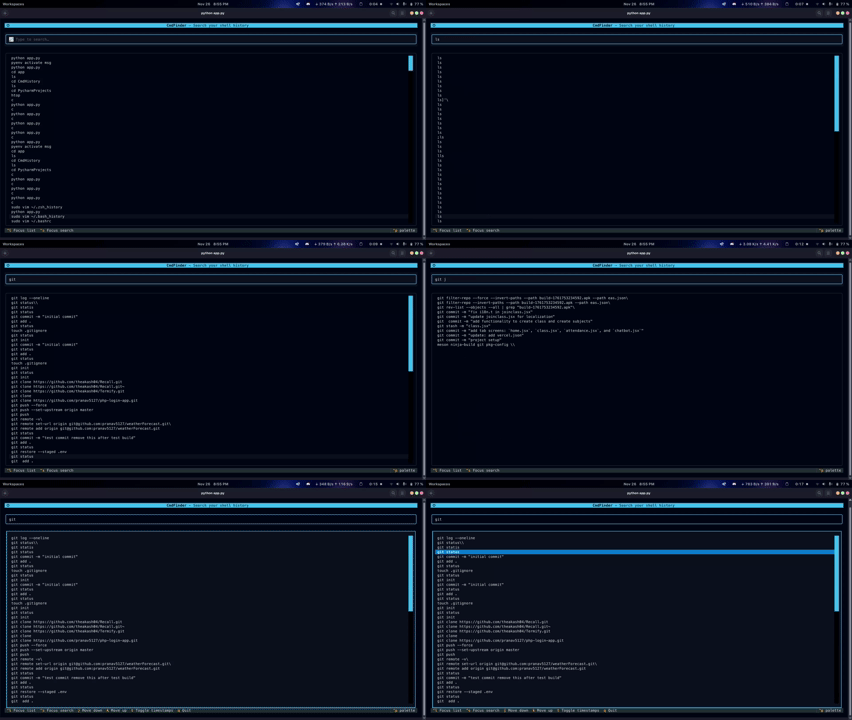
CmdFinder is a handy terminal-based user interface (TUI) that lets you fuzzy-search, browse, and execute commands from your shell history. It’s built with Textual and RapidFuzz.

Features
- 🔍 Fuzzy Search: Quickly find commands even if you don’t remember the exact syntax.
- 🐚 Shell Support:
- Zsh:
~/.zsh_history - Bash:
~/.bash_history
- Zsh:
- ⚡ Instant Execution: Pick a command and run it straight away in your shell.
- 🧭 Vim-like Navigation: Move around with
j/k. - 🕒 Timestamps: Toggle timestamps on or off.
- 🎨 Modern Interface: Built with Textual for a clean look.
Requirements
- Python 3.10+
- Bash/Zsh or compatible shell
- Read access to history files
Installation
1. Install via pip
pip install cmdfinder
2. Setup Background Service (One-time)
Run this after installation:
cmdfinder-setup
3. Run the App
cmdfinder
or simply:
cf
Troubleshooting
If your system can't find cmdfinder or cf, add ~/.local/bin to your PATH.
Bash:
echo 'export PATH="$HOME/.local/bin:$PATH"' >> ~/.bashrc
source ~/.bashrc
Zsh:
echo 'export PATH="$HOME/.local/bin:$PATH"' >> ~/.zshrc
source ~/.zshrc
Install from Source
git clone https://github.com/pranav5127/CmdFinder.git
cd cmdfinder
Optional: Create Virtual Environment
python -m venv .venv
source .venv/bin/activate
Install in Editable Mode
pip install -e .
After installing from source, run:
cmdfinder-setup
Usage
Start the TUI with:
cmdfinder
Key Bindings
| Key | Action |
|---|---|
| j | Move down |
| k | Move up |
| ↓ / ↑ | Move cursor |
| Ctrl+s | Focus search |
| l / Ctrl+l | Focus list |
| t | Toggle timestamps |
| Enter | Run selected command |
| q | Quit |
License
CmdFinder is released under the MIT License. Enjoy!


Download files
Download the file for your platform. If you're not sure which to choose, learn more about installing packages.
Source Distribution
Built Distribution
Filter files by name, interpreter, ABI, and platform.
If you're not sure about the file name format, learn more about wheel file names.
Copy a direct link to the current filters
File details
Details for the file cmdfinder-2.2.0.tar.gz.
File metadata
- Download URL: cmdfinder-2.2.0.tar.gz
- Upload date:
- Size: 10.6 kB
- Tags: Source
- Uploaded using Trusted Publishing? No
- Uploaded via: twine/6.2.0 CPython/3.10.12
File hashes
| Algorithm | Hash digest | |
|---|---|---|
| SHA256 |
a8972b3ef430d4e921874ccbf7ffcdf8c381f24d42da60b92843675ef2b507c9
|
|
| MD5 |
93434a3e97ff2eab9cc3d3e7f780f1dc
|
|
| BLAKE2b-256 |
b6268fff966bdb6e1669172896317121d003c2e701f7f94ba30fa2ee32705877
|
File details
Details for the file cmdfinder-2.2.0-py3-none-any.whl.
File metadata
- Download URL: cmdfinder-2.2.0-py3-none-any.whl
- Upload date:
- Size: 12.3 kB
- Tags: Python 3
- Uploaded using Trusted Publishing? No
- Uploaded via: twine/6.2.0 CPython/3.10.12
File hashes
| Algorithm | Hash digest | |
|---|---|---|
| SHA256 |
bad2f5d7637e2a27f6ddcf7068bbc5bd400d15531663528fa5f05b713ae90062
|
|
| MD5 |
3734571a754534071761e03a437f9f40
|
|
| BLAKE2b-256 |
1881650edf9d420b4cf668df9062a94cbf088c77ccc02146185a0a6f35139426
|






