
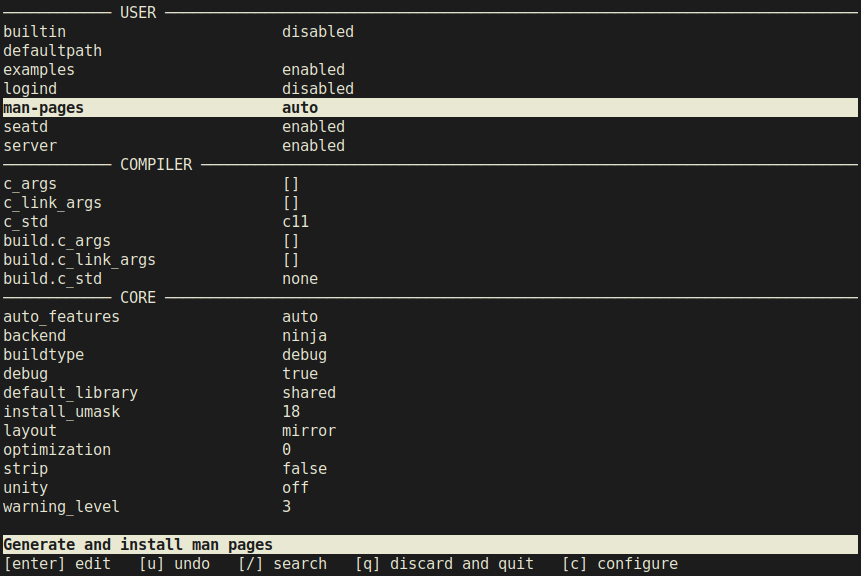
cmeson is a text-based user interface for the meson build system and offers a convenient, graphical way to configure build options instead of having to memorize and type them out in the terminal. Due to incompatibility of its TUI library, cmeson only supports Linux, MacOS and other Unix-like systems. Consequently, if you want to use this application on Windows, you can do so through WSL or Cygwin. The name and functionality of this application are derived from a similar application for cmake ccmake.
Installation
From PyPI:
pip3 install --user cmeson
From source:
git clone https://github.com/proskur1n/cmeson
cd cmeson
pip3 install --user .
Usage
cmeson builddir
cmeson [OPTIONS] builddir [sourcedir] [TRAILING]

OPTIONS
	-h, --help               Show help message and exit
	--backend BACKEND        Select backend to query build options for
sourcedir is a directory containing meson.build file and builddir is the build directory for the project. sourcedir is only needed for projects for which meson setup has not been run yet and defaults to the current working directory if not specified.
The --backend option determines the list of options in the backend section and defaults to ninja. If you specify a backend using this option, you must not change the backend in TUI as this will result in an error from meson. See the meson documentation for a complete list of supported backends.
If any trailing options are given, they are passed as-is to meson and are not interpreted by this application. Normally you do not need to specify any trailing options as most of them can be configured directly through TUI.
License
MIT License (see LICENSE for more information)
1 maintainer

Metadata
1 maintainer
Release files for cmeson 2021.10.3
For a detailed explanation of source distributions (sdists) and built distributions (wheels), please see the package formats documentation.
Built distribution (wheel)
| File | Interpreter | ABI | Platform | Reset |
|---|---|---|---|---|
| cmeson-2021.10.3-py3-none-any.whl | Python 3 | none | any | Details |
Release files / cmeson-2021.10.3-py3-none-any.whl
| Download URL | cmeson-2021.10.3-py3-none-any.whl |
|---|---|
| Size | 10.6 kB |
| Tags | Python 3 |
|
SHA-256 checksum How to use checksums |
3ce6db3748bfc63042a49b149585d66dfbf46fa7e9cdb6be91f5a0cd26b4c155
|
|
BLAKE2b-256 checksum How to use checksums |
40c7c9e0af6efd3fae795ddc83c3dc0a08debb6f7887ec038ca0915a3fb36e77
|
| Upload date | |
|
Uploaded using Trusted Publishing? What is trusted publishing? |
No |
| Uploaded via |
twine/3.4.2 importlib_metadata/4.8.1 pkginfo/1.7.1 requests/2.22.0 requests-toolbelt/0.9.1 tqdm/4.62.3 CPython/3.8.10
|














