
C++ Model Generation (CMG)
This package provides a command-line utility cmg and Python dataclasses to describe a schema, then use that schema to generate a model in C++.
You can use this for applications that require complex modeling and high performance.
The resulting code uses C++11 smart pointers for easier memory management.
Installation
Using pip:
pip install cmg
Using poetry:
poetry add cmg
Command-line
Use the cmg command to convert a schema into a set of C++ files:
For example:
cmg --schema examples/solar_system.py --output solar_system
This will create a directory called solar_system containing the following files:
solar_system/
    CMakeLists.txt         - Example CMakeLists.txt to create a library and build the tests
    planet.cpp             - Planet class implementation
    planet.hpp             - Planet class header
    root.cpp               - Root class implementation
    root.hpp               - Root class header
    solar_system.cpp       - SolarSystem class implementation
    solar_system.hpp       - SolarSystem class header
    star.cpp               - Star class implementation
    star.hpp               - Star class header
    test_solar_system.cpp  - Test suite, using GTest
You can use the CMakeLists.txt file as a starting point for your own build.
NOTE: the whole output directory will be removed and re-created every time you run
cmg.
Schema Structure
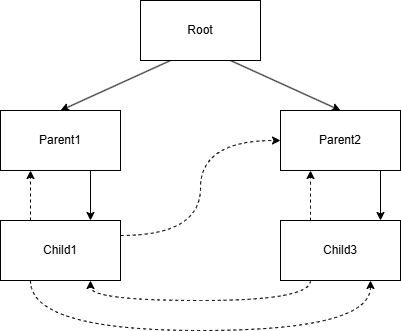
The schema consists of a set of classes (Klass) which contain fields (Field).
A tree structure can be created using parent-child relationships (solid lines). Then references can be created between classes in the DAG hierarchy (dotted lines).
Schema Version
Each schema has a required version number. When you serialize the model, the version number is stored in the database. When the database is read, the version number of the database is compared to the version of the schema used to build the C++ model. This ensures you are reading a database with a compatible structure.
| IMPORTANT: You must increment the schema version every time you update a class or field.
Examples
Please see the example schemas in the examples directory.
API Documentation
Full API documentation is available here.
C++ model usage
Each class contains create, update and destroy methods to build and modify your data structure.
Create
Objects are created using the static method create, for example:
auto root = Root::create();
auto solarSystem = SolarSystem::create(root, "The Solar System");
auto sun = Sun::create(solarSystem, "The Sun");
auto earth = Planet::create(solarSystem, "Earth");
earth.lock()->setStar(sun);
Classes without parents will create shared pointers, child classes will create weak pointers.
The root variable will be a shared_ptr. The sun and solarSystem variables will be weak_ptr.
Read
Instances of child classes need to be locked before use:
sun.lock()->getName(); // Returns "The Sun"
Instances of root classes (i.e. classes without parents) can be used directly, without lock().
Update
Each field has a getter and setter:
sun.lock()->setName(std::string("Renamed"));
sun.lock()->getName(); // Returns "Renamed"
Destroy
Objects are usually destroyed automatically when their shared_ptr count is zero. But if a parent has a reference to a child, then it will never be deleted from memory. So, calling destroy() on a parent instance will also destroy its children. The parent shared_ptr will still be in memory until the variable referencing it goes out of scope.
Checking references to objects have not expired
In the solar_system example, a Sun is owned by the Root class, but it is referenced by the SolarSystem class.
You can check if a reference to another object is not expired before using it, like this:
auto sun = earth.lock()->getSun();
if (!sun.expired())
{
    std::cout << sun.lock()->getName() << std::endl;
}
Getting shared_ptr from a child object
To make a shared_ptr using a child's weak_ptr:
auto earthPtr = earth.lock()->getptr();
std::cout << earthPtr->getName() << std::endl;
std::cout << earthPtr->getMass() << std::endl;
Use this to lock a weak object until it goes out of scope. This saves you from locking the object every time you want to call one of its functions.
Persistence - saving/reading a database to/from disk
To save a database to disk, use the Persistence class, for example:
auto persistence = solar_system::Persistence<solar_system::Root>();
persistence.save(root, "solar_system.db");
Then to read the database, you can simply run:
auto persistence = solar_system::Persistence<solar_system::Root>();
auto root = persistence.load("solar_system.db");
You can create a Persistence class for any object in the parent/child tree, if you only want to save a partial database. For example, to just write out data for the earth planet:
auto earthPersistence = solar_system::Persistence<solar_system::Planet>();
earthPersistence.save(earth.lock()->getptr(), "earth.db");
NOTE: if you change the schema, then any saved databases will no longer be compatible.
Help and bug reporting
Please ask any questions or report bugs to the GitHub issues page: https://github.com/johndru-astrophysics/cmg/issues
1 maintainer

Metadata
1 maintainer
Release files for cmg 1.2.1
For a detailed explanation of source distributions (sdists) and built distributions (wheels), please see the package formats documentation.
Source distribution (sdist)
| File | Size | Uploaded | |
|---|---|---|---|
| cmg-1.2.1.tar.gz | 18.2 kB | Details |
Built distribution (wheel)
| File | Interpreter | ABI | Platform | Reset |
|---|---|---|---|---|
| cmg-1.2.1-py3-none-any.whl | Python 3 | none | any | Details |
Total release size: 40.0 kB
Release files / cmg-1.2.1.tar.gz
| Download URL | cmg-1.2.1.tar.gz |
|---|---|
| Size | 18.2 kB |
| Tags | Source |
|
SHA-256 checksum How to use checksums |
3d9cb4961a94998f1df9d5ca87c7dbbc599fbf30c149ba06a1d3db15a53e8808
|
|
BLAKE2b-256 checksum How to use checksums |
6a9424935f0ee8812fc8e2129b3c4acda838374526a0e43ce7718c7102e767ac
|
| Upload date | |
|
Uploaded using Trusted Publishing? What is trusted publishing? |
Yes |
| Uploaded via |
twine/6.0.1 CPython/3.12.8
|
Provenance
Provenance describes where a file came from. On PyPI, provenance is shared via attestations, which provide a verifiable record of the build or publishing details. View details, limitations and caveats.


PyPI Publish Attestation
PyPI verified that this artifact, at this checksum, originated from the publisher listed below.
Signed by GitHub Actions, verified by PyPI on Jan 5, 2025.
Transparency logRelease files / cmg-1.2.1-py3-none-any.whl
| Download URL | cmg-1.2.1-py3-none-any.whl |
|---|---|
| Size | 21.9 kB |
| Tags | Python 3 |
|
SHA-256 checksum How to use checksums |
7c351e0924cc16c72a18abbccac718da0dce62a39626ffbc68717bfadedb1f52
|
|
BLAKE2b-256 checksum How to use checksums |
72eed1c86f7d9a414ad2607f5465f5d873b5d4fc406b24dcc98a179648afdc79
|
| Upload date | |
|
Uploaded using Trusted Publishing? What is trusted publishing? |
Yes |
| Uploaded via |
twine/6.0.1 CPython/3.12.8
|
Provenance
Provenance describes where a file came from. On PyPI, provenance is shared via attestations, which provide a verifiable record of the build or publishing details. View details, limitations and caveats.
PyPI Publish Attestation
PyPI verified that this artifact, at this checksum, originated from the publisher listed below.
Signed by GitHub Actions, verified by PyPI on Jan 5, 2025.
Transparency log













