
CloudMediaSync 增强版



在CloudMediaSync基础上增强了页面和消息渠道的一些功能,并增加了一些开放接口,便于其他程序调用
部署
基于原版安装教程
1. 下载增强文件
进入CloudMediaSync部署目录,全选复制以下命令并执行,自动识别系统架构并下载对应文件(macOS 的 arm64 将自动映射为 aarch64):
arch=$(uname -m)
case "$arch" in
  x86_64|amd64)
    pkg_arch="x86_64"
    ;;
  arm64|aarch64)
    pkg_arch="aarch64"
    ;;
  *)
    echo "不支持的架构: $arch" >&2
    exit 1
    ;;
esac

URL="https://cnb.cool/ilay1678/cloud-media-sync-enhanced/-/git/raw/master/dist/usercustomize.cpython-312-${pkg_arch}-linux-gnu.so"
echo "Downloading $URL ..."
if command -v wget >/dev/null 2>&1; then
  wget -O usercustomize.so "$URL"
else
  curl -L "$URL" -o usercustomize.so
fi
echo "Saved to ./usercustomize.so"
2. 修改docker-compose.yaml文件
挂载增强文件并增加环境变量:
services:
  cloud-media-sync:
    privileged: true
    container_name: cloud-media-sync
    image: imaliang/cloud-media-sync:latest  # 使用原版镜像
    restart: always
    network_mode: bridge
    volumes:
      - "./config:/config"
      - "./logs:/logs"
      - "./cache:/var/cache/nginx/emby"
      - "/data/media:/media"
      # 挂载增强文件
      - "./usercustomize.so:/cms/cms-api/usercustomize.so"
    ports:
      - "9527:9527"
      - "9096:9096"
    environment:
      - PUID=0
      - PGID=0
      - UMASK=022
      - TZ=Asia/Shanghai
      - RUN_ENV=online
      - ADMIN_USERNAME=admin
      - ADMIN_PASSWORD=admin
      - CMS_API_TOKEN=cloud_media_sync
      - EMBY_HOST_PORT=http://172.17.0.1:8096
      - EMBY_API_KEY=xxx
      - DONATE_CODE=CMS_XXX_XXX
      # Nullbr配置(增强功能所需)
      - NULLBR_APP_ID=your_app_id_here
      - NULLBR_API_KEY=your_api_key_here
      - NULLBR_BASE_URL=https://api.nullbr.online
3. 启动服务
docker-compose up -d
注意事项
- 增强功能需要配置Nullbr相关环境变量才能正常工作
页面增强
热门推荐的订阅按钮增加nullbr资源弹窗
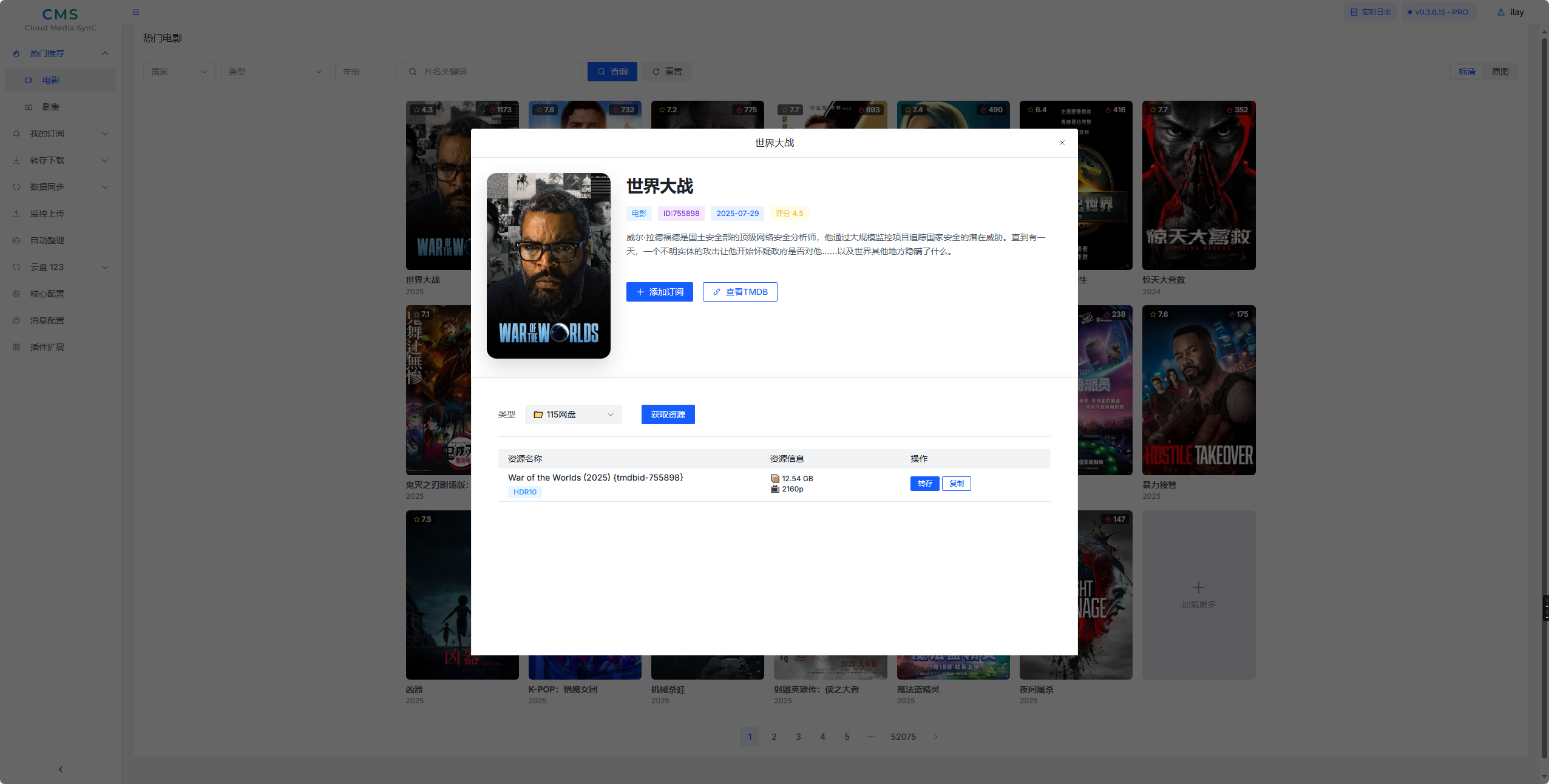
消息渠道增强
功能概述
为 CloudMediaSynC的Telegram 机器人和企业微信渠道提供了增强功能,集成了 Nullbr API 实现智能媒体搜索和转存。
主要功能
智能媒体搜索
- 触发方式: 以
?或?开头发送消息 - 示例:
? 三体、? 复仇者联盟 - 功能: 自动搜索电影、电视剧等媒体资源
- 返回: 搜索结果列表,支持查看详情
开放接口
添加分享下载任务
接口地址: POST /api/open/add_share_down?token=cloud_media_sync
功能描述: 添加一个分享下载任务到系统中
请求参数
| 参数名 | 类型 | 必填 | 说明 |
|---|---|---|---|
| url | string | 是 | 分享链接URL |
请求示例
{
    "url": "https://example.com/share/123456"
}
响应格式
成功响应:
{
    "code": 200,
    "msg": "操作成功"
}
失败响应:
{
    "code": 400,
    "msg": "参数错误"
}
或
{
    "code": 500,
    "msg": "具体错误信息"
}
响应状态码说明
| 状态码 | 说明 |
|---|---|
| 200 | 操作成功 |
| 400 | 参数错误(缺少url参数) |
| 500 | 服务器内部错误 |
注意事项
- 成功添加分享下载任务后,系统会自动触发整理任务(5秒后执行)
- URL参数不能为空
- 请确保提供的分享链接有效
1 maintainer

Metadata
1 maintainer
Release files for cms_enhance 2025082601
For a detailed explanation of source distributions (sdists) and built distributions (wheels), please see the package formats documentation.
Built distributions (wheels)
| File | Interpreter | ABI | Platform | Actions Reset |
|---|---|---|---|---|
| cms_enhance-2025082601-cp312-cp312-manylinux2014_x86_64.manylinux_2_17_x86_64.whl | CPython 3.12 | CPython 3.12 | Linux glibc 2.17+ x86-64 | Details for cms_enhance-2025082601-cp312-cp312-manylinux2014_x86_64.manylinux_2_17_x86_64.whl |
| cms_enhance-2025082601-cp312-cp312-manylinux2014_aarch64.manylinux_2_17_aarch64.whl | CPython 3.12 | CPython 3.12 | Linux glibc 2.17+ ARM64 | Details for cms_enhance-2025082601-cp312-cp312-manylinux2014_aarch64.manylinux_2_17_aarch64.whl |
Total release size: 5.4 MB
Release files / cms_enhance-2025082601-cp312-cp312-manylinux2014_x86_64.manylinux_2_17_x86_64.whl
| Download URL | cms_enhance-2025082601-cp312-cp312-manylinux2014_x86_64.manylinux_2_17_x86_64.whl |
|---|---|
| Size | 2.7 MB |
| Tags | CPython 3.12 Linux glibc 2.17+ x86-64 |
|
SHA-256 checksum How to use checksums |
07ddacd1d46da0932474febc8d8cb27059a2e99628e019c4ebb58751e0d7fe79
|
|
BLAKE2b-256 checksum How to use checksums |
20b676eef9d64eefa25642f410a2d3fa9e666a92015fb7b0f4c217f8468d0829
|
| Upload date | |
|
Uploaded using Trusted Publishing? What is trusted publishing? |
No |
| Uploaded via |
uv/0.8.13
|
Release files / cms_enhance-2025082601-cp312-cp312-manylinux2014_aarch64.manylinux_2_17_aarch64.whl
| Download URL | cms_enhance-2025082601-cp312-cp312-manylinux2014_aarch64.manylinux_2_17_aarch64.whl |
|---|---|
| Size | 2.6 MB |
| Tags | CPython 3.12 Linux glibc 2.17+ ARM64 |
|
SHA-256 checksum How to use checksums |
638eedf2b6005b573e6b2bf8954c86bdbe7a5de26ea39d177bb8bb080c9ed889
|
|
BLAKE2b-256 checksum How to use checksums |
5b4b62baacc9b46bd55ff092e16828253b8fb17199716443a0d8f61b59a2e03a
|
| Upload date | |
|
Uploaded using Trusted Publishing? What is trusted publishing? |
No |
| Uploaded via |
uv/0.8.13
|
Security for cms_enhance 2025082601
Provenance
Provenance describes where a file came from. On PyPI, provenance is shared via attestations, which provide a verifiable record of the build or publishing details. View details, limitations and caveats.
No provenance found
None of the files in this release were uploaded with provenance metadata.
A note on package security
PyPI is a repository for distributing packages, not a service for auditing them. While third-party security researchers and our staff do their best to detect and remove malicious packages, PyPI cannot guarantee the quality, security or suitability of any given package.
To learn more about protecting yourself from malicious actors, visit our package security documentation.














