
Desktop CMU Graphics is an offline version of CMU Graphics, a persistent-object graphics package geared towards beginner computer science students. CMU Graphics and its desktop version are maintained by CMU CS Academy, a Carnegie Mellon University project which develops free-to-use middle and high school computer science curriculum.
This package, including its documentation, is licensed under the BSD 3-Clause license.
Installation
Choose zip or pip
There are two different ways to install Desktop CMU Graphics on a device:
- (Mac and Windows only) Use the zip file installer that is available for download on the CMU CS Academy website.
- (Mac, Windows, and Linux) Use pip, Python’s built-in package-managing software.
Both methods come with their own advantages and limitations. If you're in doubt about which to choose, the zip file installer is the most likely to succeed. It should work regardless of most restrictions in place on school-distributed devices.
For those using devices with Linux operating systems, or for those who are familiar with the command line/terminal, the pip version of the package offers a larger degree of versatility.
The remainder of these installation instructions are only for the pip version.
Install CMU Graphics
Run the following command:
pip install cmu-graphics
Getting Started
To run our graphics framework, include the following line at the top of your Python file:
from cmu_graphics import *
At the end of your Python file, add this line:
cmu_graphics.run()
From there, the syntax for using the graphics package is identical to the online version of the framework. You can find more details about how to use the graphics framework here on our documentation page.
Teacher Support and Documentation
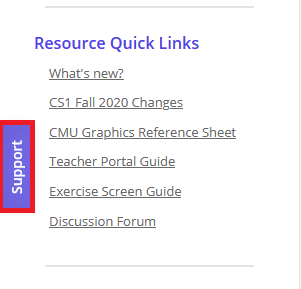
If you are a teacher with a CMU CS Academy Account and you have questions about CMU Graphics, remember that you can reach out to us through the Support tab on the left side of the CMU CS Academy website:
If you are an educator but do not have an account with CMU CS Academy, you can register for an account here.
If you are a student, or you are exploring Desktop CMU Graphics, there are plenty of resources to help you get started with the framework. Students can reach out to their teachers for questions about CMU Graphics, and a full reference documentation for the graphics framework is available on our documentation page.
2 maintainers


Metadata
2 maintainers
Release files for cmu-graphics 2.0.5
For a detailed explanation of source distributions (sdists) and built distributions (wheels), please see the package formats documentation.
Source distribution (sdist)
| File | Size | Uploaded | |
|---|---|---|---|
| cmu_graphics-2.0.5.tar.gz | 236.0 kB | Details |
Built distribution (wheel)
| File | Interpreter | ABI | Platform | Reset |
|---|---|---|---|---|
| cmu_graphics-2.0.5-py3-none-any.whl | Python 3 | none | any | Details |
Total release size: 474.3 kB
Release files / cmu_graphics-2.0.5.tar.gz
| Download URL | cmu_graphics-2.0.5.tar.gz |
|---|---|
| Size | 236.0 kB |
| Tags | Source |
|
SHA-256 checksum How to use checksums |
a8476bbff8219e5e63eb5c67e4be12d016e017889c86e342beccd92f1df109a8
|
|
BLAKE2b-256 checksum How to use checksums |
3e84eed85d5a5e50851f8d46541f0610f424a64d40d9d9c3af3b53da2bc68f28
|
| Upload date | |
|
Uploaded using Trusted Publishing? What is trusted publishing? |
No |
| Uploaded via |
twine/6.2.0 CPython/3.9.17
|
Release files / cmu_graphics-2.0.5-py3-none-any.whl
| Download URL | cmu_graphics-2.0.5-py3-none-any.whl |
|---|---|
| Size | 238.4 kB |
| Tags | Python 3 |
|
SHA-256 checksum How to use checksums |
82e4ca87aa555d0d19fcaee325c4b43a4e90b4a98ef3fcda902b1758473d9e4e
|
|
BLAKE2b-256 checksum How to use checksums |
38c319fcc7913a1188e8d9afb65437b61a53f881be3fd8343f9dab32900e265b
|
| Upload date | |
|
Uploaded using Trusted Publishing? What is trusted publishing? |
No |
| Uploaded via |
twine/6.2.0 CPython/3.9.17
|














