
PWA remote control for cmus

Project description
cmus-web


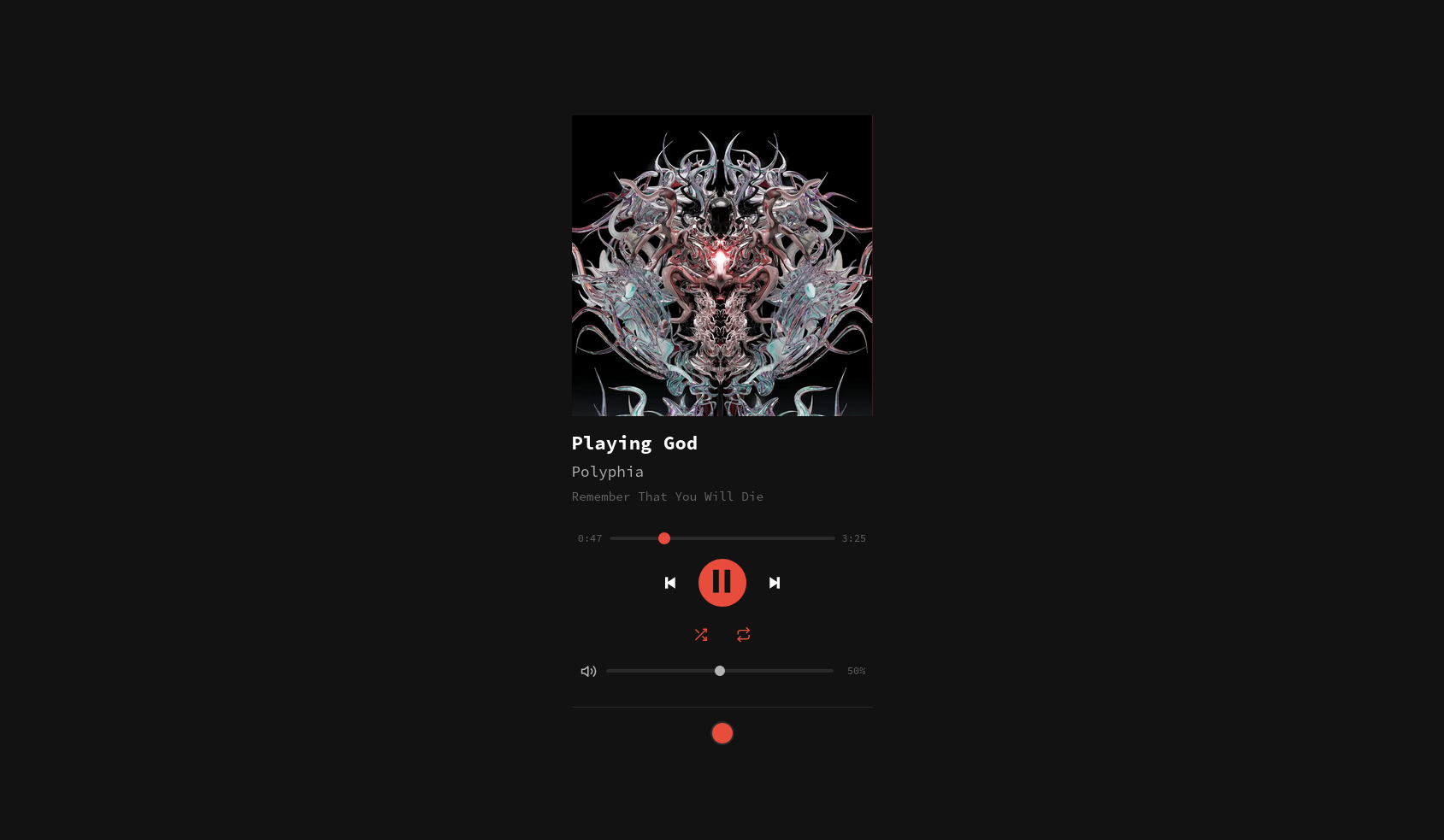
A self-hosted PWA remote control for cmus. Control your player from any device on your network.
Table of contents
- Features
- A note on PWA and HTTPS
- Prerequisites
- Installation
- Usage
- Docker
- Keyboard shortcuts
- Tech stack
- License
Features
- Real-time player state via SSE (track, position, volume, shuffle/repeat)
- Embedded album art extraction (MP3, FLAC, M4A, etc.)
- Installable PWA with offline caching
- Keyboard shortcuts for all playback controls
- Customizable accent color (persisted in localStorage)
- Zero-build frontend (vanilla HTML/CSS/JS + Alpine.js)
A note on PWA and HTTPS
The install/Add to Home Screen prompt only works over HTTPS. Browsers require a secure context for service workers and PWA installation. If you're only accessing cmus-web over LAN on http://192.168.x.x:8000, the app still works fine as a regular web page, you just won't get the install prompt.
If you want full PWA support, you need a domain name with a TLS certificate. This is straightforward with a reverse proxy like Traefik, which handles automatic HTTPS via Let's Encrypt. Put cmus-web behind Traefik and you're done.
Prerequisites
- Python 3.13+
- cmus running with a socket (default:
$XDG_RUNTIME_DIR/cmus-socketor/tmp/cmus-socket) cmus-remoteon yourPATH
Installation
From PyPI
pip install cmus-web
Or with pipx (isolated, recommended for CLI tools):
pipx install cmus-web
From source
git clone https://github.com/FawkesOficial/cmus-web.git
cd cmus-web
uv sync
Usage
Make sure cmus is running, then:
cmus-web
Open http://127.0.0.1:8000 in your browser.
CLI options
cmus-web [OPTIONS]

Options:
  --host TEXT       Bind address (default: 127.0.0.1)
  --port INTEGER    Port (default: 8000)
  --socket TEXT     cmus socket path (overrides CMUS_SOCKET env)
  --music-dir TEXT  Path to music directory for album art in Docker
  --prefix TEXT     Host path prefix from cmus-remote to strip (for Docker)
  --help            Show this message and exit.
Examples
# Bind to all interfaces (accessible from other devices)
cmus-web --host 0.0.0.0

# Use a custom socket path
cmus-web --socket /run/user/1000/cmus-socket

# Run on a different port
cmus-web --port 9090
Docker
Important: cmus socket
cmus-web communicates with cmus through a Unix domain socket. If the socket path you mount does not exist on the host, Docker will silently create a directory in its place, which will break the connection and can be confusing to debug.
Use this helper script to verify the socket exists before starting the container:
#!/usr/bin/env bash
# start-cmus-web.sh - verify cmus socket exists, then start the container

SOCKET="${CMUS_SOCKET:-$XDG_RUNTIME_DIR/cmus-socket}"

if [ ! -S "$SOCKET" ]; then
  echo "Error: cmus socket not found at $SOCKET"
  echo "Make sure cmus is running and the socket path is correct."
  exit 1
fi

docker run -d \
  -v "$SOCKET":/tmp/cmus-socket \
  -v ~/Music:/music \
  -e CMUS_WEB_PREFIX="$HOME/Music" \
  -p 8000:8000 \
  cmus-web
docker run
docker build -t cmus-web .

docker run -d \
  -v /run/user/1000/cmus-socket:/tmp/cmus-socket \
  -v ~/Music:/music \
  -e CMUS_WEB_PREFIX=/home/user/Music \
  -p 8000:8000 \
  cmus-web
The music volume mount enables album art extraction. Use CMUS_WEB_PREFIX to tell cmus-web what host path to strip from cmus-remote file paths so they resolve correctly inside the container.
docker compose
services:
  cmus-web:
    build: .
    container_name: cmus-web
    ports:
      - "8000:8000"
    volumes:
      - /run/user/1000/cmus-socket:/tmp/cmus-socket
      - ~/Music:/music
    environment:
      - CMUS_WEB_PREFIX=/home/user/Music
    restart: unless-stopped
docker compose up -d
Keyboard shortcuts
| Key | Action |
|---|---|
Space / C |
Play / Pause |
B |
Next track |
Z |
Previous track |
S |
Toggle shuffle |
R |
Toggle repeat |
L |
Search lyrics online |
+ / - |
Volume up / down |
Arrow Left / Right |
Seek -5s / +5s |
Arrow Up / Down |
Volume up / down |
Tech stack
- Backend: Python, FastAPI, uvicorn, Mutagen, SSE-Starlette
- Frontend: Vanilla HTML/CSS/JS, Alpine.js
- Packaging: uv, Hatchling
- Container: Debian slim, uv
License
cmus-web is distributed under the terms of the GPL-3.0 license.


Download files
Download the file for your platform. If you're not sure which to choose, learn more about installing packages.
Source Distribution
Built Distribution
Filter files by name, interpreter, ABI, and platform.
If you're not sure about the file name format, learn more about wheel file names.
Copy a direct link to the current filters
File details
Details for the file cmus_web-0.1.1.tar.gz.
File metadata
- Download URL: cmus_web-0.1.1.tar.gz
- Upload date:
- Size: 132.4 kB
- Tags: Source
- Uploaded using Trusted Publishing? Yes
- Uploaded via: twine/6.1.0 CPython/3.13.12
File hashes
| Algorithm | Hash digest | |
|---|---|---|
| SHA256 |
b9abc0e8f6cea2c840ebeca7c421004a29d5640c7db5cb2823d582562306d50a
|
|
| MD5 |
48c29392e5f5937b31ed0bd3fddafb95
|
|
| BLAKE2b-256 |
7320c516db5ab8019a13a73891fa029ec8a8975cb83d85413a72a26d9109c515
|
Provenance
The following attestation bundles were made for cmus_web-0.1.1.tar.gz:
Publisher:
python-publish.yml on FawkesOficial/cmus-web
-
Statement:
-
Statement type:
https://in-toto.io/Statement/v1 -
Predicate type:
https://docs.pypi.org/attestations/publish/v1 -
Subject name:
cmus_web-0.1.1.tar.gz -
Subject digest:
b9abc0e8f6cea2c840ebeca7c421004a29d5640c7db5cb2823d582562306d50a - Sigstore transparency entry: 1502319288
- Sigstore integration time:
-
Permalink:
FawkesOficial/cmus-web@e0fffb38d87798d5e54ccf6b10960d9a00bfc396 -
Branch / Tag:
refs/tags/v0.1.1 - Owner: https://github.com/FawkesOficial
-
Access:
private
-
Token Issuer:
https://token.actions.githubusercontent.com -
Runner Environment:
github-hosted -
Publication workflow:
python-publish.yml@e0fffb38d87798d5e54ccf6b10960d9a00bfc396 -
Trigger Event:
release
-
Statement type:
File details
Details for the file cmus_web-0.1.1-py3-none-any.whl.
File metadata
- Download URL: cmus_web-0.1.1-py3-none-any.whl
- Upload date:
- Size: 103.5 kB
- Tags: Python 3
- Uploaded using Trusted Publishing? Yes
- Uploaded via: twine/6.1.0 CPython/3.13.12
File hashes
| Algorithm | Hash digest | |
|---|---|---|
| SHA256 |
553d688bfbb86baab02be2e47f190755824e6117cb1fa21e90c7c003350daee4
|
|
| MD5 |
0b2f5035474b56815294d3f36ea5e6fa
|
|
| BLAKE2b-256 |
60e25a5047734602e24d2797b76a88965d9591dd19a94a0611a4f3bf50bd0252
|
Provenance
The following attestation bundles were made for cmus_web-0.1.1-py3-none-any.whl:
Publisher:
python-publish.yml on FawkesOficial/cmus-web
-
Statement:
-
Statement type:
https://in-toto.io/Statement/v1 -
Predicate type:
https://docs.pypi.org/attestations/publish/v1 -
Subject name:
cmus_web-0.1.1-py3-none-any.whl -
Subject digest:
553d688bfbb86baab02be2e47f190755824e6117cb1fa21e90c7c003350daee4 - Sigstore transparency entry: 1502319317
- Sigstore integration time:
-
Permalink:
FawkesOficial/cmus-web@e0fffb38d87798d5e54ccf6b10960d9a00bfc396 -
Branch / Tag:
refs/tags/v0.1.1 - Owner: https://github.com/FawkesOficial
-
Access:
private
-
Token Issuer:
https://token.actions.githubusercontent.com -
Runner Environment:
github-hosted -
Publication workflow:
python-publish.yml@e0fffb38d87798d5e54ccf6b10960d9a00bfc396 -
Trigger Event:
release
-
Statement type:






