
cmyt








Matplotlib colormaps from the yt project !
Colormaps overview
The following colormaps, as well as their respective reversed (*_r) versions are available
Perceptually uniform sequential colormaps
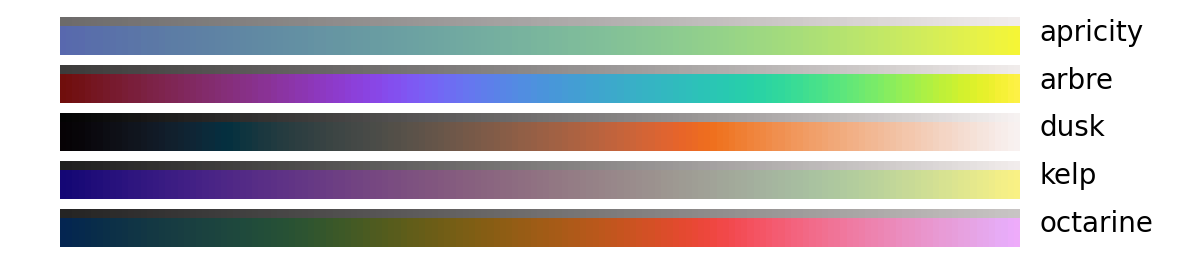
Monochromatic sequential colormaps

Miscellaneous

Installation
with pip
python -m pip install cmyt
or with conda
conda install -c conda-forge cmyt
Usage
cmyt integrates with matplotlib in a similar fashion to cmocean or cmasher
import numpy as np
import matplotlib.pyplot as plt
import cmyt  # that's it !

# generate example data
prng = np.random.RandomState(0x4D3D3D3)
noise = prng.random_sample((100, 100))
x, y = np.mgrid[-50:50, -50:50]
z = 5 * np.exp(-(x**2 + y**2) / 1000)

# setup the figure
fig, ax = plt.subplots()
ax.set(aspect="equal")

# now we can refer to cmyt colormaps as strings
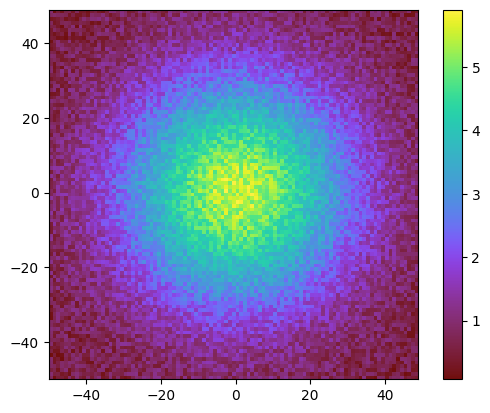
im = ax.pcolormesh(x, y, z + noise, cmap="cmyt.arbre", shading="flat")
fig.colorbar(im, ax=ax)
# alternatively, cmyt maps can also be imported as objects
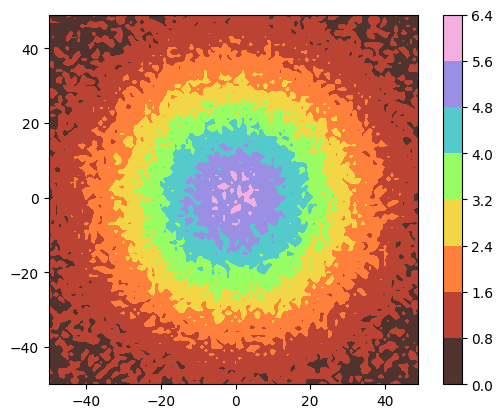
from cmyt import pastel

fig, ax = plt.subplots()
ax.set(aspect="equal")
im = ax.contourf(x, y, z + noise, cmap=pastel)
fig.colorbar(im, ax=ax)
A gallery of comparable examples using all colormaps from cmyt is available in the test directory.


Release files for cmyt 2.0.4
For a detailed explanation of source distributions (sdists) and built distributions (wheels), please see the package formats documentation.
Source distribution (sdist)
| File | Size | Uploaded | |
|---|---|---|---|
| cmyt-2.0.4.tar.gz | 28.7 kB | Details |
Built distribution (wheel)
| File | Interpreter | ABI | Platform | Reset |
|---|---|---|---|---|
| cmyt-2.0.4-py3-none-any.whl | Python 3 | none | any | Details |
Total release size: 58.9 kB
Release files / cmyt-2.0.4.tar.gz
| Download URL | cmyt-2.0.4.tar.gz |
|---|---|
| Size | 28.7 kB |
| Tags | Source |
|
SHA-256 checksum How to use checksums |
3cb83424adf95337840d9dd6eef5f0e2f6d53e9618cd11a2cb31218227e40b27
|
|
BLAKE2b-256 checksum How to use checksums |
076e42dc4082667c7729823e54c3f96d18e550d5f6d0cde7aa628492f56a61e7
|
| Upload date | |
|
Uploaded using Trusted Publishing? What is trusted publishing? |
Yes |
| Uploaded via |
twine/7.0.0 CPython/3.13.14
|
Provenance
Provenance describes where a file came from. On PyPI, provenance is shared via attestations, which provide a verifiable record of the build or publishing details. View details, limitations and caveats.


PyPI Publish Attestation
PyPI verified that this artifact, at this checksum, originated from the publisher listed below.
Signed by GitHub Actions, verified by PyPI on Oct 8, 2026.
Transparency logRelease files / cmyt-2.0.4-py3-none-any.whl
| Download URL | cmyt-2.0.4-py3-none-any.whl |
|---|---|
| Size | 30.2 kB |
| Tags | Python 3 |
|
SHA-256 checksum How to use checksums |
598e000f438f4c9a10eca3e5c71e4f136a0f0008f1ae02d1dcef2b2c566d998a
|
|
BLAKE2b-256 checksum How to use checksums |
1be60fad2ac741a1fa5fbe1f788c86cfc078d825e135f7ea92e905b7e4d2c5ba
|
| Upload date | |
|
Uploaded using Trusted Publishing? What is trusted publishing? |
Yes |
| Uploaded via |
twine/7.0.0 CPython/3.13.14
|
Provenance
Provenance describes where a file came from. On PyPI, provenance is shared via attestations, which provide a verifiable record of the build or publishing details. View details, limitations and caveats.
PyPI Publish Attestation
PyPI verified that this artifact, at this checksum, originated from the publisher listed below.
Signed by GitHub Actions, verified by PyPI on Oct 8, 2026.
Transparency log













