
CNN Classifier Toolkit



A config-driven, reproducible PyTorch toolkit for CNN image classification.
The toolkit turns a new image/label dataset into a trained, evaluated, and reported classifier through a typed YAML configuration. The same library powers the command line, so a quick smoke test and a full experiment use one pipeline.
It is published on PyPI as cnn-classifier-toolkit; the import package remains
cnn_classifier and the CLI remains cnncls.
Results at a glance
| Experiment | Result | Budget |
|---|---|---|
| CIFAR-10 scratch baseline | 92.25% test, 92.78% best validation | 50 epochs, 22.3 min MPS |
| ResNet-18 fine-tune, 32×32 | 94.98% test | 30 epochs, 19.5 min MPS |
| ResNet-18 scratch, 32×32 | 90.88% test | 30 epochs, 19.6 min MPS |
| ResNet-18 linear probe | 62.66% test | 30 epochs, 8.4 min MPS |
| Four core ablations | BN on +19.4 pp; cosine +8.5 pp; residual off +0.7 pp; augmentation off +3.1 pp | 8 epochs, 10k train subset |
| Optical degradation classifier | 85.71% test | 20 epochs, 7.5 s MPS |
| Bring-your-own-data quickstart | contract verified | 2 epochs, under a minute |
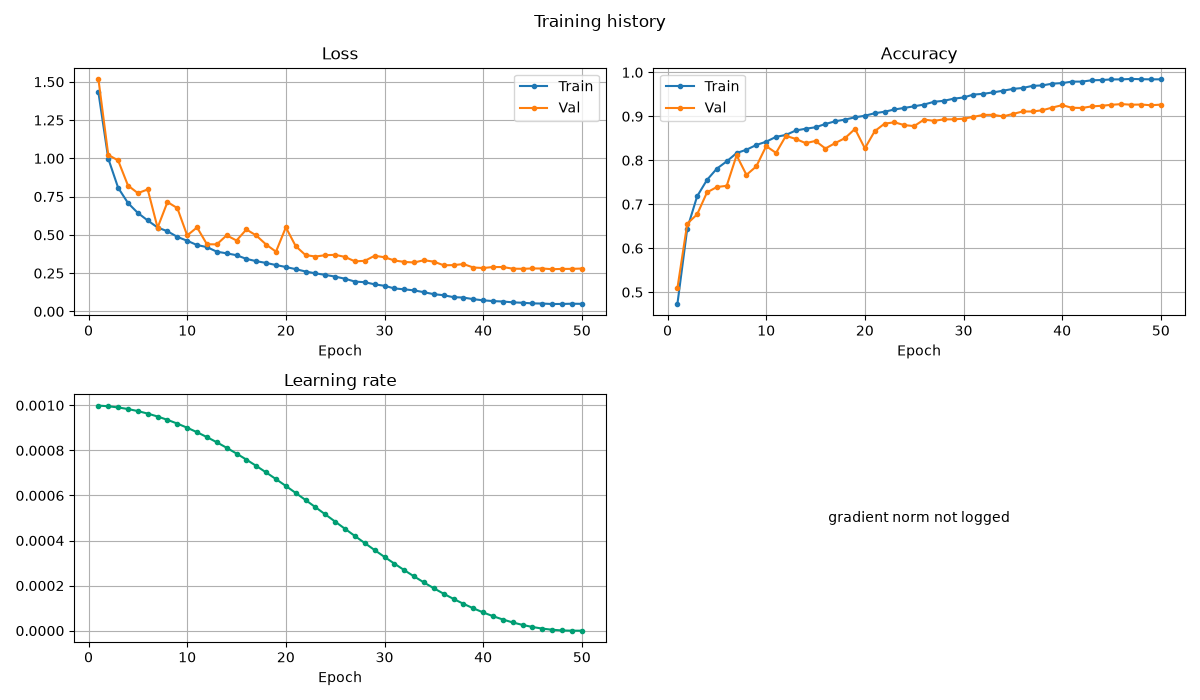
Reference: 92.42% validation / 92.61% test on MPS, seed 42. The reproduced test result is within 0.4 percentage points and clears the ≥90% gate. See the CIFAR-10 case study for the environment and caveats.
What is in the core
| Area | What you get |
|---|---|
| Data | torchvision, ImageFolder, CSV manifest, NumPy, and synthetic adapters; 8-bit and 16-bit image I/O; group-safe splits; leakage and duplicate inspection |
| Models | configurable simple CNN, configurable residual CNN, torchvision backbone wrapper, 32×32 stem adaptation, freezing, differential parameter groups |
| Training | callbacks, early stopping, checkpoint/resume, AMP, gradient clipping and accumulation, MixUp/CutMix, EMA, warmup/cosine/step/plateau schedules |
| Evaluation | top-k, per-class metrics, confusion matrices, NLL, calibration (ECE/MCE/Brier), bootstrap intervals, TTA, latency, error analysis |
| Diagnostics | one-batch overfit, shape tracing, gradient reports, determinism checks |
| Artifacts | resolved config, environment and git metadata, data fingerprints, metrics, checkpoints, predictions, figures, model contract |
| Reports | self-contained HTML and Markdown, inline figures, no CDN or network dependency |
| Devices | automatic CUDA, Apple MPS, or CPU selection |
Install
From PyPI
pip install cnn-classifier-toolkit
cnncls doctor
From a checkout
make sync
source .venv/bin/activate
cnncls doctor
make sync installs the package non-editable so the cnncls entry point works
reliably on macOS, where an editable .pth can be hidden after PyTorch loads.
Run make sync again after changing library code. Without activating the
environment, use uv run --no-sync cnncls ....
Quickstart
Train a tiny deterministic smoke model with no downloads:
cnncls train -c configs/tests/synthetic.yaml --set training.epochs=1
The command creates a run directory under runs/ containing the resolved
configuration, data fingerprints, model contract, checkpoints, test
predictions, figures, report.html, and report.md.
Inspect the pipeline before training:
cnncls inspect-data -c configs/tests/synthetic.yaml
cnncls debug -c configs/tests/synthetic.yaml --overfit-batch --steps 20
cnncls train -c configs/tests/synthetic.yaml --dry-run
Evaluate, predict, and rebuild reports from artifacts:
cnncls evaluate --checkpoint runs/<run>/checkpoints/best.pt --split test
cnncls predict --checkpoint runs/<run>/checkpoints/best.pt --input image.png
cnncls report --run runs/<run>
cnncls compare runs/<run-a> runs/<run-b> --out results/comparison
Demos
| Demo | What it shows | Entry point |
|---|---|---|
| CIFAR-10 scratch | reference residual CNN and the full training path | python demos/cifar10/scripts/run_scratch.py |
| Transfer benchmark | scratch vs linear probe vs fine-tune at 32×32 | python demos/cifar10/scripts/run_transfer.py |
| Ablations | four controlled pairs on a reduced CIFAR split | python demos/ablations/run_ablations.py |
| Optical degradation | manifest data, group-safe splits, confusion analysis | python demos/optics_degradation/scripts/run_optics.py |
| Bring your own data | raw-to-intake contract and custom adapters | python demos/bring_your_own_data/scripts/run_quickstart.py |
The bring-your-own-data quickstart uses a committed 16-bit fixture and finishes in a few seconds.
Command line
| Command | Purpose |
|---|---|
cnncls init DIR |
Scaffold a config, README, and data layout |
cnncls doctor |
Versions, device selection, optional dependencies |
cnncls inspect-data -c CONFIG |
Class balance, duplicates, corruption, leakage, model contract |
cnncls debug -c CONFIG |
One-batch overfit, shape trace, gradients, determinism |
cnncls train -c CONFIG |
Train, evaluate, write figures and the report |
cnncls evaluate --checkpoint PATH |
Evaluate on test or val, write predictions and metrics |
cnncls predict --checkpoint PATH --input PATH |
Image, folder, or manifest inference |
cnncls report --run DIR |
Rebuild HTML and Markdown from artifacts |
cnncls compare RUN... --out DIR |
Fair comparison with test-fingerprint enforcement |
train --dry-run builds the dataset and model, runs one forward/backward pass,
prints the contract and parameter counts, and exits without writing a run.
Documentation
The full site is published at https://pengzhao-ai.github.io/cnn-classifier/:
- Quickstart
- How it works
- Models & architectures
- Configuration
- Techniques
- CIFAR-10 demo
- Bring your own data
- CLI
- API
Project layout
src/cnn_classifier/
├── config/       typed YAML schema, defaults chain, CLI overrides
├── core/         devices, seeding, hashing, shared contracts
├── data/         adapters, image I/O, splits, transforms, inspection
├── models/       CNN builders, torchvision wrapper, transfer utilities
├── training/     trainer, callbacks, checkpoints, optimizer, schedules, AMP
├── evaluation/   metrics, calibration, bootstrap, latency, comparison
├── diagnostics/  overfit, tracing, gradients, determinism
├── viz/          publication-style figures and HTML/Markdown reports
├── runs/         run directories and artifact writers
└── cli.py        `cnncls` command line
Development
make test        # library tests
make coverage    # core coverage gate
make lint        # ruff
make typecheck   # mypy
make docs        # this site
make build       # wheel and sdist
make gate        # all of the above
Contributor notes are in CONTRIBUTING.md.
License
Apache-2.0. See LICENSE.
Citation
If you use this toolkit, cite it using CITATION.cff.
1 maintainer

Metadata
1 maintainer
Release files for cnn-classifier-toolkit 0.1.0
For a detailed explanation of source distributions (sdists) and built distributions (wheels), please see the package formats documentation.
Source distribution (sdist)
| File | Size | Uploaded | Provenance | Actions |
|---|---|---|---|---|
| cnn_classifier_toolkit-0.1.0.tar.gz | 79.9 kB | With provenance | Details for cnn_classifier_toolkit-0.1.0.tar.gz |
Built distribution (wheel)
| File | Interpreter | ABI | Platform | Actions Reset |
|---|---|---|---|---|
| cnn_classifier_toolkit-0.1.0-py3-none-any.whl | Python 3 | none | any | Details for cnn_classifier_toolkit-0.1.0-py3-none-any.whl |
Total release size: 196.5 kB
Release files / cnn_classifier_toolkit-0.1.0.tar.gz
| Download URL | cnn_classifier_toolkit-0.1.0.tar.gz |
|---|---|
| Size | 79.9 kB |
| Tags | Source |
|
SHA-256 checksum How to use checksums |
515af0dedc6b1a0ba5d3f89aaa558b50558b120f1cf047c65f6b4d0bb83fba99
|
|
BLAKE2b-256 checksum How to use checksums |
7fcf770acfef4d12637f4dad2d851df5cf3428b5995d0f0a106a74686a4839d6
|
| Upload date | |
|
Uploaded using Trusted Publishing? What is trusted publishing? |
Yes |
| Uploaded via |
twine/7.0.0 CPython/3.13.16
|
Provenance
Provenance describes where a file came from. On PyPI, provenance is shared via attestations, which provide a verifiable record of the build or publishing details. View details, limitations and caveats.


PyPI Publish Attestation
PyPI verified that this artifact, at this checksum, originated from the publisher listed below.
Signed by GitHub Actions, verified by PyPI on Nov 3, 2026.
Transparency logRelease files / cnn_classifier_toolkit-0.1.0-py3-none-any.whl
| Download URL | cnn_classifier_toolkit-0.1.0-py3-none-any.whl |
|---|---|
| Size | 116.6 kB |
| Tags | Python 3 |
|
SHA-256 checksum How to use checksums |
99ece9f98ae7abdc04924a51ee5d6dfcd4e296f473f02509dc434527e4e2783e
|
|
BLAKE2b-256 checksum How to use checksums |
eebd4e584f8652bd03c332d4817ef54a8c82c2979c80ad042824fdf8a3fda8d5
|
| Upload date | |
|
Uploaded using Trusted Publishing? What is trusted publishing? |
Yes |
| Uploaded via |
twine/7.0.0 CPython/3.13.16
|
Provenance
Provenance describes where a file came from. On PyPI, provenance is shared via attestations, which provide a verifiable record of the build or publishing details. View details, limitations and caveats.
PyPI Publish Attestation
PyPI verified that this artifact, at this checksum, originated from the publisher listed below.
Signed by GitHub Actions, verified by PyPI on Nov 3, 2026.
Transparency logSecurity for cnn-classifier-toolkit 0.1.0
Provenance
Provenance describes where a file came from. On PyPI, provenance is shared via attestations, which provide a verifiable record of the build or publishing details. View details, limitations and caveats.
Full provenance
All 2 files in this release have been uploaded with provenance metadata.
Attestation for cnn_classifier_toolkit-0.1.0.tar.gz
PyPI Publish Attestation
PyPI verified that this artifact, at this checksum, originated from the publisher listed below.
Signed by GitHub Actions, verified by PyPI on Nov 3, 2026.
Transparency logA note on package security
PyPI is a repository for distributing packages, not a service for auditing them. While third-party security researchers and our staff do their best to detect and remove malicious packages, PyPI cannot guarantee the quality, security or suitability of any given package.
To learn more about protecting yourself from malicious actors, visit our package security documentation.













