
An interactive jupyter notebook for downloading satellite imagery

Project description
CoastSeg











News
We are thrilled to announce the official release of CoastSeg version 1.0.0! Please see the release notes. If you are an existing CoastSeg user, to upgrade to this latest version of CoastSeg:
git pull origin main
then:
pip install coastseg==1.0.0
What is CoastSeg?
Coastseg stands for Coastal Segmentation, it is an interactive jupyter notebook for downloading satellite imagery with CoastSat and applying Doodleverse/Zoo image segmentation models to satellite imagery. CoastSeg provides an interactive interface for drawing Regions of Interest (ROIs) on a map, downloading satellite imagery, loading geojson files, extracting shorelines from satellite imagery, and much more. In a nutshell, it is ...
- ... an easy way to download time-series of cloud-masked and post-processed satellite imagery anywhere in the world
- ... a mapping extension for CoastSat using Segmentation Zoo models.
- ... an interactive interface to download satellite imagery using CoastSat from Google Earth Engine
- ... an interactive interface for extracting shorelines from satellite imagery
- ... an interactive interface to apply segmentation models to satellite imagery
In more detail, CoastSeg represents the following advances in satellite-derived shoreline workflows:
- An emulation of the CoastSat methodology for defining a shoreline extraction project, image downloading, shoreline extraction, shoreline filtering, and tide correction, all within a single jupyter notebook that can be accessed online
- A pip-installable package for CoastSat workflows
- Use of concurrency for image downloads from Google Earth Engine
- A faster and more convenient API-based methodology for tidal height estimation, using pyTMD
- An initial implementation of an alternative shoreline mapping workflow using Zoo models from the Doodleverse
- A conda environment that can work on secure networks
- Script-based data wrangling utilities
- Hyperparameter experimentation and tracking using an organizational workflow idea called ‘Sessions’
- Supporting databases for transects, reference shorelines, beach slopes, and other useful metadata variables
- A deep-learning based shoreline extraction workflow (still in development)
Version 1 is now stable, and we have a lot of planned new features for version 2.
- Create ROIs(regions of interest) along the coast and automatically load shorelines on the map.
- Use Google Earth Engine to automatically download satellite imagery for each ROI clicked on the map.

- Coastseg can automatically extract shorelines from downloaded satellite imagery.
Table of Contents
Useful Links
Installation Instructions
We recommend that you use Windows 10, Windows 11, or Ubuntu Linux. Mac users, please see here
In order to use Coastseg you need to install Python packages in an environment. We recommend you use Anaconda or Miniconda to install the python packages in an environment for Coastseg.
After you install miniconda/Anaconda on your PC, open the Anaconda prompt or Terminal in Mac and Linux and use the cd command (change directory) to go the folder where you have downloaded the Coastseg repository.
Install from conda-forge
- Create an miniconda/Anaconda environment and Activate it
- This command creates an anaconda environment named
coastsegand installspython 3.10in it.conda create --name coastseg python=3.10 -y conda activate coastseg
-
Install coastseg
conda install -c conda-forge coastseg==1.1.41
-
(Optional) Install Optional Dependencies
- Only install these dependencies if you plan to use CoastSeg's zoo workflow notebook.
pip install tensorflow
pip install transformers
Install from Pypi
- Create an miniconda/Anaconda environment
- This command creates an anaconda environment named
coastsegand installspython 3.10in it.conda create --name coastseg python=3.10 -y
-
Activate your conda environment
conda activate coastseg
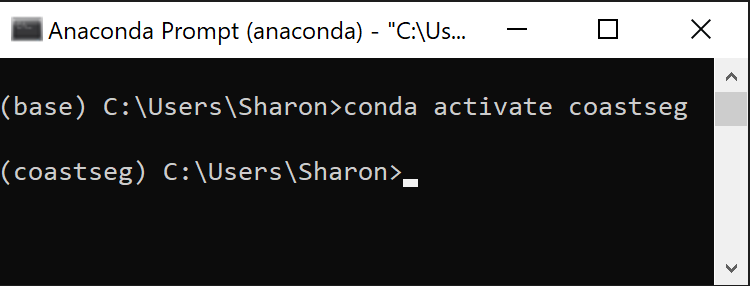
- If you have successfully activated coastseg you should see that your terminal's command line prompt should now start with
(coastseg).
- Install Conda Dependencies
- CoastSeg requires
jupyterlabandgeopandasto function properly so they will be installed in thecoastsegenvironment. - Geopandas has GDAL as a dependency so its best to install it with conda.
- Make sure to install geopandas from the
conda-forgechannel to ensure you get the latest version. - Make sure to install both jupyterlab and geopandas from the conda forge channel to avoid dependency conflicts
conda install -c conda-forge geopandas jupyterlab -y
- CoastSeg requires
- Install the CoastSeg from PyPi
pip install coastseg
- Uninstall the h5py installed by pip and reinstall with conda-forge
pip install jsonschema==4.19.0is a temporary command you have to run until issue https://github.com/stac-utils/pystac/issues/1214 is resolved
pip install jsonschema==4.19.0 --user
pip uninstall h5py -y
conda install -c conda-forge h5py -y
CoastSeg Update Guide
This guide is designed to help you easily update CoastSeg, whether you're updating to a specific version, the latest version, applying a patch, or updating code and notebooks from GitHub.
Step 1: Install CoastSeg from PyPi
Option 1: Update to the latest version
- Install CoastSeg from PyPi
- To ensure you have the latest features and fixes, use this command:
pip install coastseg --upgrade
- Don't worry if you see the warning message below. This is normal
"ERROR: pip's dependency resolver does not currently take into account all the packages that are installed. This behaviour is the source of the following dependency conflicts."
- Install jsonschema
- This is necessary to run coastseg in a jupyter notebook.
pip install jsonschema==4.19.0 --user
Option 2: Update to a Specific Version
- Install CoastSeg from PyPi
- If you need a specific version of CoastSeg, use this command:
- Replace with the desired version number (e.g., 1.1.26).
pip install coastseg==<version>
- Don't worry if you see the warning message below. This is normal
"ERROR: pip's dependency resolver does not currently take into account all the packages that are installed. This behaviour is the source of the following dependency conflicts."
- Install jsonschema
- This is necessary to run coastseg in a jupyter notebook.
pip install jsonschema==4.19.0 --user
Step 2: Update Code and Notebooks from GitHub
(Optional) Follow these steps if you want the latest notebooks or code updates from the CoastSeg GitHub repository.
Click to expand instructions
Step 1: Open CoastSeg in Anaconda
- Open Anaconda Prompt
- Activate the coastseg environment
conda activate coastseg
- Go to your coastseg location
cd <coastseg location>
Step 2: Check for a Remote Connection to CoastSeg Repository
-Run the command below. In the output of this command you should see origin https://github.com/Doodleverse/CoastSeg.git (fetch)
git remote -v
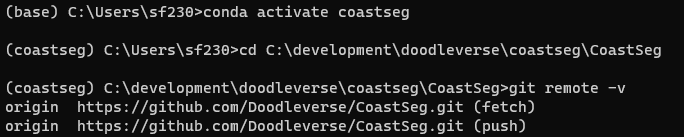
- If you don't see this output, then run the following command
 git remote add origin  https://github.com/Doodleverse/CoastSeg.git
 git pull origin main
Step 3: Pull the Latest Changes
-
Run the command below
git pull origin main -
If you recieve an error message like the one shown below then proceed to 3, otherwise go to Go to Step 4: Verify Update Success
Please commit your changes or stash them before you merge Aborting -
Run the command below:
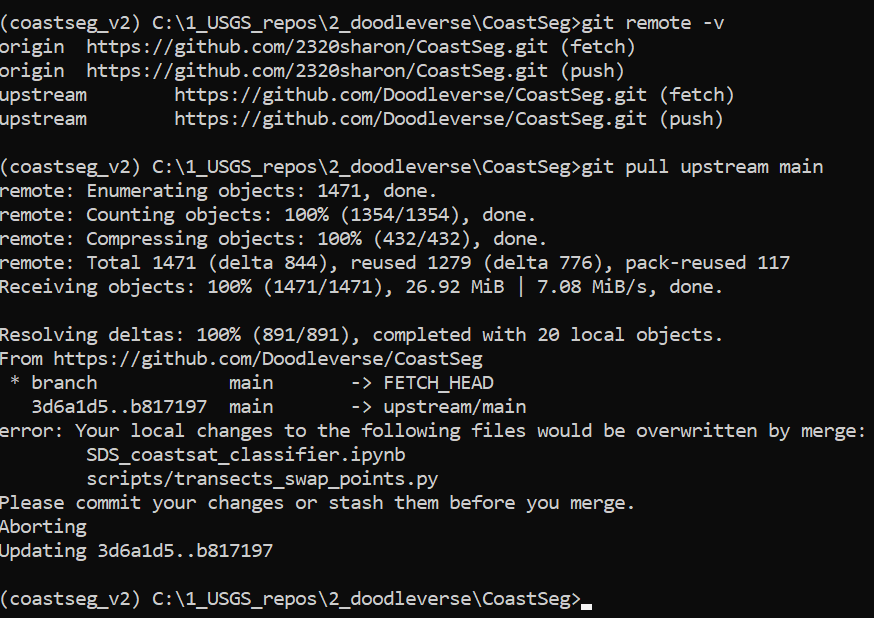
- WARNING This will clear out anything you have written to the
certifications.jsonmake sure to save that file to a new location then move it back when you're done upgrading
       git fetch origin
       git reset --hard origin/main
       git pull origin main
Step 4: Verify Update Success
git status
- This command should return the following message
-
On branch main
Your branch is up to date with 'origin/main'.
Having Installation Errors?
Use the command conda clean --all to clean old packages from your anaconda base environment. Ensure you are not in your coastseg environment or any other environment by running conda deactivate, to deactivate any environment you're in before running conda clean --all. It is recommended that you have Anaconda prompt (terminal for Mac and Linux) open as an administrator before you attempt to install coastseg again.
Conda Clean Steps
conda deactivate
conda clean --all
Getting Started
- Sign up to use Google Earth Engine Python API
First, you need to request access to Google Earth Engine at https://signup.earthengine.google.com/. It takes about 1 day for Google to approve requests.
-
Activate your conda environment
conda activate coastseg
- If you have successfully activated coastseg you should see that your terminal's command line prompt should now start with
(coastseg).
- Download CoastSeg from GitHub
Once you’ve created the coastseg environment you’ll need to run git clone the coastseg code onto your computer. Follow the guide How to Clone CoastSeg in the wiki for how to perform a git clone to download the coastseg code onto your computer.
- Launch Jupyter Lab
- Run this command in the coastseg directory to launch the notebook
SDS_coastsat_classifierjupyter lab SDS_coastsat_classifier.ipynb
- Use the
SDS_coastsat_classifierto Download Imagery
Check out the wiki guide How to Download Imagery for comprehensive guides for how to use coastseg to download imagery and apply image segmentation models to the imagery you download.
- Use the
add_new_transects_notebookto Download Imagery
Authors
Package maintainers:
- @dbuscombe-usgs Contracted to USGS Pacific Coastal and Marine Science Center.
- @2320sharon : Lead Software Developer / Contracted to USGS Pacific Coastal and Marine Science Center.
Contributions:
- @ebgoldstein
- @venuswku
- @robbibt
- @edlazarus
- Beta testers: Catherine Janda, Ann Gibbs, Jon Warrick, Andrea O’Neill, Kathryn Weber, Julia Heslin (USGS)
- We would like to express our gratitude to all the contributors who made this release possible. Thank you to everyone who tested the beta versions of coastseg and provided us with the feedback we needed to improve coastseg. Thanks also to the developers and maintainers of pyTMD, DEA-tools, xarray, and GDAL, without which this project would be impossible
Citations
Thank you to all the amazing research who contributed their transects to coastseg.
- Hawaii small islands https://pubs.usgs.gov/of/2011/1009/data.html
- Barter Island, Alaska https://www.sciencebase.gov/catalog/item/5fa1f10ad34e198cb793cee4
- Pacific Northwest, Gulf, and SE USA: Dr Sean Vitousek, USGS-PCMSC, based on DSAS transects
- Atlantic barrier islands: https://www.sciencebase.gov/catalog/item/5d5ece47e4b01d82ce961e36
- Mexico, New Zealand, Japan, Chile, Peru all from: https://zenodo.org/record/7758183#.ZCXZMcrMJPY
- Snyder, A.G., and Gibbs, A.E., 2019, National assessment of shoreline change: A GIS compilation of updated vector shorelines and associated shoreline change data for the north coast of Alaska, Icy Cape to Cape Prince of Wales: U.S. Geological Survey data release, https://doi.org/10.5066/P9H1S1PV.
- Gibbs, A.E., Ohman, K.A., Coppersmith, R., and Richmond, B.M., 2017, National Assessment of Shoreline Change: A GIS compilation of updated vector shorelines and associated shoreline change data for the north coast of Alaska, U.S. Canadian border to Icy Cape: U.S. Geological Survey data release, https://doi.org/10.5066/F72Z13N1.
- Himmelstoss, E.A., Kratzmann, M., Hapke, C., Thieler, E.R., and List, J., 2010, The National Assessment of Shoreline Change: A GIS Compilation of Vector Shorelines and Associated Shoreline Change Data for the New England and Mid-Atlantic Coasts: U.S. Geological Survey Open-File Report 2010-1119, available at https://pubs.usgs.gov/of/2010/1119/.
- Kilian Vos. (2023). Time-series of shoreline change along the Pacific Rim (v1.4) [Data set]. Zenodo. https://doi.org/10.5281/zenodo.7758183
- Vos, Kilian, Wen, Deng, Harley, Mitchell D., Turner, Ian L., & Splinter, Kristen D. (2022). Beach-face slope dataset for Australia (Version 2) [Data set]. Zenodo. https://doi.org/10.5281/zenodo.7272538
- Gibbs, A.E., Jones, B.M., and Richmond, B.M., 2020, A GIS compilation of vector shorelines and coastal bluff edge positions, and associated rate-of-change data for Barter Island, Alaska: U.S. Geological Survey data release, https://doi.org/10.5066/P9CRBC5I.
Release history Release notifications | RSS feed


Download files
Download the file for your platform. If you're not sure which to choose, learn more about installing packages.
Source Distribution
Built Distribution
Filter files by name, interpreter, ABI, and platform.
If you're not sure about the file name format, learn more about wheel file names.
Copy a direct link to the current filters
File details
Details for the file coastseg-1.1.42.dev3.tar.gz.
File metadata
- Download URL: coastseg-1.1.42.dev3.tar.gz
- Upload date:
- Size: 24.4 MB
- Tags: Source
- Uploaded using Trusted Publishing? No
- Uploaded via: twine/4.0.2 CPython/3.11.8
File hashes
| Algorithm | Hash digest | |
|---|---|---|
| SHA256 |
bf09c1b1dcc9bcd22041cdcc91a76369a38c16d2d68fa6e077c1f115f375a7f4
|
|
| MD5 |
f298aa43c56aeb4309560cab8ac74bff
|
|
| BLAKE2b-256 |
49a55c9ffbe0fa1887b73b328db636757c1532e2813a8337db0e7f651aa83d96
|
File details
Details for the file coastseg-1.1.42.dev3-py3-none-any.whl.
File metadata
- Download URL: coastseg-1.1.42.dev3-py3-none-any.whl
- Upload date:
- Size: 24.8 MB
- Tags: Python 3
- Uploaded using Trusted Publishing? No
- Uploaded via: twine/4.0.2 CPython/3.11.8
File hashes
| Algorithm | Hash digest | |
|---|---|---|
| SHA256 |
844da1e99d6385d83292c12700b9881b2380fe2270f7d619e49b0ce35f34ab3b
|
|
| MD5 |
18c97fc349e30f4452ca14e24ed20c2b
|
|
| BLAKE2b-256 |
d1c6520345cd8c0687c21cd09fd9758c79dbf28903060a2410a84540d61219ad
|






