
Closed-loop simulator of complex behavior and learning based on reinforcement learning and deep neural networks.

Project description
CoBeL-RL: Closed-loop simulator of Complex Behavior and Learning based on Reinforcement Learning and deep neural networks
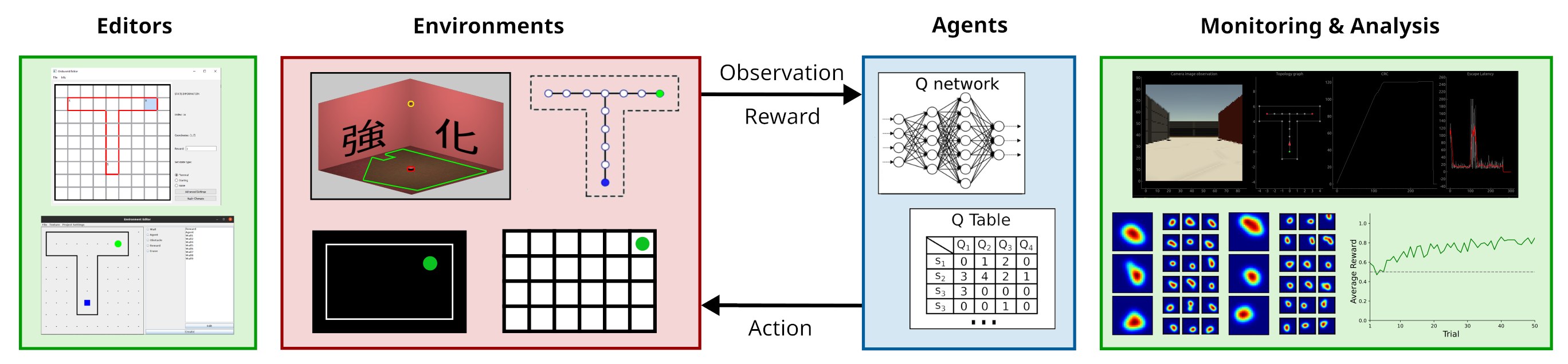
CoBeL-RL is a closed-loop simulator of complex behavior and learning based on RL and deep neural networks. It provides a neuroscience-oriented framework for efficiently setting up and running simulations. CoBeL-RL offers a set of virtual environments, e.g., T-maze and Morris water maze, which can be simulated at different levels of abstraction, e.g., a simple gridworld or a 3D environment with complex visual stimuli, and set up using intuitive GUI tools. A range of RL algorithms, e.g., Dyna-Q and deep Q-network algorithms, is provided and can be easily extended. CoBeL-RL provides tools for monitoring and analyzing behavior and unit activity, and allows for fine-grained control of the simulation via interfaces to relevant points in its closed-loop. In summary, CoBeL-RL fills an important gap in the software toolbox of computational neuroscience. (From Diekmann et al. (2023), https://doi.org/10.3389/fninf.2023.1134405)
Installation Guide
You can install CoBeL-RL from PyPI directly via pip:
pip install cobel
If you wish to build CoBeL-RL from source download or clone the project using git. You can do this by typing the following into your command line :
git clone https://github.com/sencheng/CoBeL-RL.git
See GitHub's documentation for more details and options for cloning repositories.
Install the build package and then create a .wheel file.
pip install build
python -m build .
This will create a dist folder containing an installable Python .wheel file.
These steps are sufficient to install CoBeL-RL. Get started by running one of the demos below. For new users, we recommend the Dyna-Q demo.
Optional Dependencies
Per default CoBeL-RL does not install any Deep Learning framework. Instead you can install them as optional dependencies:
- PyTorch can be installed via the
[torch]option. PyTorch provides builds for specific platforms and hardware via its own indices. Follow the instructions on the official website to instead install the build which best fits your system. - Tensorflow can be installed via the
[tensorflow-cpu]or[tensorflow-cuda]option. - Flax can installed via the
[flax-cpu],[flax-cuda]or[flax-tpu]option.
Dyna-Q Demo
To run the Dyna-Q demo:
python demo/gridworld/demo_dyna_q.py
This should run the demo and visualize a 5 x 5 gridworld without obstacles.
DQN Demo
Install PyTorch using the [torch] optional dependency. Alternatively, install PyTorch by following the instructions on the official website.
To run the DQN demo:
python demo/topology/demo_dqn.py
This should run the demo and visualize a 10 x 2 linear track topology environment. The pose, i.e., position and rotation, of each node serve as input to the DQN.
3D Simulators
CoBeL-RL allows for topological and continuous environments to be combined with simulators which render complex visual observations. Choose one of the 3D simulators below and follow the listed instructions. Either will run the DQN demo and combine it with the simulator in question.
Unity
Follow the installation instructions on the Unity Simulator repository.
You will need to set up an environment variable for the Unity path to run the demos.
export UNITY_EXECUTABLE="/path/to/unity/"
Alternatively, you can provide the path to the executable directly in the demo script as a parameter to the simulator during initialization
UnitySimulator('room', '/path/to/unity/', resize=(30, 1))
or as a command line argument.
python demo/unity/demo_dqn.py --executable /path/to/unity/
Godot
Follow the installation instructions on the Godot Simulator repository.
You will need to set up an environment variable for the Godot path to run the demos.
export GODOT_EXECUTABLE="/path/to/godot/"
Alternatively, you can provide the path to the executable directly in the demo script as a parameter to the simulator during initialization
GodotSimulator('room.tscn', '/path/to/godot/', resize=(30, 1))
or as a command line argument.
python demo/godot/demo_dqn.py --executable /path/to/godot/
Supported Deep Learning Frameworks
CoBeL-RL uses interface classes so that its Deep RL agents can be combined with different Deep Learning frameworks. Currently, three frameworks are supported: PyTorch, Tensorflow and Flax. Below you can find example code snippets which show how the same network can be set up with each of these in CoBeL-RL.
PyTorch
from torch import Tensor
from torch.nn import Linear
from torch.nn.functional import relu
from cobel.network import TorchNetwork

class Model(nn.Module):

    def __init__(self) -> None:
        super().__init__()
        self.hidden_1 = Linear(in_features=6, out_features=64)
        self.hidden_2 = Linear(in_features=64, out_features=64)
        self.output = Linear(in_features=64, out_features=4)
        self.double()

    def forward(self, layer_input: Tensor) -> Tensor:
        x = self.hidden_1(layer_input)
        x = relu(x)
        x = self.hidden_2(x)
        x = relu(x)
        x = self.output(x)

        return x

network = Model()
model = TorchNetwork(network)
Tensorflow
from tensorflow.keras.models import Sequential
from tensorflow.keras.layers import Input, Dense
from cobel.network import KerasNetwork

network = Sequential([
    Input((6, )),
    Dense(64, activation='relu', name='hidden_1'),
    Dense(64, activation='relu', name='hidden_2'),
    Dense(4, name='output'),
])
network.compile(optimizer='adam', loss='mse')
model = KerasNetwork(network)
Flax (experimental)
from flax.nnx import Module, Linear, Rngs, relu
from cobel.network import FlaxNetwork

class Model(Module):

    def __init__(self) -> None:
        rngs = Rngs(0)
        self.hidden_1 = Linear(6, 64, rngs=rngs)
        self.hidden_2 = Linear(64, 64, rngs=rngs)
        self.output = Linear(64, 4, rngs=rngs)

    def __call__(self, layer_input):
        x = self.hidden_1(layer_input)
        x = relu(x)
        x = self.hidden_2(x)
        x = relu(x)
        x = self.output(x)

        return x

network = Model()
model = FlaxNetwork(network)
List of publications
- Kappel, D., & Cheng, S. (2025). Global remapping emerges as the mechanism for renewal of context-dependent behavior in a reinforcement learning model. In Frontiers in Computational Neuroscience (Vol. 18). Frontiers Media SA. [DOI]
- Zeng X, Diekmann N, Wiskott L and Cheng S (2023) Modeling the function of episodic memory in spatial learning. Front. Psychol. 14:1160648. [DOI]
- Diekmann, N., Vijayabaskaran, S., Zeng, X., Kappel, D., Menezes, M. C., & Cheng, S. (2023). CoBeL-RL: A neuroscience-oriented simulation framework for complex behavior and learning. In Frontiers in Neuroinformatics (Vol. 17). Frontiers Media SA. [DOI]
- Diekmann, N., & Cheng, S. (2023). A model of hippocampal replay driven by experience and environmental structure facilitates spatial learning. In eLife (Vol. 12). eLife Sciences Publications, Ltd. [DOI]
- Vijayabaskaran, S., & Cheng, S. (2022). Navigation task and action space drive the emergence of egocentric and allocentric spatial representations. In D. Bush (Ed.), PLOS Computational Biology (Vol. 18, Issue 10, p. e1010320). Public Library of Science (PLoS). [DOI]
- Walther, T., Diekmann, N., Vijayabaskaran, S. et al. Context-dependent extinction learning emerging from raw sensory inputs: a reinforcement learning approach. Sci Rep 11, 2713 (2021). [DOI]
Citing CoBeL-RL
Please cite our methods paper:
@article{DiekmannEtAl2023,
    author = {Diekmann, Nicolas and Vijayabaskaran, Sandhiya and Zeng, Xiangshuai and Kappel, David and Menezes, Matheus Chaves and Cheng, Sen},
    title = {CoBeL-RL: A neuroscience-oriented simulation framework for complex behavior and learning},
    journal = {Frontiers in Neuroinformatics},
    volume = {17},
    month = {March},
    year = {2023},
    doi = {10.3389/fninf.2023.1134405},
}
Notes
CoBeL-RL is developed by the Computational Neuroscience group of the Institute for Neural Computation at the Ruhr University Bochum. Check out our homepage for more information on us and our research.
For a similar framework built around spiking neural networks check out our sister framework CoBeL-spike.
Code Contributors
Thomas Walther, Nicolas Diekmann, Sandhiya Vijayabaskaran, Filippos Panagiotou, Xiangshuai Zeng, Matheus Chaves Menezes, David Kappel, Jon Recalde, Alexander Jungeilges, Shipra Prasad, Maria Camila Sanchez Lopez, William Forchap, Kilian Kandt, Marius Tenhumberg, Athithan Konoswaran, Henriette Knopp, Tim Nyul, Denis Meral, Brandon Finnenthal, Zenon Zacouris, Florian Becker, Pascal Kosak, Jasper Angl, Chuan Jin, Umut Yilmaz, Maximilian Frese, Frederik Hüttemann, Christopher Thomas, Gerrit Simon Fischer, Duc Cuong Tommy Tran, Maximilian Wojak, Oleksandr Chaban, Sebastian Benedict Schäfer, David Jarne Nörtemann, Philip Woltersdorf, Aya Altamimi, Nick Kellermann, Gianluca De Stefano, Patrick Del Fedele, Yorick Sen, Jan Tekautschitz
Release history Release notifications | RSS feed


Download files
Download the file for your platform. If you're not sure which to choose, learn more about installing packages.
Source Distribution
Built Distribution
Filter files by name, interpreter, ABI, and platform.
If you're not sure about the file name format, learn more about wheel file names.
Copy a direct link to the current filters
File details
Details for the file cobel-3.0.0.tar.gz.
File metadata
- Download URL: cobel-3.0.0.tar.gz
- Upload date:
- Size: 115.7 kB
- Tags: Source
- Uploaded using Trusted Publishing? No
- Uploaded via: uv/0.9.4
File hashes
| Algorithm | Hash digest | |
|---|---|---|
| SHA256 |
3c10f12f72952fd55410dfaf6c5bef218be043a67a3d950f7a7b406fd8b7fe86
|
|
| MD5 |
7bea6907698119f18ece57e561bd31b2
|
|
| BLAKE2b-256 |
0df97837e7bd4f3aabd234730d090afdb27102820005b48066602767c8125902
|
File details
Details for the file cobel-3.0.0-py3-none-any.whl.
File metadata
- Download URL: cobel-3.0.0-py3-none-any.whl
- Upload date:
- Size: 158.5 kB
- Tags: Python 3
- Uploaded using Trusted Publishing? No
- Uploaded via: uv/0.9.4
File hashes
| Algorithm | Hash digest | |
|---|---|---|
| SHA256 |
43e8d18ef3b9fd18d930c99250dca63785b6fe79f4bc0abb5de794729d67dbab
|
|
| MD5 |
0af4a2ac4d728a7fcdc8bce3095eb564
|
|
| BLAKE2b-256 |
523f8ddbf27eea5076ffeba208ae4849b913b156c3b98b38fa06f2545090764e
|






