
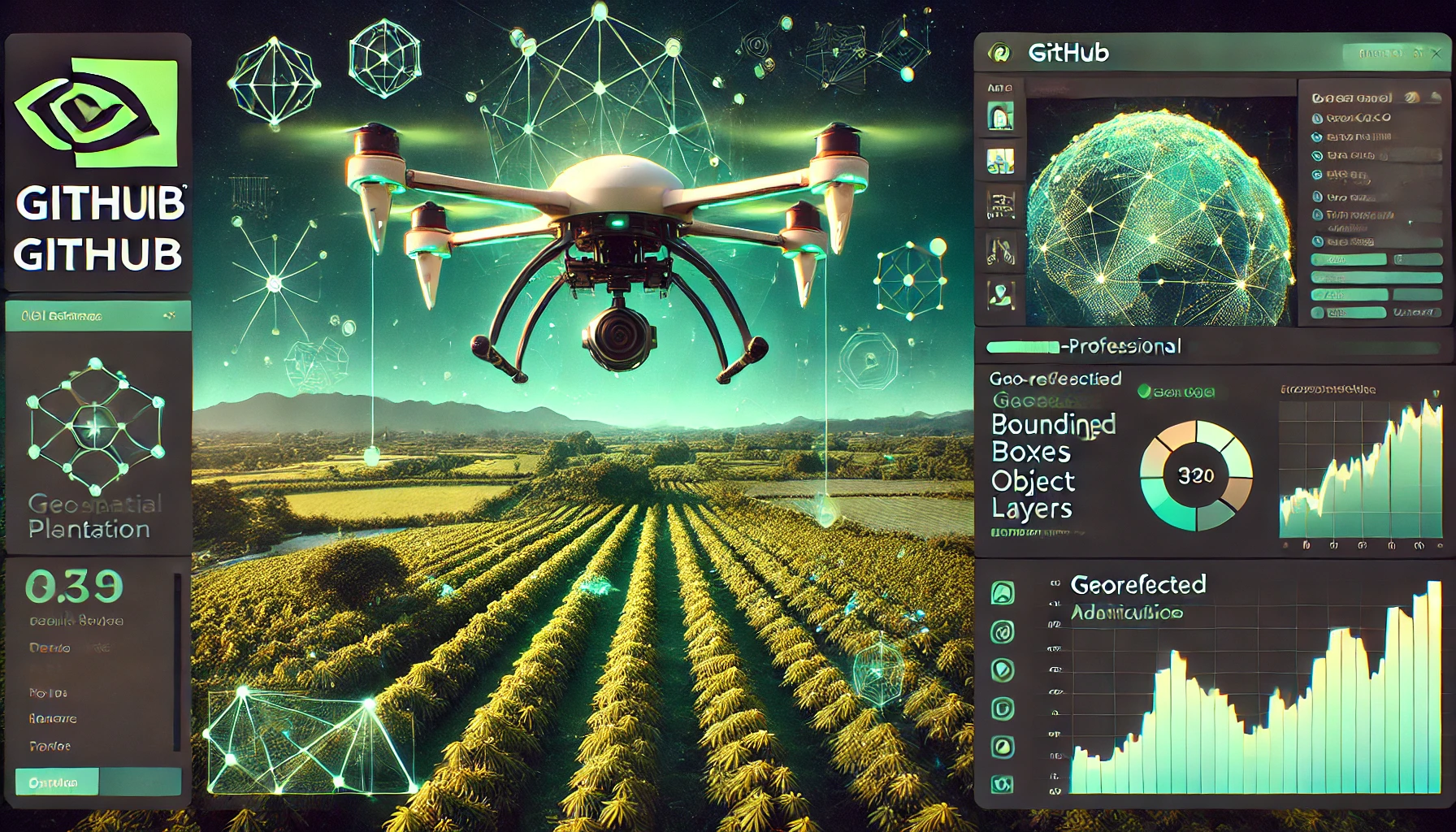
🌱 Cocoa Plant Detection + GIS Pipeline with YOLOv8 + Streamlit








An end-to-end YOLOv8 pipeline to detect cocoa-plants + missed-planting-holes from aerial imagery. Output is QGIS-ready, and available via both a Python CLI and a Streamlit demo.
🚀 Quick Install
pip install cocoa-plant-detector
Table of Contents
- Overview
- Project Structure
- Full Detection Pipeline
- QGIS Integration
- Streamlit Web Demo
- Command-Line Interface (CLI)
- Geo-Referencing Details
- Dataset Notes
- Model Performance
- Reproducibility
- Example Visuals
- License
- Maintainer
Demo Notebook
📌 Note: GitHub may truncate full notebook preview due to image-heavy output — download or open locally for complete view.
Overview
This repository delivers a production-ready AI pipeline for detecting cocoa plants and planting holes from high-resolution aerial imagery using YOLOv8 and QGIS.
It includes:
- 🧩 Tiling of large orthomosaic images
- 🧠 Batch object detection on tiles
- 🧭 Spatial deduplication and coordinate conversion
- 🗂️ GeoJSON/GPKG export for GIS tools
📦 Features
🤖 YOLOv8 deep learning for cocoa plant & hole detection
🌍 GeoJSON/GPKG export with spatial deduplication
🖥️ Easy CLI access: cocoa-cli
🌐 Streamlit App: Upload + detect live
🛰️ Built for drone/orthomosaic imagery
✅ Packaged & published on PyPI
🧪 Installation
Clone the repo and install dependencies:
git clone https://github.com/NiiOsa1/cocoa-plant-detector.git
cd cocoa-plant-detector
pip install -r requirements.txt
🧠 Model Auto-Download
The trained YOLOv8s model will be downloaded automatically when you run the CLI or Streamlit app — no manual setup needed.
🔗 Backup link (optional): Download from Google Drive
Project Structure
cocoa-plant-detector/
├── cocoa_cli_pipeline/         # 🔧 CLI entrypoints (tile, infer, geoconvert)
│   ├── cli.py                  # ├── CLI command dispatcher
│   ├── infer.py                # ├── CLI: batch inference
│   ├── geoconvert.py           # ├── CLI: label → GeoJSON conversion
│   └── tiler.py                # └── CLI: tile large .tif orthomosaics
├── cocoa_pipeline_core/        # 🧠 Core reusable logic (non-CLI)
│   ├── tile_creator.py         # ├── Manual tile generator (1024px w/ overlap)
│   ├── batch_infer_yolov8.py   # ├── Scripted batch inference (auto-downloads model)
│   ├── deduplicate_and_filter.py  # ├── Deduplicate + convert YOLO txt to GeoJSON
│   └── utils.py                # └── Utility functions (e.g., download model)
├── streamlit_app/              # 🌐 Web UI (live tile prediction)
│   └── app.py
├── notebooks/                  # 📓 Training + inference walkthrough
│   └── CocoaPlant_YOLOv8_Training_QGIS_Deployment.ipynb
├── examples/                   # 📸 Visual results: metrics, outputs, overlays
│   ├── val_batch0_pred.jpg     # ├── Predicted validation samples
│   ├── StreamlitApp.png        # └── UI + overlay visualizations
├── test_data/                  # 🧪 Sample tiles + labels for quick testing
│   └── tile_31200_22400.tif
├── runs/                       # 📂 Outputs from inference (auto-created, .gitignored)
├── requirements.txt            # 📦 Dependencies for pip install
├── setup.py                    # 📦 Enables pip install . and CLI registration
├── .gitignore                  # 🧼 Cleans output, model weights, build artifacts
└── README.md                   # 📖 You're looking at it
Full Detection Pipeline
-
🧱 Tile Large Aerial Image
python cocoa_pipeline_core/tile_creator.pyInput: Image_4.tif
Output: tiles1/ (1024×1024 px tiles with 22% overlap)
-
🧠 YOLOv8 Batch Inference
You can now run the inference script with your own tile folder like this:
python cocoa_pipeline_core/batch_infer_yolov8.py \
 --tiles test_data/ \
 --output runs/test_output
🔁 The script will automatically:
-
Download
best.ptfrom Google Drive if missing -
Predict on all
.tiftiles in the folder -
Save detection labels and visual outputs
Inference across all tiles
Confidence: conf=0.22, IoU: 0.73
Outputs YOLO .txt format
-
🌍 Convert to GeoJSON/GPKG
python cocoa_pipeline_core/deduplicate_and_filter.pypython deduplicate_and_filter_final.py
Converts to map-based UTM coordinates
Deduplicates detections from overlapping tiles
Saves:
qgis_ready6_detections.geojson
QGIS Integration
This repo includes a ready-to-open QGIS project:
📄 Project_Cocoa.qgz
Includes:
Image_4.tif as the basemap
Pre-styled detection layer (holes + cocoa plants)
Correct CRS, colors, symbology
🚀 To use: Open QGIS (v3.28+ recommended)
Load Project_Cocoa.qgz
All layers and styles will auto-load 🎯
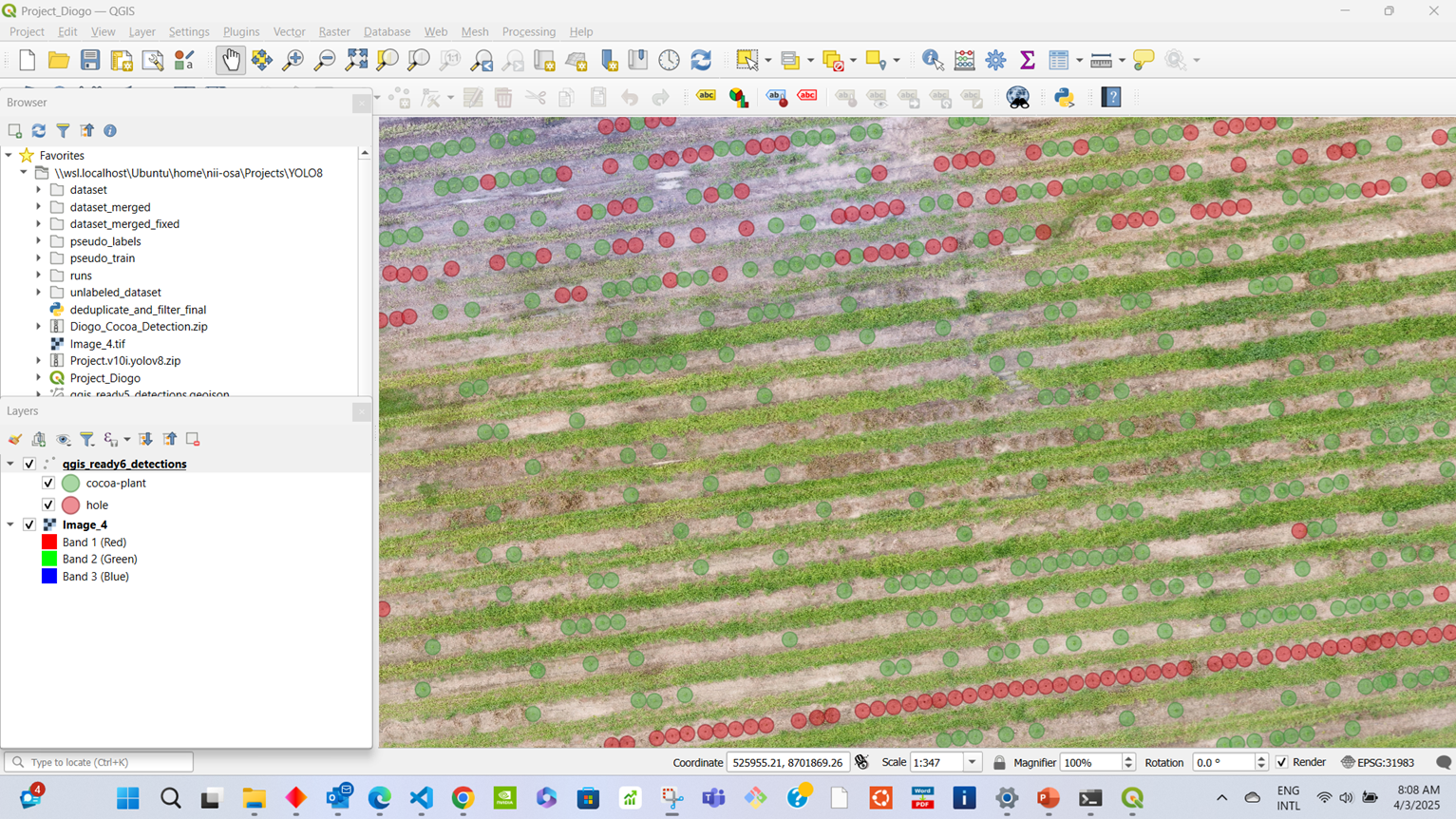
🗺️ GIS Integration Output
Final Detection Overlay in QGIS Bounding boxes converted to UTM, deduplicated, and displayed on the original orthomosaic.
🚀 Streamlit Web Demo
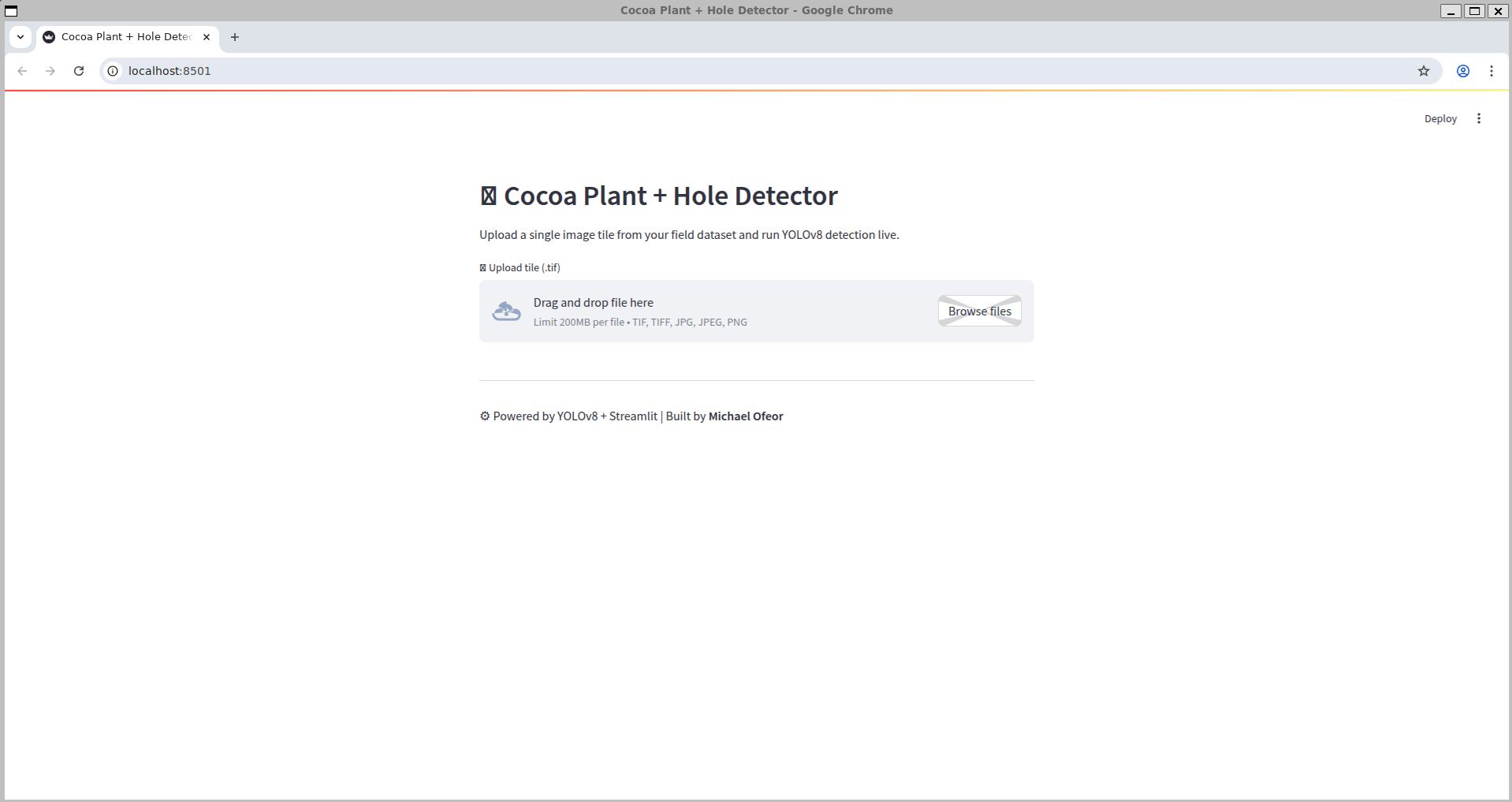
A live demo is available to test cocoa plant and planting hole detection directly in your browser:
You can upload .tif, .jpg, or .png tiles and get YOLOv8-predicted outputs in real time — powered by the same model used in the pipeline.
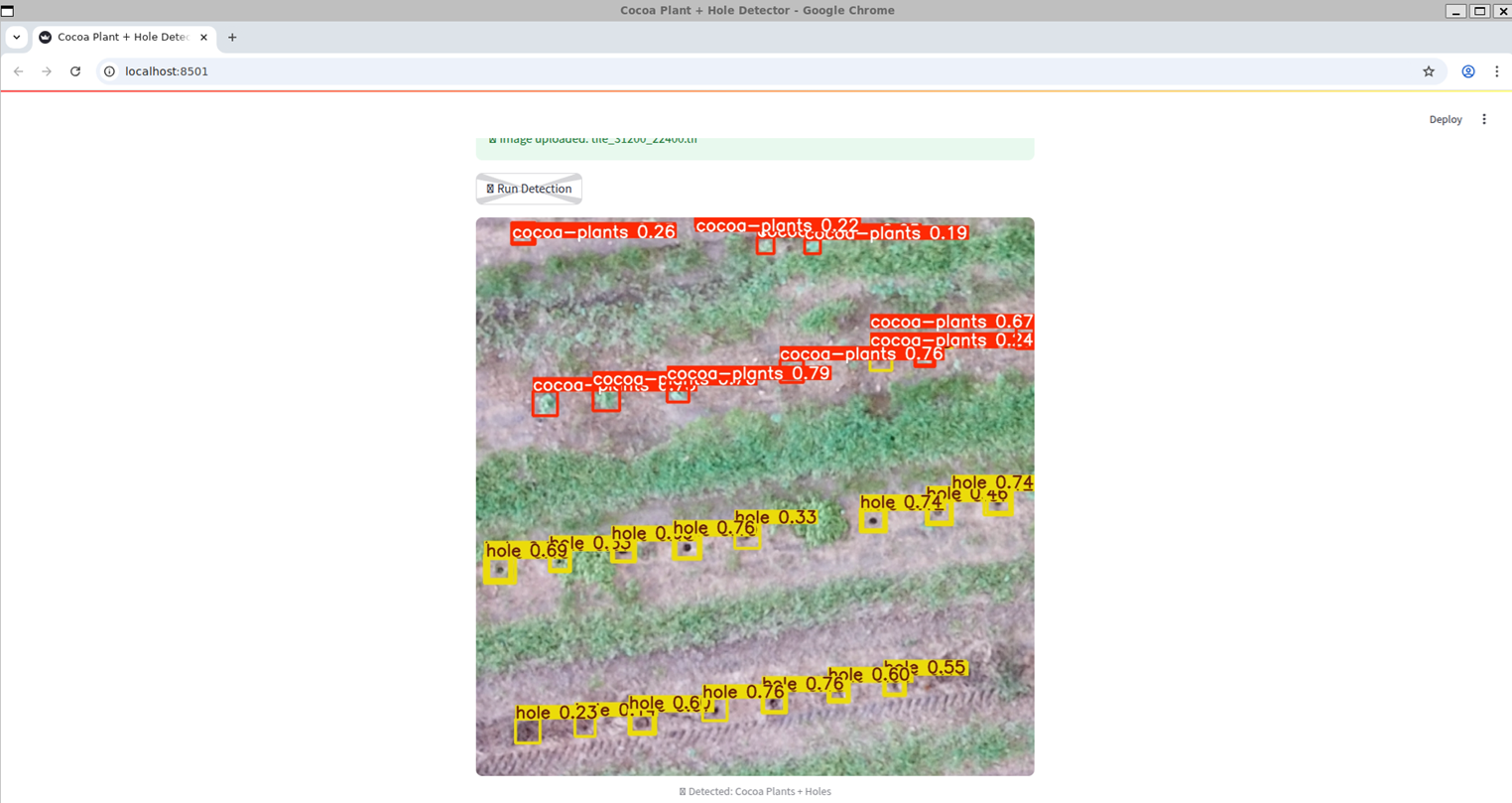
🚀 Streamlit Demo
Live Tile Prediction (via Streamlit) This tile was uploaded through the Streamlit UI and predicted live using the trained model.
Predicted Detection Output
Command-Line Interface (CLI)
The full pipeline is also usable via a single terminal command. After installing the package with:
pip install .
You get access to:
cocoa-cli --help
Available Subcommands:
Command	      Description
tile	      Tile large aerial image
infer	      Run YOLOv8 batch inference
geoconvert    Convert YOLO labels to deduplicated GeoJSON
Example Usage:
 1. Tile large .tif image
cocoa-cli tile --input path/to/Image_4.tif --output tiles/

 2. Run batch inference
cocoa-cli infer --tiles tiles/ --output predictions/

 3. Convert YOLO txt → GeoJSON (deduplicated, GIS-ready)
cocoa-cli geoconvert --input predictions/ --output output.geojson
✅ CLI Prediction in Action Here's a sample CLI batch inference run, showing per-tile predictions, detection speeds, and saved outputs.
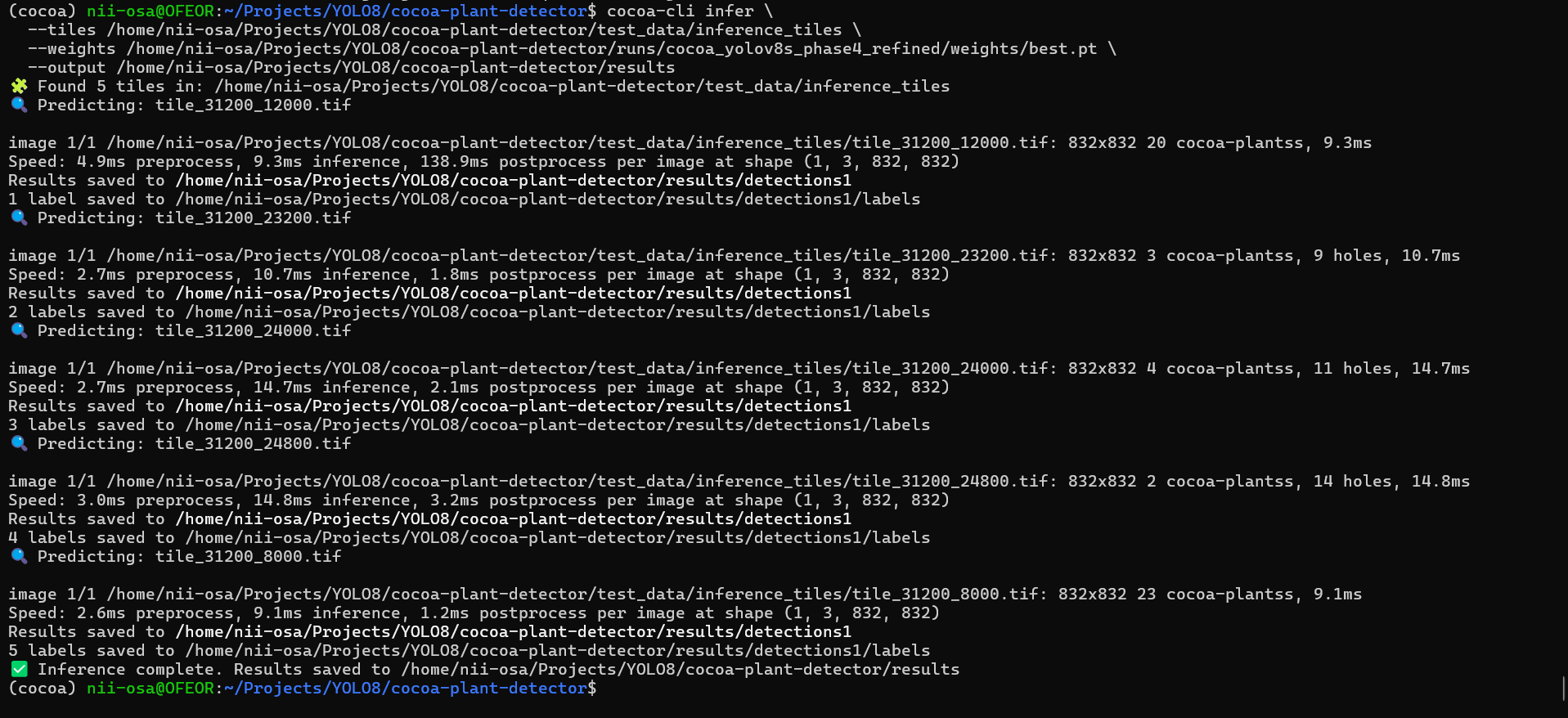
💡 The trained model is automatically downloaded if missing. You do not need to manually specify --weights unless using a custom model.
Geo-Referencing Details
These values were extracted from the original orthomosaic (Image_4.tif) and used to convert pixel detections into map-based coordinates (UTM):
Origin X      = 525765.6597     ← Upper-left X in UTM meters
Origin Y      = 8702143.3199    ← Upper-left Y in UTM meters
Pixel Width   = 0.01298099167   ← ~1.3 cm per pixel
Pixel Height  = -0.01298099167  ← Negative = North-up
📌 Important: These values are dataset-specific. Always extract your raster metadata when working with a different image.
Dataset Notes
Total training images: 1500

1089 expertly labeled

411 cleaned pseudo-labeled

Classes:

0 = cocoa-plant

1 = hole
Model Performance
| Set        | mAP@0.5 | Precision | Recall | F1 Score |
|------------|---------|-----------|--------|----------|
| Train      | 0.907   | 0.861     | 0.876  | 0.868    |
| Validation | 0.844   | 0.846     | 0.797  | 0.821    |
| Test       | 0.779   | 0.835     | 0.738  | 0.784    |
✅ Model: YOLOv8s (22.6MB)
⚡ Fast inference: ~16ms per image
🎯 Balanced detection for both classes
🔒 No signs of overfitting despite small dataset
Reproducibility
Run the pipeline locally:
-
Tile image python cocoa_pipeline_core/tile_creator.py
-
Run inference python cocoa_pipeline_core/batch_infer_yolov8.py
-
Convert & deduplicate python cocoa_pipeline_core/deduplicate_and_filter.py
Optional: Streamlit UI streamlit run streamlit_app/app.py
Example Visuals
Here’s a quick walkthrough of the pipeline in action:
A few visual highlights from model performance and predictions:
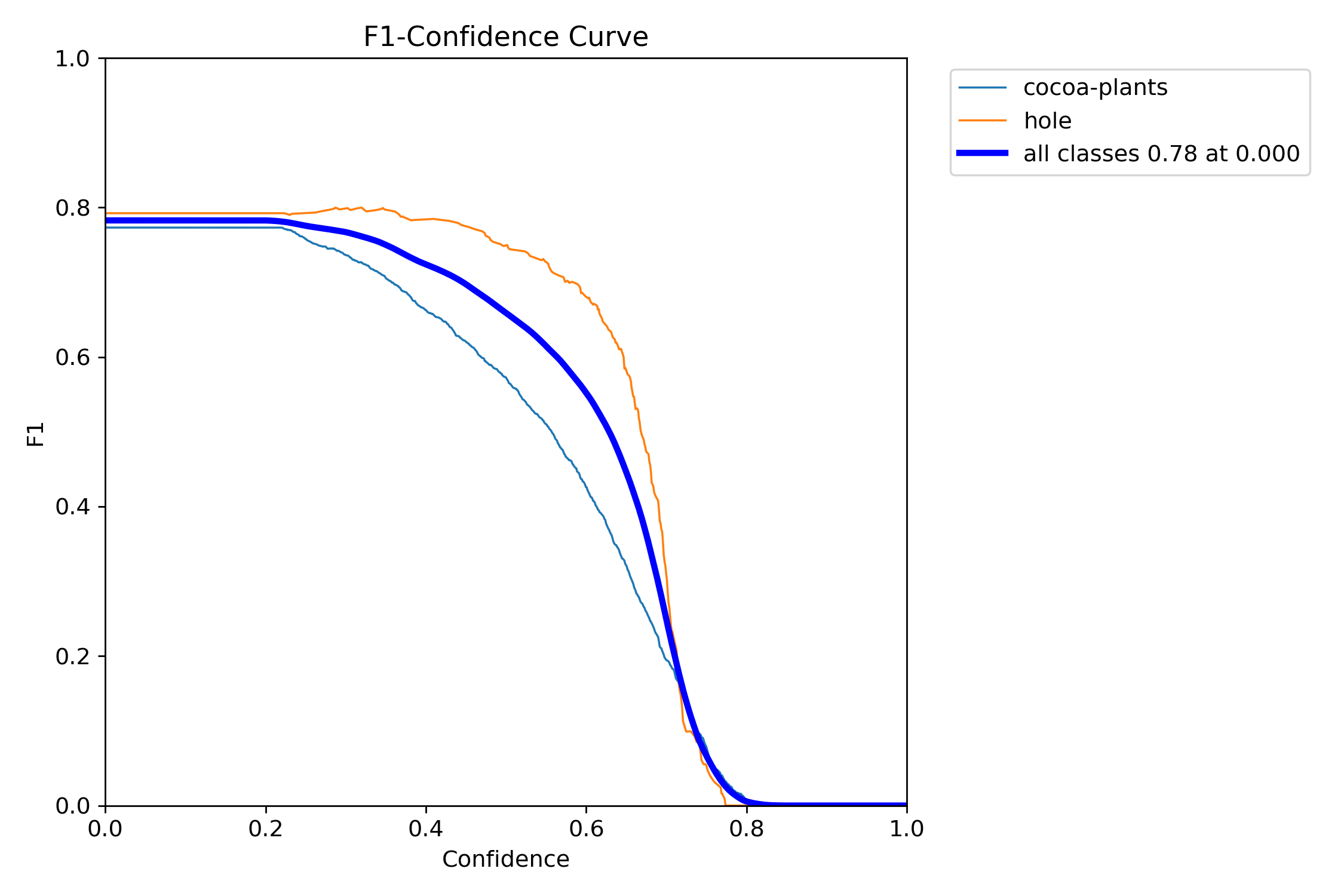
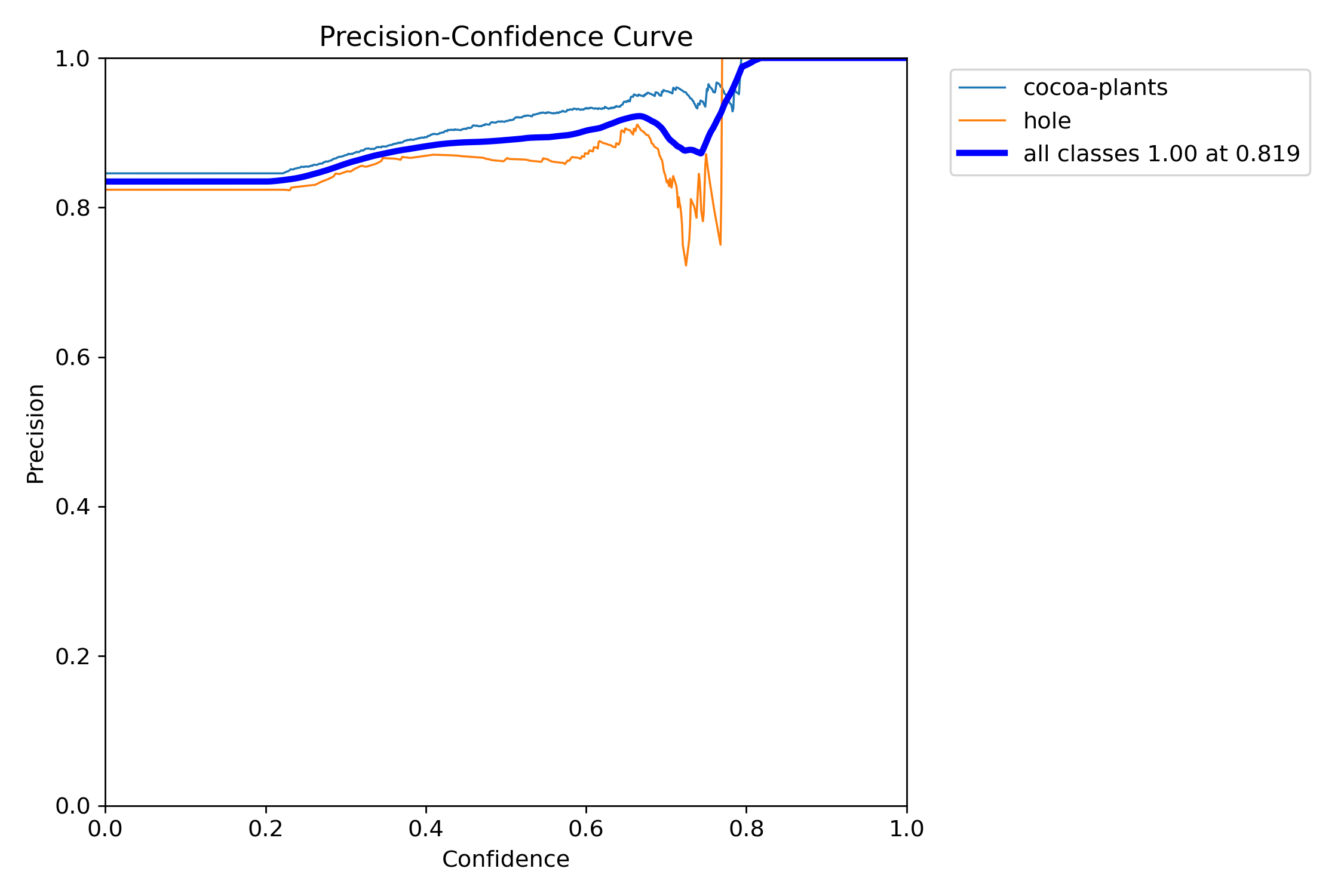
📊 Training Metrics & Model Behavior
F1 Score vs Confidence
Precision vs Confidence
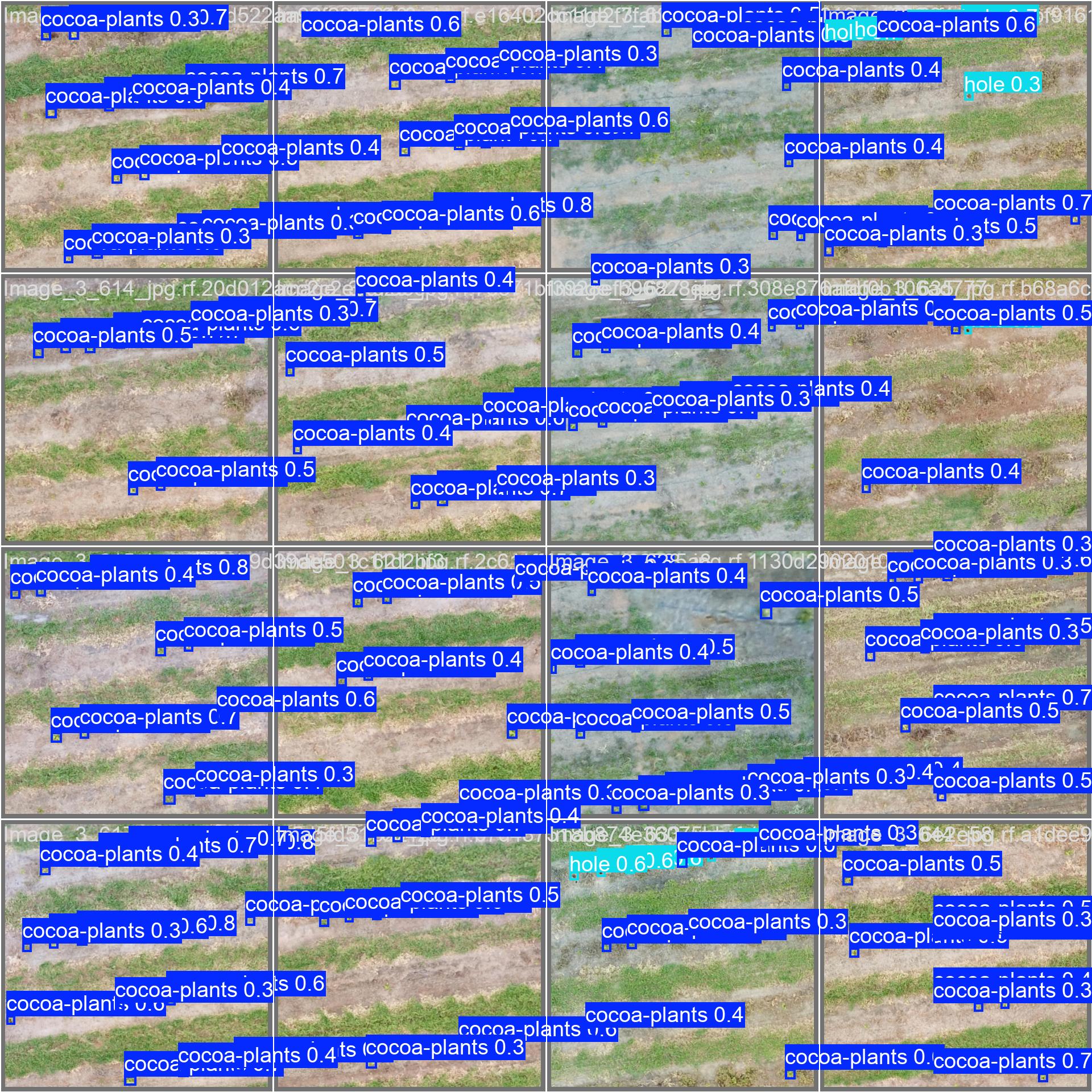
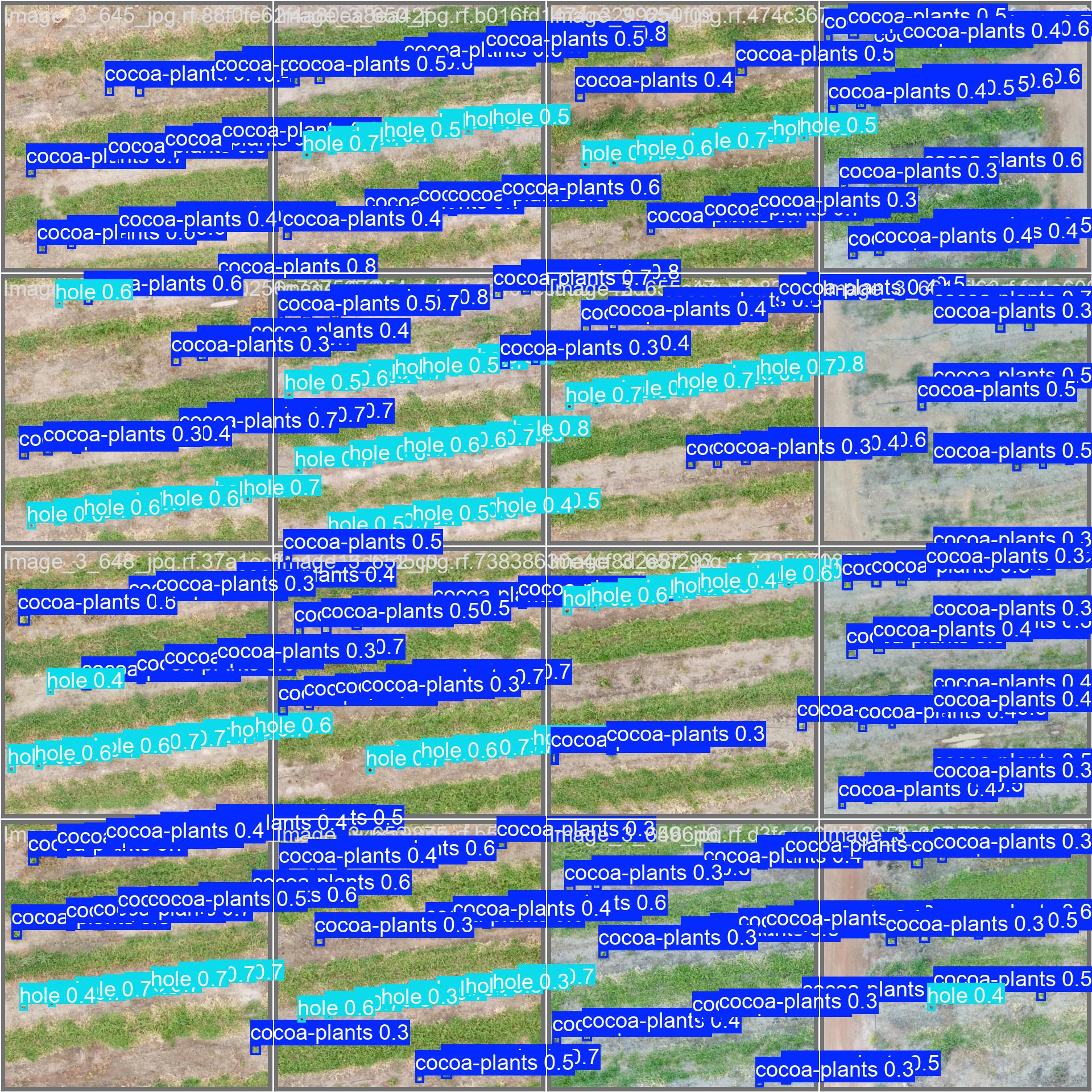
🧠 Sample Predictions on Validation Tiles
Sample Prediction – val_batch0
Sample Prediction – val_batch1
🧪 Try It Yourself
Want to test the pipeline locally with included sample tiles?
streamlit run streamlit_app/app.py
Upload from test_data/ and see the same prediction pipeline running on your machine.
License
This repository is licensed under the MIT License. You’re free to use, modify, and distribute — with credit to the author.
Maintainer
Michael Mensah Ofeor 🔗 GitHub – @NiiOsa1 📩 michaelofeor2011@yahoo.com
⚡ Built for real-world cocoa analysis. Powered by geospatial logic, YOLOv8, and a deep love for clean AI pipelines.
1 maintainer

Metadata
1 maintainer
Release files for cocoa-plant-detector 0.1.4
For a detailed explanation of source distributions (sdists) and built distributions (wheels), please see the package formats documentation.
Source distribution (sdist)
| File | Size | Uploaded | |
|---|---|---|---|
| cocoa_plant_detector-0.1.4.tar.gz | 876.5 kB | Details |
Built distribution (wheel)
| File | Interpreter | ABI | Platform | Reset |
|---|---|---|---|---|
| cocoa_plant_detector-0.1.4-py3-none-any.whl | Python 3 | none | any | Details |
Total release size: 882.3 kB
Release files / cocoa_plant_detector-0.1.4.tar.gz
| Download URL | cocoa_plant_detector-0.1.4.tar.gz |
|---|---|
| Size | 876.5 kB |
| Tags | Source |
|
SHA-256 checksum How to use checksums |
13c00b95162ad9d1aa82799f72944ba20c9221821d11a64551de24ab9b87efdb
|
|
BLAKE2b-256 checksum How to use checksums |
c9457c3375a15c19becc002f130aaa0df579c26eef3171d9073bc1351e25ade7
|
| Upload date | |
|
Uploaded using Trusted Publishing? What is trusted publishing? |
No |
| Uploaded via |
twine/6.1.0 CPython/3.12.3
|
Release files / cocoa_plant_detector-0.1.4-py3-none-any.whl
| Download URL | cocoa_plant_detector-0.1.4-py3-none-any.whl |
|---|---|
| Size | 5.8 kB |
| Tags | Python 3 |
|
SHA-256 checksum How to use checksums |
3bdbe2e9eb59812ccd65be587d8b63e7373c15646ea549079c8a7d322e33a3aa
|
|
BLAKE2b-256 checksum How to use checksums |
01272a9f82460a2588de111d119d27911b56dd99d79de0c8b861a540d9d82e65
|
| Upload date | |
|
Uploaded using Trusted Publishing? What is trusted publishing? |
No |
| Uploaded via |
twine/6.1.0 CPython/3.12.3
|














