
With CocoIndex, users declare the transformation, CocoIndex creates & maintains an index, and keeps the derived index up to date based on source update, with minimal computation and changes.

Project description

Data transformation for AI










Ultra performant data transformation framework for AI, with core engine written in Rust. Support incremental processing and data lineage out-of-box. Exceptional developer velocity. Production-ready at day 0.
⭐ Drop a star to help us grow!
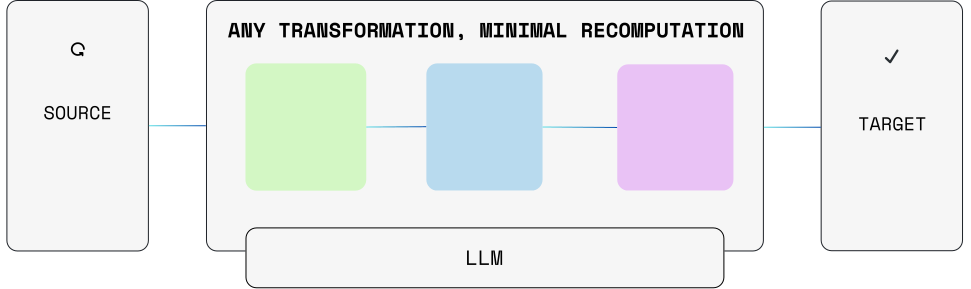
CocoIndex makes it effortless to transform data with AI, and keep source data and target in sync. Whether you’re building a vector index, creating knowledge graphs for context engineering or performing any custom data transformations — goes beyond SQL.
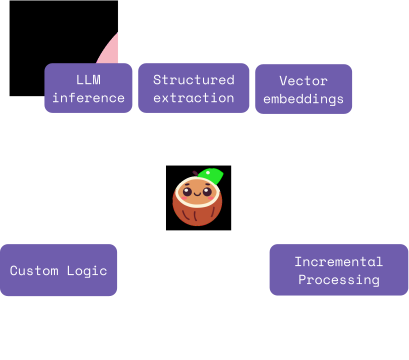
Exceptional velocity
Just declare transformation in dataflow with ~100 lines of python
# import
data['content'] = flow_builder.add_source(...)

# transform
data['out'] = data['content']
    .transform(...)
    .transform(...)

# collect data
collector.collect(...)

# export to db, vector db, graph db ...
collector.export(...)
CocoIndex follows the idea of Dataflow programming model. Each transformation creates a new field solely based on input fields, without hidden states and value mutation. All data before/after each transformation is observable, with lineage out of the box.
Particularly, developers don't explicitly mutate data by creating, updating and deleting. They just need to define transformation/formula for a set of source data.
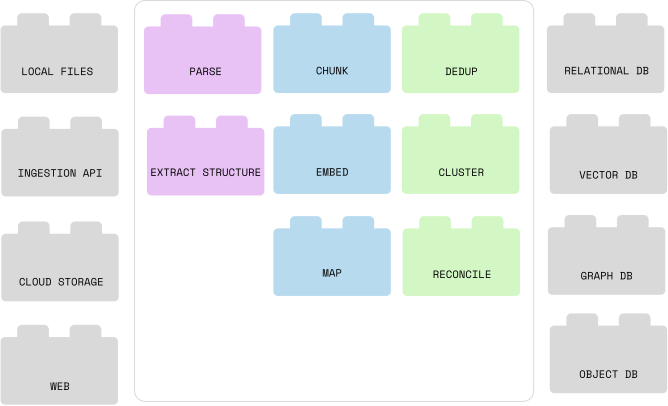
Plug-and-Play Building Blocks
Native builtins for different source, targets and transformations. Standardize interface, make it 1-line code switch between different components - as easy as assembling building blocks.
Data Freshness
CocoIndex keep source data and target in sync effortlessly.
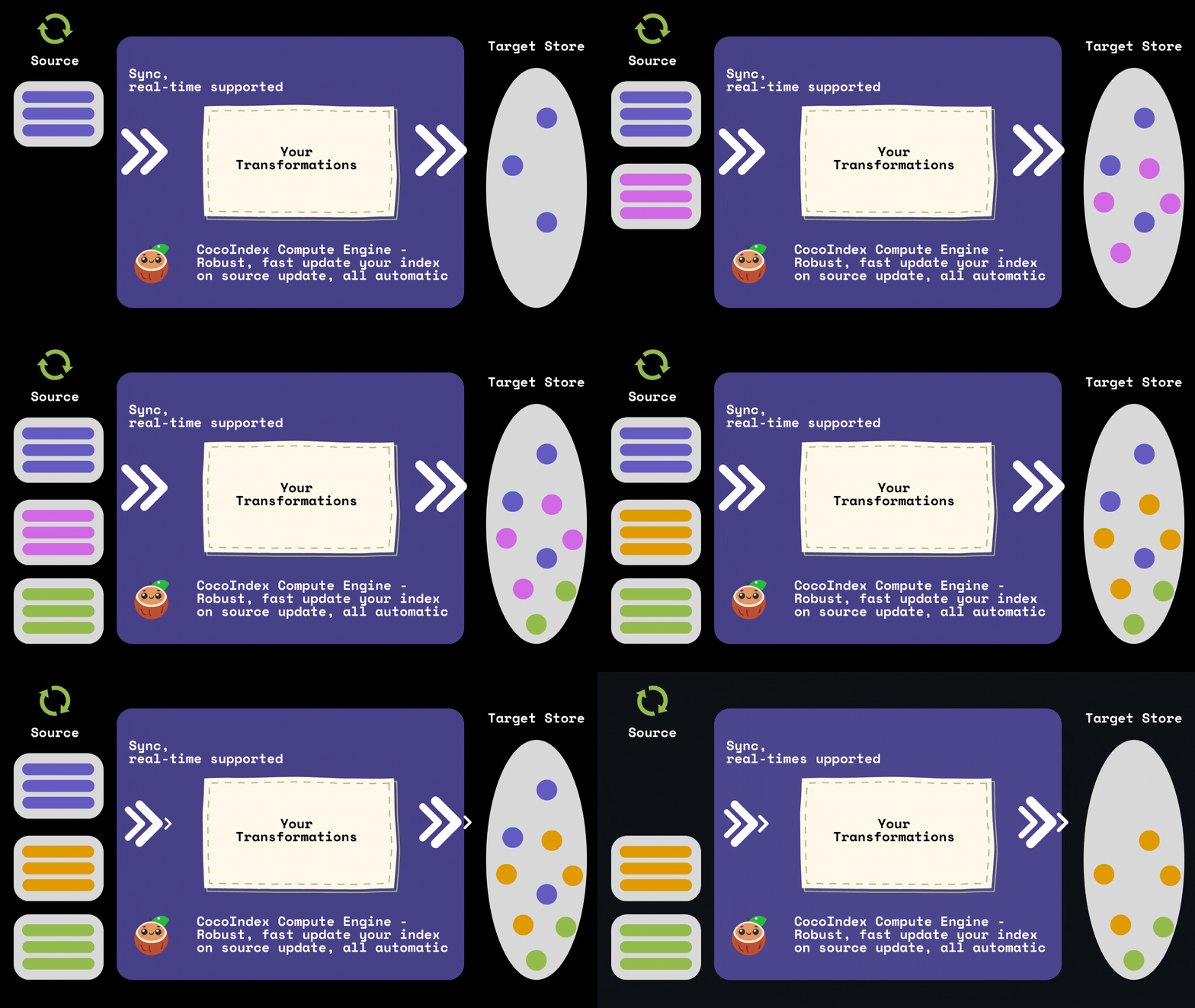
It has out-of-box support for incremental indexing:
- minimal recomputation on source or logic change.
- (re-)processing necessary portions; reuse cache when possible
Quick Start
If you're new to CocoIndex, we recommend checking out
Setup
- Install CocoIndex Python library
pip install -U cocoindex
-
Install Postgres if you don't have one. CocoIndex uses it for incremental processing.
-
(Optional) Install Claude Code skill for enhanced development experience. Run these commands in Claude Code:
/plugin marketplace add cocoindex-io/cocoindex-claude
/plugin install cocoindex-skills@cocoindex
Define data flow
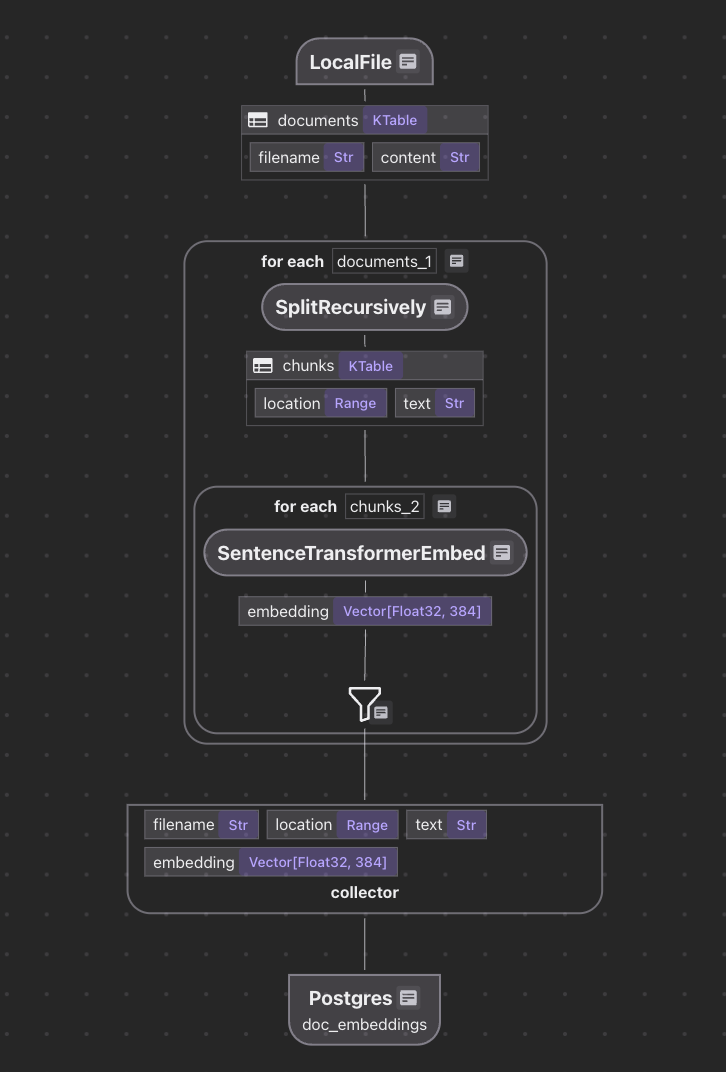
Follow Quick Start Guide to define your first indexing flow. An example flow looks like:
@cocoindex.flow_def(name="TextEmbedding")
def text_embedding_flow(flow_builder: cocoindex.FlowBuilder, data_scope: cocoindex.DataScope):
    # Add a data source to read files from a directory
    data_scope["documents"] = flow_builder.add_source(cocoindex.sources.LocalFile(path="markdown_files"))

    # Add a collector for data to be exported to the vector index
    doc_embeddings = data_scope.add_collector()

    # Transform data of each document
    with data_scope["documents"].row() as doc:
        # Split the document into chunks, put into `chunks` field
        doc["chunks"] = doc["content"].transform(
            cocoindex.functions.SplitRecursively(),
            language="markdown", chunk_size=2000, chunk_overlap=500)

        # Transform data of each chunk
        with doc["chunks"].row() as chunk:
            # Embed the chunk, put into `embedding` field
            chunk["embedding"] = chunk["text"].transform(
                cocoindex.functions.SentenceTransformerEmbed(
                    model="sentence-transformers/all-MiniLM-L6-v2"))

            # Collect the chunk into the collector.
            doc_embeddings.collect(filename=doc["filename"], location=chunk["location"],
                                   text=chunk["text"], embedding=chunk["embedding"])

    # Export collected data to a vector index.
    doc_embeddings.export(
        "doc_embeddings",
        cocoindex.targets.Postgres(),
        primary_key_fields=["filename", "location"],
        vector_indexes=[
            cocoindex.VectorIndexDef(
                field_name="embedding",
                metric=cocoindex.VectorSimilarityMetric.COSINE_SIMILARITY)])
It defines an index flow like this:
🚀 Examples and demo
| Example | Description |
|---|---|
| Text Embedding | Index text documents with embeddings for semantic search |
| Code Embedding | Index code embeddings for semantic search |
| PDF Embedding | Parse PDF and index text embeddings for semantic search |
| PDF Elements Embedding | Extract text and images from PDFs; embed text with SentenceTransformers and images with CLIP; store in Qdrant for multimodal search |
| Manuals LLM Extraction | Extract structured information from a manual using LLM |
| Amazon S3 Embedding | Index text documents from Amazon S3 |
| Azure Blob Storage Embedding | Index text documents from Azure Blob Storage |
| Google Drive Text Embedding | Index text documents from Google Drive |
| Meeting Notes to Knowledge Graph | Extract structured meeting info from Google Drive and build a knowledge graph |
| Docs to Knowledge Graph | Extract relationships from Markdown documents and build a knowledge graph |
| Embeddings to Qdrant | Index documents in a Qdrant collection for semantic search |
| Embeddings to LanceDB | Index documents in a LanceDB collection for semantic search |
| FastAPI Server with Docker | Run the semantic search server in a Dockerized FastAPI setup |
| Product Recommendation | Build real-time product recommendations with LLM and graph database |
| Image Search with Vision API | Generates detailed captions for images using a vision model, embeds them, enables live-updating semantic search via FastAPI and served on a React frontend |
| Face Recognition | Recognize faces in images and build embedding index |
| Paper Metadata | Index papers in PDF files, and build metadata tables for each paper |
| Multi Format Indexing | Build visual document index from PDFs and images with ColPali for semantic search |
| Custom Source HackerNews | Index HackerNews threads and comments, using CocoIndex Custom Source |
| Custom Output Files | Convert markdown files to HTML files and save them to a local directory, using CocoIndex Custom Targets |
| Patient intake form extraction | Use LLM to extract structured data from patient intake forms with different formats |
| HackerNews Trending Topics | Extract trending topics from HackerNews threads and comments, using CocoIndex Custom Source and LLM |
| Patient Intake Form Extraction with BAML | Extract structured data from patient intake forms using BAML |
| Patient Intake Form Extraction with DSPy | Extract structured data from patient intake forms using DSPy |
More coming and stay tuned 👀!
📖 Documentation
For detailed documentation, visit CocoIndex Documentation, including a Quickstart guide.
🤝 Contributing
We love contributions from our community ❤️. For details on contributing or running the project for development, check out our contributing guide.
👥 Community
Welcome with a huge coconut hug 🥥⋆。˚🤗. We are super excited for community contributions of all kinds - whether it's code improvements, documentation updates, issue reports, feature requests, and discussions in our Discord.
Join our community here:
- 🌟 Star us on GitHub
- 👋 Join our Discord community
- ▶️ Subscribe to our YouTube channel
- 📜 Read our blog posts
Support us
We are constantly improving, and more features and examples are coming soon. If you love this project, please drop us a star ⭐ at GitHub repo
License
CocoIndex is Apache 2.0 licensed.
Release history Release notifications | RSS feed


Download files
Download the file for your platform. If you're not sure which to choose, learn more about installing packages.
Source Distribution
Built Distributions
Filter files by name, interpreter, ABI, and platform.
If you're not sure about the file name format, learn more about wheel file names.
Copy a direct link to the current filters
File details
Details for the file cocoindex-0.3.23.tar.gz.
File metadata
- Download URL: cocoindex-0.3.23.tar.gz
- Upload date:
- Size: 387.8 kB
- Tags: Source
- Uploaded using Trusted Publishing? Yes
- Uploaded via: maturin/1.10.2
File hashes
| Algorithm | Hash digest | |
|---|---|---|
| SHA256 |
99052eca60f45e868f0ccdc391b0dbff9dcde3f5bf79909ebf2f03d1199866d0
|
|
| MD5 |
c549f37e450eaf0068a8d61dc6f10d2a
|
|
| BLAKE2b-256 |
fb5ef9ec9ebf3923ceae978810d6982cde2f502b03080ff763ac2f827c48a26d
|
File details
Details for the file cocoindex-0.3.23-cp311-abi3-win_amd64.whl.
File metadata
- Download URL: cocoindex-0.3.23-cp311-abi3-win_amd64.whl
- Upload date:
- Size: 19.1 MB
- Tags: CPython 3.11+, Windows x86-64
- Uploaded using Trusted Publishing? Yes
- Uploaded via: maturin/1.10.2
File hashes
| Algorithm | Hash digest | |
|---|---|---|
| SHA256 |
a6f356c7797fb9fc2f4c755a49c94c22f1fefd20ae7f7f3a1ce090a71bbe9e1e
|
|
| MD5 |
dac18e91e7346e76b36646ac9e649c22
|
|
| BLAKE2b-256 |
76df65782723b2ce164da75932d54b34ffce5ea5b3f9d6d7d59405dda040ad26
|
File details
Details for the file cocoindex-0.3.23-cp311-abi3-manylinux_2_28_x86_64.whl.
File metadata
- Download URL: cocoindex-0.3.23-cp311-abi3-manylinux_2_28_x86_64.whl
- Upload date:
- Size: 18.5 MB
- Tags: CPython 3.11+, manylinux: glibc 2.28+ x86-64
- Uploaded using Trusted Publishing? Yes
- Uploaded via: maturin/1.10.2
File hashes
| Algorithm | Hash digest | |
|---|---|---|
| SHA256 |
2cdb532b4fbaa286f70ca4328a3a395b550cf3adbe2a00ab3da534de5b3716b9
|
|
| MD5 |
715f0201a4f00467a5af48bfa6d94bf9
|
|
| BLAKE2b-256 |
10b219ecc38ccb9719b9562e4eb5ca5453c6bd58d214cbd4f592197bc7fccb0f
|
File details
Details for the file cocoindex-0.3.23-cp311-abi3-manylinux_2_28_aarch64.whl.
File metadata
- Download URL: cocoindex-0.3.23-cp311-abi3-manylinux_2_28_aarch64.whl
- Upload date:
- Size: 17.9 MB
- Tags: CPython 3.11+, manylinux: glibc 2.28+ ARM64
- Uploaded using Trusted Publishing? Yes
- Uploaded via: maturin/1.10.2
File hashes
| Algorithm | Hash digest | |
|---|---|---|
| SHA256 |
09b4ff0170f0686033d71b3da2040f6976da3b85a9923a60adb337574a26ec0d
|
|
| MD5 |
39f4c735d092c6f8c9e71f2c3b9f75f6
|
|
| BLAKE2b-256 |
78180bfbe2593f185f64372f15739c7801c18564c2e470c68eda93a30cccfcc0
|
File details
Details for the file cocoindex-0.3.23-cp311-abi3-macosx_11_0_arm64.whl.
File metadata
- Download URL: cocoindex-0.3.23-cp311-abi3-macosx_11_0_arm64.whl
- Upload date:
- Size: 17.4 MB
- Tags: CPython 3.11+, macOS 11.0+ ARM64
- Uploaded using Trusted Publishing? Yes
- Uploaded via: maturin/1.10.2
File hashes
| Algorithm | Hash digest | |
|---|---|---|
| SHA256 |
70c6fdc8685f98fc0a65866429e3b396545233dc798b02667ca149465a995ad0
|
|
| MD5 |
55ac5fdde96ff5edd818367734f2d46e
|
|
| BLAKE2b-256 |
2afcdfbf579ef1c7ada4e14ff30466a43a88536a607fa7acfc40c310c374bd9e
|
File details
Details for the file cocoindex-0.3.23-cp311-abi3-macosx_10_12_x86_64.whl.
File metadata
- Download URL: cocoindex-0.3.23-cp311-abi3-macosx_10_12_x86_64.whl
- Upload date:
- Size: 18.0 MB
- Tags: CPython 3.11+, macOS 10.12+ x86-64
- Uploaded using Trusted Publishing? Yes
- Uploaded via: maturin/1.10.2
File hashes
| Algorithm | Hash digest | |
|---|---|---|
| SHA256 |
efb8da923621dc465d4acad26a8d245ba67d5b66b6bbd71f9b00d6f700fba084
|
|
| MD5 |
895f2593bf66ab970d4b587cdd908a86
|
|
| BLAKE2b-256 |
4e98a96147eebde2cab724d58be0a3c577ad21816c08d8d9c6ef504f62e5c40e
|






