
Code Factory
🏭 Orchestrate coding agents via Kanban — high autonomy, isolated per-issue workspaces, single-file repo-owned workflow contract
Quick Start · CLI · Workflow · Specification
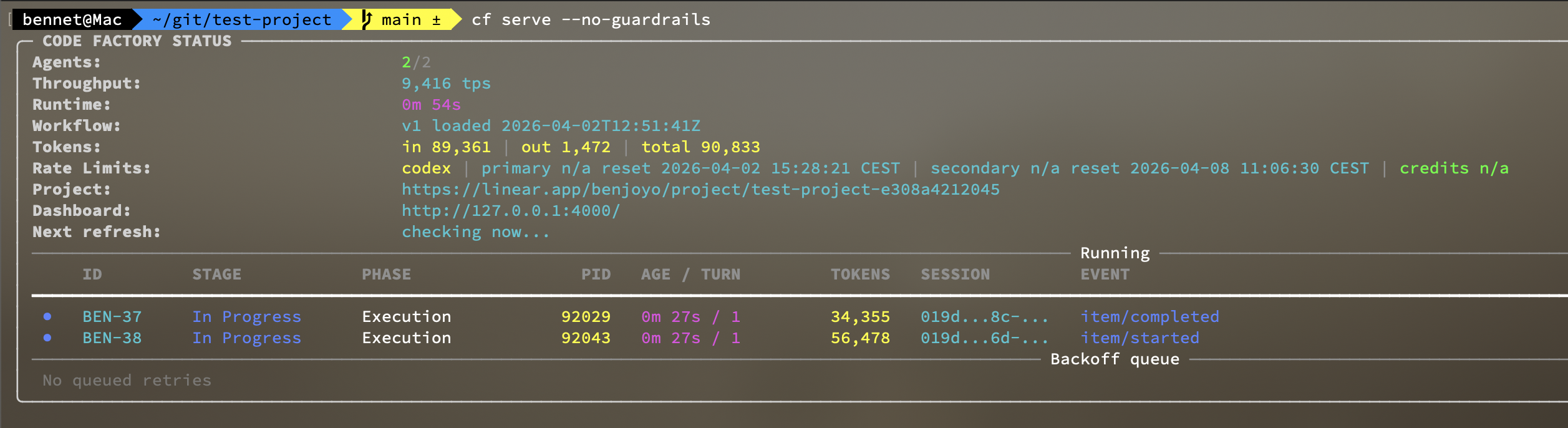
Code Factory is a Python asyncio implementation and extension of the OpenAI Symphony spec. It
polls tracker work, creates isolated per-issue workspaces, runs coding-agent
sessions inside them, and keeps the workflow contract versioned in
WORKFLOW.md.
Use it when you want repeatable issue execution, repo-owned workflow policy, and enough observability to operate concurrent agent runs without building a custom harness around your coding agent.
Typical Workflow

What You Need
- Python 3.12
uv- A valid
WORKFLOW.md - Access to the tracker configured in
WORKFLOW.md - A working coding-agent command available to
codex.command
Installation
Install cf from PyPI as a uv tool:
uv tool install code-factory-agent
Then run it directly:
cf --help
cf serve --no-guardrails
If you prefer not to install the tool, you can still run it from the repo with
uv run cf ....
Quick Start
1. Install from PyPI
uv tool install code-factory-agent
2. Create a starter workflow in a new project
cf init
cf init walks you through the starter values, renders a
project-specific WORKFLOW.md, and copies this repo's bundled skills into
./.agents/skills. Re-run with --force if you want to overwrite an existing
workflow or skills bundle.
Most projects should make a few repo-specific edits before first real use. The starter workflow is intentionally generic; adapt the bootstrap, verification, and review setup to your stack.
Example additions to copy into WORKFLOW.md and tailor:
hooks:
  after_create: |
    git clone --depth 1 git@github.com:your-org/your-repo.git .
    uv sync

states:
  "In Progress":
    hooks:
      before_complete: |
        make verify
  "Rework":
    hooks:
      before_complete: |
        make verify

review:
  prepare: |
    uv sync
  servers:
    - name: app
      base_port: 8000
      command: |
        uv run python -m uvicorn your_project.app:app --host 127.0.0.1 --port {{ review.port }}
      url: http://127.0.0.1:{{ review.port }}
Use these as patterns, not defaults:
hooks.after_create: install dependencies, build generated assets, or run any one-time workspace bootstrap your repo needs.states.<state>.hooks.before_complete: run the quality gate your team expects before handoff, for examplemake verify,uv run pytest -q, or a lint/test script.review.prepareandreview.servers: makecf reviewimmediately useful by starting the exact app or dev server a reviewer should inspect.
3. Start the service
cf serve --no-guardrails
If you omit the workflow path, the CLI defaults to ./WORKFLOW.md.
By default, rotating file logs are written to ./log/code-factory.log beside
the workflow. Override the root for one run with --logs-root, or change/disable
it in observability.file_logging.
4. Create issues and move to Todo
- Create new issues in Linear Backlog
- Move ready-for-dev issues to Todo
5. Steer agents during execution (optional)
Run:
cf steer ENG-123 "also add integration tests please"
This appends operator guidance to an in-flight issue turn.
6. Review PRs
Run:
cf review ENG-123
This will:
- Launch a review worktree and any configured review servers.
- Open the browser automatically, if configured.
- Let you quickly submit PR comments with any problems you find.
7. Move issues to Merging, Todo, or Rework
Move reviewed issues to:
- Merging, if review was successful
- Todo, if you left review comments in the PR
- Rework, if you left review comments and want a full, clean re-attempt at the issue
CLI Overview
The main operator commands are:
cf initto bootstrap a repo-local workflow and bundled skillscf serveto run the long-lived automation servicecf reviewto launch a review worktree and any configured review serverscf steerto append operator guidance to an in-flight issue turncf issue,cf comment,cf workpad, andcf trackerfor tracker-facing operator actions
See docs/cli.md for the general CLI reference and docs/ticket-cli.md for ticket-oriented commands.
Ticket Surfaces
Agent sessions use flat tracker_issue_*, tracker_comment_*,
tracker_pr_link, and tracker_file_upload tools for ticket work. The
orchestrator manages workpad.md synchronization to a ticket comment
automatically during the run.
Operators can use the CLI for the same ticket surface area:
cf issue get ISSUE
cf issue list [--project PROJECT] [--team TEAM] [--state STATE]
cf issue create --team TEAM --title TITLE
cf issue update ISSUE
cf issue move ISSUE --state STATE
cf issue link-pr ISSUE --url URL
cf comment list ISSUE
cf comment create ISSUE
cf comment update COMMENT
cf workpad get ISSUE
cf workpad sync ISSUE
Workflow
WORKFLOW.md is the main operator surface for Code Factory. It keeps tracker
configuration, active states, prompt sections, completion gates, review setup,
workspace hooks, and observability settings in the repo so teams can version and
hot-reload automation policy alongside application code.
See the workflow docs for the current contract:
Observability
Code Factory exposes a local observability API and, when stderr is attached to a TTY, a live terminal dashboard for operators. See docs/observability.md for endpoints, dashboard behavior, rotating file logs, and steering/discovery details.
Runtime Notes
- Startup validates the workflow and required dispatch settings before the scheduler loop begins.
WORKFLOW.mdis hot-reloaded automatically; valid changes affect future dispatches without restarting the service.- Only issues in active workflow states are dispatched.
Development
For local development from a checkout:
git clone git@github.com:Benjoyo/code-factory.git
cd code-factory
make setup
Run the CLI directly from the repo with uv run:
uv run cf --help
uv run cf serve --no-guardrails
If you want the checkout on your PATH during development, install the local editable tool:
uv tool install --editable .
Run the full verification suite:
make verify
Create and publish a release in one command:
make release-patch
make release-minor
make release-major
Each release target runs make verify, bumps project.version, creates a
matching annotated v... tag, and pushes the current branch plus tag to
origin. Override the remote with make release-patch REMOTE=<remote> if
needed.
1 maintainer

Metadata
1 maintainer
Release files for code-factory-agent 0.8.0
For a detailed explanation of source distributions (sdists) and built distributions (wheels), please see the package formats documentation.
Source distribution (sdist)
| File | Size | Uploaded | |
|---|---|---|---|
| code_factory_agent-0.8.0.tar.gz | 3.2 MB | Details |
Built distribution (wheel)
| File | Interpreter | ABI | Platform | Reset |
|---|---|---|---|---|
| code_factory_agent-0.8.0-py3-none-any.whl | Python 3 | none | any | Details |
Total release size: 3.5 MB
Release files / code_factory_agent-0.8.0.tar.gz
| Download URL | code_factory_agent-0.8.0.tar.gz |
|---|---|
| Size | 3.2 MB |
| Tags | Source |
|
SHA-256 checksum How to use checksums |
b2534a6459bcdb2b745f0dad784529b925e16ea240b0ba994574270a8637d5ed
|
|
BLAKE2b-256 checksum How to use checksums |
6014adf0a17caa8e6a5f9e15c582425812106edc54f3eb0cf95eaa3cc4205cc4
|
| Upload date | |
|
Uploaded using Trusted Publishing? What is trusted publishing? |
Yes |
| Uploaded via |
twine/6.1.0 CPython/3.13.12
|
Provenance
Provenance describes where a file came from. On PyPI, provenance is shared via attestations, which provide a verifiable record of the build or publishing details. View details, limitations and caveats.


PyPI Publish Attestation
PyPI verified that this artifact, at this checksum, originated from the publisher listed below.
Signed by GitHub Actions, verified by PyPI on Apr 22, 2026.
Transparency logRelease files / code_factory_agent-0.8.0-py3-none-any.whl
| Download URL | code_factory_agent-0.8.0-py3-none-any.whl |
|---|---|
| Size | 247.3 kB |
| Tags | Python 3 |
|
SHA-256 checksum How to use checksums |
f4462e17ce6af68e9c6885e6bc2366935b6c788a828df9969d2e0b36952b1aab
|
|
BLAKE2b-256 checksum How to use checksums |
0ec6c9dc8d0d18c31099e2f200645bbea58afae00691ed28d431fb37f4415a08
|
| Upload date | |
|
Uploaded using Trusted Publishing? What is trusted publishing? |
Yes |
| Uploaded via |
twine/6.1.0 CPython/3.13.12
|
Provenance
Provenance describes where a file came from. On PyPI, provenance is shared via attestations, which provide a verifiable record of the build or publishing details. View details, limitations and caveats.
PyPI Publish Attestation
PyPI verified that this artifact, at this checksum, originated from the publisher listed below.
Signed by GitHub Actions, verified by PyPI on Apr 22, 2026.
Transparency log













