
code2mermaid




code2mermaid is a python-only library to help convert Python code in Mermaid chartflows specifications. code2mermaid supports conditional and loops.
Environment
Install the project
pip install code2mermaid
To visualize flowcharts you can use
Mermaid Live
mermaid-py
pip install mermaid-py
import mermaid as md
from mermaid.graph import Graph

def plot_mermaid(mermaid_diagram):
    graph = Graph(
        title='chartflow',
        script=mermaid_diagram,
    )
    Mermaid(graph) # render the graph in notebook
Getting Started
from code2mermaid import code_to_mermaid
Mermaid supports five types of orientation:
- TB - Top to bottom (default)
- TD - Top-down/ same as top to bottom
- BT - Bottom to top
- RL - Right to left
- LR - Left to right
code2mermaid add a new node in graph each line in code
Labels are supported using two forms of comments:
- #> first form
- #|second form|
This makes it possible to keep standard code comments and easily add annotations to the graph.
There are 7 types of nodes supported, each of them has its own style:
- default - general code
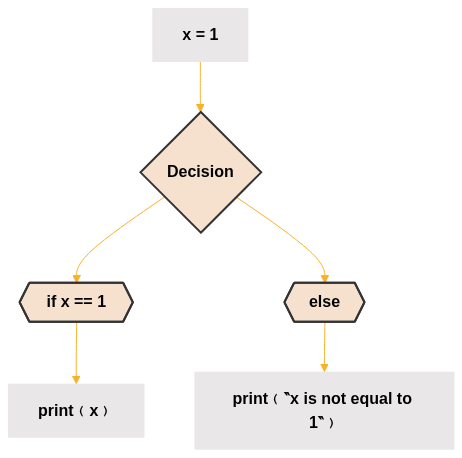
- conditional - when a node of the if/elif/else type is detected it is inserted into the graph
- condition - the type of the condition, can be if, elif and else
- functional - nodes that contain an F., useful for examples using pytorch-like
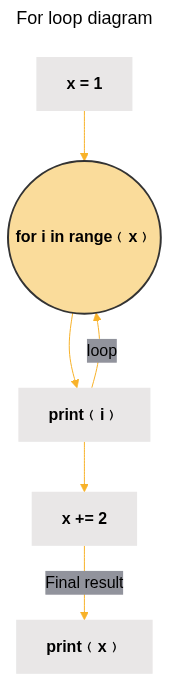
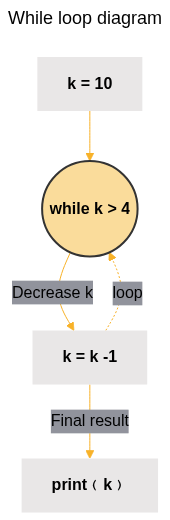
- loop - node of the for/while type
- parameter - extracts the parameters of the function and transforms them into nodes.
selfparameters and type annotations are ignored - terminal - nodes that start with
returnideal to indicate the end of the graph
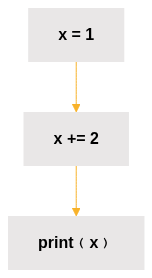
1. First Chartflow
code = """
x = 1
x += 2
print(x)
"""
mermaid_diagram = code_to_mermaid(code)
2. Conditional Node
code = """
x = 1
if x == 1:
    print(x)
else:
    print("x is not equal to 1")
"""
mermaid_diagram = code_to_mermaid(code)
3. For Loop Nodes
We can insert titles in flowchart and labels in chart
code = """
x = 1
for i in range(x):
    print(i)
x += 2
#> Final result
print(x)
"""
mermaid_diagram = code_to_mermaid(code, "For loop diagram")
3. While Nodes
code = """
k = 10
while k > 4:
    #> Decrease k
    k = k -1
#> Final result
print(k)
"""
mermaid_diagram = code_to_mermaid(code, "While loop diagram")
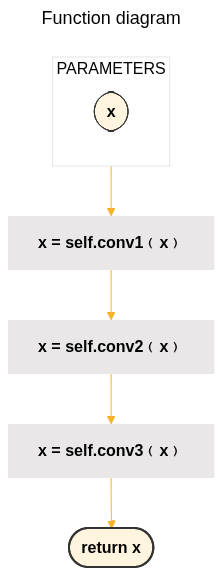
- Function Nodes
code = """
def forward(self, x):
    x = self.conv1(x)
    x = self.conv2(x)
    x = self.conv3(x)
    return x
"""
mermaid_diagram = code_to_mermaid(code, "Function diagram")
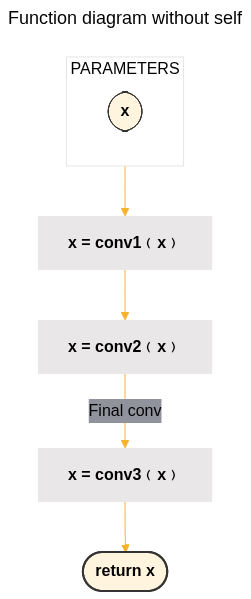
You can suppress self. in nodes
code = """
def forward(self, x):
    x = self.conv1(x)
    x = self.conv2(x)
    #> Final conv
    x = self.conv3(x)
    return x
"""
mermaid_diagram = code_to_mermaid(
    code,
    "Function diagram without self",
    remove_self=True
)
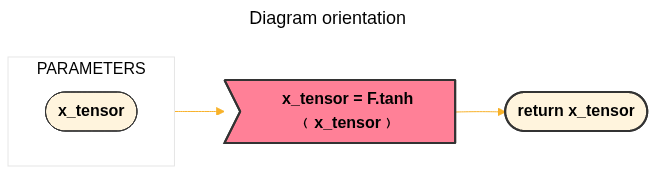
- Diagram orientation
code = """
def forward(self, x_tensor):
    x_tensor = F.tanh(x_tensor)
    return x_tensor
"""
mermaid_diagram = code_to_mermaid(
    code,
    "Diagram orientation",
    orientation="LR",
)
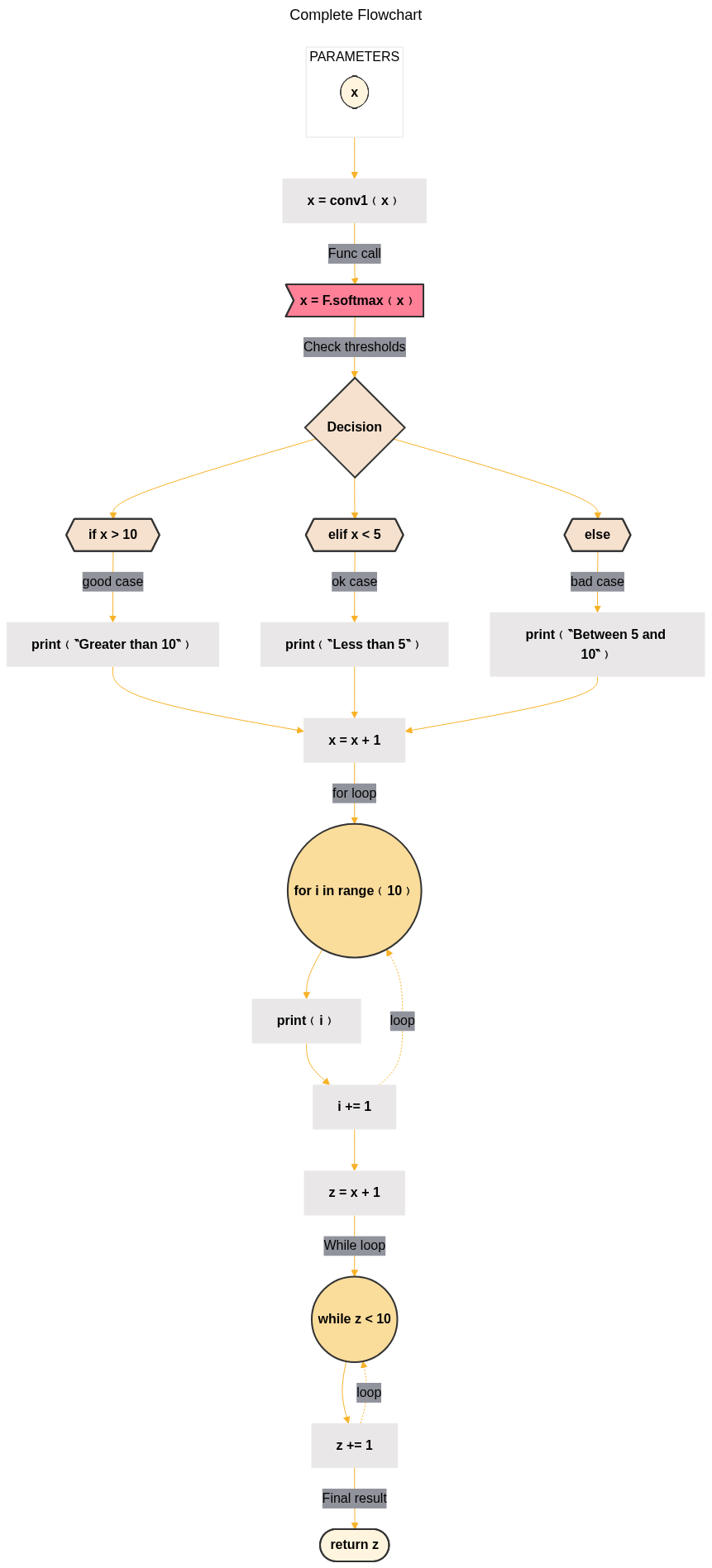
- Full Diagram
code = """
def myfunc(self, x: Tensor):
    x = self.conv1(x)
    #> Func call
    x = F.softmax(x)
    #> Check thresholds
    if x > 10:
        #> good case
        print("Greater than 10")
    elif x < 5:
        #> ok case
        print("Less than 5")
    else:
        #> bad case
        print("Between 5 and 10")
    x = x + 1
    #> for loop
    for i in range(10):
        print(i)
        i += 1
    z = x + 1
    #> While loop
    while z < 10:
        z += 1
    #> Final result
    return z
"""
mermaid_diagram = code_to_mermaid(
    code,
    "Complete Flowchart",
    remove_self=True
)
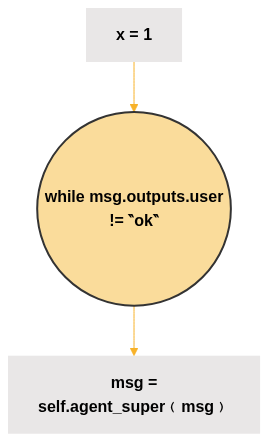
- Long expressions
After 0.3.0 release code2mermaid offers supports to long expressions. Previously long expressions were truncated by Mermaid if the len was greater than 24 characters.
code = """
x = 1
while msg.outputs.user != "ok":
    msg = self.agent_super(msg)
"""
mermaid_diagram = code_to_mermaid(code)
Change the style
code2mermaid uses a pre-defined color palette. But through the _node_style parameter you can change it.
To check the default style:
from code2mermaid.style import node_style
print(node_style)
Acknowledgments
code2mermaid was developed using 3.5 Sonnet. Thanks to Anthropic for making it available free via Claude.
1 maintainer

Metadata
1 maintainer
Release files for code2mermaid 0.3.0
For a detailed explanation of source distributions (sdists) and built distributions (wheels), please see the package formats documentation.
Source distribution (sdist)
| File | Size | Uploaded | |
|---|---|---|---|
| code2mermaid-0.3.0.tar.gz | 23.0 kB | Details |
Built distribution (wheel)
| File | Interpreter | ABI | Platform | Reset |
|---|---|---|---|---|
| code2mermaid-0.3.0-py3-none-any.whl | Python 3 | none | any | Details |
Total release size: 37.8 kB
Release files / code2mermaid-0.3.0.tar.gz
| Download URL | code2mermaid-0.3.0.tar.gz |
|---|---|
| Size | 23.0 kB |
| Tags | Source |
|
SHA-256 checksum How to use checksums |
5e6093e2dd4815a9570a4517b8db1732ec58ebe1866f5bdc85f239a422f4ad26
|
|
BLAKE2b-256 checksum How to use checksums |
23701573a6ceec69bd94b3e430878c4197a6020c42815a62e54fd5013fdafe79
|
| Upload date | |
|
Uploaded using Trusted Publishing? What is trusted publishing? |
No |
| Uploaded via |
uv/0.5.4
|
Release files / code2mermaid-0.3.0-py3-none-any.whl
| Download URL | code2mermaid-0.3.0-py3-none-any.whl |
|---|---|
| Size | 14.8 kB |
| Tags | Python 3 |
|
SHA-256 checksum How to use checksums |
9fed9fd0ee97fcd480caada8bc0eec18d38021bf108aafcb9335058e7044db37
|
|
BLAKE2b-256 checksum How to use checksums |
89d2caff16ac4a1c5f7ba1963438410a78ec13fbca158cdd1a225c194d06b4b0
|
| Upload date | |
|
Uploaded using Trusted Publishing? What is trusted publishing? |
No |
| Uploaded via |
uv/0.5.4
|














