
CodeAlchemy


CodeAlchemy is a versatile Python package designed to simplify development workflows by providing powerful decorators for logging, performance monitoring, and utilities. Whether you're looking to track function execution times, group logs for better readability, or Utility methods to interact with other services.
Key Features:
- Decorators: Enhance your Python functions with performance tracking and logging capabilities.
- Kafka Utilities: Easily produce and consume messages with Kafka, with advanced features like round-robin message distribution and offset management.
Installation
You can install codealchemy using pip:
pip install codealchemy
Usage
Here is how you can use the codealchemy package in your Python code:
Decorators
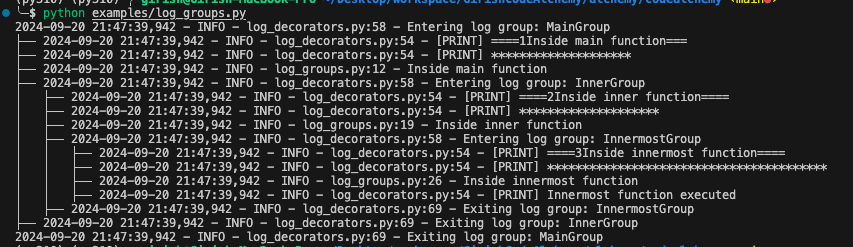
code_execution_time: This decorator logs the execution time of the decorated function.log_group(group_name): This decorator logs entry and exit points of the decorated function, grouping logs under a specified group name.
- code execution time
from codealchemy import code_execution_time

@code_execution_time
def example_function():
    import time
    time.sleep(2)
    print("Function executed")

example_function()
- Log groups
from codealchemy import log_group
import logging

# Ensure the logger level is set to INFO
logging.getLogger(__name__).setLevel(logging.INFO)

@log_group("MainGroup")
def main_function():
    print("Inside main function")
    print("*"*20)
    logging.info("Inside main function")
    inner_function()

@log_group("InnerGroup")
def inner_function():
    print("Inside inner function")
    print("*"*20)
    logging.info("Inside inner function")
    innermost_function()

@log_group("InnermostGroup")
def innermost_function():
    print("Inside innermost function")
    print("*"*20)
    logging.info("Inside innermost function")
    print("Innermost function executed")

main_function()
Utility
kafkaUtils: A utility module that simplifies Kafka-related operations for Python developers.
-
Kafka Producer: The Kafka producer sends messages to Kafka topics. Here's how you can use it:
from codealchemy import kafkaUtils

config_file = "config.json"
topic = "topic_name"

producer = kafkaUtils.KafkaProducer(config_file, topic)


print("\nProducing Messages to default partition:")
# Send messages to default partitions
for i in range(10):
    # Construct the message payload
    message = {"key": i, "value": f"Test message {i}"}
    producer.send_message(message)
# Flush to ensure all messages are sent
producer.flush()
print("\nLatest offsets:")
producer.display_partition_offsets()


print("\nProducing Messages to Particular partition:")
# Send messages to specific partitions
for i in range(10):
    # Construct the message payload
    message = {"key": i, "value": f"Test message {i}"}
    producer.send_message(message, partition=1)
producer.flush()
print("\nLatest offsets:")
producer.display_partition_offsets()


print("\nProducing Messages in Round Robin:")
# Send messages in a round-robin fashion across partitions
for i in range(10):
    message = {"key": i, "value": f"Test message {i}"}
    producer.send_message_round_robin(message)
producer.flush()
print("\nLatest offsets:")
producer.display_partition_offsets()
-
Kafka Consumer: The Kafka consumer consumes messages from Kafka topics. Here's how you can use it:
from codealchemy import kafkaUtils

config_file = "config.json"
topic = "topic_name"
group_id = "group_id"

auto_offset = "earliest"
 # earliest -->Start from the beginning if no previous offset exists
 # latest -->Start from the end if no previous offset exists

consumer = kafkaUtils.KafkaConsumer(config_file, topic, group_id, auto_offset)
consumer.consume_messages()
If you need to consume from particular offset
consumer = kafkaUtils.KafkaConsumer(config_file, topic, group_id)
consumer.consume_messages(offset=2350, partition=1)
# consumer.consume_messages(offset=2350) # For all partition
If you need to consume from particular timestamp
consumer = kafkaUtils.KafkaConsumer(config_file, topic, group_id)
consumer.consume_messages(timestamp="2024-11-13T22:39:00.999Z", partition=1)
# consumer.consume_messages(timestamp="2024-11-13T22:39:00.999Z") # For all partition
If you need to list all the Consumer Group Offset
consumer_info = kafkaUtils.KafkaConsumer(config_file, topic)
consumer_info.list_consumer_groups_offsets()
Sample
config.json{ "bootstrap.servers": "kafkabroker:9093", "security.protocol": "SSL", "ssl.key.password": "Password@1", "ssl.certificate.location": "/etc/secrets/kafka/truststore.pem", "ssl.key.location": "/etc/secrets/kafka/keystore.pem", "ssl.ca.location": "/etc/secrets/kafka/caroot.pem" }
License
This project is licensed under the MIT License. See the LICENSE file for more details.
1 maintainer

Metadata
1 maintainer
Release files for codealchemy 1.2.6
For a detailed explanation of source distributions (sdists) and built distributions (wheels), please see the package formats documentation.
Source distribution (sdist)
| File | Size | Uploaded | |
|---|---|---|---|
| codealchemy-1.2.6.tar.gz | 13.6 kB | Details |
Built distribution (wheel)
| File | Interpreter | ABI | Platform | Reset |
|---|---|---|---|---|
| codealchemy-1.2.6-py3-none-any.whl | Python 3 | none | any | Details |
Total release size: 29.6 kB
Release files / codealchemy-1.2.6.tar.gz
| Download URL | codealchemy-1.2.6.tar.gz |
|---|---|
| Size | 13.6 kB |
| Tags | Source |
|
SHA-256 checksum How to use checksums |
fc93e568108c59e2c8ba3830b4be6613c54b1436b729a53a0229beb7e5c6e44d
|
|
BLAKE2b-256 checksum How to use checksums |
181f7d2476c3c1bf82c23104675c186eacc28a307f4b6bc7ac64dec066fef6a8
|
| Upload date | |
|
Uploaded using Trusted Publishing? What is trusted publishing? |
No |
| Uploaded via |
twine/5.1.1 CPython/3.10.15
|
Release files / codealchemy-1.2.6-py3-none-any.whl
| Download URL | codealchemy-1.2.6-py3-none-any.whl |
|---|---|
| Size | 16.0 kB |
| Tags | Python 3 |
|
SHA-256 checksum How to use checksums |
9b350ef66b7cc255f75b5536920f0a3ffc2ae4af019a659342c0eeac7f11c39b
|
|
BLAKE2b-256 checksum How to use checksums |
be0dead0111974b576b7bc05a2bf853108fd4f0e3a965473d40575ed34220a95
|
| Upload date | |
|
Uploaded using Trusted Publishing? What is trusted publishing? |
No |
| Uploaded via |
twine/5.1.1 CPython/3.10.15
|














