
A package with decorators to capture execution time and create log groups for functions.

Project description
CodeAlchemy
codealchemy is a Python package that provides decorators for capturing the execution time of functions and creating log groups for functions. This package can be used to enhance logging and performance monitoring in your Python projects.
Installation
You can install codealchemy using pip:
pip install codealchemy
Usage
Here is how you can use the decorators provided by codealchemy in your Python code:
- code execution time
from codealchemy import code_execution_time

@code_execution_time
def example_function():
    import time
    time.sleep(2)
    print("Function executed")

example_function()
- Log groups
from codealchemy import log_group
import logging

# Ensure the logger level is set to INFO
logging.getLogger(__name__).setLevel(logging.INFO)

@log_group("MainGroup")
def main_function():
    print("Inside main function")
    print("*"*20)
    logging.info("Inside main function")
    inner_function()

@log_group("InnerGroup")
def inner_function():
    print("Inside inner function")
    print("*"*20)
    logging.info("Inside inner function")
    innermost_function()

@log_group("InnermostGroup")
def innermost_function():
    print("Inside innermost function")
    print("*"*20)
    logging.info("Inside innermost function")
    print("Innermost function executed")

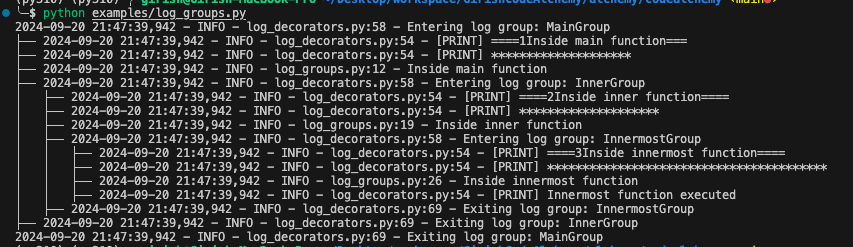
main_function()
Decorators
code_execution_time: This decorator logs the execution time of the decorated function.log_group(group_name): This decorator logs entry and exit points of the decorated function, grouping logs under a specified group name.
Development
If you want to contribute to the development of codealchemy, you can set up a development environment by following these steps:
- Clone the repository:
git clone https://github.com/girishcodealchemy/codealchemy.git
- Navigate to the project directory:
cd codealchemy
- Install the package in editable mode with development dependencies:
pip install -e .[dev]
Publishing to PyPI
This project uses GitHub Actions to automate the process of publishing the package to PyPI.
GitHub Action Workflow
The GitHub Action is defined in .github/workflows/publish-to-pypi.yml. It triggers on new releases and performs the following steps:
- Checkout the code.
- Set up Python.
- Install dependencies (
setuptools,wheel,twine). - Build the package.
- Publish the package to PyPI using credentials stored in GitHub Secrets.
Setting Up GitHub Secrets
To securely store your PyPI credentials, add the following secrets to your GitHub repository:
PYPI_USERNAME: Your PyPI username.PYPI_PASSWORD: Your PyPI password.
Creating a New Release
To trigger the GitHub Action and publish the package to PyPI:
- Navigate to your GitHub repository.
- Go to the
Releasestab. - Click
Draft a new release. - Fill in the release details (tag version, release title, description).
- Click
Publish release.
The GitHub Action will automatically run and upload the package to PyPI.
License
This project is licensed under the MIT License. See the LICENSE file for more details.


Download files
Download the file for your platform. If you're not sure which to choose, learn more about installing packages.
Source Distribution
Built Distribution
Filter files by name, interpreter, ABI, and platform.
If you're not sure about the file name format, learn more about wheel file names.
Copy a direct link to the current filters
File details
Details for the file codealchemy-1.1.tar.gz.
File metadata
- Download URL: codealchemy-1.1.tar.gz
- Upload date:
- Size: 4.6 kB
- Tags: Source
- Uploaded using Trusted Publishing? No
- Uploaded via: twine/5.1.1 CPython/3.10.15
File hashes
| Algorithm | Hash digest | |
|---|---|---|
| SHA256 |
d9f4684798c41907cf2d36d68f46222e3074e7f8af7e8ae1ec93f37866d858b3
|
|
| MD5 |
b5a858b634c23ee07700d9706f44db1e
|
|
| BLAKE2b-256 |
600e0871b23eef6103903d088dad4b67f7d2e9c7c50df8fdd066747b9577a7a9
|
File details
Details for the file codealchemy-1.1-py3-none-any.whl.
File metadata
- Download URL: codealchemy-1.1-py3-none-any.whl
- Upload date:
- Size: 5.4 kB
- Tags: Python 3
- Uploaded using Trusted Publishing? No
- Uploaded via: twine/5.1.1 CPython/3.10.15
File hashes
| Algorithm | Hash digest | |
|---|---|---|
| SHA256 |
ad37522f58cf5d1d59b77d40d7321af67ab407f357ae70a6348384077d1efaad
|
|
| MD5 |
a996d28b8928053f9e0a6c0f3c6eb533
|
|
| BLAKE2b-256 |
157e6fd697f26b323a7e461a35cbcc3572fd7d9fdefef54b83eec96afab6bcc6
|






