
CodeAway
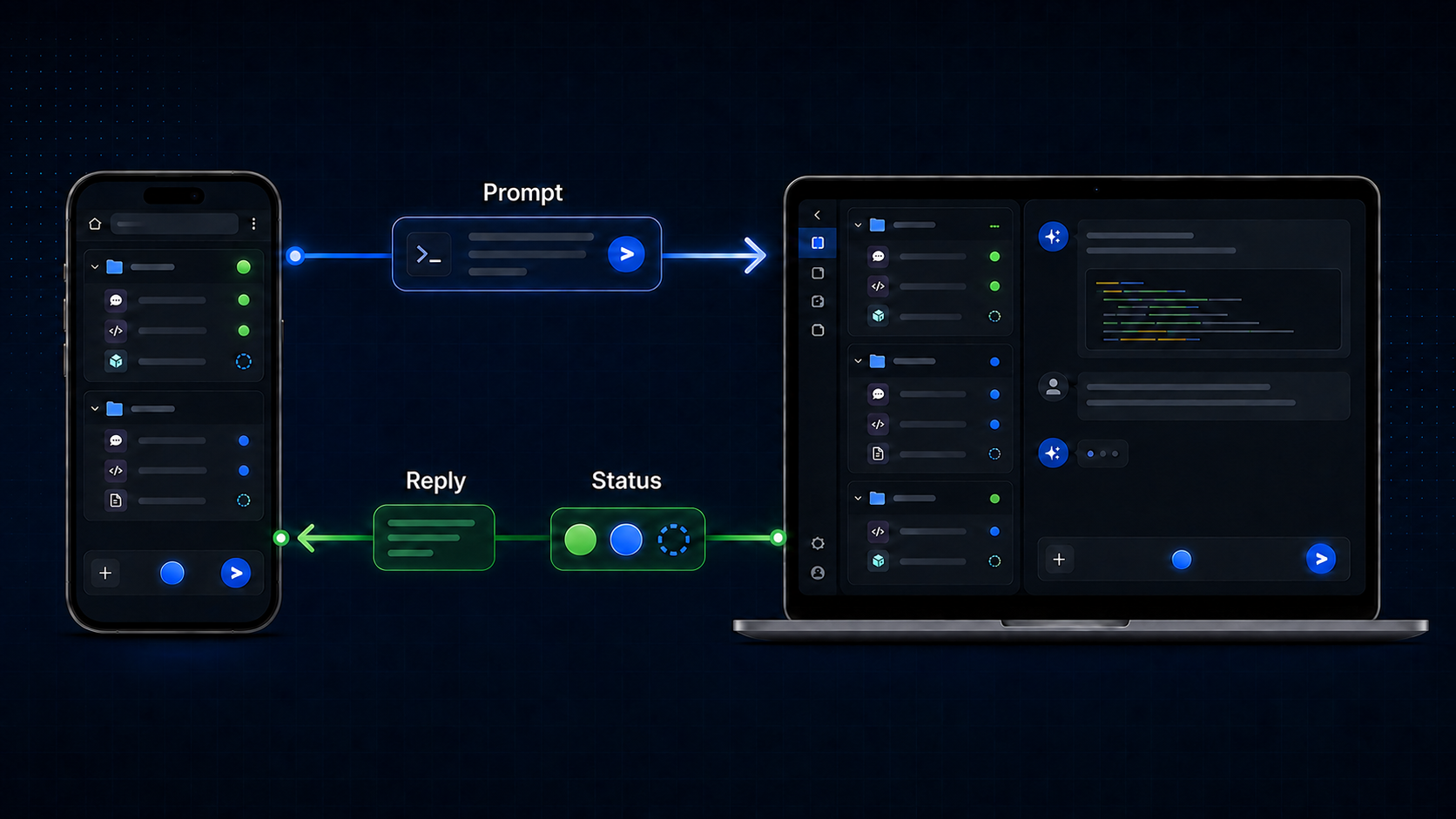
CodeAway is a thin, browser-based remote control for local AI coding agents.
Version 0.1 supports one pairing only: Windows with Codex Desktop. The
source repository is codeaway2; the Python package and command are
codeaway.
Status: early alpha. The Windows/Codex Desktop phone flow has been smoke-tested; expect rough edges and breaking changes.
Install
The shortest recommended path is:
uvx codeaway
uvx is convenient, not required. You can instead install with either:
pipx install codeaway
py -m pip install codeaway
Platform support
Windows with Codex Desktop is the supported pairing. macOS and Linux can install the package, but desktop control for those platforms is not implemented yet.
Run CodeAway
The first run is laptop-only. Start CodeAway in the foreground:
uvx codeaway
It listens on 127.0.0.1:8765 and opens /setup in the laptop browser. Choose
the visible Codex Desktop window and draw all three capture regions:
- Sidebar: the projects and tasks on the left.
- Conversation: the right pane above the input.
- Composer: the chat box only; it may grow taller. Do not include the full-width toolbar or status row.
To enable phone access, restart with an address assigned to the laptop on your LAN or Tailscale network:
uvx codeaway --ip <IPv4-LAN-or-Tailscale-address>
The explicit address is saved only after it binds successfully. Later
uvx codeaway launches reuse both that address and the saved calibration. If
the saved Codex window and all three regions resolve, CodeAway prints the phone
workspace URL without opening a laptop browser. The phone workspace still
links to /setup when recalibration is needed.
If a cached address is no longer available, CodeAway warns, falls back to
127.0.0.1, and saves that fallback. An invalid explicit address exits instead
of silently changing interfaces. Use --no-browser to suppress an otherwise
necessary setup launch and --port PORT to select and cache another port.
CodeAway v0.1 accepts IPv4 literals only; IPv6 addresses are rejected with an
actionable startup error.
Security: A non-loopback endpoint grants full desktop mouse and keyboard input control to every device that can reach it. CodeAway v0.1 has no pairing or authentication, so expose it only on a network boundary you trust.
Architecture
CodeAway deliberately separates two independent backend axes:
| Module | Backends | Responsibility |
|---|---|---|
agents.py |
Codex first; Claude Code and Cursor later | Owns application semantics: detection, projects and tasks, navigation, calibrated surfaces, and actions |
desktop.py |
Windows first; macOS and Linux later | Owns OS mechanics: windows, screenshots, accessibility, mouse, keyboard, and clipboard operations |
The server composes one agent backend with one desktop backend. For the first release that pair is Codex Desktop on Windows. Agent backends do not contain Windows APIs, and desktop backends do not contain Codex-specific behavior.
1 maintainer

Metadata
1 maintainer
Release files for codeaway 0.1.0
For a detailed explanation of source distributions (sdists) and built distributions (wheels), please see the package formats documentation.
Source distribution (sdist)
| File | Size | Uploaded | Provenance | Actions |
|---|---|---|---|---|
| codeaway-0.1.0.tar.gz | 1.4 MB | With provenance | Details for codeaway-0.1.0.tar.gz |
Built distribution (wheel)
| File | Interpreter | ABI | Platform | Actions Reset |
|---|---|---|---|---|
| codeaway-0.1.0-py3-none-any.whl | Python 3 | none | any | Details for codeaway-0.1.0-py3-none-any.whl |
Total release size: 1.4 MB
Release files / codeaway-0.1.0.tar.gz
| Download URL | codeaway-0.1.0.tar.gz |
|---|---|
| Size | 1.4 MB |
| Tags | Source |
|
SHA-256 checksum How to use checksums |
39f273e6945334f82c747caf3ae14ca45238a619e69ac051a58e203e47a512b8
|
|
BLAKE2b-256 checksum How to use checksums |
a8f21a57f63898e9121892e4a1a917baa665b603452f848a1648f323ba88cae9
|
| Upload date | |
|
Uploaded using Trusted Publishing? What is trusted publishing? |
Yes |
| Uploaded via |
twine/7.0.0 CPython/3.13.14
|
Provenance
Provenance describes where a file came from. On PyPI, provenance is shared via attestations, which provide a verifiable record of the build or publishing details. View details, limitations and caveats.


PyPI Publish Attestation
PyPI verified that this artifact, at this checksum, originated from the publisher listed below.
Signed by GitHub Actions, verified by PyPI on Sep 6, 2026.
Transparency logRelease files / codeaway-0.1.0-py3-none-any.whl
| Download URL | codeaway-0.1.0-py3-none-any.whl |
|---|---|
| Size | 34.5 kB |
| Tags | Python 3 |
|
SHA-256 checksum How to use checksums |
f3126fbad39a5707938294e404deca29488255783d30d05b501cf0e4b706a1c8
|
|
BLAKE2b-256 checksum How to use checksums |
7d584b09185a864f349880ccf98bd7b120f3de7d6b059b0ce23765933542a49c
|
| Upload date | |
|
Uploaded using Trusted Publishing? What is trusted publishing? |
Yes |
| Uploaded via |
twine/7.0.0 CPython/3.13.14
|
Provenance
Provenance describes where a file came from. On PyPI, provenance is shared via attestations, which provide a verifiable record of the build or publishing details. View details, limitations and caveats.
PyPI Publish Attestation
PyPI verified that this artifact, at this checksum, originated from the publisher listed below.
Signed by GitHub Actions, verified by PyPI on Sep 6, 2026.
Transparency logSecurity for codeaway 0.1.0
Provenance
Provenance describes where a file came from. On PyPI, provenance is shared via attestations, which provide a verifiable record of the build or publishing details. View details, limitations and caveats.
Full provenance
All 2 files in this release have been uploaded with provenance metadata.
Attestation for codeaway-0.1.0.tar.gz
PyPI Publish Attestation
PyPI verified that this artifact, at this checksum, originated from the publisher listed below.
Signed by GitHub Actions, verified by PyPI on Sep 6, 2026.
Transparency logA note on package security
PyPI is a repository for distributing packages, not a service for auditing them. While third-party security researchers and our staff do their best to detect and remove malicious packages, PyPI cannot guarantee the quality, security or suitability of any given package.
To learn more about protecting yourself from malicious actors, visit our package security documentation.













