
Codebase Brief
Project site: codebase-brief





Need a reviewed, task-specific handoff for a coding chat? Codebase Brief turns one coding task into a short file shortlist—with excerpts, reasons, and source paths—when your assistant cannot access the project directly or you want to choose exactly what context to share.
It works locally, without an AI service or account. Review the brief, save it, or paste it into the assistant you want to use.
When Codebase Brief fits
It is most useful when your chat cannot access the current local project, or when you want a small, reviewable handoff instead of giving an assistant broad repo access. Some tools now offer local-folder or GitHub-repository access—for example, ChatGPT Work and Codex, Claude's local and GitHub connections, and Gemini's GitHub import. Availability depends on the tool, plan, and setup. If your assistant can already read the current working tree and do the task safely, its built-in repo access may be simpler; you may not need Codebase Brief.
See it in action
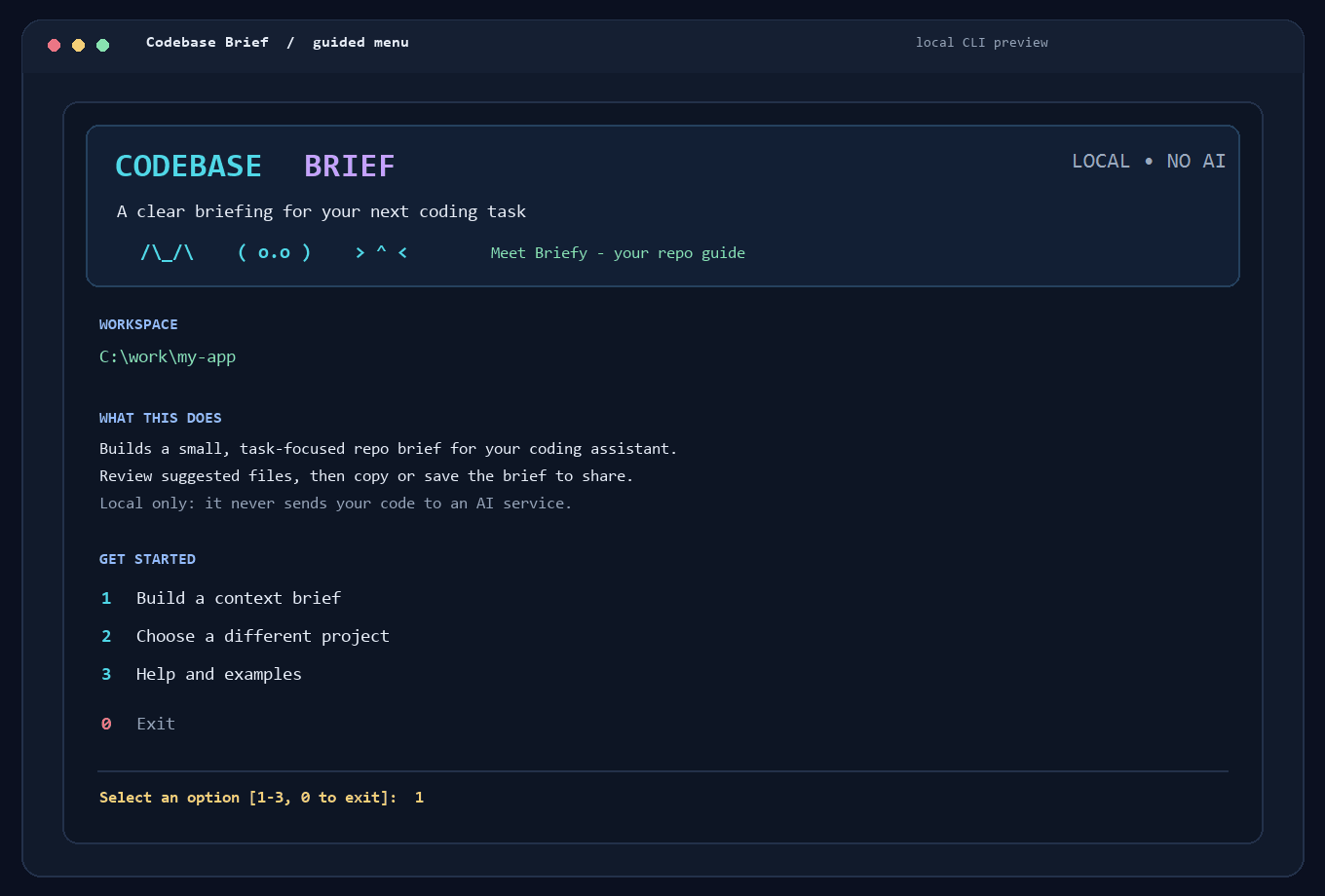
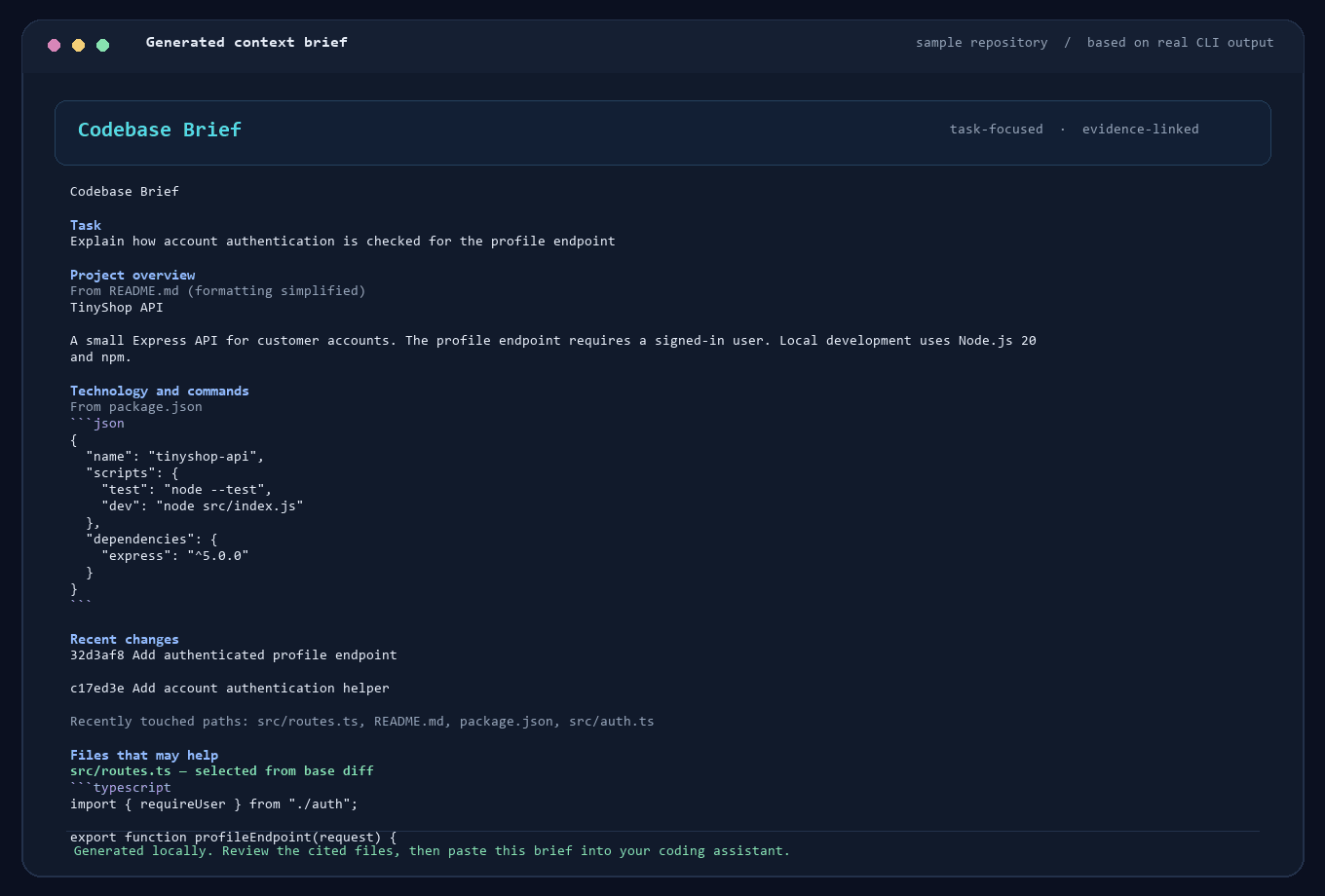
The first image is a terminal-style rendering of the app's actual numbered menu. The sample brief was generated by running Codebase Brief on a small example repository with a Git base ref.
Watch the 12-second product walkthrough.
Install the latest build
You need Python 3.10 or newer. Git is optional, but required for recent-history and base-diff details.
The current PyPI package includes the review-feedback summary, importer-aware --base selection, and a sample demo. Install it with pipx:
pipx install codebase-brief
brief "C:\work\my-app" --task "Trace the login flow" --copy
The brief is copied to your clipboard for pasting into your assistant. Replace the example path and task with yours. To use the numbered menu, run brief with no arguments.
Want to see a real example before choosing your project? Run brief --demo. It uses a tiny temporary example project and does not read or change your files.
If you do not have pipx installed, skip the command above and use the virtual-environment steps below instead; they work with the project's minimum Python version. To install pipx first, follow its official installation guide. The current pipx installer requires Python 3.11 or newer, while Codebase Brief itself supports Python 3.10 and newer.
Or use a virtual environment:
python -m venv .venv
.venv\Scripts\Activate.ps1
python -m pip install --upgrade codebase-brief
codebase-brief
On macOS or Linux, activate the environment with source .venv/bin/activate after creating it with python3 -m venv .venv.
If the brief command is not available, use python -m context_inject while that same virtual environment is active.
Use the menu
When the menu opens, it uses the folder you launched it from as the starting project. Type a number and press Enter:
- 1 — Build a context brief: Describe the coding task, optionally enter a Git base ref, then accept or change the approximate size limit.
- 2 — Choose a different project: Point the tool at another local repository or source folder.
- 3 — Help and examples: See the workflow and an example command.
- 0 — Exit: Close the menu.
In plain terms, Codebase Brief makes a small guide to a project so an AI coding assistant can get oriented before helping with a task. It does not write or fix code. It reads project information locally and prepares a guide for you to review and share.
For selected source files, it looks for code near words in your task and labels each excerpt with its source line range. This is a bounded, best-effort search: if it finds no clear match, it falls back to a general excerpt. Check the cited lines in your editor before relying on them.
Before generating the brief, the tool shows suggested files and why they were selected. Press Enter to keep the checked files, type file numbers to toggle selections, or use add path/to/file.py to include another safe text file from the repository. Type none for an overview without source excerpts. After the brief is shown, saved, or copied, Codebase Brief prints a copyable summary of files kept, removed, added from suggestions, and manually added. To help improve file selection, paste that summary into the tester feedback form along with your task and whether the brief helped. Do not include private source code or secrets. The menu's save-here choice writes context.md in the folder where you launched the menu; if that is the target repository, the file will be created there. Choose the show or copy option to avoid writing a file into that folder.
For your first try, choose a project you know and a task you understand. Check whether the suggested files are the ones you would have shown a coding assistant yourself.
Run it with a command
You can skip the menu and generate a brief directly:
codebase-brief "C:\work\my-app" --task "Add authentication middleware" --base main --budget 2400 --output context.md
Replace the example folder and task with your own. --base main prioritizes files changed between main and the current HEAD; omit it if you do not want a Git diff. --output context.md saves the result to that path. Without --output, the brief is printed in the terminal.
To copy the result directly to your clipboard, use --copy instead of --output:
codebase-brief "C:\work\my-app" --task "Find the login flow" --copy
The generated Markdown is a starting map for your assistant, not a complete copy or analysis of the repository. Review it, then paste the whole brief into the coding assistant where you want to work. It tells the assistant to answer the Task at the top using the brief as context. Codebase Brief prepares the handoff; the AI chat does the analysis or coding.
What it includes
- Project documentation and common stack manifests, such as
package.jsonandpyproject.toml. - Recent Git commit subjects and changed paths when Git is available.
- A short list of task-related files with a note explaining each suggestion.
- Small excerpts from selected files, within the requested size budget.
- Source paths throughout the brief so you can open and verify the material.
The file picker uses task words, recent changes, selected Git diffs, common entry points, and direct local Python or JavaScript/TypeScript imports. With --base, it also scans supported source files for direct imports of changed files. It understands literal dynamic imports, Python importlib calls with literal module names, and simple paths aliases in tsconfig.json or jsconfig.json. This is still static analysis: imports assembled from runtime values, complex config inheritance, generated modules, and unsupported languages may be missed.
Privacy and limitations
- Repository reading and brief generation happen on your computer. The application has no AI calls, telemetry, or hosted service.
- The tool does not write to the target repository just to read it or generate a brief. It writes a file only when you choose a save option; menu option 2 saves
context.mdin the current working folder, which may be the target repository. - Common credential files, ignored files, generated files, and private-key files are excluded. Some recognizable secret formats and assignments are redacted.
- Filtering is best-effort, not a security guarantee or full secret scan. Review the brief before sharing it, especially when working with private code.
- The size budget is approximate: it estimates tokens from character count and is not tied to a particular model tokenizer.
- Without Git, the tool still reads supported documentation and manifests, but cannot include Git history or diff details.
Development
Clone the repository, create a virtual environment, and install the project in editable mode:
python -m venv .venv
.venv\Scripts\Activate.ps1
python -m pip install --editable .
python -m unittest discover -s tests -v
See CONTRIBUTING.md for contribution notes, CHANGELOG.md for project changes, and LICENSE for the MIT terms.
Help shape Codebase Brief
This is an early open-source project. If you try it, the most useful feedback is which suggested files you kept, removed, or added—and whether the resulting brief gave your assistant enough context. Use the tester feedback form; use GitHub Issues for reproducible bugs and concrete feature requests. The launch kit has a short demo plan, the Product Hunt draft contains prepared listing copy, and PyPI setup is in PYPI_PUBLISHING.md.
1 maintainer

Metadata
1 maintainer
Release files for codebase-brief 0.1.4
For a detailed explanation of source distributions (sdists) and built distributions (wheels), please see the package formats documentation.
Source distribution (sdist)
| File | Size | Uploaded | |
|---|---|---|---|
| codebase_brief-0.1.4.tar.gz | 32.5 kB | Details |
Built distribution (wheel)
| File | Interpreter | ABI | Platform | Reset |
|---|---|---|---|---|
| codebase_brief-0.1.4-py3-none-any.whl | Python 3 | none | any | Details |
Total release size: 57.1 kB
Release files / codebase_brief-0.1.4.tar.gz
| Download URL | codebase_brief-0.1.4.tar.gz |
|---|---|
| Size | 32.5 kB |
| Tags | Source |
|
SHA-256 checksum How to use checksums |
f905c98bf72884270e12d017e12217017a18ef17cdc0f2e05a735a937fb5b163
|
|
BLAKE2b-256 checksum How to use checksums |
6274a70c41f41ca2b34fb534e11ec7c330676872ba23f3248f5947fb2e1d9070
|
| Upload date | |
|
Uploaded using Trusted Publishing? What is trusted publishing? |
Yes |
| Uploaded via |
twine/7.0.0 CPython/3.13.14
|
Provenance
Provenance describes where a file came from. On PyPI, provenance is shared via attestations, which provide a verifiable record of the build or publishing details. View details, limitations and caveats.


PyPI Publish Attestation
PyPI verified that this artifact, at this checksum, originated from the publisher listed below.
Signed by GitHub Actions, verified by PyPI on Oct 13, 2026.
Transparency logRelease files / codebase_brief-0.1.4-py3-none-any.whl
| Download URL | codebase_brief-0.1.4-py3-none-any.whl |
|---|---|
| Size | 24.6 kB |
| Tags | Python 3 |
|
SHA-256 checksum How to use checksums |
2f68dc35dfb6ac4026896483f1c530e0c320ee6f88e217fa3456ffdd7e958547
|
|
BLAKE2b-256 checksum How to use checksums |
490d65b145b178d8983dbad5679362edde59c0a84f2fc3431524437ba7a3b4e3
|
| Upload date | |
|
Uploaded using Trusted Publishing? What is trusted publishing? |
Yes |
| Uploaded via |
twine/7.0.0 CPython/3.13.14
|
Provenance
Provenance describes where a file came from. On PyPI, provenance is shared via attestations, which provide a verifiable record of the build or publishing details. View details, limitations and caveats.
PyPI Publish Attestation
PyPI verified that this artifact, at this checksum, originated from the publisher listed below.
Signed by GitHub Actions, verified by PyPI on Oct 13, 2026.
Transparency log













