

Automated code benchmark solution.
Empower developers with tools to trace and analyze project performances.
Introduction
What is Codebench?
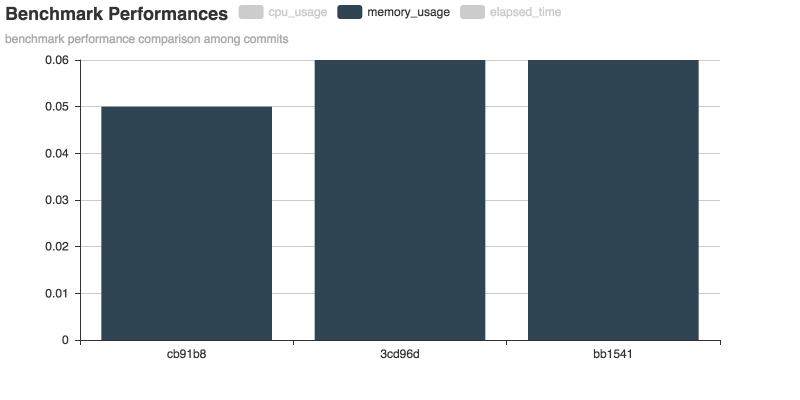
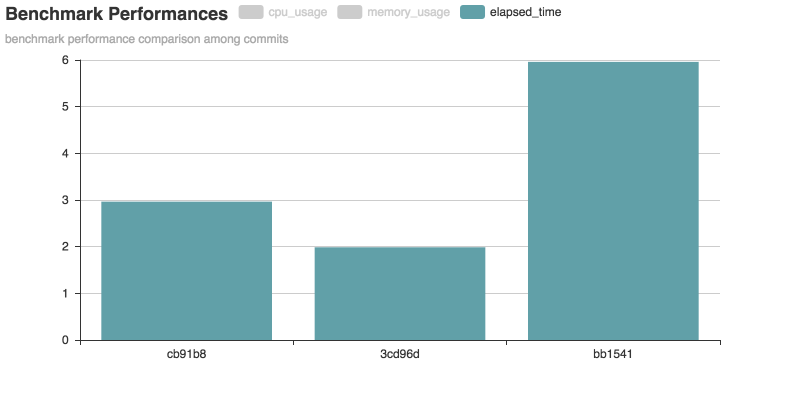
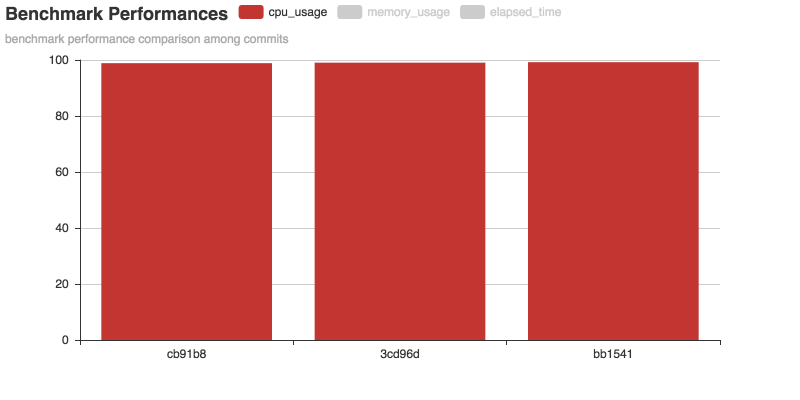
Codebench is a tool that runs user-defined benchmark programs, monitors system information and generates reports. It is most powerful when using in a project tracked by git. It runs benchmarks based on different commits and reports the system usage difference, so that users can compare and track performance changes of their project across commits. It can also be used in CI (Continuous Integration) to detect recent commits that increases/decreases project performance.
What Codebench is not?
Codebench itself does not provide benchmark programs. It is not smart enough to generate a benchmark program for your code. Instead, it can be considered as a wrapper or a supervisor for your benchmark.
Features
- Normal Mode
- comparison among commits
- auto-generated report
- CI Mode (in development)
- comparison with baseline
- auto-generated report
- threshold alarms
Installation
Codebench can be simply installed by running:
pip install codebench
If you want to install from a source distribution, extract the tarball and run the following command:
python setup.py install
Usage
Command Line Interface
Codebench provides a command line interface. Run codebench -h for details.
Sample
See codebench-sample for details.
A quick demo is demonstrated below:
codebench --before ./before_script.sh --start ./benchmark.py \
--report_type chart --commits cb91b8 3cd96d bb1541
1 maintainer

Metadata
1 maintainer
Release files for codebench 0.0.2
For a detailed explanation of source distributions (sdists) and built distributions (wheels), please see the package formats documentation.
Built distributions (wheels)
| File | Interpreter | ABI | Platform | Reset |
|---|---|---|---|---|
| codebench-0.0.2-py3-none-any.whl | Python 3 | none | any | Details |
| codebench-0.0.2-py2-none-any.whl | Python 2 | none | any | Details |
Total release size: 16.8 kB
Release files / codebench-0.0.2-py3-none-any.whl
| Download URL | codebench-0.0.2-py3-none-any.whl |
|---|---|
| Size | 8.4 kB |
| Tags | Python 3 |
|
SHA-256 checksum How to use checksums |
3555cf69f805b03d4cb78a21b551d2223f77ce82187cf98f27d4b8ebc4aca36d
|
|
BLAKE2b-256 checksum How to use checksums |
d5838375bdf4c71b5110d657428e9798c4b59a9ec4882026a20658772b63475f
|
| Upload date | |
|
Uploaded using Trusted Publishing? What is trusted publishing? |
No |
| Uploaded via |
twine/1.12.1 pkginfo/1.4.2 requests/2.19.1 setuptools/40.6.2 requests-toolbelt/0.8.0 tqdm/4.28.1 CPython/3.7.1
|
Release files / codebench-0.0.2-py2-none-any.whl
| Download URL | codebench-0.0.2-py2-none-any.whl |
|---|---|
| Size | 8.4 kB |
| Tags | Python 2 |
|
SHA-256 checksum How to use checksums |
55bfda4dc6b06b4ea4b0fdb99a1265af7e304fe99890bd3e731f4672dc50d3ce
|
|
BLAKE2b-256 checksum How to use checksums |
91ba185627825142170061eb2db4e92cc1ca0e3d5d3c8582f74c7e18e0b80bda
|
| Upload date | |
|
Uploaded using Trusted Publishing? What is trusted publishing? |
No |
| Uploaded via |
twine/1.12.1 pkginfo/1.4.2 requests/2.19.1 setuptools/40.6.2 requests-toolbelt/0.8.0 tqdm/4.28.1 CPython/3.7.1
|













