
CodeFence
Check AI-written code before you commit it.
Offline. Zero dependencies. No account. No telemetry.
Free: full 30-rule scanner. Pro ($19, one-time): git hook, baseline, policy, SARIF/HTML. See pricing ↓
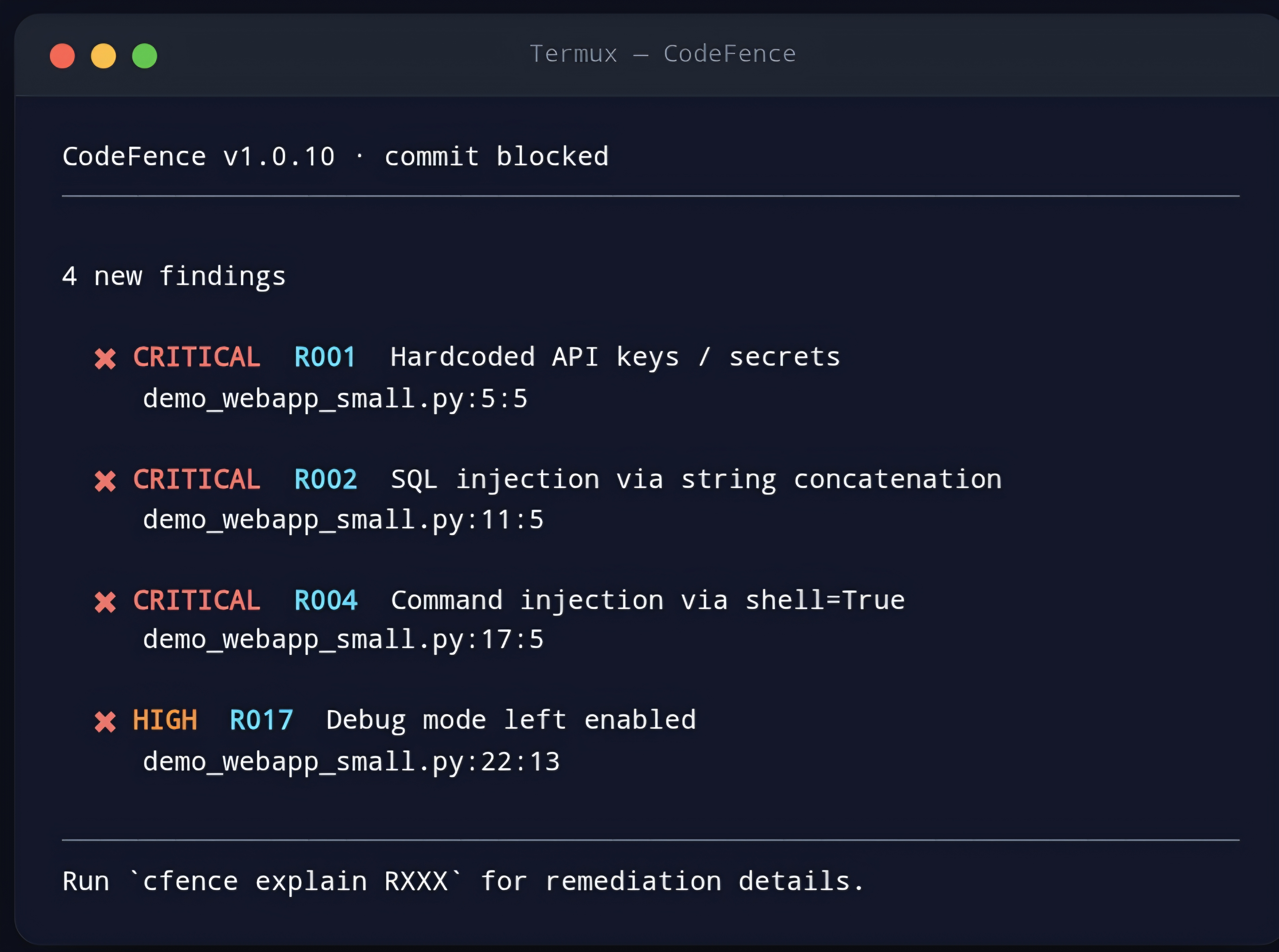
What it does
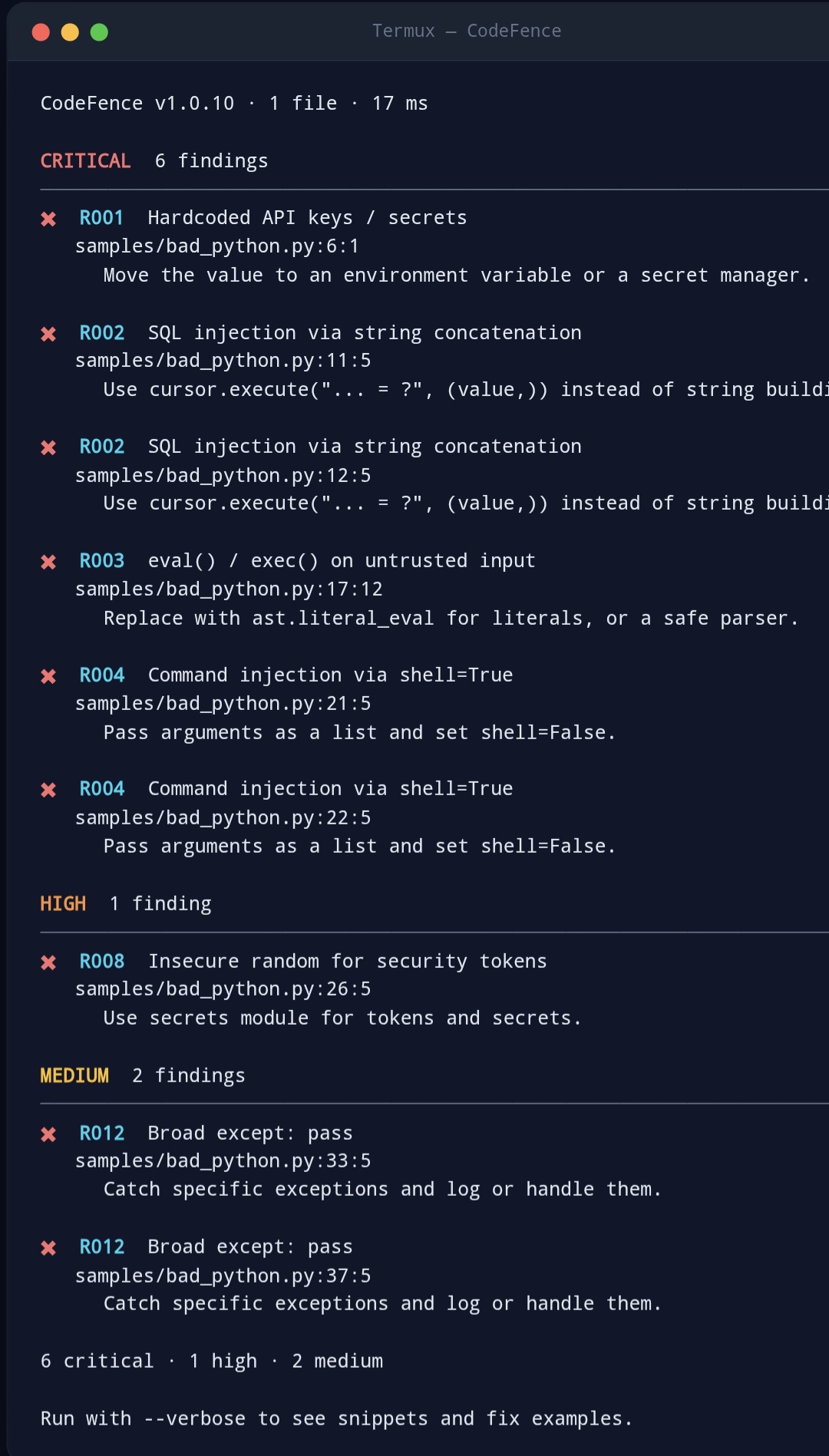
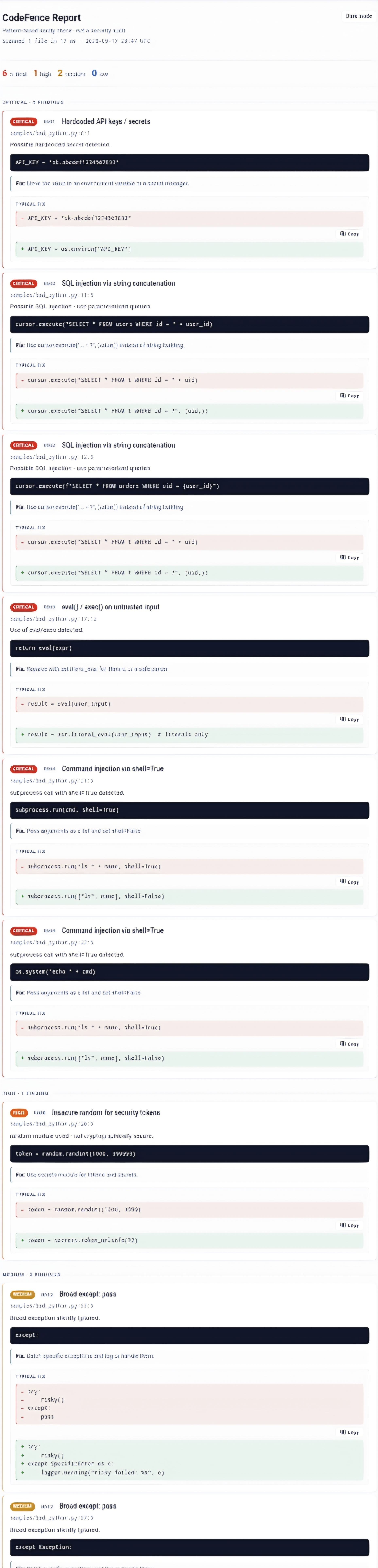
CodeFence is a single-file, zero-dependency Python CLI that scans source code for selected dangerous patterns before you commit. It runs a curated set of rules and reports findings with:
- severity (critical / high / medium / low / info)
- exact location (file:line:column)
- code snippet
- short remediation
- typical before/after fix example
It is designed around the risks commonly encountered in AI-assisted development, but scans ordinary source code regardless of how it was written.
The gate workflow:
AI writes code
     |
     v
CodeFence runs on staged files
     |
     v
policy evaluation (allow / warn / block)
     |
     v
PASS or BLOCKED
     |
     v
git commit
What it does NOT do
- Not an autofixer. It shows a typical fix; it does not edit files.
- Not a security audit. It is a pattern-based sanity checker.
- Not a replacement for Semgrep, CodeQL, or professional review.
- Not interprocedural. No dataflow, no taint analysis.
- Not a guarantee. A clean scan does not mean the code is secure.
For per-rule samples, known false-positive scenarios, false-negative
scenarios, and the full detection methodology, see
docs/DETECTION_METHODOLOGY.md.
Install
pip install codefence
Or run it directly:
python3 codefence.py app.py
Quick start
One-time setup in a git repository:
codefence init
This installs a pre-commit hook and creates .codefence/config.json. Every commit is then gated automatically.
Daily usage:
codefence --staged          # scan only what is staged
codefence --staged --diff   # only NEW findings since baseline
codefence baseline          # snapshot current findings
One-off scans:
codefence src/
codefence --format json --output report.json src/
codefence --format html --output report.html src/
codefence --format sarif --output results.sarif .
Policy-as-code:
codefence --policy company-policy.json --staged
codefence policy validate company-policy.json
Explanation:
codefence explain R002
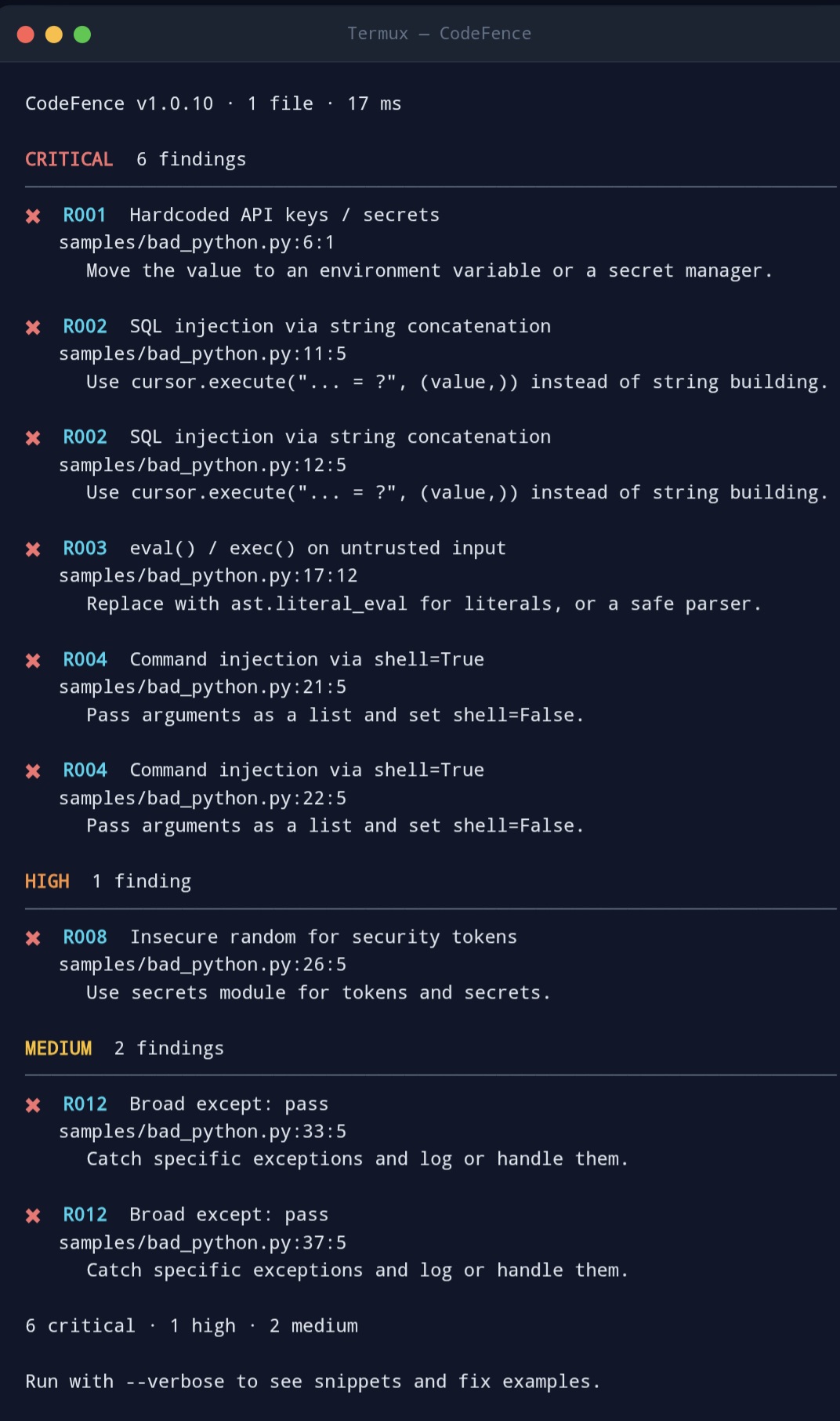
The 30 rules
Rules are shipped in rules.json (human-readable JSON). You can inspect them, and you can add or disable rules for your own use.
Secrets
- R001 - Hardcoded API keys / secrets
- R011 - Hardcoded database credentials
- R028 - Env var with hardcoded fallback secret
Injection
- R002 - SQL injection via string concatenation (Python)
- R003 - eval() / exec() on untrusted input (Python)
- R004 - Command injection via shell=True (Python)
- R005 - innerHTML with unsanitized data (JavaScript)
- R010 - Path traversal
- R014 - Prototype pollution (JavaScript)
- R019 - Unsafe deserialization (pickle, yaml.load)
Authentication
- R006 - Missing authentication on endpoints
- R015 - Missing rate limiting on public endpoints
- R018 - Open redirect
- R020 - Never-expiring tokens / JWT
Cryptography
- R008 - Insecure random for security tokens (Python)
- R009 - Disabled TLS/SSL verification
- R016 - MD5 / SHA1 for password hashing
Configuration
- R007 - Overly permissive CORS (*)
- R017 - Debug mode left enabled
- R021 - Missing security headers (Express)
Reliability
- R022 - Race conditions (check-then-act)
- R026 - HTTP request without timeout
- R027 - Naive datetime (no timezone, context-aware)
Quality
- R012 - Broad except: pass
- R013 - Mutable default arguments
- R023 - Logging sensitive data
- R024 - Unused imports / dead code
- R025 - Promise rejection ignored (JavaScript)
AI-specific
- R030 - Typosquatted package imports
- R031 - TODO / FIXME / HACK in new code
Each rule carries a confidence level and a stable rule_version + fingerprint for baseline stability.
Configuration
Options can be passed as CLI flags or through a JSON config file (auto-discovered at .codefence/config.json after 'codefence init').
Example .codefence/config.json:
{
  "schema": "codefence/config-v1",
  "format": "json",
  "severity": "medium",
  "include": ["*.py", "*.js"],
  "exclude": ["node_modules", ".git", "venv", "samples"],
  "max_size": 2097152,
  "cache": false
}
Priority: CLI flags > config file > built-in defaults.
Optional cache
Pass --cache to enable a local cache at ~/.cache/codefence/. The cache is keyed by SHA-256 of the file content plus a fingerprint of rules.json. It is off by default. See SECURITY.md for how the cache is protected.
Optional history
Pass --history to record this scan in a local SQLite database at ~/.local/share/codefence/history.db. Off by default.
Set CODEFENCE_NO_HISTORY=1 to disable history entirely, even when --history is set.
Query history:
codefence history
codefence stats
Security and privacy
Free tier — no network calls at runtime:
- Zero network calls during scans.
- Zero telemetry.
- Zero data upload.
Pro activation — one call, once, per machine:
- The first time you use a Pro feature, CodeFence validates your license key against Getly's public endpoint.
- No account, no email, no tracking, no device fingerprint.
- After the first validation, the result is cached locally at
~/.codefence/getly.json. - From that point on, CodeFence runs fully offline. The license is permanent. Silent background refreshes are attempted when a network is available, but a missing network never disables Pro.
Files CodeFence writes:
--outputtarget, when specified~/.cache/codefence/(only when--cacheis set)~/.local/share/codefence/(only when--historyis set)~/.codefence/getly.json(only for Getly Pro licenses)
CodeFence never writes to the files you scan, and never executes the code you scan.
The full threat model is documented in SECURITY.md.
Updates
Free updates for all v1.x releases:
pip install --upgrade codefence
Your license key keeps working across updates. No re-activation needed. If a future v2.0 introduces a new major license, that will be stated clearly before it ships.
Verifying the download
Every shipped file is hashed in CHECKSUMS.txt. To verify:
sha256sum codefence.py rules.json
Compare the output with the corresponding lines in CHECKSUMS.txt. If the hashes do not match, do not use the file.
Free vs Pro
Free gives you the full scanner. Pro gives you the workflow.
You are not paying for more detection. The Free tier includes all 30 rules. You are paying for the automation layer that turns findings into a gate.
| Feature | Free | Pro ($19) |
|---|---|---|
| All 30 rules (Python + JavaScript) | Yes | Yes |
| CLI output (colored, compact, verbose) | Yes | Yes |
| JSON output | Yes | Yes |
| Configuration, include/exclude, severity filters | Yes | Yes |
| Offline, zero dependencies, zero network | Yes | Yes |
--format sarif |
- | Yes |
--format html |
- | Yes |
Git pre-commit hook (init-hook) |
- | Yes |
--staged / --diff |
- | Yes |
baseline |
- | Yes |
--policy + policy validate |
- | Yes |
--evidence (deterministic hashes) |
- | Yes |
--history + history / stats |
- | Yes |
explain RXXX |
- | Yes |
init-github (GitHub Actions workflow) |
- | Yes |
init (one-command setup) |
- | Yes |
Free = detect. Pro = enforce.
Activating Pro
After purchase you receive a unique license key of the form
GETLY-XXXX-XXXX-XXXX-XXXX. Store it in one of two places.
Option 1 — File:
mkdir -p ~/.codefence
echo 'GETLY-XXXX-XXXX-XXXX-XXXX' > ~/.codefence/license.key
Option 2 — Environment variable (recommended for CI):
export CODEFENCE_LICENSE_KEY='GETLY-XXXX-XXXX-XXXX-XXXX'
The first time a Pro feature is used, CodeFence validates the key
against Getly's public endpoint. The result is cached locally at
~/.codefence/getly.json. From that point on, CodeFence runs fully
offline. The license is permanent and needs no re-activation.
Legacy identifier:signature keys are still accepted if you have one.
Verify activation:
cfence init-hook # works only with a valid Pro license
The license is verified locally with HMAC-SHA256. No network call, no telemetry, no activation server.
Payment and pricing
$19 USD, one-time.
Includes the current major version (v1.x) and its maintenance releases. No subscription. No support. No account.
Payments are available in cryptocurrency only:
- USDT (TRC20 or BEP20)
- BTC
- SOL
- TRX
- XRP
Official purchase channels:
- Getly
- SilkRoadx402
- ctlx.cc
If you find CodeFence on any other site claiming to sell it, treat that site as unofficial.
License
Source-available. Not open source.
Summary:
- Personal use on up to 3 devices that you own or control.
- Read, study, and privately modify the source.
- No redistribution. No resale. No bundling.
- No scanning-as-a-service on a commercial basis.
For plain-language answers to common questions, see LICENSE_FAQ.md. For the full legal terms, see LICENSE.txt and TERMS_OF_USE.md.
Governing law: England and Wales. Mandatory consumer protections in your country of residence remain fully applicable.
Support
There is no support.
- No email. No chat. No issue tracker.
- No guaranteed updates.
- No bug-fix commitments.
If you need a product with ongoing support, please look elsewhere.
FAQ
Q: Will this find every security issue in my code? A: No. It finds a curated set of dangerous patterns. It is a sanity check, not a security audit.
Q: Can I use it in CI? A: Yes. JSON and SARIF outputs are pure on stdout. Exit codes are stable.
Q: Does it phone home? A: No. Zero network calls. You can verify by reading the source or by running it under strace.
Q: Does it fix my code? A: No. It shows a typical before/after fix. You apply it yourself.
Q: Does it support TypeScript? A: No. Python, JavaScript (.js, .mjs, .cjs).
Q: What about false positives? A: Pattern-based scanners always produce some. Rules with lower confidence are flagged as such. You can disable any rule in rules.json or via policy overrides.
Q: Can I modify the source? A: Yes, privately. See LICENSE_FAQ.md.
Q: Can my team use it? A: Each developer using CodeFence on their own machine needs their own license. One license covers one individual on up to three devices.
Q: How do I get updates? A: There are no guaranteed updates.
Q: Can I get a refund? A: See REFUND_POLICY.md.
A note on honesty
This product is built to do a specific, limited thing well. It does not overstate what it can do. Every claim in this README is traceable to a line of code or a test. If you find a claim that is not supported by what the tool actually does, please report it.
End of README.
1 maintainer

Release files for codefence 1.0.12
For a detailed explanation of source distributions (sdists) and built distributions (wheels), please see the package formats documentation.
Source distribution (sdist)
| File | Size | Uploaded | |
|---|---|---|---|
| codefence-1.0.12.tar.gz | 88.3 kB | Details |
Built distribution (wheel)
| File | Interpreter | ABI | Platform | Reset |
|---|---|---|---|---|
| codefence-1.0.12-py3-none-any.whl | Python 3 | none | any | Details |
Total release size:183.0 kB
Release files / codefence-1.0.12.tar.gz
| Download URL | codefence-1.0.12.tar.gz |
|---|---|
| Size | 88.3 kB |
| Tags | Source |
|
SHA-256 checksum How to use checksums |
40e7c4e4659afad5f88f02f861e89511ec353512207bbc3130419d3d34ffee77
|
|
BLAKE2b-256 checksum How to use checksums |
2bd574ab32b61961dfbe206373ec5b80b5b59ee6f10a04760109b7eafc13a6a8
|
| Upload date | |
|
Uploaded using Trusted Publishing? What is trusted publishing? |
No |
| Uploaded via |
twine/7.0.0 CPython/3.13.13
|
Release files / codefence-1.0.12-py3-none-any.whl
| Download URL | codefence-1.0.12-py3-none-any.whl |
|---|---|
| Size | 94.8 kB |
| Tags | Python 3 |
|
SHA-256 checksum How to use checksums |
7bc5dc4273b9ece9e761b9afa47ec14f8f2d96918150d2aaa42a6b8bf2a14880
|
|
BLAKE2b-256 checksum How to use checksums |
450dfa0827fe0638461bebb399ffbccd92cb20c3aea8ae1ff78076e922b1d816
|
| Upload date | |
|
Uploaded using Trusted Publishing? What is trusted publishing? |
No |
| Uploaded via |
twine/7.0.0 CPython/3.13.13
|














