
CodeFinetuner





CodeFinetuner fine-tunes a local code autocomplete model on your own repository for use in editors like VS Code or Vim/Neovim. It trains a Low-Rank Adapter (LoRA) on Structure-Aware Fill-in-the-Middle (FIM) examples so the model learns the structure and patterns of your codebase.
The result is an autocomplete model specialized on your codebase that runs entirely on your machine. If you have the hardware to fine-tune locally, this keeps your source code fully private, it never leaves your system, no cloud service, no external API.
Table of Contents
- Demo
- Architecture
- Project Structure
- How Training Examples Are Created
- Quick Start
- Installation
- Configuration
- Usage
- MLflow Tracking
- Evaluation
- Fine-tuned Model Usage
- Docker Image
- Tree-sitter Customization
- Tests
- Resources
- License
Demo
https://github.com/user-attachments/assets/d4fe8709-5b3a-4aec-bc4b-898ca3d66bd0
Architecture
CodeFinetuner follows a simple pipeline. First, raw code is parsed and turned into FIM examples. These examples are then used to train a LoRA adapter and evaluate the fine-tuned model using multiple metrics. Finally, the model is converted into GGUF format for deployment.
Raw Code Files
     |
     v
[Preprocess]  -- tree-sitter parsing -> FIM examples -> tokenized jsonl datasets
     |
     v
[Finetune]    -- LoRA adapter training -> merged safetensors model
     |
     v
[Evaluate]    -- CodeBLEU, SentenceBLEU, edit similarity, exact match, line match, perplexity
     |
     v
[Convert]     -- GGUF conversion -> quantized model for deployment
Project Structure
.
├── src/
│   └── codefinetuner/           # Core packages
│       ├── preprocess/
│       ├── finetune/
│       ├── evaluate/
│       └── convert/
├── config/                      # User configuration
│   └── codefinetuner_config.yaml
├── data/                        # Default data directory
├── outputs/                     # Pipeline outputs
├── scripts/                     # Utility scripts
├── tests/                       # Tests
├── third_party/                 # External submodules
└── docs/                        # Documentation
How Training Examples Are Created
CodeFinetuner builds FIM examples from real code structure. It first extracts blocks such as functions or classes, then masks smaller sub-blocks like statements or expressions for the model to predict. This approach helps the model learn the logical structure of your codebase instead of unrelated fragments.
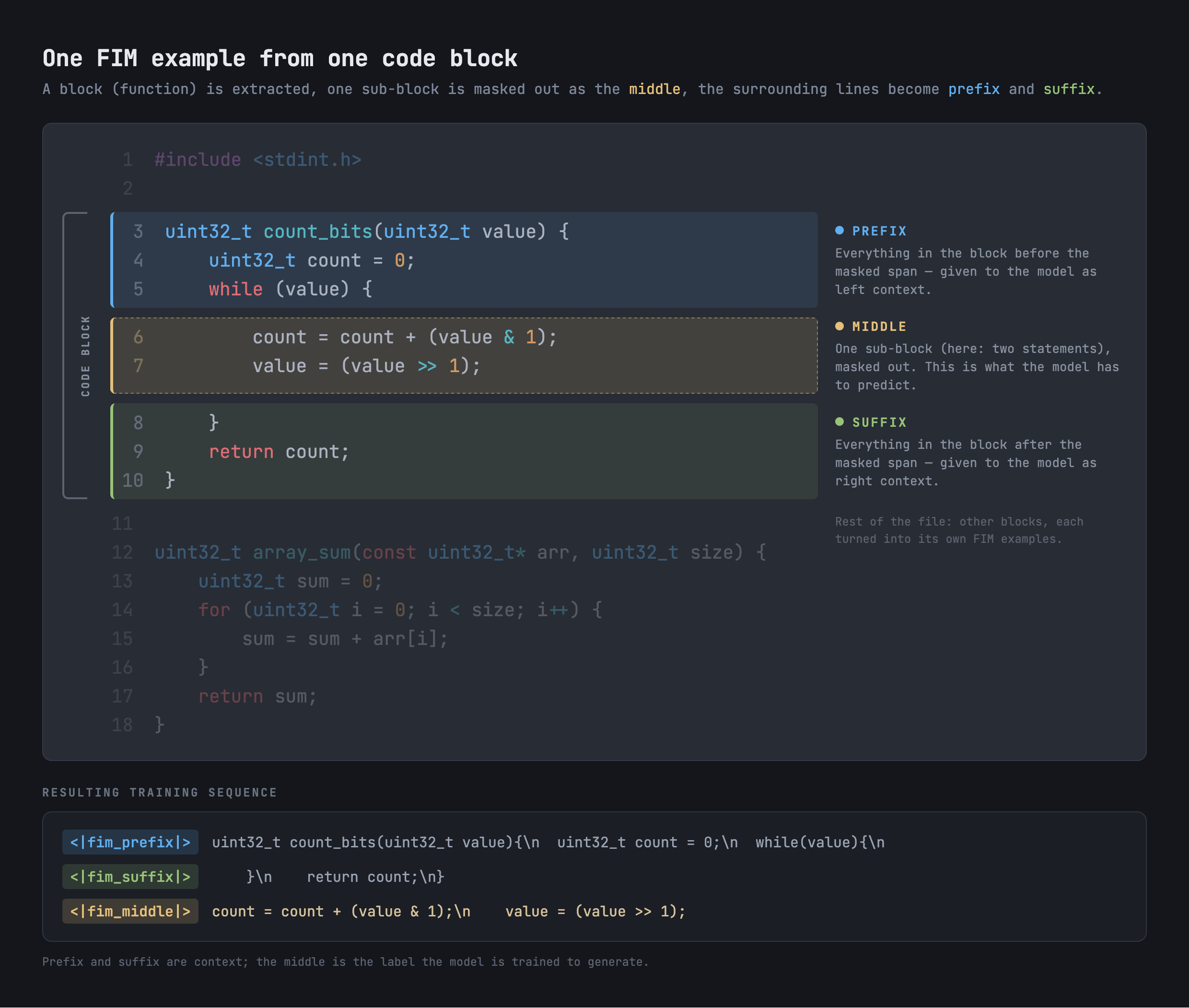
Additionally, config parameters are available to include randomly split FIM examples in your dataset, which can sometimes improve fine-tuning results.
Quick Start
1. Installation
Install CodeFinetuner globally to run the pipeline anywhere on your system:
uv tool install codefinetuner
2. Configuration
Download the default configuration file and adjust the parameters as needed:
curl -L -O https://raw.githubusercontent.com/cuolm/codefinetuner/master/config/codefinetuner_config.yaml
Alternatively, create one manually according to the Configuration section.
3. Adding Your Data
Prepare your training data directory:
mkdir -p data
Place your target code files inside the data/ directory.
For manual dataset splitting, place your files into data/train/, data/eval/, and data/test/, then update split_mode: "manual" in codefinetuner_config.yaml (default is "auto").
4. Execution
Run the pipeline:
codefinetuner --config="codefinetuner_config.yaml"
Installation
As a Global CLI Tool
uv tool install codefinetuner
As a Library Dependency
# Using uv
uv add codefinetuner

# Using pip
pip install codefinetuner
From Source
git clone --recurse-submodules https://github.com/cuolm/codefinetuner
cd codefinetuner

# Using uv (Recommended)
uv sync

# Using pip
python3 -m venv .venv
source .venv/bin/activate  # On Windows: .venv\Scripts\activate
pip install -r requirements.txt
pip install -e .
Note: See MLflow Tracking to install with MLflow tracking support (
codefinetuner[mlflow]).
Note: For NVIDIA GPU training, your driver and the installed PyTorch build must be compatible. See the NVIDIA GPU / CUDA Compatibility Guide if training falls back to CPU or stops with a GPU error.
Configuration
The pipeline uses a single-source-of-truth YAML configuration file. It utilizes YAML anchors (&globals) to share core parameters across all stages (preprocess, finetune, evaluate, convert), ensuring consistency and reducing redundancy.
Configuration Structure
Create codefinetuner_config.yaml using the template below. For the full parameter list, see the Configuration Reference Guide.
# globals contain all the mandatory parameters.
globals: &globals
  workspace_path: null  # null: defaults to current working directory (CWD)
  model_name: "unsloth/Qwen2.5-Coder-3B"
  fim_prefix_token: "<|fim_prefix|>"
  fim_middle_token: "<|fim_middle|>"
  fim_suffix_token: "<|fim_suffix|>"
  fim_pad_token: "<|fim_pad|>"
  eos_token: "<|endoftext|>"
  label_pad_token_id: -100
  max_token_sequence_length: 1024
  data_language: "c"
  data_extensions: [".c", ".h"]
  use_unsloth: False  # True enables Unsloth optimizations, requires CUDA

preprocess:
  <<: *globals  # inherits all global parameters
  split_mode: "auto"
  # ... (preprocess specific settings)

finetune:
  <<: *globals
  lora_r: 32
  trainer_num_train_epochs: 1
  # ... (finetune specific settings)

evaluate:
  <<: *globals
  benchmark_sample_size: 250
  # ... (evaluate specific settings)

convert:
  <<: *globals
  # ... (convert specific settings)
Note: See
config/codefinetuner_config.yamlfor a full production example.
Data Preparation
Place source files in your raw_data_path (default: workspace_path/data).
- Auto Split: Place files directly in the directory.
- Manual Split: Create
train,eval, andtestsubfolders insideraw_data_pathand assign files according to your manual split preferences.
Usage
CLI Usage
If installed via uv tool install:
codefinetuner --config="codefinetuner_config.yaml"
If running within the source repository cloned from GitHub:
# Installed via uv (Recommended)
uv run codefinetuner --config="config/codefinetuner_config.yaml"

# Installed via pip
python3 -m codefinetuner.pipeline --config="config/codefinetuner_config.yaml"
Pipeline flags
--config: Use a different config file.--skip-preprocess: Skip preprocessing.--skip-finetune: Skip fine-tuning.--skip-evaluate: Skip evaluation.--skip-convert: Skip conversion.
Python Module Usage
import codefinetuner

# Full pipeline
codefinetuner.run_pipeline("codefinetuner_config.yaml")

# Skip stages
codefinetuner.run_pipeline(
    "codefinetuner_config.yaml",
    skip_preprocess=True,
    skip_convert=True
)
Evaluation
After the evaluate stage runs, results are saved under outputs/evaluate. This shows how the fine-tuned model compares to the base model across metrics such as CodeBLEU, SentenceBLEU, edit similarity, exact match, line match, and perplexity.
For full example runs, see:
Note: The
evaluatestage's benchmark scores use greedy decoding, so they're reproducible and comparable across runs. llama.vim and llama.vscode instead sample withtop_kandtop_p, so completions in your editor won't exactly match the benchmark numbers. Treat the benchmark as a way to compare fine-tuning runs against each other — the real measure of usefulness is how the model performs in your editor.
MLflow Tracking
CodeFinetuner can track metrics and artifacts for each pipeline stage using MLflow. It is an optional extra, not installed by default.
Enable MLflow
As a Global CLI Tool
uv tool install "codefinetuner[mlflow]"
As a Library Dependency
# Using uv
uv add "codefinetuner[mlflow]"

# Using pip
pip install "codefinetuner[mlflow]"
From Source
git clone --recurse-submodules https://github.com/cuolm/codefinetuner
cd codefinetuner

# Using uv (Recommended) — mlflow is already included via the dev dependency group
uv sync

# Using pip
python3 -m venv .venv
source .venv/bin/activate  # On Windows: .venv\Scripts\activate
pip install -r requirements.txt
pip install -e ".[mlflow]"
View Tracked Runs
Tracking data is stored locally in a SQLite backend under outputs/mlflow. Launch the UI to inspect runs:
uv run mlflow ui --backend-store-uri sqlite:///outputs/mlflow/mlflow.db
Model Artifact Logging
Use the mlflow_model_logging_strategy config parameter to control which model artifacts (LoRA adapters, merged GGUF models) get logged, since GGUF exports can be large. See the Configuration Reference Guide for all options.
Fine-tuned Model Usage
The convert stage exports the final model to GGUF format for local inference. The resulting file is saved at outputs/convert/results/<model_name>-lora-merged.gguf, where <model_name> is the last segment of your configured model_name (e.g. model_name: "unsloth/Qwen2.5-Coder-3B" produces Qwen2.5-Coder-3B-lora-merged.gguf).
For setup instructions with Vim/Neovim, see llama.vim. For setup instructions with the VS Code extension llama.vscode, see the inference-vscode guide.
Docker Image
Docker images are automatically built and published using GitHub Actions. Separate images are available for GPU and CPU usage. The built images can be found in the project's GitHub Container Registry. Images are tagged :cpu/:gpu (always pointing to the latest release) and by version. Containers start an SSH service automatically, useful for remote GPU providers like RunPod (see the RunPod Setup Guide).
Manual Build
1. Build the Docker Image
GPU Image:
docker build -f Dockerfile.gpu -t codefinetuner:gpu-local .
CPU Image:
docker build -f Dockerfile.cpu -t codefinetuner:cpu-local .
2. Prepare Data and Run the Container
To allow the container to access your data for fine-tuning, use a bind mount to link your host machine's data directory to the container.
On your host machine (where you run Docker), create a folder named data if it does not already exist. Put all files you want to use for fine-tuning inside the data directory. For manual mode, include train, eval, and test subfolders with the split you want to use.
NVIDIA GPU (Recommended)
Use this command to enable CUDA support for torch and bitsandbytes. Requires the NVIDIA Container Toolkit installed on the host machine. See the NVIDIA GPU Setup Guide for driver and PyTorch build compatibility.
docker run --gpus all -it --rm \
  -v $(pwd)/data:/app/data \
  codefinetuner:gpu-local /bin/bash
CPU Only
Use this if you do not have a compatible GPU. Fine-tuning will be much slower.
docker run -it --rm \
  -v $(pwd)/data:/app/data \
  codefinetuner:cpu-local /bin/bash
Tree-sitter Customization
Tree-sitter turns source code into structural blocks used to generate FIM examples. Use this section to add new languages or build missing parsers.
- Add Language Definitions: define
block_typesandsubblock_typesin JSON. - Build Custom Parser: compile a parser from source, for example for Mojo.
Tests
Run the test suite with:
pytest tests
Resources
- Qwen2.5-Coder Technical Report
- Structure-Aware Fill-in-the-Middle Pretraining for Code
- LoRA: Low-Rank Adaptation of Large Language Models
- Efficient Training of Language Models to Fill in the Middle
- From Output to Evaluation: Does Raw Instruction-Tuned Code LLMs Output Suffice for Fill-in-the-Middle Code Generation?
- CodeBLEU: a Method for Automatic Evaluation of Code Synthesis
- HF LLM Course
- llama.vim
- llama.vscode
License
Licensed under the Apache License 2.0.
1 maintainer

Download files
Download the file for your platform. If you're not sure which to choose, learn more about installing packages.
Source Distribution
Built Distribution
Filter files by name, interpreter, ABI, and platform.
If you're not sure about the file name format, learn more about wheel file names.
Copy a direct link to the current filters
File details
Details for the file codefinetuner-0.5.3.tar.gz.
File metadata
- Download URL: codefinetuner-0.5.3.tar.gz
- Upload date:
- Size: 29.6 MB
- Tags: Source
- Uploaded using Trusted Publishing? Yes
- Uploaded via:
twine/7.0.0 CPython/3.13.14
File hashes
| Algorithm | Hash digest | |
|---|---|---|
| SHA256 |
8489670e8b89607273f0faa4588f0a30f932c6cd4b78455a4c91a31c1c1f1eb8
|
|
| MD5 |
342a3c11815ce40a695104c41f49776b
|
|
| BLAKE2b-256 |
5db3294b5bc0db6cd590a53e1894cd822ea7a9952681b1d3245495f1832d6c7a
|
Provenance
The following attestation bundles were made for codefinetuner-0.5.3.tar.gz:
Publisher:
release.yaml on cuolm/codefinetuner
-
Statement:
-
Statement type:
https://in-toto.io/Statement/v1 -
Predicate type:
https://docs.pypi.org/attestations/publish/v1 -
Subject name:
codefinetuner-0.5.3.tar.gz -
Subject digest:
8489670e8b89607273f0faa4588f0a30f932c6cd4b78455a4c91a31c1c1f1eb8 - Sigstore transparency entry: 2795588514
- Sigstore integration time:
-
Permalink:
cuolm/codefinetuner@b9be26a48771e3d36790a906bda2fe2ce16cd616 -
Branch / Tag:
refs/tags/0.5.3 - Owner: https://github.com/cuolm
-
Access:
public
-
Token Issuer:
https://token.actions.githubusercontent.com -
Runner Environment:
github-hosted -
Publication workflow:
release.yaml@b9be26a48771e3d36790a906bda2fe2ce16cd616 -
Trigger Event:
push
-
Statement type:
File details
Details for the file codefinetuner-0.5.3-py3-none-any.whl.
File metadata
- Download URL: codefinetuner-0.5.3-py3-none-any.whl
- Upload date:
- Size: 61.8 kB
- Tags: Python 3
- Uploaded using Trusted Publishing? Yes
- Uploaded via:
twine/7.0.0 CPython/3.13.14
File hashes
| Algorithm | Hash digest | |
|---|---|---|
| SHA256 |
cb552f81991f404d4e19970964ce64ad31d1003cb32139bbba58afc20233d4d8
|
|
| MD5 |
78614288892034c5a4f0f889854d39b6
|
|
| BLAKE2b-256 |
130c2cef9db74a7a90c0d1aba48261191574c178ac1287a2b39883b3b13daeba
|
Provenance
The following attestation bundles were made for codefinetuner-0.5.3-py3-none-any.whl:
Publisher:
release.yaml on cuolm/codefinetuner
-
Statement:
-
Statement type:
https://in-toto.io/Statement/v1 -
Predicate type:
https://docs.pypi.org/attestations/publish/v1 -
Subject name:
codefinetuner-0.5.3-py3-none-any.whl -
Subject digest:
cb552f81991f404d4e19970964ce64ad31d1003cb32139bbba58afc20233d4d8 - Sigstore transparency entry: 2795588582
- Sigstore integration time:
-
Permalink:
cuolm/codefinetuner@b9be26a48771e3d36790a906bda2fe2ce16cd616 -
Branch / Tag:
refs/tags/0.5.3 - Owner: https://github.com/cuolm
-
Access:
public
-
Token Issuer:
https://token.actions.githubusercontent.com -
Runner Environment:
github-hosted -
Publication workflow:
release.yaml@b9be26a48771e3d36790a906bda2fe2ce16cd616 -
Trigger Event:
push
-
Statement type:














