
Add your description here
Verified details
These details have been verified by PyPIProject links
GitHub Statistics
Maintainers

Project description
CodeFinetuner




CodeFinetuner fine-tunes a local code autocomplete model on your own repository for use in editors like VS Code or Vim/Neovim. It trains a Low-Rank Adapter (LoRA) on Fill-In-the-Middle (FIM) examples so the model learns the structure and patterns of your codebase.
Table of Contents
- Architecture
- Project Structure
- How Training Examples Are Created
- Quick Start
- Installation
- Configuration
- Usage
- Finetuned Model Usage
- Docker Image
- Tree-sitter Customization
- Tests
- Resources
- License
Architecture
CodeFinetuner follows a simple pipeline. First, raw code is parsed and turned into FIM examples. These examples are then used to train a LoRA adapter and evaluate the fine‑tuned model using multiple metrics. Finally, the model is converted into GGUF format for deployment.
Raw Code Files
     |
     v
[Preprocess]  -- tree-sitter parsing -> FIM examples -> tokenized jsonl datasets
     |
     v
[Finetune]    -- LoRA adapter training -> merged safetensors model
     |
     v
[Evaluate]    -- CodeBLEU, SentenceBLEU, edit similarity, exact match, line match, perplexity
     |
     v
[Convert]      -- GGUF conversion -> quantized model for deployment
Project Structure
.
├── src/
│   └── codefinetuner/           # Core packages
│       ├── preprocess/
│       ├── finetune/
│       ├── evaluate/
│       └── convert/
├── config/                      # User configuration
│   └── codefinetuner_config.yaml
├── data/                        # Default data directory
├── outputs/                     # Pipeline outputs
├── scripts/                     # Utility scripts
├── tests/                       # Tests
├── third_party/                 # External submodules
└── docs/                        # Documentation
How Training Examples Are Created
CodeFinetuner builds FIM examples from real code structure, not random text chunks. It first extracts blocks such as functions or classes, then masks smaller sub-blocks like statements or expressions for the model to predict. This approach helps the model learn the logical structure of your codebase instead of unrelated fragments.
Here is an example illustrating how a single FIM example is created:
Source Code File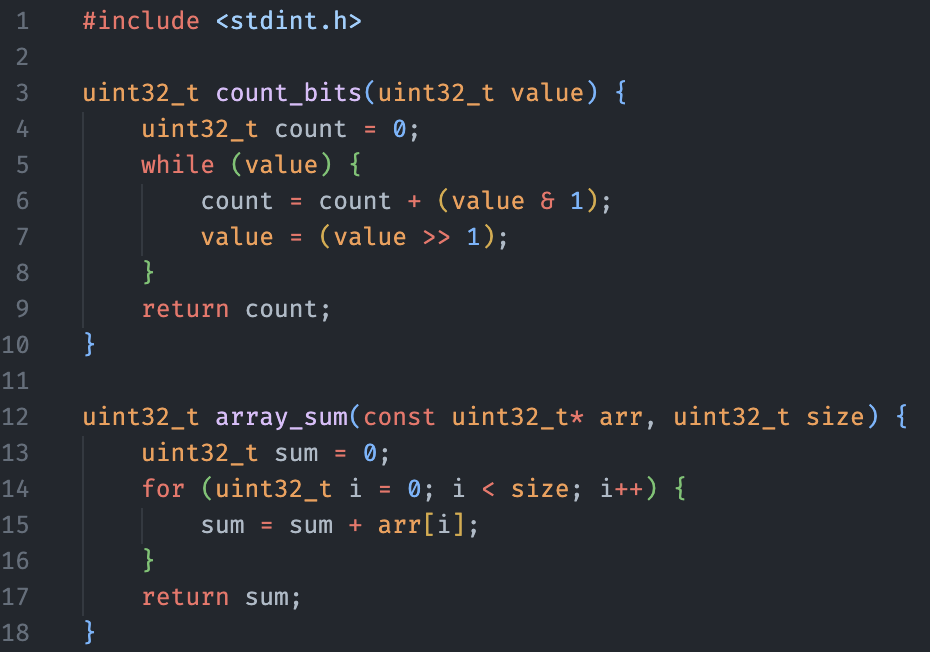
|
Code Block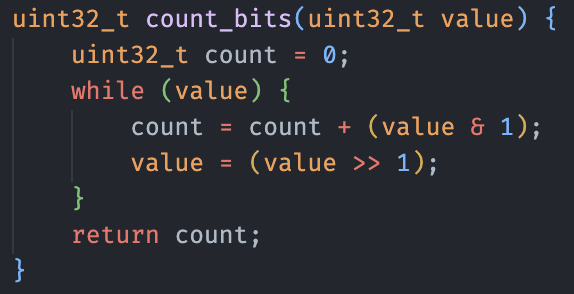
|
One Subblock
|
<|fim_prefix|>uint32_t count_bits(uint32_t value){\n  uint32_t count = 0;\n  while(value){\n
<|fim_suffix|>    }\n    return count;
<|fim_middle|>count = count + (value & 1);\n    value = (value >> 1);
Quick Start
Install CodeFinetuner globally to run the pipeline anywhere on your system:
uv tool install codefinetuner
Create a configuration file according to the Configuration section and run the pipeline:
codefinetuner --config="codefinetuner_config.yaml"
Installation
As a Global CLI Tool
uv tool install codefinetuner
As a Library Dependency
uv add codefinetuner
# or
pip install codefinetuner
From Source
git clone --recurse-submodules https://github.com/cuolm/codefinetuner
cd codefinetuner

# Using uv (Recommended)
uv sync

# Using pip
pip install -r requirements.txt
pip install -e .
Configuration
The pipeline uses a single-source-of-truth YAML configuration file. It utilizes YAML anchors (&globals) to share core parameters across all stages (preprocess, finetune, evaluate, convert), ensuring consistency and reducing redundancy.
Configuration Structure
Create codefinetuner_config.yaml using the template below. For the full parameter list, see the Configuration Reference Guide.
# globals contain all the mandatory parameters.
globals: &globals
  workspace_path: null  # null: defaults to current working directory (CWD)
  model_name: "Qwen/Qwen2.5-Coder-1.5B"
  fim_prefix_token: "<|fim_prefix|>"
  fim_middle_token: "<|fim_middle|>"
  fim_suffix_token: "<|fim_suffix|>"
  fim_pad_token: "<|fim_pad|>"
  eos_token: "<|endoftext|>"
  label_pad_token_id: -100
  max_token_sequence_length: 512
  data_language: "c"
  data_extensions: [".c", ".h"]
  use_unsloth: True

preprocess:
  <<: *globals  # inherits all global parameters
  split_mode: "manual"
  # ... (preprocess specific settings)

finetune:
  <<: *globals
  lora_r: 32
  trainer_num_train_epochs: 1
  # ... (finetune specific settings)

evaluate:
  <<: *globals
  benchmark_sample_size: 4
  # ... (evaluate specific settings)

convert:
  <<: *globals
  # ... (convert specific settings)
Note: See
config/codefinetuner_config.yamlfor a full production example.
Data Preparation
Place source files in your raw_data_path (default: workspace_path/data).
- Auto Split: Place files directly in the directory.
- Manual Split: Create
train,eval, andtestsubfolders insideraw_data_pathand assign files according to your manual split preferences.
Usage
CLI Usage
If installed via uv tool install:
codefinetuner --config="codefinetuner_config.yaml"
If running within the source repository cloned from GitHub:
uv run codefinetuner --config="config/codefinetuner_config.yaml"
Pipeline flags
--config: Use a different config file.--skip-preprocess: Skip preprocessing.--skip-finetune: Skip fine-tuning.--skip-evaluate: Skip evaluation.--skip-convert: Skip conversion.
Python Module Usage
import codefinetuner

# Full pipeline
codefinetuner.run_pipeline("codefinetuner_config.yaml")

# Skip stages
codefinetuner.run_pipeline(
    "codefinetuner_config.yaml",
    skip_preprocess=True,
    skip_convert=True
)
Finetuned Model Usage
The convert stage exports the final model to GGUF format for local inference. The resulting file is saved at outputs/convert/results/lora_model.gguf.
For setup instructions with the VS Code extension llama.vscode, see the inference-vscode guide.
Docker Image
1. Build the Docker Image
Build the image from the Dockerfile, tagging it as codefinetuner-image.
docker build -t codefinetuner-image .
2. Prepare Data and Run the Container
To allow the container to access your data for fine-tuning, use a bind mount to link your host machine's data directory to the container.
On your host machine (where you run Docker), create a folder named data if it does not already exist. Put all files you want to use for fine-tuning inside the data directory. For manual mode, include train, eval, and test subfolders with the split you want to use.
NVIDIA GPU (Recommended)
Use this command to enable CUDA support for torch and bitsandbytes. Requires the NVIDIA Container Toolkit installed on the host machine.
docker run --gpus all -it --rm \
  -v $(pwd)/data:/app/data \
  codefinetuner-image /bin/bash
CPU Only
Use this if you do not have a compatible GPU. Fine-tuning will be much slower.
docker run -it --rm \
  -v $(pwd)/data:/app/data \
  codefinetuner-image /bin/bash
Tree-sitter Customization
Tree-sitter turns source code into structural blocks used to generate FIM examples. Use this section to add new languages or build missing parsers.
- Add Language Definitions: define
block_typesandsubblock_typesin JSON. - Build Custom Parser: compile a parser from source, for example for Mojo.
Tests
Run the test suite with:
pytest
Resources
- Qwen2.5-Coder Technical Report
- Structure-Aware Fill-in-the-Middle Pretraining for Code
- LoRA: Low-Rank Adaptation of Large Language Models
- Efficient Training of Language Models to Fill in the Middle
- From Output to Evaluation: Does Raw Instruction-Tuned Code LLMs Output Suffice for Fill-in-the-Middle Code Generation?
- CodeBLEU: a Method for Automatic Evaluation of Code Synthesis
- HF LLM Course
- llama.vscode
License
Licensed under the Apache License 2.0.
Project details
Verified details
These details have been verified by PyPIProject links
GitHub Statistics
Maintainers
Release history Release notifications | RSS feed


Download files
Download the file for your platform. If you're not sure which to choose, learn more about installing packages.
Source Distribution
Built Distribution
Filter files by name, interpreter, ABI, and platform.
If you're not sure about the file name format, learn more about wheel file names.
Copy a direct link to the current filters
File details
Details for the file codefinetuner-0.4.0rc1.tar.gz.
File metadata
- Download URL: codefinetuner-0.4.0rc1.tar.gz
- Upload date:
- Size: 18.0 MB
- Tags: Source
- Uploaded using Trusted Publishing? Yes
- Uploaded via: twine/6.1.0 CPython/3.13.12
File hashes
| Algorithm | Hash digest | |
|---|---|---|
| SHA256 |
2744eacaa2a5554121e01c6697fd69408dde32f42ec382e613a9f7aedf534310
|
|
| MD5 |
e521bbbb07b55ab8a0682e882caaa761
|
|
| BLAKE2b-256 |
5b3e5856581d55ac3e11e29d78d0b22aeb0285154a58fbef07e54818303a2ad7
|
Provenance
The following attestation bundles were made for codefinetuner-0.4.0rc1.tar.gz:
Publisher:
release.yaml on cuolm/codefinetuner
-
Statement:
-
Statement type:
https://in-toto.io/Statement/v1 -
Predicate type:
https://docs.pypi.org/attestations/publish/v1 -
Subject name:
codefinetuner-0.4.0rc1.tar.gz -
Subject digest:
2744eacaa2a5554121e01c6697fd69408dde32f42ec382e613a9f7aedf534310 - Sigstore transparency entry: 2084501468
- Sigstore integration time:
-
Permalink:
cuolm/codefinetuner@d2028657af799d465ffbea7c82aec5c76e2eb410 -
Branch / Tag:
refs/tags/0.4.0 - Owner: https://github.com/cuolm
-
Access:
public
-
Token Issuer:
https://token.actions.githubusercontent.com -
Runner Environment:
github-hosted -
Publication workflow:
release.yaml@d2028657af799d465ffbea7c82aec5c76e2eb410 -
Trigger Event:
push
-
Statement type:
File details
Details for the file codefinetuner-0.4.0rc1-py3-none-any.whl.
File metadata
- Download URL: codefinetuner-0.4.0rc1-py3-none-any.whl
- Upload date:
- Size: 176.0 kB
- Tags: Python 3
- Uploaded using Trusted Publishing? Yes
- Uploaded via: twine/6.1.0 CPython/3.13.12
File hashes
| Algorithm | Hash digest | |
|---|---|---|
| SHA256 |
32e2aaa6e1e2b9550b4cac3a5585bceddd0a2d4164533209a33fdfb52fc32d90
|
|
| MD5 |
f14281a1234faf3fd9fcf3c143944f61
|
|
| BLAKE2b-256 |
83cd8dface9872961bb1e0d0f781cd2cd77f3fd948881d526c37bda7117b9c8c
|
Provenance
The following attestation bundles were made for codefinetuner-0.4.0rc1-py3-none-any.whl:
Publisher:
release.yaml on cuolm/codefinetuner
-
Statement:
-
Statement type:
https://in-toto.io/Statement/v1 -
Predicate type:
https://docs.pypi.org/attestations/publish/v1 -
Subject name:
codefinetuner-0.4.0rc1-py3-none-any.whl -
Subject digest:
32e2aaa6e1e2b9550b4cac3a5585bceddd0a2d4164533209a33fdfb52fc32d90 - Sigstore transparency entry: 2084501505
- Sigstore integration time:
-
Permalink:
cuolm/codefinetuner@d2028657af799d465ffbea7c82aec5c76e2eb410 -
Branch / Tag:
refs/tags/0.4.0 - Owner: https://github.com/cuolm
-
Access:
public
-
Token Issuer:
https://token.actions.githubusercontent.com -
Runner Environment:
github-hosted -
Publication workflow:
release.yaml@d2028657af799d465ffbea7c82aec5c76e2eb410 -
Trigger Event:
push
-
Statement type:






