
CodeFox CLI - code auditing and code review tool

Project description

CodeFox-CLI
Intelligent automated code review system


🦊 Overview
CodeFox-CLI is an intelligent automated code review system that takes over routine security and code quality checks, allowing senior developers to focus on architecture and complex tasks.
Unlike traditional linters, CodeFox understands the context of the entire project and its business logic, delivering not just review comments but ready-to-apply fixes (Auto-Fix). Works with Gemini, Ollama, and OpenRouter - use your preferred AI backend.
| vs Linters | vs AI code review (e.g. CodeRabbit) |
|---|---|
| Understands full project context & business logic | Self-hosted / local (Ollama), no vendor lock-in |
| Suggests fixes, not only rules | Configurable models, security/performance/style rules |
| RAG over your codebase for relevant hints | CLI-first: git diff → review in seconds |
📥 Installation
Choose the installation method that fits your workflow.
🔹 Install dependencies (local setup)
pip install -r requirements.txt
🔹 Development mode (editable install)
Provides the local codefox CLI command and enables live code changes.
python3 -m pip install -e .
🔹 Install from GitHub
🐍 Using pip
python3 -m pip install codefox
# or python3 -m pip install git+https://github.com/URLbug/CodeFox-CLI.git@main
⚡ Using uv (recommended for CLI usage)
uv tool install codefox
# or uv tool install git+https://github.com/URLbug/CodeFox-CLI.git@main
✅ Verify installation
codefox version
Or
python3 -m codefox version
🚀 Quick Start
Initialize (stores your API key)
codefox init
Run a scan (uses the current git diff)
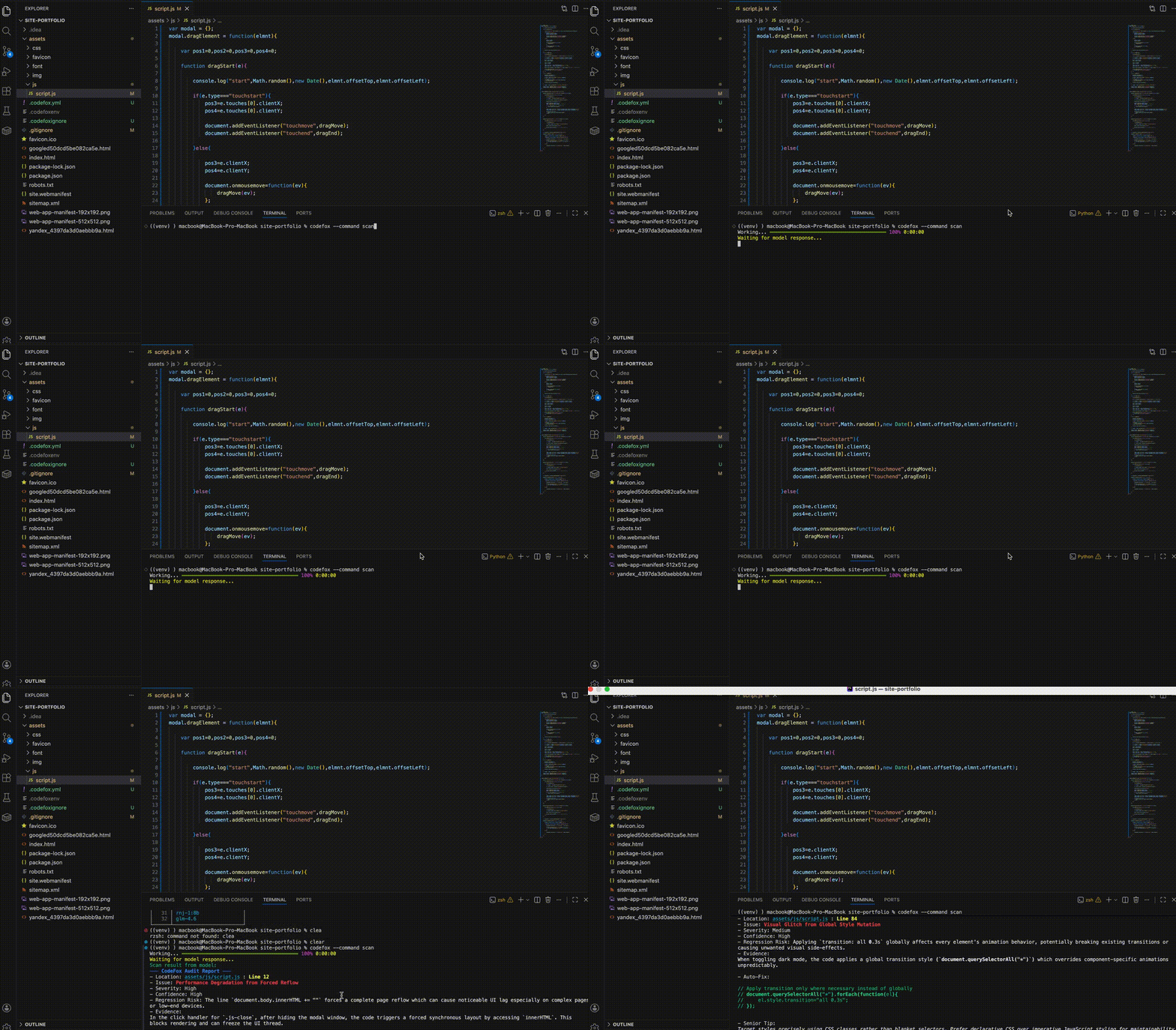
codefox scan
Show version
codefox version
⚙️ Configuration
Ignore file: ./.codefoxignore
Specifies paths that should not be uploaded to the File Store.
Model settings: ./.codefox.yml
Used for fine-grained configuration of the analysis behavior and model parameters (such as model selection, temperature, review rules, baseline, and prompts).
For detailed configuration options and examples, see WIKI.md.
Example config used in the demo above (Ollama + qwen3-coder):
provider: ollama
model:
  name: qwen3-coder:30b
  temperature: 0.5
  max_tokens: 4000
review:
  severity: high
  max_issues: null
  suggest_fixes: true
  diff_only: false
baseline:
  enable: true
ruler:
  security: true
  performance: true
  style: true
prompt:
  system: null
  extra: null
Token configuration: ./codefoxenv
Stores the API token for the model. This file is used by the CLI for authentication and should not be committed to version control.
📚 Documentation
Full configuration reference and examples: WIKI.md - provider settings, model options, review rules, prompts, and more.
🧩 Commands
| Command | Description |
|---|---|
init |
Saves the API key locally and creates a .codefoxignore and .codefox.yml file in the current directory. |
list |
Shows the full list of models available for the current provider (Gemini, Ollama, or OpenRouter) from .codefox.yml. |
scan |
Collects changes from the git diff, uploads files to the File Store, and sends requests to the configured model. |
version |
Displays the current CodeFox CLI version. |
--help |
Shows available flags and usage information. |
🧪 Examples
List available models (for the provider in .codefox.yml)
codefox list
Run a scan in a project
codefox scan
🛠 Development
Install with dev dependencies (includes pytest, mypy, ruff, types-PyYAML):
pip:
pip install -e ".[dev]"
# or: pip install -r requirements.txt -r requirements-dev.txt
uv:
uv pip install -e ".[dev]"
Run tests:
pytest tests -v
Lint and format:
ruff check codefox tests
ruff format codefox tests
Static type check:
mypy codefox
🤝 Contributing
Bug reports, pull requests, and documentation improvements are welcome.


Download files
Download the file for your platform. If you're not sure which to choose, learn more about installing packages.
Source Distribution
Built Distribution
Filter files by name, interpreter, ABI, and platform.
If you're not sure about the file name format, learn more about wheel file names.
Copy a direct link to the current filters
File details
Details for the file codefox-0.3.5.tar.gz.
File metadata
- Download URL: codefox-0.3.5.tar.gz
- Upload date:
- Size: 27.7 kB
- Tags: Source
- Uploaded using Trusted Publishing? No
- Uploaded via: twine/6.2.0 CPython/3.12.12
File hashes
| Algorithm | Hash digest | |
|---|---|---|
| SHA256 |
e78b4bee323c86e4a464e3aa441e3a36df3e8d1d2e5efe5b3ec8daee85e89fcc
|
|
| MD5 |
e4c5c32310e23f8fadfe8a8e7781dc6b
|
|
| BLAKE2b-256 |
e4930a9f6f08bd647901cb44dd50108952ba0efb1d4615679e943132ff351401
|
File details
Details for the file codefox-0.3.5-py3-none-any.whl.
File metadata
- Download URL: codefox-0.3.5-py3-none-any.whl
- Upload date:
- Size: 29.7 kB
- Tags: Python 3
- Uploaded using Trusted Publishing? No
- Uploaded via: twine/6.2.0 CPython/3.12.12
File hashes
| Algorithm | Hash digest | |
|---|---|---|
| SHA256 |
de046936bca32bc25eb62044c1ee5fd1b51a1b864e6bf87f725a9cdbb9718b5e
|
|
| MD5 |
78f476d1956e69fe20e83ddfd79262ac
|
|
| BLAKE2b-256 |
1e15363ce6396c62635f1f663a287726708b7c6aedb4ec60f878a537a79dea00
|






