
Two external deps (igraph, leidenalg), zero parsing code.
This is CodeGraph, implemented with LSP servers. The idea is to utilize LSP output (which you probably already configured for auto-complete, syntax highlighting etc) and provide network analysis on your code. This should be a fine addition to your Claude skills. Currently only supports gopls and pyright-langserver.
Install
uv tool install codegraph-lsp # or: pipx install codegraph-lsp
This gives you two commands: codegraph (extraction and analysis) and codegraph-dot (renders a report for Graphviz). Rendering SVGs also needs Graphviz (sfdp). The LSP servers for your languages have to be on PATH:
# Python — pyright via uv
uv tool install pyright

# Go — gopls
go install golang.org/x/tools/gopls@latest
Architecture:
lsp.py: JSON-RPC client over stdio. Threads a reader, dispatches responses by ID, ignores server-initiated notifications (diagnostics, logs). Works with any LSP server. ~170 lines replacing whatever tree-sitter glue you had.extract.py: Drives textDocument/documentSymbol per file, then textDocument/references and callHierarchy/outgoingCalls per interesting symbol (classes, functions, methods, structs). Flattens hierarchical DocumentSymbol responses into qualified names. Skips vendored dirs,__pycache__, .pb.go, and test code (tests/,test/,testdata/,test_*.py,*_test.py,conftest.py,*_test.go) unless--include-testsis given.graph.py: Collapses symbol-level edges to file-level coupling (undirected, weighted by reference count). Runs Leiden with configurable resolution. Reports communities, modularity score, top coupling pairs.__main__.py:Two modes: full extraction and --diff (incremental). Incremental loads a previous graph, re-extracts only the listed files, merges, re-runs Leiden.dot.py: Thecodegraph-dotcommand: renders a report as Graphviz dot, at symbol, file or community level (see Visualisation).
Usage on your workstation:
Installed, run codegraph directly; from a checkout, through uv run as below.
uv run codegraph /path/to/repo
uv run codegraph /path/to/repo -o report.json --save-graph graph.json
uv run codegraph /path/to/repo --diff src/changed.py --load-graph graph.json
uv run codegraph /path/to/repo --resolution 2.0  # more granular communities
uv run codegraph /path/to/repo --jobs 16         # more concurrent LSP lookups per file (default 8)
uv run codegraph /path/to/repo --include-tests   # also index test code (skipped by default)
uv run codegraph /path/to/repo --exclude 'examples/*' --exclude fakes  # skip more paths
uv run codegraph /path/to/repo --min-community-size 1  # keep Leiden's tiny symbol communities (default folds < 3)
--diff paths are resolved against the repo root, not the current directory.
Only the LSP servers for languages that have files to index are started, so a Python-only repo never launches gopls, and only those servers need to be installed.
Symbol communities smaller than --min-community-size (default 3) are folded into the community they have the heaviest links to, or, with no links at all (a constructor only ever reached through its class), into the one holding most symbols of their files. Leiden otherwise leaves such symbols as one- or two-symbol communities that say nothing about coupling.
In the report's symbol_graph, edges point from dependent to dependency (caller -> callee, use site -> definition). Symbols are identified by source_id/target_id (<file>::<qualified name>), since qualified names alone repeat across files.
Visualisation
Needs graphviz
codegraph-dot report.json | sfdp -Tsvg -o codegraph.svg
From a checkout without installing, python3 scripts/visualise.py takes the same arguments.
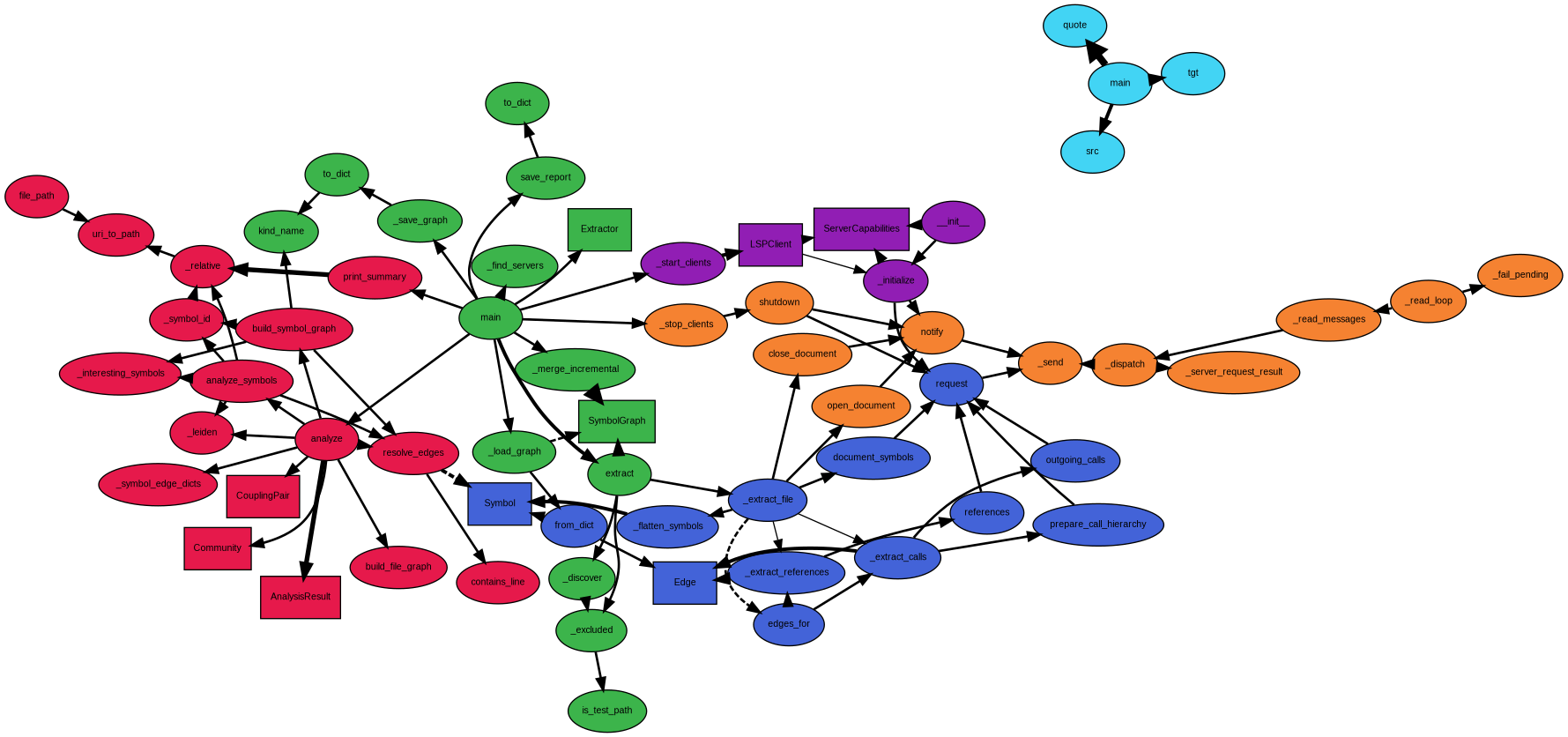
Drawing every symbol stops being readable at a few hundred nodes (a 22k-line Go CLI already gives 1,200 nodes and 3,500 edges), so --level chooses what one node stands for:
--level |
One node per | Edges |
|---|---|---|
symbol |
function, class, struct… | references with weight ≥ 2, and all calls |
file |
file, coloured by the community most of its symbols are in | summed weight between files |
community |
symbol community, labelled with its main files | summed weight between communities |
auto (default) |
symbol up to --max-nodes (300) drawn nodes, community beyond |
In the file and community views a link is drawn only if it is one of the --top (default 3) heaviest of one of its ends; a caption counts the ones left out. To zoom into one community:
codegraph-dot report.json --level community --link 'codegraph-c{id}.svg' | sfdp -Tsvg -o codegraph.svg
codegraph-dot report.json --community 3 --hubs 5 | sfdp -Tsvg -o codegraph-c3.svg
codegraph-dot report.json --drilldowns   # ids of communities worth a page (>= --min-size symbols)
--community N draws that community's symbols plus one stub per community it links to, with the link weight in each direction. --hubs K leaves out the K symbols with the most dependents (the Client/Ctx types everything touches) and lists them in a legend instead of letting them pull every edge into the middle. --link makes each community in the overview a hyperlink to its page; it works when the SVG is opened directly, not through a README <img>.
Across several repos
scripts/codegraph-svg.sh renders codegraph.svg for each repo it is given and adds a "Call graph" section to that repo's README if it doesn't link the SVG yet. For a graph too large to draw symbol by symbol it writes the community overview there and one page per community under docs/ (docs/codegraph-cN.svg, replacing earlier ones; --pages DIR to move them), linked from the overview. Nothing is committed.
scripts/codegraph-svg.sh ~/src/repo-a ~/src/repo-b
scripts/codegraph-svg.sh --root src/pkg --svg docs/graph.svg --pages docs/graph ~/src/repo-c
Nodes colored by Leiden community, edge thickness scaled by coupling weight. sfdp over dot because force-directed handles coupling graphs without a natural hierarchy better: dot tries to find a DAG ranking that doesn't exist here.
Symbol views use curved edges (splines=curved): graphviz's obstacle-avoiding splines=true takes 20s on 300 symbols and minutes on 1,000, against well under a second. The file and community views are small enough to keep it.
Known tradeoffs you'll hit:
- The initial extraction is O(interesting_symbols) LSP round-trips, issued concurrently per file (
--jobs). For a large repo that could still be minutes on first run. Subsequent--diffruns are fast :only changed files get re-queried. - gopls call hierarchy is solid. pyright call hierarchy support is spottier :it implements prepareCallHierarchy but outgoingCalls may return incomplete results for dynamic dispatch. The code degrades gracefully: if call hierarchy isn't available, it falls back to reference-only edges. You get a coupling graph either way, just with less semantic precision on the call direction.
- The _dispatch handler answers server requests (like window/showMessageRequest) with
null(workspace/configurationgets onenullper item, i.e. "use defaults"). Some servers may not like that. If you see hangs, that's the first place to look.
1 maintainer

Metadata
1 maintainer
Release files for codegraph-lsp 0.1.0
For a detailed explanation of source distributions (sdists) and built distributions (wheels), please see the package formats documentation.
Source distribution (sdist)
| File | Size | Uploaded | Provenance | Actions |
|---|---|---|---|---|
| codegraph_lsp-0.1.0.tar.gz | 67.5 kB | With provenance | Details for codegraph_lsp-0.1.0.tar.gz |
Built distribution (wheel)
| File | Interpreter | ABI | Platform | Actions Reset |
|---|---|---|---|---|
| codegraph_lsp-0.1.0-py3-none-any.whl | Python 3 | none | any | Details for codegraph_lsp-0.1.0-py3-none-any.whl |
Total release size: 94.1 kB
Release files / codegraph_lsp-0.1.0.tar.gz
| Download URL | codegraph_lsp-0.1.0.tar.gz |
|---|---|
| Size | 67.5 kB |
| Tags | Source |
|
SHA-256 checksum How to use checksums |
e6040c8d526355e26f790b5704c8bc1b5f87f7f04e91da8cc9136fc72a46b1e5
|
|
BLAKE2b-256 checksum How to use checksums |
6af2d79278e26d81fc37ef3b76ee621725662e3d9a52a68ed23666c6a4e16d49
|
| Upload date | |
|
Uploaded using Trusted Publishing? What is trusted publishing? |
Yes |
| Uploaded via |
twine/7.0.0 CPython/3.13.16
|
Provenance
Provenance describes where a file came from. On PyPI, provenance is shared via attestations, which provide a verifiable record of the build or publishing details. View details, limitations and caveats.


PyPI Publish Attestation
PyPI verified that this artifact, at this checksum, originated from the publisher listed below.
Signed by GitHub Actions, verified by PyPI on Nov 27, 2026.
Transparency logRelease files / codegraph_lsp-0.1.0-py3-none-any.whl
| Download URL | codegraph_lsp-0.1.0-py3-none-any.whl |
|---|---|
| Size | 26.6 kB |
| Tags | Python 3 |
|
SHA-256 checksum How to use checksums |
822b9943610ae2cd7c16c66fccdafebf103d7707b37a151a5796ba7d6c4dbe20
|
|
BLAKE2b-256 checksum How to use checksums |
0cbee82a3407fc7a31ad8851e25f04faa33dda266d8cc33ae4f9834349a4f5f0
|
| Upload date | |
|
Uploaded using Trusted Publishing? What is trusted publishing? |
Yes |
| Uploaded via |
twine/7.0.0 CPython/3.13.16
|
Provenance
Provenance describes where a file came from. On PyPI, provenance is shared via attestations, which provide a verifiable record of the build or publishing details. View details, limitations and caveats.
PyPI Publish Attestation
PyPI verified that this artifact, at this checksum, originated from the publisher listed below.
Signed by GitHub Actions, verified by PyPI on Nov 27, 2026.
Transparency logSecurity for codegraph-lsp 0.1.0
Provenance
Provenance describes where a file came from. On PyPI, provenance is shared via attestations, which provide a verifiable record of the build or publishing details. View details, limitations and caveats.
Full provenance
Both files in this release have been uploaded with provenance metadata.
Attestation for codegraph_lsp-0.1.0.tar.gz
PyPI Publish Attestation
PyPI verified that this artifact, at this checksum, originated from the publisher listed below.
Signed by GitHub Actions, verified by PyPI on Nov 27, 2026.
Transparency logA note on package security
PyPI is a repository for distributing packages, not a service for auditing them. While third-party security researchers and our staff do their best to detect and remove malicious packages, PyPI cannot guarantee the quality, security or suitability of any given package.
To learn more about protecting yourself from malicious actors, visit our package security documentation.













