
🏗️ CodeGraphContext (CGC)
Turn code repositories into a queryable graph for AI agents.
🌐 Languages:
- 🇬🇧 English
- 🇨🇳 中文
- 🇰🇷 한국어
- 🇺🇦 Українська
- 🇷🇺 Русский
- 🇯🇵 日本語 (Soon)
- 🇪🇸 Español (Soon)
🌍 Help translate CodeGraphContext to your language by raising an issue & PR on https://github.com/Shashankss1205/CodeGraphContext/issues!
Bridge the gap between deep code graphs and AI context.















A powerful MCP server and CLI toolkit that indexes local code into a graph database to provide context to AI assistants and developers. Use it as a standalone CLI for comprehensive code analysis or connect it to your favorite AI IDE via MCP for AI-powered code understanding.
📍 Quick Navigation
✨ Experience CGC
👨🏻💻 Installation and CLI
Install in seconds with pip and unlock a powerful CLI for code graph analysis.

🛠️ Indexing in Seconds
The CLI intelligently parses your tree-sitter nodes to build the graph.

🤖 Powering your AI Assistant
Use natural language to query complex call-chains via MCP.

Project Details
- Version: 0.4.2
- Authors: Shashank Shekhar Singh shashankshekharsingh1205@gmail.com
- License: MIT License (See LICENSE for details)
- Website: CodeGraphContext
👨💻 Maintainer
CodeGraphContext is created and actively maintained by:
Shashank Shekhar Singh
- 📧 Email: shashankshekharsingh1205@gmail.com
- 🐙 GitHub: @Shashankss1205
- 🔗 LinkedIn: Shashank Shekhar Singh
- 🌐 Website: codegraphcontext.vercel.app
Contributions and feedback are always welcome! Feel free to reach out for questions, suggestions, or collaboration opportunities.
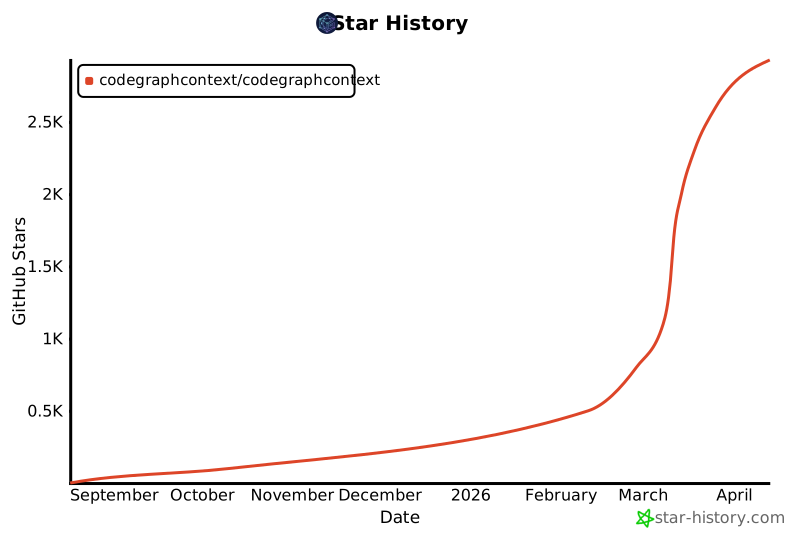
Star History
Features
- Code Indexing: Analyzes code and builds a knowledge graph of its components.
- Relationship Analysis: Query for callers, callees, class hierarchies, call chains and more.
- Pre-indexed Bundles: Load famous repositories instantly with
.cgcbundles - no indexing required! (Learn more) - Live File Watching: Watch directories for changes and automatically update the graph in real-time (
cgc watch). - Interactive Setup: A user-friendly command-line wizard for easy setup.
- Dual Mode: Works as a standalone CLI toolkit for developers and as an MCP server for AI agents.
- Multi-Language Support: Full support for 14 programming languages.
- Flexible Database Backend: KùzuDB (default on Windows), FalkorDB Lite (typical embedded default on Unix when installed), FalkorDB Remote, or Neo4j (all platforms via Docker/native).
Supported Programming Languages
CodeGraphContext provides comprehensive parsing and analysis for the following languages:
| Language | Language | Language | |||
|---|---|---|---|---|---|
| 🐍 | Python | 📜 | JavaScript | 🔷 | TypeScript |
| ☕ | Java | 🏗️ | C / C++ | #️⃣ | C# |
| 🐹 | Go | 🦀 | Rust | 💎 | Ruby |
| 🐘 | PHP | 🍎 | Swift | 🎨 | Kotlin |
| 🎯 | Dart | 🐪 | Perl |
Each language parser extracts functions, classes, methods, parameters, inheritance relationships, function calls, and imports to build a comprehensive code graph.
Database Options
CodeGraphContext supports multiple graph database backends to suit your environment:
| Feature | KùzuDB | FalkorDB Lite | Neo4j |
|---|---|---|---|
| Typical default | Windows (embedded, when kuzu is installed) |
Unix (Python 3.12+, when falkordblite works) |
When explicitly configured |
| Setup | Zero-config / Embedded | Zero-config / In-process | Docker / External |
| Platform | All (Windows Native, macOS, Linux) | Unix-only (Linux/macOS/WSL) | All Platforms |
| Use Case | Desktop, IDE, Local development | Specialized Unix development | Enterprise, Massive graphs |
| Requirement | pip install kuzu |
pip install falkordblite |
Neo4j Server / Docker |
| Speed | ⚡ Extremely Fast | ⚡ Fast | 🚀 Scalable |
| Persistence | Yes (to disk) | Yes (to disk) | Yes (to disk) |
Used By
CodeGraphContext is already being explored by developers and projects for:
- Static code analysis in AI assistants
- Graph-based visualization of projects
- Dead code and complexity detection
If you’re using CodeGraphContext in your project, feel free to open a PR and add it here! 🚀
Dependencies
neo4j>=5.15.0watchdog>=3.0.0stdlibs>=2023.11.18typer[all]>=0.9.0rich>=13.7.0inquirerpy>=0.3.7python-dotenv>=1.0.0tree-sitter>=0.21.0tree-sitter-language-pack>=0.6.0pyyamlpytestnbformatnbconvert>=7.16.6pathspec>=0.12.1
Note: Python 3.10-3.14 is supported.
Quick Start
Install the core toolkit
pip install codegraphcontext
If 'cgc' command isn't found, run our one-line fix:
curl -sSL https://raw.githubusercontent.com/CodeGraphContext/CodeGraphContext/main/scripts/post_install_fix.sh | bash
Getting Started
📋 Understanding CodeGraphContext Modes
CodeGraphContext operates in two modes, and you can use either or both:
🛠️ Mode 1: CLI Toolkit (Standalone)
Use CodeGraphContext as a powerful command-line toolkit for code analysis:
- Index and analyze codebases directly from your terminal
- Query code relationships, find dead code, analyze complexity
- Visualize code graphs and dependencies
- Perfect for developers who want direct control via CLI commands
🤖 Mode 2: MCP Server (AI-Powered)
Use CodeGraphContext as an MCP server for AI assistants:
- Connect to AI IDEs (VS Code, Cursor, Windsurf, Claude, Kiro, etc.)
- Let AI agents query your codebase using natural language
- Automatic code understanding and relationship analysis
- Perfect for AI-assisted development workflows
You can use both modes! Install once, then use CLI commands directly OR connect to your AI assistant.
Installation (Both Modes)
-
Install:
pip install codegraphcontext⚙️ Troubleshooting: In case, command
cgcnot foundIf you encounter "cgc: command not found" after installation, run the PATH fix script:
Linux/Mac:
# Download the fix script
curl -O https://raw.githubusercontent.com/CodeGraphContext/CodeGraphContext/main/scripts/post_install_fix.sh

# Make it executable
chmod +x post_install_fix.sh

# Run the script
./post_install_fix.sh

# Restart your terminal or reload shell config
source ~/.bashrc  # or ~/.zshrc for zsh users
Windows (PowerShell):
# Download the fix script
curl -O https://raw.githubusercontent.com/CodeGraphContext/CodeGraphContext/main/scripts/post_install_fix.sh

# Run with bash (requires Git Bash or WSL)
bash post_install_fix.sh

# Restart PowerShell or reload profile
. $PROFILE
-
Database Setup (Automatic)
- KùzuDB (default on Windows): Runs natively on Windows, macOS, and Linux. On Windows it is the usual embedded choice;
pip install kuzuif needed. - FalkorDB Lite (typical default on Unix): When Python 3.12+ and
falkordbliteare available on Unix/macOS/WSL, the embedded backend prefers FalkorDB Lite; otherwise KùzuDB is used. - Neo4j (Alternative): To use Neo4j instead, or if you prefer a server-based approach, run:
cgc neo4j setup
- KùzuDB (default on Windows): Runs natively on Windows, macOS, and Linux. On Windows it is the usual embedded choice;
For CLI Toolkit Mode
Start using immediately with CLI commands:
# Index your current directory
cgc index .

# List all indexed repositories
cgc list

# Analyze who calls a function
cgc analyze callers my_function

# Find complex code
cgc analyze complexity --threshold 10

# Find dead code
cgc analyze dead-code

# Watch for live changes (optional)
cgc watch .

# See all commands
cgc help
See the full CLI Commands Guide for all available commands and usage scenarios.
🎨 Premium Interactive Visualization
CodeGraphContext can generate stunning, interactive knowledge graphs of your code. Unlike static diagrams, these are premium web-based explorers:
- Premium Aesthetics: Dark mode, glassmorphism, and modern typography (Outfit/JetBrains Mono).
- Interactive Inspection: Click any node to open a detailed side panel with symbol information, file paths, and context.
- Quick Search: Live-search through the graph to find specific symbols instantly.
- Intelligent Layouts: Force-directed and hierarchical layouts that make complex relationships readable.
- Zero-Dependency Viewing: Standalone HTML files that work in any modern browser.
# Visualize function calls
cgc analyze calls my_function --viz

# Explore class hierarchies
cgc analyze tree MyClass --viz

# Visualize search results
cgc find pattern "Auth" --viz
🤖 For MCP Server Mode
Configure your AI assistant to use CodeGraphContext:
-
Setup: Run the MCP setup wizard to configure your IDE/AI assistant:
cgc mcp setup
The wizard can automatically detect and configure:
- VS Code
- Cursor
- Windsurf
- Claude
- Gemini CLI
- ChatGPT Codex
- Cline
- RooCode
- Amazon Q Developer
- Kiro
Upon successful configuration,
cgc mcp setupwill generate and place the necessary configuration files:- It creates an
mcp.jsonfile in your current directory for reference. - It stores your database credentials securely in
~/.codegraphcontext/.env. - It updates the settings file of your chosen IDE/CLI (e.g.,
.claude.jsonor VS Code'ssettings.json).
-
Start: Launch the MCP server:
cgc mcp start
-
Use: Now interact with your codebase through your AI assistant using natural language! See examples below.
Ignoring Files (.cgcignore)
You can tell CodeGraphContext to ignore specific files and directories by creating a .cgcignore file in the root of your project. This file uses the same syntax as .gitignore.
Example .cgcignore file:
# Ignore build artifacts
/build/
/dist/

# Ignore dependencies
/node_modules/
/vendor/

# Ignore logs
*.log
MCP Client Configuration
The cgc mcp setup command attempts to automatically configure your IDE/CLI. If you choose not to use the automatic setup, or if your tool is not supported, you can configure it manually.
Add the following server configuration to your client's settings file (e.g., VS Code's settings.json or .claude.json):
{
  "mcpServers": {
    "CodeGraphContext": {
      "command": "cgc",
      "args": [
        "mcp",
        "start"
      ],
      "env": {
        "NEO4J_URI": "YOUR_NEO4J_URI",
        "NEO4J_USERNAME": "YOUR_NEO4J_USERNAME",
        "NEO4J_PASSWORD": "YOUR_NEO4J_PASSWORD"
      },
      "disabled": false,
      "alwaysAllow": []
    }
  }
}
Natural Language Interaction Examples
Once the server is running, you can interact with it through your AI assistant using plain English. Here are some examples of what you can say:
Indexing and Watching Files
-
To index a new project:
- "Please index the code in the
/path/to/my-projectdirectory." OR - "Add the project at
~/dev/my-other-projectto the code graph."
- "Please index the code in the
-
To start watching a directory for live changes:
- "Watch the
/path/to/my-active-projectdirectory for changes." OR - "Keep the code graph updated for the project I'm working on at
~/dev/main-app."
When you ask to watch a directory, the system performs two actions at once:
- It kicks off a full scan to index all the code in that directory. This process runs in the background, and you'll receive a
job_idto track its progress. - It begins watching the directory for any file changes to keep the graph updated in real-time.
This means you can start by simply telling the system to watch a directory, and it will handle both the initial indexing and the continuous updates automatically.
- "Watch the
Querying and Understanding Code
-
Finding where code is defined:
- "Where is the
process_paymentfunction?" - "Find the
Userclass for me." - "Show me any code related to 'database connection'."
- "Where is the
-
Analyzing relationships and impact:
- "What other functions call the
get_user_by_idfunction?" - "If I change the
calculate_taxfunction, what other parts of the code will be affected?" - "Show me the inheritance hierarchy for the
BaseControllerclass." - "What methods does the
Orderclass have?"
- "What other functions call the
-
Exploring dependencies:
- "Which files import the
requestslibrary?" - "Find all implementations of the
rendermethod."
- "Which files import the
-
Advanced Call Chain and Dependency Tracking (Spanning Hundreds of Files): The CodeGraphContext excels at tracing complex execution flows and dependencies across vast codebases. Leveraging the power of graph databases, it can identify direct and indirect callers and callees, even when a function is called through multiple layers of abstraction or across numerous files. This is invaluable for:
-
Impact Analysis: Understand the full ripple effect of a change to a core function.
-
Debugging: Trace the path of execution from an entry point to a specific bug.
-
Code Comprehension: Grasp how different parts of a large system interact.
-
"Show me the full call chain from the
mainfunction toprocess_data." -
"Find all functions that directly or indirectly call
validate_input." -
"What are all the functions that
initialize_systemeventually calls?" -
"Trace the dependencies of the
DatabaseManagermodule."
-
-
Code Quality and Maintenance:
- "Is there any dead or unused code in this project?"
- "Calculate the cyclomatic complexity of the
process_datafunction insrc/utils.py." - "Find the 5 most complex functions in the codebase."
-
Repository Management:
- "List all currently indexed repositories."
- "Delete the indexed repository at
/path/to/old-project."
Contributing
Contributions are welcome! 🎉
Please see our CONTRIBUTING.md for detailed guidelines.
If you have ideas for new features, integrations, or improvements, open an issue or submit a Pull Request.
Join discussions and help shape the future of CodeGraphContext.
1 maintainer

Metadata
1 maintainer
Release files for codegraphcontext-rust 0.9.20
For a detailed explanation of source distributions (sdists) and built distributions (wheels), please see the package formats documentation.
Source distribution (sdist)
| File | Size | Uploaded | |
|---|---|---|---|
| codegraphcontext_rust-0.9.20.tar.gz | 1.3 MB | Details |
Built distributions (wheels)
Total release size: 88.6 MB
Release files / codegraphcontext_rust-0.9.20.tar.gz
| Download URL | codegraphcontext_rust-0.9.20.tar.gz |
|---|---|
| Size | 1.3 MB |
| Tags | Source |
|
SHA-256 checksum How to use checksums |
d21b189b46475468aa1fba3b96f9d2b938f05415f9bcf250970dee7c2b40ebaf
|
|
BLAKE2b-256 checksum How to use checksums |
c953f1edb2a3751789f6dd90a01098efe458dffdc66d04986deaaf5fb8307d35
|
| Upload date | |
|
Uploaded using Trusted Publishing? What is trusted publishing? |
No |
| Uploaded via |
twine/7.0.0 CPython/3.13.14
|
Release files / codegraphcontext_rust-0.9.20-cp313-cp313-win_amd64.whl
| Download URL | codegraphcontext_rust-0.9.20-cp313-cp313-win_amd64.whl |
|---|---|
| Size | 5.2 MB |
| Tags | CPython 3.13 Windows x86-64 |
|
SHA-256 checksum How to use checksums |
8a889773a1bdef0a13945e57e83e6175105f92bb19648a6822816c9e23abbc56
|
|
BLAKE2b-256 checksum How to use checksums |
0c6e252faae9627fac0fe237561c2d899025c1e0452217c1791625289b3432b3
|
| Upload date | |
|
Uploaded using Trusted Publishing? What is trusted publishing? |
No |
| Uploaded via |
twine/7.0.0 CPython/3.13.14
|
Release files / codegraphcontext_rust-0.9.20-cp313-cp313-manylinux_2_28_x86_64.whl
| Download URL | codegraphcontext_rust-0.9.20-cp313-cp313-manylinux_2_28_x86_64.whl |
|---|---|
| Size | 5.6 MB |
| Tags | CPython 3.13 Linux glibc 2.28+ x86-64 |
|
SHA-256 checksum How to use checksums |
1e0efacc4f18584184c13c3611bb6503192dfb5a6f3d54d06418de5d20f0d028
|
|
BLAKE2b-256 checksum How to use checksums |
4ffe01c451dd9941cc21aa72737c9b567b0bf3502d2c0af1dff6578b7bc06453
|
| Upload date | |
|
Uploaded using Trusted Publishing? What is trusted publishing? |
No |
| Uploaded via |
twine/7.0.0 CPython/3.13.14
|
Release files / codegraphcontext_rust-0.9.20-cp313-cp313-macosx_11_0_arm64.whl
| Download URL | codegraphcontext_rust-0.9.20-cp313-cp313-macosx_11_0_arm64.whl |
|---|---|
| Size | 5.6 MB |
| Tags | CPython 3.13 macOS 11.0+ ARM64 |
|
SHA-256 checksum How to use checksums |
6e1e84986ac4bb4a3f4e3633c787e7925cfcf0a54a361faf447a4686001e36fb
|
|
BLAKE2b-256 checksum How to use checksums |
97f9fedd5f5c35b33cc5855ea46d8382b12e51995a412352e704b5550b5bb1f0
|
| Upload date | |
|
Uploaded using Trusted Publishing? What is trusted publishing? |
No |
| Uploaded via |
twine/7.0.0 CPython/3.13.14
|
Release files / codegraphcontext_rust-0.9.20-cp313-cp313-macosx_10_12_x86_64.whl
| Download URL | codegraphcontext_rust-0.9.20-cp313-cp313-macosx_10_12_x86_64.whl |
|---|---|
| Size | 5.4 MB |
| Tags | CPython 3.13 macOS 10.12+ x86-64 |
|
SHA-256 checksum How to use checksums |
b12328df9552bc45941f066dc5f8e57bcb71835c2aca03c7a09bf1ccd278f2c8
|
|
BLAKE2b-256 checksum How to use checksums |
fdcdd0dd255fd3849cd0d0b55a836280f00e61785083564447a90ab6985ec713
|
| Upload date | |
|
Uploaded using Trusted Publishing? What is trusted publishing? |
No |
| Uploaded via |
twine/7.0.0 CPython/3.13.14
|
Release files / codegraphcontext_rust-0.9.20-cp312-cp312-win_amd64.whl
| Download URL | codegraphcontext_rust-0.9.20-cp312-cp312-win_amd64.whl |
|---|---|
| Size | 5.2 MB |
| Tags | CPython 3.12 Windows x86-64 |
|
SHA-256 checksum How to use checksums |
72c0e1ed5b39fde42dea76a9ec1ce43eb45e8b82ba61ea1d09343af84261110c
|
|
BLAKE2b-256 checksum How to use checksums |
53180a2a2dffa02e4eb694f735a9ba372ff6d250720abd4fdb1ea6a3b1bb3a83
|
| Upload date | |
|
Uploaded using Trusted Publishing? What is trusted publishing? |
No |
| Uploaded via |
twine/7.0.0 CPython/3.13.14
|
Release files / codegraphcontext_rust-0.9.20-cp312-cp312-manylinux_2_28_x86_64.whl
| Download URL | codegraphcontext_rust-0.9.20-cp312-cp312-manylinux_2_28_x86_64.whl |
|---|---|
| Size | 5.6 MB |
| Tags | CPython 3.12 Linux glibc 2.28+ x86-64 |
|
SHA-256 checksum How to use checksums |
5b9380ad219dbecabc8b7f469cf755f2663270425fb561715b1f64d3c5a53c51
|
|
BLAKE2b-256 checksum How to use checksums |
3558da5608804c39c6bc9132f89f0a31a3d750423032c4b365ba916b16198a6a
|
| Upload date | |
|
Uploaded using Trusted Publishing? What is trusted publishing? |
No |
| Uploaded via |
twine/7.0.0 CPython/3.13.14
|
Release files / codegraphcontext_rust-0.9.20-cp312-cp312-macosx_11_0_arm64.whl
| Download URL | codegraphcontext_rust-0.9.20-cp312-cp312-macosx_11_0_arm64.whl |
|---|---|
| Size | 5.6 MB |
| Tags | CPython 3.12 macOS 11.0+ ARM64 |
|
SHA-256 checksum How to use checksums |
54695ceb135111226b2735cb17170af6033e0db7726c4f97beb494f4dc8d0c1b
|
|
BLAKE2b-256 checksum How to use checksums |
8a35207c65e6d801e64ced815b59d5316de432684727ba5804a3be3952d620b7
|
| Upload date | |
|
Uploaded using Trusted Publishing? What is trusted publishing? |
No |
| Uploaded via |
twine/7.0.0 CPython/3.13.14
|
Release files / codegraphcontext_rust-0.9.20-cp312-cp312-macosx_10_12_x86_64.whl
| Download URL | codegraphcontext_rust-0.9.20-cp312-cp312-macosx_10_12_x86_64.whl |
|---|---|
| Size | 5.4 MB |
| Tags | CPython 3.12 macOS 10.12+ x86-64 |
|
SHA-256 checksum How to use checksums |
d55b19af084592601e0e1b3a2348eb33340d484ed0263f8b49669b1cb7680ab6
|
|
BLAKE2b-256 checksum How to use checksums |
652a8f962213503a205e1dc652570db510d221c29231621cbfde1406b99459a6
|
| Upload date | |
|
Uploaded using Trusted Publishing? What is trusted publishing? |
No |
| Uploaded via |
twine/7.0.0 CPython/3.13.14
|
Release files / codegraphcontext_rust-0.9.20-cp311-cp311-win_amd64.whl
| Download URL | codegraphcontext_rust-0.9.20-cp311-cp311-win_amd64.whl |
|---|---|
| Size | 5.2 MB |
| Tags | CPython 3.11 Windows x86-64 |
|
SHA-256 checksum How to use checksums |
33bb6ab1068766941f0381377c2aa385ba2aafd53e8418d8623f97157f34cdf7
|
|
BLAKE2b-256 checksum How to use checksums |
f3b8477910649277a49ad529ef8ebdc7875767ff9dbaa4a835c21e82c7f6f6e4
|
| Upload date | |
|
Uploaded using Trusted Publishing? What is trusted publishing? |
No |
| Uploaded via |
twine/7.0.0 CPython/3.13.14
|
Release files / codegraphcontext_rust-0.9.20-cp311-cp311-manylinux_2_28_x86_64.whl
| Download URL | codegraphcontext_rust-0.9.20-cp311-cp311-manylinux_2_28_x86_64.whl |
|---|---|
| Size | 5.6 MB |
| Tags | CPython 3.11 Linux glibc 2.28+ x86-64 |
|
SHA-256 checksum How to use checksums |
408707db6cfbba56729893907f5f9c56e1e34b5f5eb44a35eb044c9949052cc9
|
|
BLAKE2b-256 checksum How to use checksums |
e07b5fb44e847465a5af0c0e8eeba91c275f5a826a68fd12f31371af450b4feb
|
| Upload date | |
|
Uploaded using Trusted Publishing? What is trusted publishing? |
No |
| Uploaded via |
twine/7.0.0 CPython/3.13.14
|
Release files / codegraphcontext_rust-0.9.20-cp311-cp311-macosx_11_0_arm64.whl
| Download URL | codegraphcontext_rust-0.9.20-cp311-cp311-macosx_11_0_arm64.whl |
|---|---|
| Size | 5.6 MB |
| Tags | CPython 3.11 macOS 11.0+ ARM64 |
|
SHA-256 checksum How to use checksums |
e5e866c4e8ff1c2ddb6aa6f4a4c389241922ae202dd7036f74bf189059c2df03
|
|
BLAKE2b-256 checksum How to use checksums |
172ec35e44720529fcd704a3ee560bf1c202d47a4961a3c2079e08f4d3418975
|
| Upload date | |
|
Uploaded using Trusted Publishing? What is trusted publishing? |
No |
| Uploaded via |
twine/7.0.0 CPython/3.13.14
|
Release files / codegraphcontext_rust-0.9.20-cp311-cp311-macosx_10_12_x86_64.whl
| Download URL | codegraphcontext_rust-0.9.20-cp311-cp311-macosx_10_12_x86_64.whl |
|---|---|
| Size | 5.4 MB |
| Tags | CPython 3.11 macOS 10.12+ x86-64 |
|
SHA-256 checksum How to use checksums |
3b721f153df8f951c47fa161234b883c9fb839e3c43d7d3ad429d1432c395393
|
|
BLAKE2b-256 checksum How to use checksums |
170af1f55647769b7d2c8a65c51d2ff9ee84dcb149a5d729814b0b5c41967ac1
|
| Upload date | |
|
Uploaded using Trusted Publishing? What is trusted publishing? |
No |
| Uploaded via |
twine/7.0.0 CPython/3.13.14
|
Release files / codegraphcontext_rust-0.9.20-cp310-cp310-win_amd64.whl
| Download URL | codegraphcontext_rust-0.9.20-cp310-cp310-win_amd64.whl |
|---|---|
| Size | 5.2 MB |
| Tags | CPython 3.10 Windows x86-64 |
|
SHA-256 checksum How to use checksums |
e74e2b3eb315f09cb6ffb16f52d4bd5ddd480dce558ba6f8a78370d673f5580c
|
|
BLAKE2b-256 checksum How to use checksums |
5e5940f4bf5121490fc04e394bf74418c3f5eca744ed9ce2d76a2baa7ce51bd0
|
| Upload date | |
|
Uploaded using Trusted Publishing? What is trusted publishing? |
No |
| Uploaded via |
twine/7.0.0 CPython/3.13.14
|
Release files / codegraphcontext_rust-0.9.20-cp310-cp310-manylinux_2_28_x86_64.whl
| Download URL | codegraphcontext_rust-0.9.20-cp310-cp310-manylinux_2_28_x86_64.whl |
|---|---|
| Size | 5.6 MB |
| Tags | CPython 3.10 Linux glibc 2.28+ x86-64 |
|
SHA-256 checksum How to use checksums |
850f60cb61017e4f9b6ddb8ee20cfbc3b8994863aab73bd245eb9bbb57e1f4b9
|
|
BLAKE2b-256 checksum How to use checksums |
08d5e2c31ac88856b3c99c48553e2f0e894182f7094097e69021aa343718735f
|
| Upload date | |
|
Uploaded using Trusted Publishing? What is trusted publishing? |
No |
| Uploaded via |
twine/7.0.0 CPython/3.13.14
|
Release files / codegraphcontext_rust-0.9.20-cp310-cp310-macosx_11_0_arm64.whl
| Download URL | codegraphcontext_rust-0.9.20-cp310-cp310-macosx_11_0_arm64.whl |
|---|---|
| Size | 5.6 MB |
| Tags | CPython 3.10 macOS 11.0+ ARM64 |
|
SHA-256 checksum How to use checksums |
b632d821f4d5cfd60b734cc9280a64df0adcb7679437599be1660414d3ca64c2
|
|
BLAKE2b-256 checksum How to use checksums |
9579207543515197ca6cb5f022e3fdea8266093c4a68b8b5038ac601334ad01c
|
| Upload date | |
|
Uploaded using Trusted Publishing? What is trusted publishing? |
No |
| Uploaded via |
twine/7.0.0 CPython/3.13.14
|
Release files / codegraphcontext_rust-0.9.20-cp310-cp310-macosx_10_12_x86_64.whl
| Download URL | codegraphcontext_rust-0.9.20-cp310-cp310-macosx_10_12_x86_64.whl |
|---|---|
| Size | 5.4 MB |
| Tags | CPython 3.10 macOS 10.12+ x86-64 |
|
SHA-256 checksum How to use checksums |
1ccecb0b836aae1a49d827b86fa47142ec63426cbfd224eae60cf615e6957a0b
|
|
BLAKE2b-256 checksum How to use checksums |
12cfbd037f3aac553ea61124775e7e129cadc385a0b7e37ae47ae6562d70e46b
|
| Upload date | |
|
Uploaded using Trusted Publishing? What is trusted publishing? |
No |
| Uploaded via |
twine/7.0.0 CPython/3.13.14
|














