
CodeLith
Build with AI. Understand what you build.
AI has made software development faster than ever, but it has also made it easier to build without understanding. For students and new developers especially, AI-generated code can become a black box rather than an opportunity to learn.
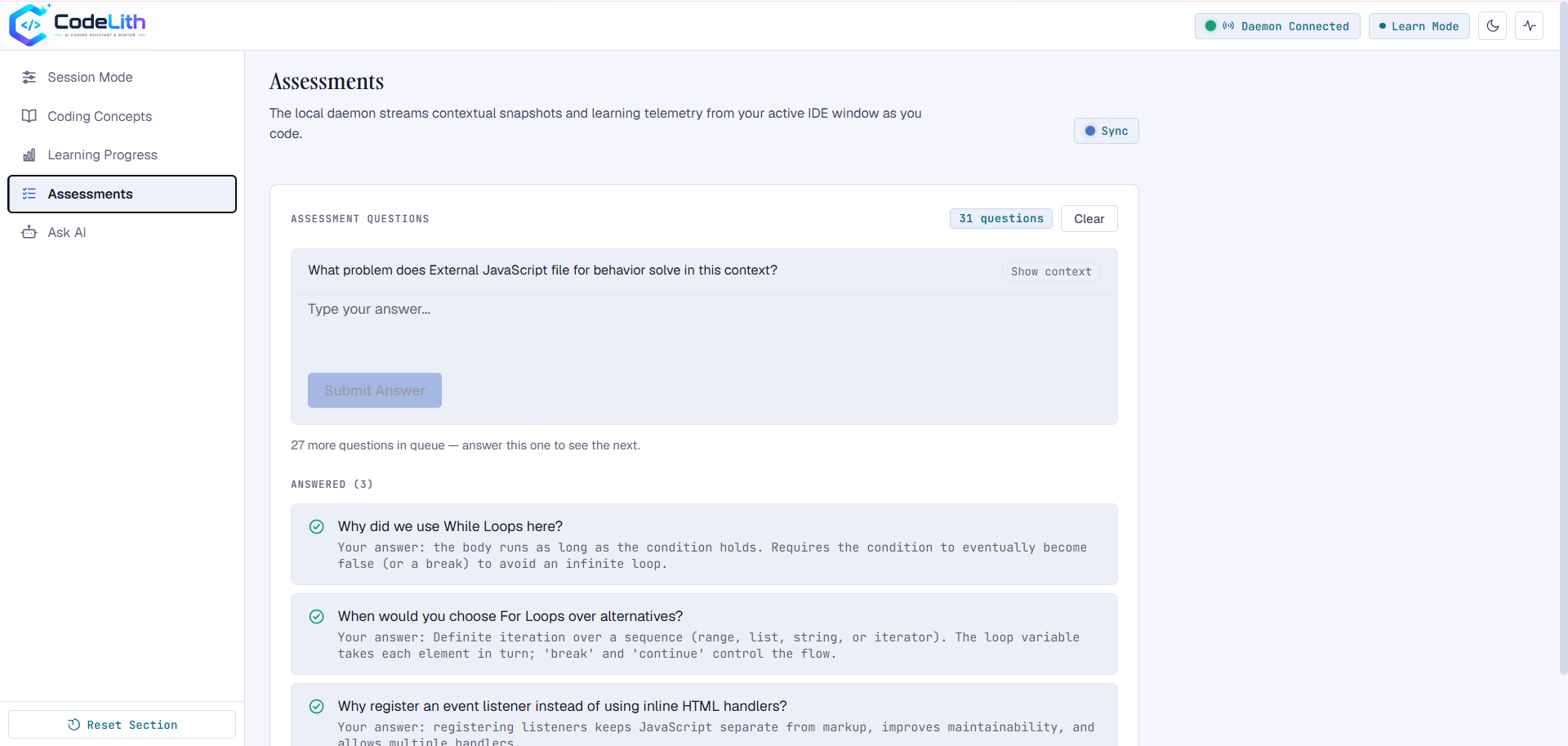
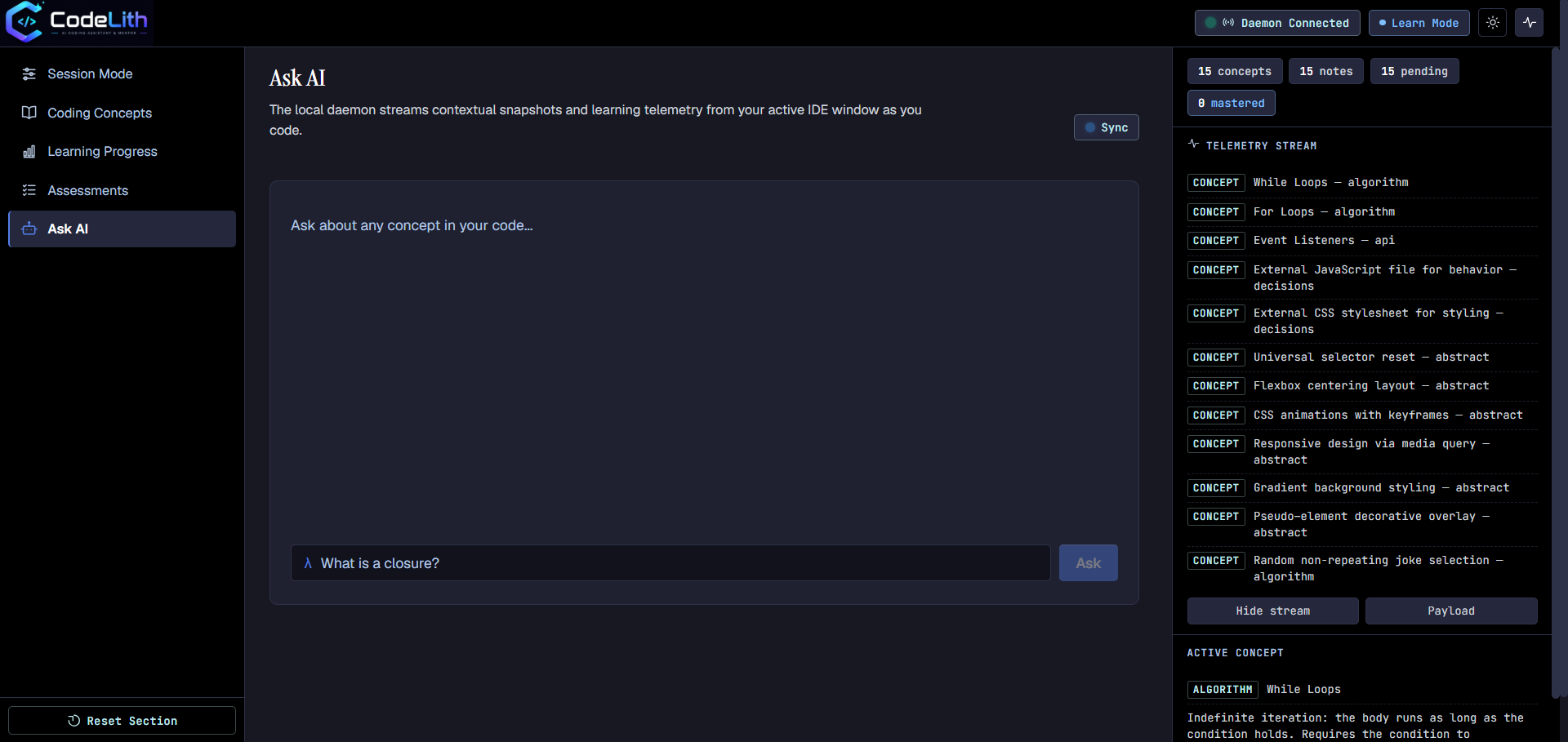
CodeLith bridges this gap by combining AI-powered coding with contextual learning—as the agent builds, it identifies the concepts introduced in the code, explains them visually, assesses the user's understanding, and tracks their progress. It transforms AI-assisted coding from simply getting code to actually understanding how it works.
Prototype
| CodeLith Terminal Agent | Real-time code explanations - Dark Mode |
|---|---|
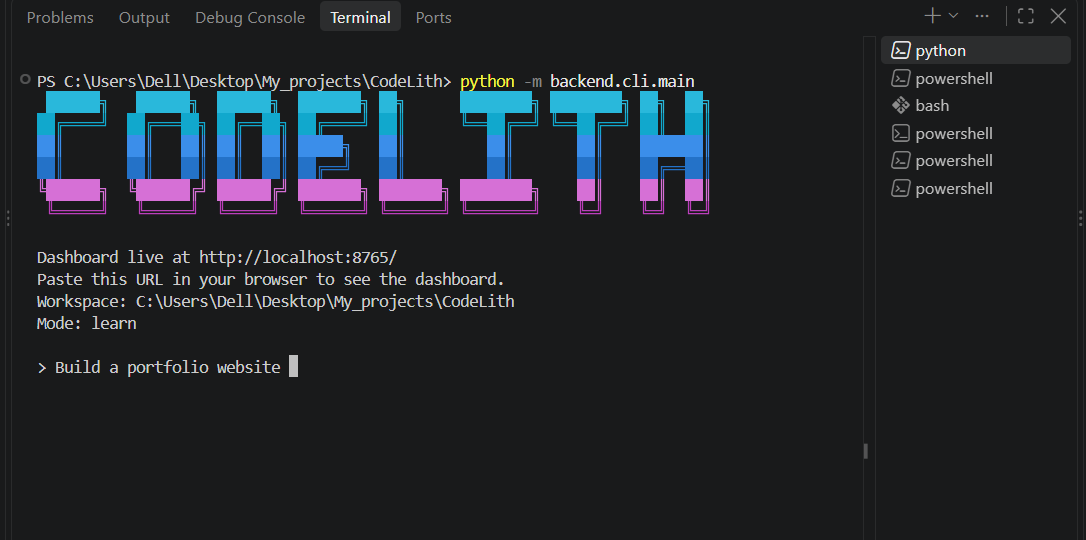 |
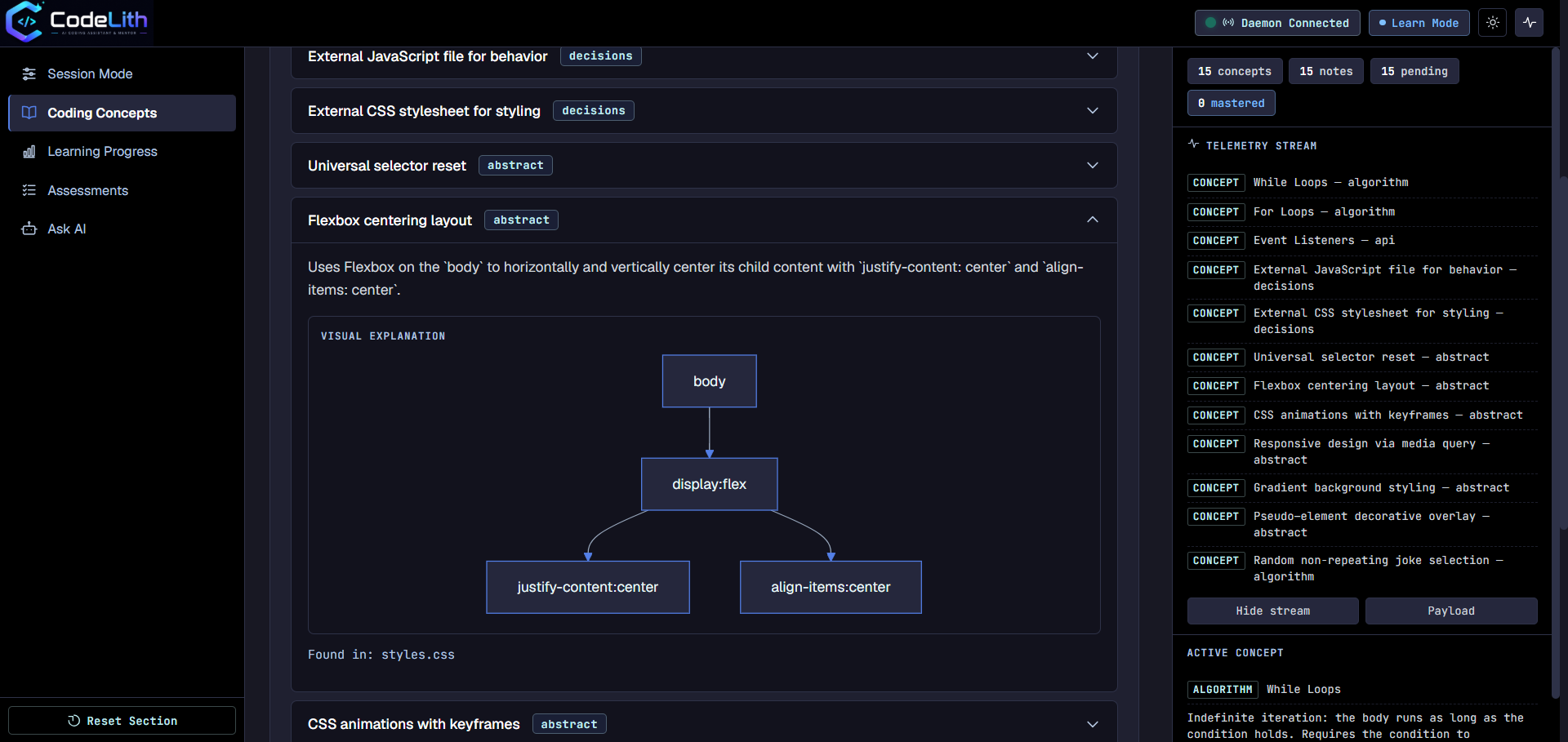 |
| Track Your Learning Progress - Dark Mode | Choose Your Coding Mode - Dark Mode |
|---|---|
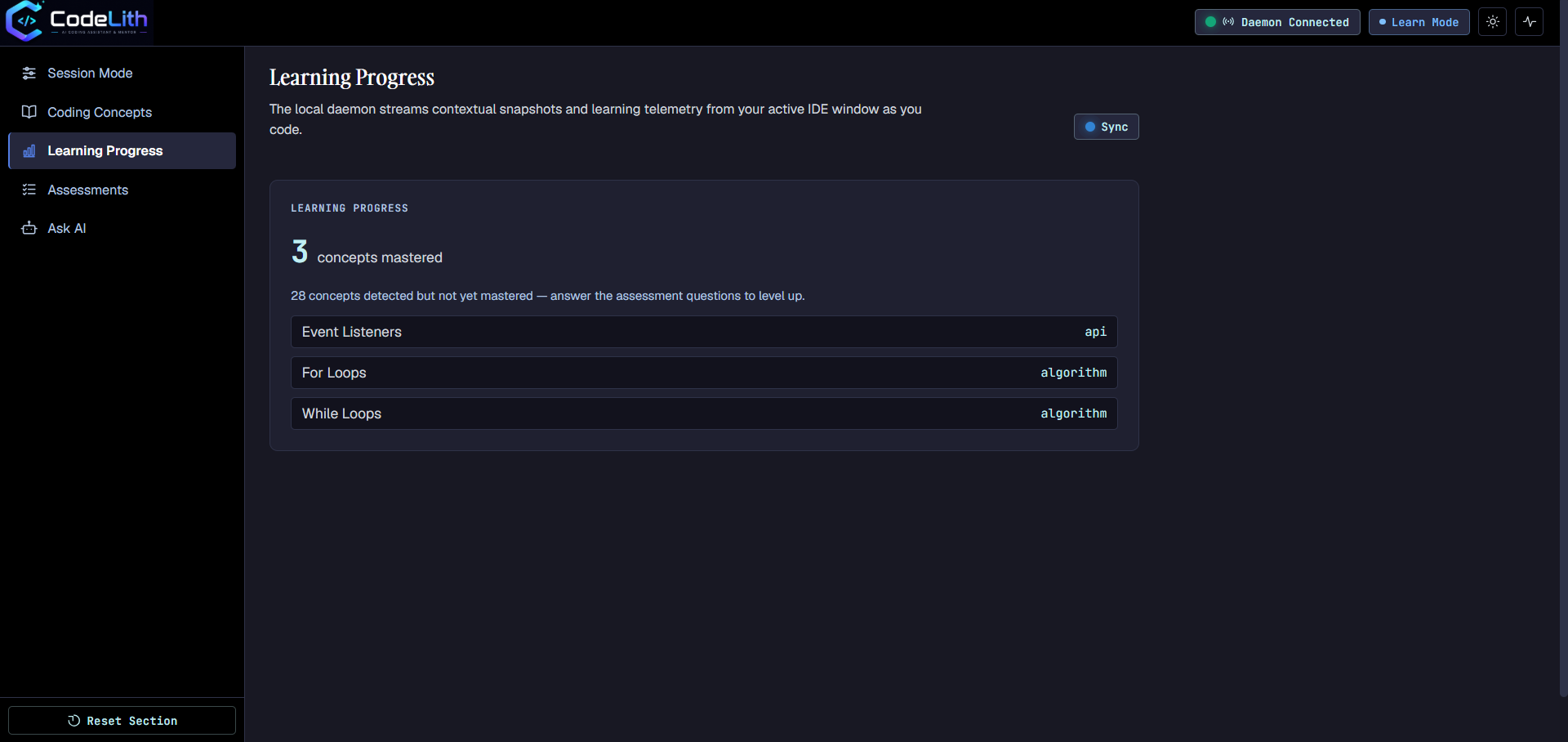 |
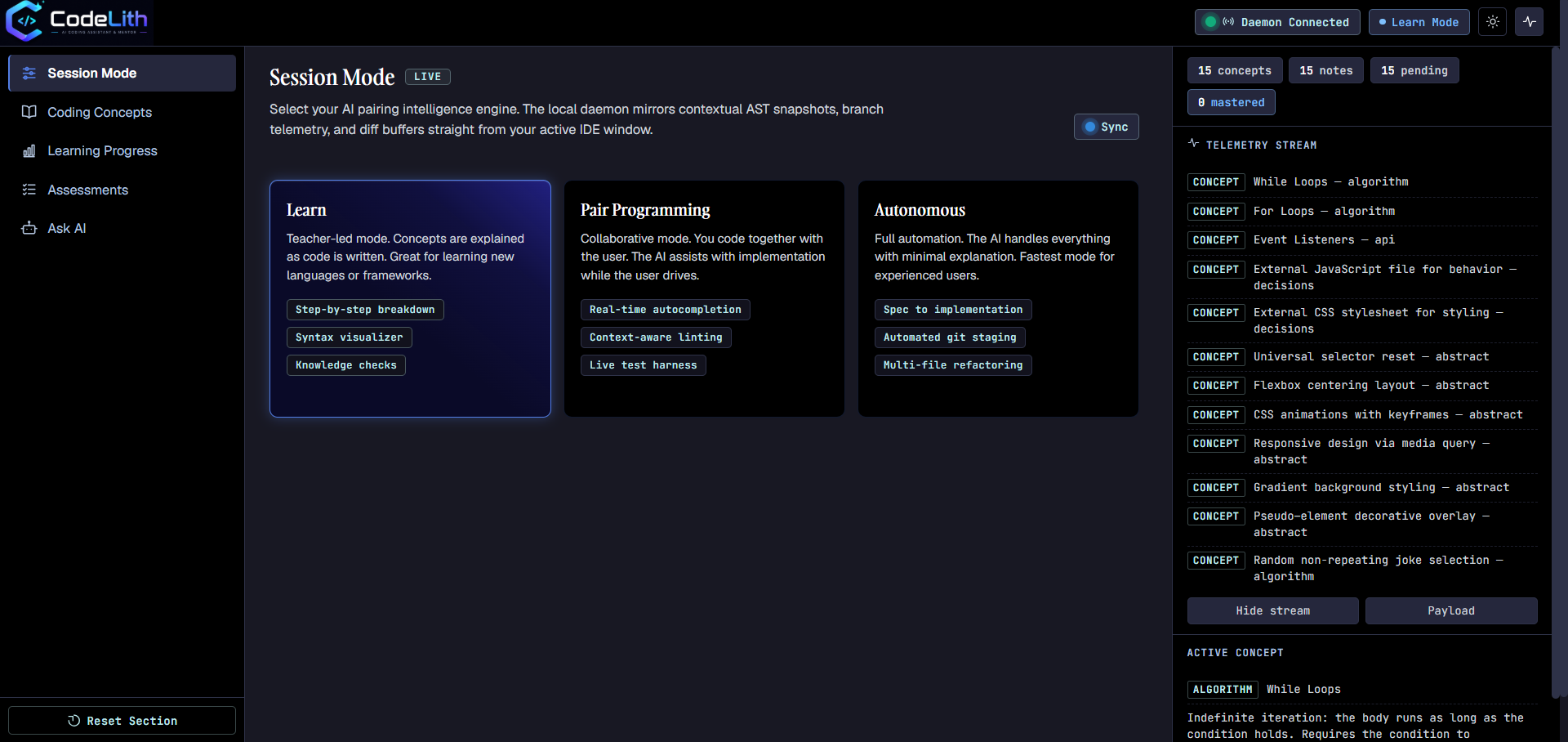 |
| Check Your Understanding - Light Mode | Ask CodeLith AI - Dark Mode |
|---|---|
 |
 |
How it works
CodeLith does not attach a generic lesson to a coding session. It follows the actual work the coding agent performed, finds the important idea inside the result, and turns that idea into a path toward independent understanding.
flowchart LR
    R[User request<br/>Build a notification service] --> A[AI coding agent]
    A --> T[Tool activity<br/>Read, edit, run tests]
    T --> C[Generated code<br/>Provider-backed service]
    C --> D{Meaningful concept<br/>in the changed code?}
    D -->|Evidence found| K[Dependency Injection]
    K --> V[Visual explanation<br/>Receives dependency<br/>instead of creating it]
    V --> Q[Assessment<br/>Why is testing easier?]
    Q --> M[Mastery<br/>Explain and reuse it]
    D -->|No| N[Keep workflow quiet]

    classDef action fill:#16324f,stroke:#4ba3c7,color:#ffffff
    classDef insight fill:#f3b562,stroke:#c47f24,color:#171717
    classDef outcome fill:#2f6f5e,stroke:#8ed1b2,color:#ffffff
    class A,T,C action
    class K,V,Q insight
    class M outcome
The learning is grounded in evidence, not in a static tutorial library:
- The request provides the goal.
- The coding agent's tool activity shows what it actually changed and ran.
- The concept detector identifies a meaningful technique from that change.
- The visual explanation makes the technique concrete in the context of the new code.
- The assessment checks whether the user can reason about the choice, rather than merely recognize its name.
- Mastery means the user can explain and reuse the idea independently.
Architecture
CodeLith is a local three-process system: a CLI, a browser dashboard, and a background daemon that hosts the API and the agent graph. Both frontends talk to the same daemon, which is the single source of truth for session state (conversation history, mode, concepts, assessments, teachings).
flowchart TB
    subgraph Local[User machine]
        CLI[codelith CLI<br/>interactive terminal]
        UI[React dashboard<br/>concepts, activity, progress]
        D[Local daemon<br/>FastAPI + uvicorn<br/>localhost]
        G[Agent graph<br/>LangGraph orchestration]
        DB[(SQLite<br/>local session state)]
        K[(OS keyring<br/>Groq + OpenRouter keys)]
        CLI <-->|HTTP| D
        UI <-->|HTTP + SSE| D
        D --> G
        D <--> DB
        CLI --> K
    end

    subgraph Agents[Specialized agents]
        C[Coding]
        X[Concept detection]
        R[Debugging]
        A[Assessment]
        T[Teaching]
    end

    G --> C
    C -->|failed command| R
    C -->|successful turn| X
    X --> A
    X --> T
    A --> DB
    T --> DB
    C -->|model request| LLM[LLM providers<br/>Groq + OpenRouter<br/>HTTPS]
    R -->|model request| LLM
    X -->|model request when needed| LLM
    A -->|model request| LLM
    T -->|model request| LLM
Repository layout
CodeLith/
├── backend/
│   ├── agents/           # coding, debug, assessment, teacher agents + concept detector
│   ├── cli/              # the `codelith` command-line interface
│   ├── daemon/           # FastAPI server, detached-process launcher, state files
│   ├── database/         # SQLite persistence: concepts, teachings, assessments
│   ├── llm/              # Groq + OpenRouter clients, key and model resolution
│   ├── orchestrator/     # LangGraph agent graph, session modes, event stream
│   └── main.py           # backend entrypoint
├── frontend/             # React dashboard (Vite + TypeScript + Mermaid)
├── tests/                # pytest suite
├── pyproject.toml        # packaging config + `codelith` entry point
└── README.md
Future Enhancements
- Add session export/import so users can save conversations, concepts, assessments, and progress.
- Add project/workspace awareness so CodeLith can remember the repository being studied and maintain project-specific learning context.
- Add user progress analytics: mastered concepts, recurring mistakes, learning streaks, and recommended next topics.
- Build a plugin system for custom agents, tools, concept detectors, and teaching strategies.
First-time CodeLith setup
These steps are for users who installed CodeLith from PyPI for the first time.
1. Install CodeLith
Use Python 3.10 or newer:
py -m pip install codelith
2. Start CodeLith
codelith
On the first run, CodeLith asks for two API keys. Create them from the official provider pages:
- Groq: https://console.groq.com/keys
- OpenRouter: https://openrouter.ai/keys
Paste each key when prompted. CodeLith validates the key before saving it to the Windows credential store. The keys are not written to the project or printed in the terminal.
Groq powers teaching, explanations, assessment, and concept detection. OpenRouter powers the coding and debugging agents. Both keys are required for the complete experience.
After setup, CodeLith starts its local daemon and opens the dashboard in your browser. The dashboard is normally available at http://localhost:8765/.
Once installed, CodeLith can be launched anytime with a single command:
codelith
Commands
In the terminal session
Typed at the > prompt, after the banner:
| Command | Effect |
|---|---|
exit, quit, q |
Leave the session — the daemon keeps running in the background |
reset, clear, /reset |
Start a fresh conversation |
mode |
Show the current mode and the available modes |
mode <name> |
Switch mode — one of learn, pair-programming, autonomous |
Anything else is sent to the agent. Mode changes made on the dashboard are picked up by the terminal automatically, and vice versa.
CLI subcommands
| Command | Effect |
|---|---|
codelith |
Chat session: first-run key setup, daemon autostart, dashboard link — opens in the browser after a short pause |
codelith setup [groq|openrouter] |
Enter or re-enter an API key (validated first, saved to the OS credential store) |
codelith config show |
Show every model role and its resolved model |
codelith config set <role> <model> |
Override one role's model (Available agent roles are coding, debugging, teaching, assessment,grading, and detection.) |
codelith config unset <role> |
Remove a role's override — back to the built-in default |
Daemon control
| Command | Effect |
|---|---|
python -m backend.daemon.launcher start |
Start the daemon detached, if not already running |
python -m backend.daemon.launcher status |
Show whether it runs, and on which port |
python -m backend.daemon.launcher open |
Start it if needed, then open the dashboard in the browser |
python -m backend.daemon.launcher stop |
Stop the daemon |
Three ways to work
| Mode | Best for | Behavior |
|---|---|---|
learn |
Building understanding | Detects concepts, explains the work, and asks questions about each new concept. |
pair-programming |
Staying in the flow | Focuses on building while detecting concepts and asking occasional questions. |
autonomous |
Finishing a well-defined task | Prioritizes implementation and debugging with minimal learning interruptions. |
Switch modes from either interface.
Development setup
Backend
git clone https://github.com/MakersNeedMore-MnM/Round2-himanibagale
cd Round2-himanibagale
python -m venv .venv
.venv\Scripts\activate            # Windows (bash: source .venv/Scripts/activate)
pip install -e .
Run from source without installing the package:
python -m backend.cli.main
Frontend (dashboard)
cd frontend
npm install
npm run dev       # dev server with HMR on :5173, calls the daemon on :8765
npm run build     # writes backend/daemon/static/ inside the Python package
Tests
python -m pytest tests/ -v
Contributing
Want to contribute? Check out our Contributing Guide.
License
MIT — see LICENSE.
1 maintainer

Metadata
1 maintainer
Release files for codelith 0.1.0
For a detailed explanation of source distributions (sdists) and built distributions (wheels), please see the package formats documentation.
Source distribution (sdist)
| File | Size | Uploaded | Provenance | |
|---|---|---|---|---|
| codelith-0.1.0.tar.gz | 2.1 MB | Without provenance | Details |
Built distribution (wheel)
| File | Interpreter | ABI | Platform | Reset |
|---|---|---|---|---|
| codelith-0.1.0-py3-none-any.whl | Python 3 | none | any | Details |
Total release size: 4.3 MB
Release files / codelith-0.1.0.tar.gz
| Download URL | codelith-0.1.0.tar.gz |
|---|---|
| Size | 2.1 MB |
| Tags | Source |
|
SHA-256 checksum How to use checksums |
75b78bdd98d5348e972069dea5749d424ab1e7c167176d5f787e989bb91a185e
|
|
BLAKE2b-256 checksum How to use checksums |
709f146f85b155716f74a68b432cb39b9da03a3528345e1967bc619985b46fef
|
| Upload date | |
|
Uploaded using Trusted Publishing? What is trusted publishing? |
No |
| Uploaded via |
twine/7.0.0 CPython/3.12.10
|
Release files / codelith-0.1.0-py3-none-any.whl
| Download URL | codelith-0.1.0-py3-none-any.whl |
|---|---|
| Size | 2.2 MB |
| Tags | Python 3 |
|
SHA-256 checksum How to use checksums |
631289cc1bc35ec9350d356a6ffa0ab6abd2859bbde753d707aaf551c2ff004b
|
|
BLAKE2b-256 checksum How to use checksums |
14277d786098144c7eef904f66066455d5437461c07c86389197ce6d815ad46e
|
| Upload date | |
|
Uploaded using Trusted Publishing? What is trusted publishing? |
No |
| Uploaded via |
twine/7.0.0 CPython/3.12.10
|
Security for codelith 0.1.0
Provenance
Provenance describes where a file came from. On PyPI, provenance is shared via attestations, which provide a verifiable record of the build or publishing details. View details, limitations and caveats.
No provenance found
None of the files in this release were uploaded with provenance metadata.
A note on package security
PyPI is a repository for distributing packages, not a service for auditing them. While third-party security researchers and our staff do their best to detect and remove malicious packages, PyPI cannot guarantee the quality, security or suitability of any given package.
To learn more about protecting yourself from malicious actors, visit our package security documentation.













