

Codendium
Turn a source tree into a US Copyright Office compliant deposit PDF — and know the page count before you render it.










Use this when
- You are registering a copyright for software with the US Copyright Office and need to prepare the source-code deposit.
- You need the page count before generating a PDF, because the rule that applies depends on it.
- Your program runs past 50 pages, so §721.6 requires the first 25 pages and the last 25 rather than a selection of your choosing.
- You need to redact trade secrets under §721.7 without shifting pagination.
- You need to strip comments without altering the code.
- You need a reproducible deposit — identical inputs, byte-identical PDF — so a re-run proves what was filed.
Not the right tool for questions about copyright law or registration strategy, for jurisdictions outside the United States, or for general-purpose source-to-PDF printing. Codendium prepares a document; it is not legal advice.
The problem this solves
To register software copyright in the United States you must deposit "identifying portions" of your source code, and the Copyright Office is exacting about what that means. The Compendium of U.S. Copyright Office Practices (Third) requires the program title and version on the first page, monospaced type at roughly 9–10 pt, about 40 lines per page, continuous page numbering and clear file paths. Then §721.6 adds the rule that governs everything else: if the program runs to more than 50 pages, you deposit the first 25 pages and the last 25 — not a selection of your choosing.
Doing that by hand from a real multi-file project is slow and easy to get wrong. Worse, the number that decides which rule applies — the page count — is invisible until you have already built the PDF. So you build it, discover you are at 62 pages, change something, and build it again.
Codendium turns that into one step. Point it at a folder; it discovers the source, puts it in the order you want, optionally strips comments, lays it on a compliant grid, and tells you the exact page count before rendering anything. Then it writes both the complete PDF for your records and the filing copy with §721.6 already applied, plus a manifest recording exactly what went in.
It is useful if you are an individual developer, a small studio or a law firm preparing a software registration, and you would rather not assemble a 200-page deposit in a word processor.
How it works
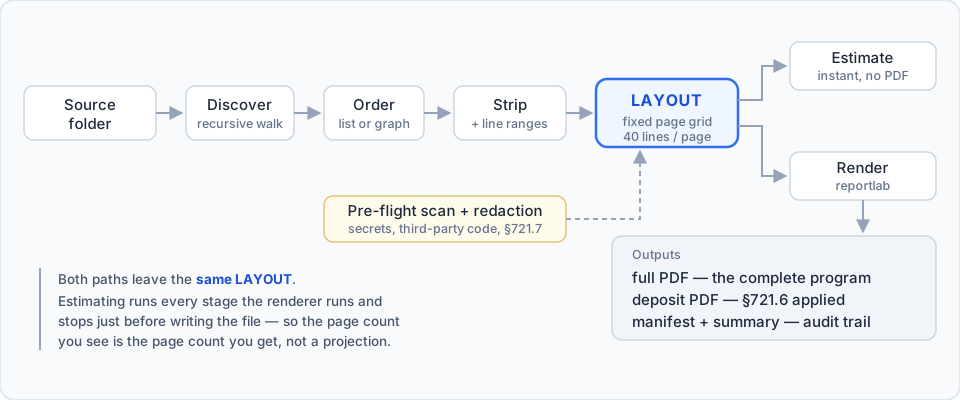
The page grid is fixed and the font is monospaced, so page count is a pure function of the character stream. Estimating runs the same discovery, ordering, stripping and layout the renderer runs, and stops just before writing the file. The estimate is therefore not a projection of the page count — it is the page count, and the test suite asserts that equality against the rendered PDF across seven different layout configurations.
Install
pip install codendium            # CLI only
pip install "codendium[gui]"     # CLI + desktop GUI
Python 3.10 or newer. On Windows use the py launcher in place of python.
The GUI needs PySide6; the CLI does not, so on a headless machine or in CI
pip install codendium pulls only the four runtime dependencies.
From source instead:
git clone https://github.com/ami-a/codendium.git
cd codendium
pip install -e ".[dev]"          # everything, including the test suite
Quick start
python -m copyright_deposit # opens the GUI
Or from the command line:
# Propose an order from the code's own structure
python -m copyright_deposit suggest-order <folder> --write order.txt

# Exact page count, no PDF written, plus the comment-policy comparison
python -m copyright_deposit estimate <folder> --order-file order.txt --what-if

# Build it
python -m copyright_deposit build <folder> --order-file order.txt \
    --name "My Program" --program-version 1.2.0 \
    --owner "Jane Developer" --revision auto -o out
build exits non-zero and writes nothing if it finds credentials in the
selected files, which makes it safe to run unattended.
What you get
| File | Purpose |
|---|---|
deposit_full.pdf |
The complete program, for your records |
deposit_deposit.pdf |
The filing copy, with §721.6 applied |
deposit_manifest.json |
Every file, its SHA-256, and the pages it landed on |
deposit_summary.txt |
Readable audit trail, plus the statement to give the Office |
The application
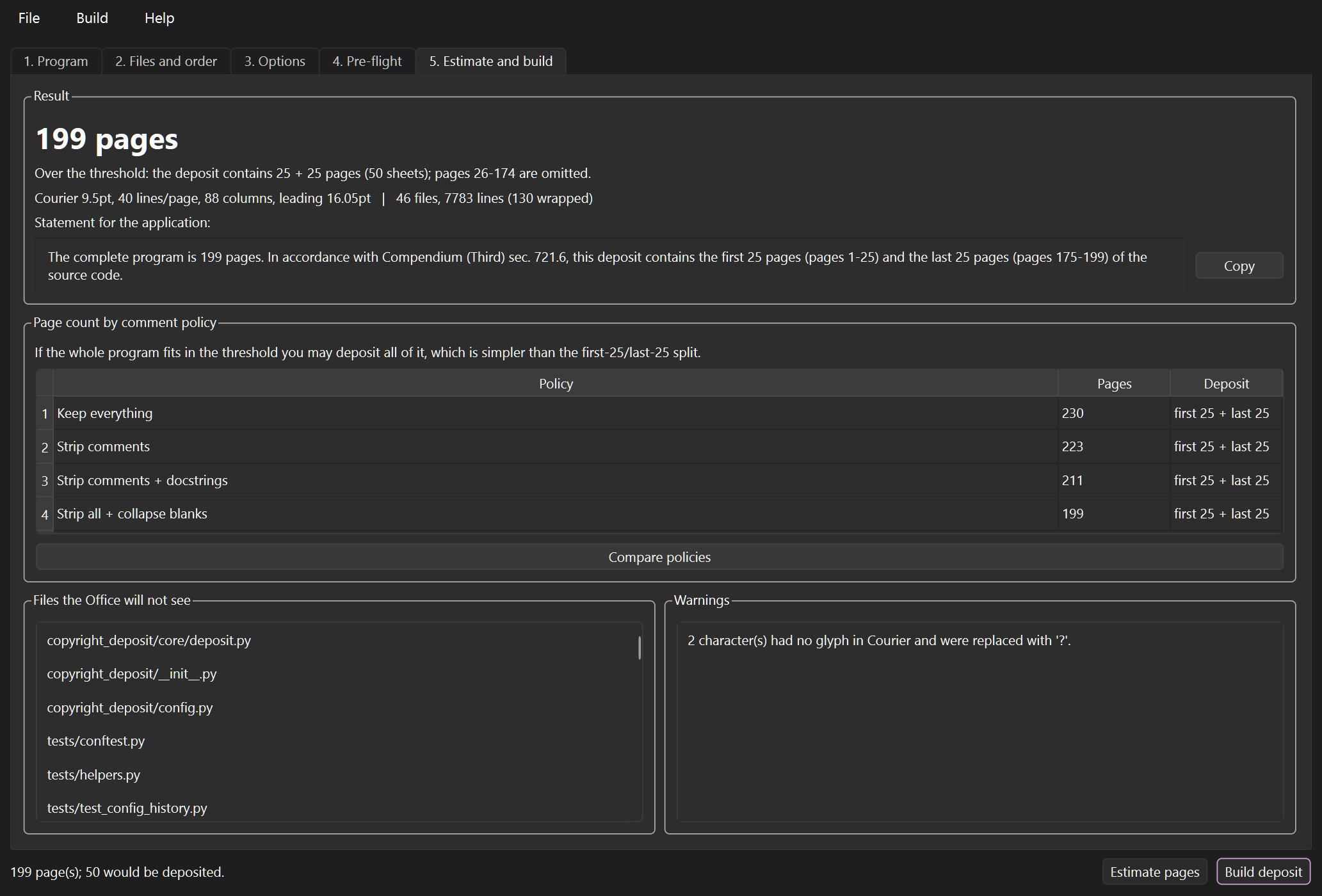
The estimate answers the question that actually matters — what do I change to get under 50 pages and deposit the whole program?
Keep everything                   236 pages   (first 25 + last 25)
Strip comments                    229 pages   (first 25 + last 25)
Strip comments + docstrings       217 pages   (first 25 + last 25)
Strip all + collapse blanks       205 pages   (first 25 + last 25)
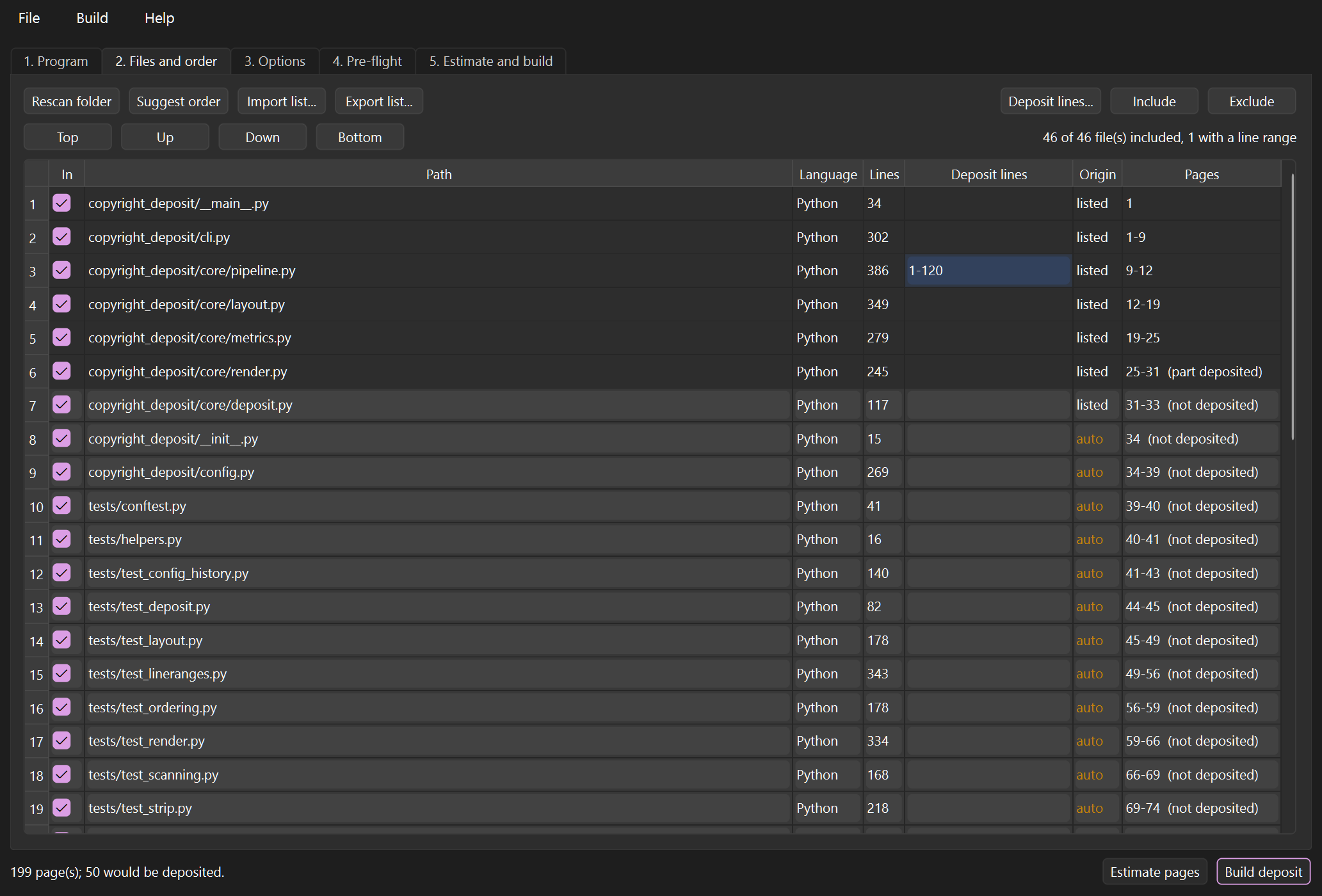
The file list is the order list. Drag rows, or let Suggest order build one
from the entry points and the import/#include graph. Files nobody named are
appended and flagged, so an automatic decision never passes for a deliberate
one, and the Pages column shows which files fall inside the omitted middle —
code the Office will never see.
Depositing only part of a file
Give any file a line range and only those lines are deposited — the Deposit
lines column in the GUI, or --lines on the command line:
python -m copyright_deposit build <folder> --lines "src/core.py=1-50,120-200"
Accepted forms: 1-50, 120-200 (blocks), 12 (one line), 305- (to the end),
-40 (from the start). Overlapping ranges are merged; out-of-range ones are
clamped or reported.
Line numbers are the ones in your editor — the original file's, not positions after comments were stripped. An extract is then marked twice, so no reader can mistake it for a whole file:
FILE: src/core.py
PARTIAL FILE - lines 1-50, 120-200 of 380 included
------------------------------------------------------------
def public_api(value):
    return _compute(value)
- - - - - -  [ lines 51-119 omitted (69 lines) ]  - - - - - -
def _compute(value):
One thing the markers deliberately do not claim: lines removed by the comment policy are not reported as omitted. If stripping deleted lines 1–2, you did not omit them — so no marker appears. Elisions are computed from your ranges against the file's true length, never from which lines happened to survive.
Stripping code without breaking it
Strippers never rewrite source. They classify byte ranges as comment or docstring, and a shared routine removes those ranges — so the transform is provably subtractive.
- Python —
tokenizefor comments,astfor docstrings, so a#inside a string cannot be mistaken for a comment. Afterwards the original and stripped ASTs are compared; on any difference the file is kept verbatim and a warning is raised. - Everything else — Pygments, but only after its token stream is verified to
reconstruct the source exactly.
Comment.Preprocis never removed: C lexers classify#includeand#defineas comments, and deleting those would gut the deposit. - Fallback — a hand-written C-family state machine handling raw strings
(
R"tag( */ )tag"), C# verbatim strings, Rustr#"…"#, template literals, line splicing, and JavaScript regex literals containing//.
A docstring that is the only statement in a function is never removed — that would leave an empty suite and turn valid source into a syntax error.
Safeguards
| Check | Why it exists |
|---|---|
| Secret / PII scan | A deposit becomes a public record. Anything left in the code is readable by anyone who inspects the filing, so high-severity findings block the build until redacted or acknowledged. |
| Third-party detector | A registration covers only your own authorship. Flags foreign copyright holders, SPDX licences and generated files — and reads only the comment layer, so prose and code never trigger it. |
| Redaction (§721.7) | Blocked-out text is never written into the PDF, only a filled rectangle, so it cannot be copied or extracted. Line count is unchanged, so pagination cannot shift. The 49 % limit is checked. |
| Reproducibility | Identical settings and sources produce a byte-identical PDF, so a re-run proves what was filed. |
Page grid
Letter (or A4), 0.75 in margins, Courier 9.5 pt, 40 lines per page, 88 columns.
Courier is a PDF base-14 face: guaranteed monospaced, rendered identically by
every viewer, with no embedding or font-redistribution question — which is what
you want in a document you are filing. To use something else, point --font at
a monospaced .ttf or drop one in
copyright_deposit/assets/fonts/. A
proportional font is rejected rather than silently breaking the grid, and
glyphs the font cannot draw become ? with a warning rather than vanishing.
Overlong lines wrap — never truncate — and the wrap is counted in the estimate.
Dependencies
| Package | Version | Licence | Used for |
|---|---|---|---|
| reportlab | ≥ 4.0 | BSD | PDF generation |
| Pygments | ≥ 2.7 | BSD-2-Clause | Comment classification for ~30 languages |
| charset-normalizer | ≥ 2.0 | MIT | Deterministic source decoding |
| pathspec | ≥ 0.9 | MPL-2.0 | .gitignore matching |
| PySide6 | ≥ 6.8.1 | LGPL-3.0 | GUI (optional) |
PySide6 is LGPL. That imposes nothing on you for source use or a normal
pip install, but it is worth knowing the day anyone freezes this into a
distributed binary.
Tests
pip install -e ".[test]"
python -m pytest
175 tests covering stripper correctness on adversarial input, AST equivalence, grid compliance, both §721.6 branches, redaction non-extractability, byte-level reproducibility, line-range selection and elision marking, order resolution, scanner false positives, and settings/history round-trips.
The estimate-equals-render property is asserted directly: the estimated page
count is compared against len(PdfReader(...).pages) of the file actually
written.
Limitations
- Comment classification is verified for Python and validated for C-family and Pygments-supported languages; an unrecognised language is deposited verbatim rather than guessed at.
Licence
Apache License 2.0 — Copyright 2026 ami-a.
Codendium prepares a deposit. It is not legal advice. Whether a particular deposit satisfies the Copyright Office for a particular work is a judgement for you or your attorney to make.
1 maintainer

Release files for codendium 1.0.1
For a detailed explanation of source distributions (sdists) and built distributions (wheels), please see the package formats documentation.
Source distribution (sdist)
| File | Size | Uploaded | |
|---|---|---|---|
| codendium-1.0.1.tar.gz | 361.0 kB | Details |
Built distribution (wheel)
| File | Interpreter | ABI | Platform | Reset |
|---|---|---|---|---|
| codendium-1.0.1-py3-none-any.whl | Python 3 | none | any | Details |
Total release size: 462.8 kB
Release files / codendium-1.0.1.tar.gz
| Download URL | codendium-1.0.1.tar.gz |
|---|---|
| Size | 361.0 kB |
| Tags | Source |
|
SHA-256 checksum How to use checksums |
9c7a9a9c48887d97815b5c60929e9afa8c192b4f5a6171005021d0d228865ee3
|
|
BLAKE2b-256 checksum How to use checksums |
65b51be2f08b22263b1e13b4b30e5c42c600a6ba0c56ce9c1ef071590a3f4363
|
| Upload date | |
|
Uploaded using Trusted Publishing? What is trusted publishing? |
Yes |
| Uploaded via |
twine/7.0.0 CPython/3.13.14
|
Provenance
Provenance describes where a file came from. On PyPI, provenance is shared via attestations, which provide a verifiable record of the build or publishing details. View details, limitations and caveats.


PyPI Publish Attestation
PyPI verified that this artifact, at this checksum, originated from the publisher listed below.
Signed by GitHub Actions, verified by PyPI on Sep 23, 2026.
Transparency logRelease files / codendium-1.0.1-py3-none-any.whl
| Download URL | codendium-1.0.1-py3-none-any.whl |
|---|---|
| Size | 101.9 kB |
| Tags | Python 3 |
|
SHA-256 checksum How to use checksums |
b005940a464f43be3627a7886a89e913a4ee0e48391ac7f9d3e8a2e89e756602
|
|
BLAKE2b-256 checksum How to use checksums |
344e3880e5c665719238118a900f96ffb8c86432b23c867c3796ad4906458e5c
|
| Upload date | |
|
Uploaded using Trusted Publishing? What is trusted publishing? |
Yes |
| Uploaded via |
twine/7.0.0 CPython/3.13.14
|
Provenance
Provenance describes where a file came from. On PyPI, provenance is shared via attestations, which provide a verifiable record of the build or publishing details. View details, limitations and caveats.
PyPI Publish Attestation
PyPI verified that this artifact, at this checksum, originated from the publisher listed below.
Signed by GitHub Actions, verified by PyPI on Sep 23, 2026.
Transparency log













