
Codeplain plain2code renderer
Render ***plain source to software code using the Codeplain API.
Codeplain.ai - Code Generation as a Service
Codeplain is a platform that generates software code using large language models based on requirements you specify in ***plain specification language.
Schematic overview of the Codeplain's code generation service
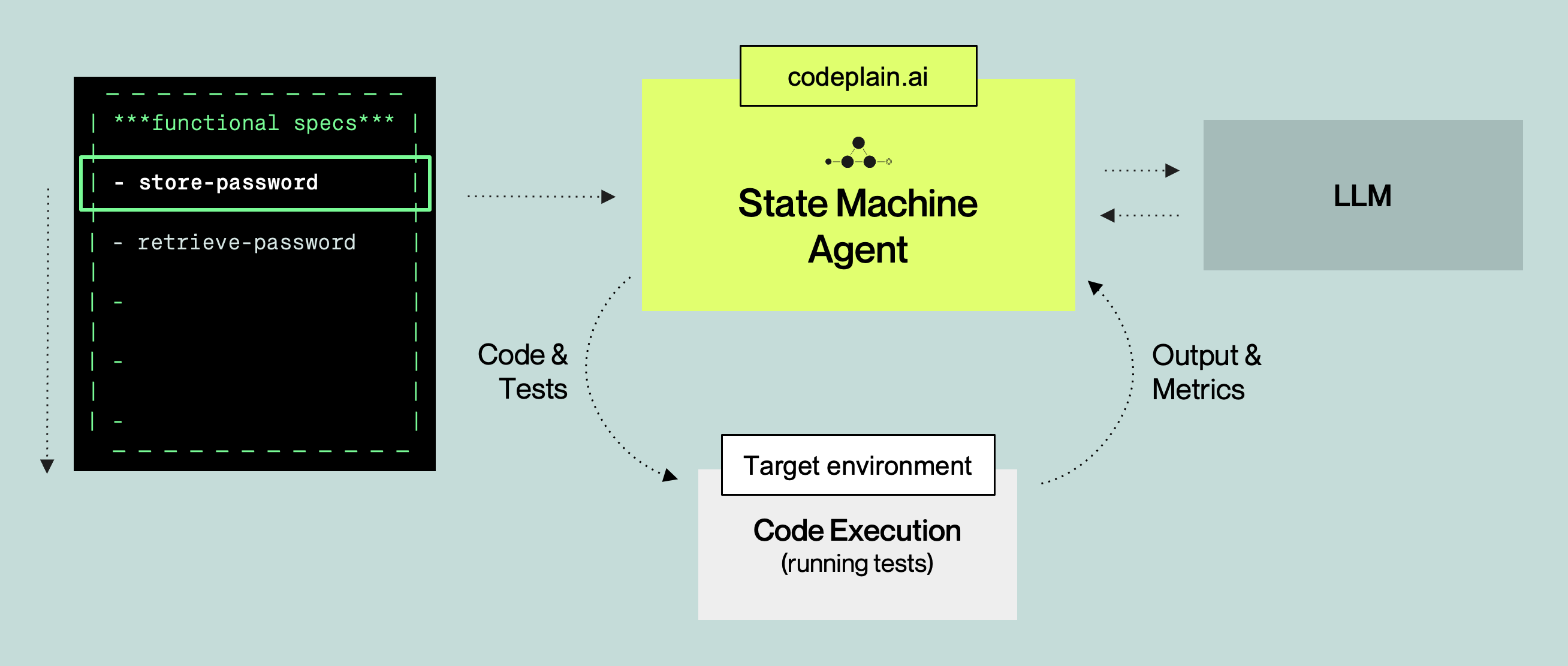
Abstracting Away Code Generation Complexity with ***plain
***plain is a novel specification language that helps abstracting away complexity of using large language models for code generation.
An example application in ***plain

Getting started
Prerequisites
System requirements
To run the plain2code client, you need Python 3.11 or a later version.
Windows users: Please install WSL (Windows Subsystem for Linux) as this is currently the supported environment for running plain code on Windows.
Authorization - Codeplain API Key
We are using Codeplain API Key to authorize requests to the Codeplain API. To get your Codeplain API Key, please contact Codeplain.ai support at support@codeplain.ai.
In order to generate code, you need to export the following environment variable:
export CODEPLAIN_API_KEY="your_actual_api_key_here"
Installation Steps
- Clone this repository
- Set your Codeplain API key as an environment variable:
export CODEPLAIN_API_KEY=your_api_key_here - (Recommended) Create and activate a virtual environment:
python -m venv .venv
source .venv/bin/activate
- Install required libraries
pip install -r requirements.txt
Quick Start
After completing the installation steps above, you can immediately test the system with a simple "Hello World" example:
-
Change to the example folder and run the example:
cd examples/example_hello_world_python
python ../../plain2code.py hello_world_python.plain
Note: Rendering will take a few minutes to complete.
-
The system will generate a Python application in the
builddirectory. You can run it with:cd build python hello_world.py
Crash reporting
If the plain2code client crashes unexpectedly, it sends an anonymous crash report to Codeplain to help improve the tool. To disable crash reporting, set the CODEPLAIN_NO_TELEMETRY=1 flag.
Releasing
Releases are built and published with uv. The version is read from _version.py.
- Bump the version in
_version.pyand commit/tag (git tag v<version>). - Build the distributions:
uv build --python 3.11
This producesdist/codeplain-<version>-py3-none-any.whlanddist/codeplain-<version>.tar.gz. - (Optional) Smoke-test the wheel:
uv run --with dist/codeplain-<version>-py3-none-any.whl --no-project -- codeplain --status
- (Optional) Publish to TestPyPI first:
uv publish --publish-url https://test.pypi.org/legacy/ dist/codeplain-<version>*
- Publish to PyPI:
uv publish dist/codeplain-<version>*
Authenticate withUV_PUBLISH_TOKEN=pypi-...(recommended),--token pypi-..., or--username __token__ --password pypi-.... - Push the tag:
git push origin v<version>.
Additional Resources
Examples and Sample Projects
- See the examples folder for sample projects in Golang, Python, and React.
- For example application how to implement task manager in ***plain see example-task-manager repository.
- For example application how to implement SaaS connectors in ***plain see example-saas-connectors repository.
Documentation
- For more details on the ***plain format, see the ***plain language specification.
- For step-by-step instructions for creating your first ***plain project see the Kickstart your ***plain project.
- For complete CLI documentation and usage examples, see plain2code CLI documentation.
2 maintainers


Download files
Download the file for your platform. If you're not sure which to choose, learn more about installing packages.
Source Distribution
Built Distribution
Filter files by name, interpreter, ABI, and platform.
If you're not sure about the file name format, learn more about wheel file names.
Copy a direct link to the current filters
File details
Details for the file codeplain-0.3.5.tar.gz.
File metadata
- Download URL: codeplain-0.3.5.tar.gz
- Upload date:
- Size: 472.4 kB
- Tags: Source
- Uploaded using Trusted Publishing? No
- Uploaded via:
uv/0.11.24 {"installer":{"name":"uv","version":"0.11.24","subcommand":["publish"]},"python":null,"implementation":{"name":null,"version":null},"distro":{"name":"macOS","version":null,"id":null,"libc":null},"system":{"name":null,"release":null},"cpu":null,"openssl_version":null,"setuptools_version":null,"rustc_version":null,"ci":null}
File hashes
| Algorithm | Hash digest | |
|---|---|---|
| SHA256 |
57e8c5dd9ca2c6aa77afa1ddbdecbcd3327a2bbfc59219bab8b470d4095fe7d5
|
|
| MD5 |
93cfb6f6dc72eb5aa29ccb5ecd0d924d
|
|
| BLAKE2b-256 |
dda9f66e9b139611bce3ca1d885f2d394448dc5ba76205d3c6ff8bee9786e8c4
|
File details
Details for the file codeplain-0.3.5-py3-none-any.whl.
File metadata
- Download URL: codeplain-0.3.5-py3-none-any.whl
- Upload date:
- Size: 162.8 kB
- Tags: Python 3
- Uploaded using Trusted Publishing? No
- Uploaded via:
uv/0.11.24 {"installer":{"name":"uv","version":"0.11.24","subcommand":["publish"]},"python":null,"implementation":{"name":null,"version":null},"distro":{"name":"macOS","version":null,"id":null,"libc":null},"system":{"name":null,"release":null},"cpu":null,"openssl_version":null,"setuptools_version":null,"rustc_version":null,"ci":null}
File hashes
| Algorithm | Hash digest | |
|---|---|---|
| SHA256 |
d9b579ee539e978fc9265f0fd8bf760e402b87e5e3f510f0ea184969d650229f
|
|
| MD5 |
c69e6e8943064ee67e662679b549a2b9
|
|
| BLAKE2b-256 |
1bdb5ab0c132d7e74d4c34ba03c4d7ca0f67aaf0a3a89c282032acd5fc67eea8
|







