
🚀 CodePrint




A blazing-fast, cross-platform CLI tool that creates comprehensive AI-ready snapshots of your codebase. Perfect for use with ChatGPT, Claude, Gemini, and other AI assistants.

✨ Features
- 🚀 Lightning Fast: Parallel processing for rapid scanning
- 🎯 Smart Detection: Automatically detects project type and applies appropriate filters
- 📋 Multiple Formats: Outputs in TXT or MCP (Markdown Context Pack) format
- 📎 Clipboard Ready: Option to copy output directly to clipboard
- 🔍 Gitignore Support: Respects
.gitignorepatterns - 🎨 Beautiful CLI: Colorful ASCII art and progress indicators
- 🌍 Cross-Platform: Works on Windows, macOS, Linux, Git Bash, and more
- 🧠 AI-Optimized: Perfect for prompt engineering with any AI assistant
📦 Installation
Quick Install (Recommended)
Using the universal installer:
Linux/macOS:
curl -sSL https://raw.githubusercontent.com/Tanayk07/codeprint/main/install.sh | bash
Windows (PowerShell):
iwr -useb https://raw.githubusercontent.com/Tanayk07/codeprint/main/install.ps1 | iex
Package Managers
pip (Python)
pip install codeprintio
npm (Node.js)
npm install -g codeprintio
Homebrew (macOS)
brew tap Tanayk07/codeprint
brew install codeprintio
Chocolatey (Windows)
choco install codeprintio
WinGet (Windows)
winget install codeprintio
Snap (Linux)
sudo sudo snap install codeprintio
APT (Debian/Ubuntu)
sudo add-apt-repository ppa:Tanayk07/codeprint
sudo apt update
sudo sudo apt install codeprintio
🚀 Quick Start
Basic Usage
Scan current directory and save to file:
codeprint
Scan with specific format:
codeprint -f mcp  # Generate MCP format
codeprint -f txt  # Generate TXT format (default)
Copy to clipboard automatically:
codeprint -c
Advanced Usage
# Scan specific directory
codeprint -p /path/to/project

# Custom output file
codeprint -o my_snapshot.txt

# Include hidden files
codeprint --include-hidden

# Set custom limits
codeprint --max-files 1000 --max-file-size 2048 --max-lines 2000

# Disable automatic project detection
codeprint --no-auto-detect

# Disable gitignore patterns
codeprint --no-gitignore

# Verbose output
codeprint -v
🎯 Project Type Detection
CodePrint automatically detects your project type and applies appropriate ignore patterns:
| Project Type | Detection Files | Auto-Ignored |
|---|---|---|
| Python | requirements.txt, setup.py, pyproject.toml |
__pycache__, *.pyc, venv/, .egg-info/ |
| JavaScript | package.json |
node_modules/, dist/, *.min.js |
| TypeScript | tsconfig.json |
node_modules/, dist/, *.d.ts |
| Java | pom.xml, build.gradle |
target/, *.class, .gradle/ |
| Android | AndroidManifest.xml, gradle.properties |
build/, *.apk, *.aab |
| iOS | Podfile, *.xcodeproj |
Pods/, *.ipa, DerivedData/ |
| React | package.json + React files |
node_modules/, build/, .next/ |
| .NET | *.csproj, *.sln |
bin/, obj/, packages/ |
| Go | go.mod |
vendor/, *.exe |
| Rust | Cargo.toml |
target/, Cargo.lock |
| Flutter | pubspec.yaml |
build/, .dart_tool/ |
📋 Output Formats
TXT Format
Simple text format with file contents and directory structure. Perfect for quick sharing.
MCP Format (Markdown Context Pack)
Structured markdown format with metadata, syntax highlighting, and better organization. Ideal for AI assistants.
⚙️ Configuration
Command-Line Flags
| Flag | Description | Default |
|---|---|---|
-f, --format |
Output format (txt/mcp) | txt |
-o, --output |
Output file name | auto-generated |
-c, --clipboard |
Copy to clipboard | false |
-p, --path |
Path to scan | current directory |
--max-file-size |
Max file size (KB) | 1024 |
--max-files |
Max number of files | 500 |
--max-lines |
Max lines per file | 1000 |
--include-hidden |
Include hidden files | false |
--no-gitignore |
Ignore .gitignore patterns | false |
--no-auto-detect |
Disable project type detection | false |
--no-progress |
Disable progress output | false |
--no-parallel |
Disable parallel processing | false |
-v, --verbose |
Verbose output | false |
Environment Variables
export GEMINI_DEFAULT_FORMAT=mcp
export GEMINI_CLIPBOARD=true
export GEMINI_MAX_FILES=1000
🔧 Development
Building from Source
# Clone the repository
git clone https://github.com/Tanayk07/codeprint.git
cd codeprint

# Install dependencies
pip install -r requirements.txt

# Run locally
python src/codeprint.py

# Run tests
pytest tests/

# Build distributions
python setup.py sdist bdist_wheel
Contributing
Contributions are welcome! Please feel free to submit a Pull Request.
- Fork the repository
- Create your feature branch (
git checkout -b feature/AmazingFeature) - Commit your changes (
git commit -m 'Add some AmazingFeature') - Push to the branch (
git push origin feature/AmazingFeature) - Open a Pull Request
📈 Performance
CodePrint is optimized for speed:
- Parallel Processing: Utilizes multiple threads for file processing
- Smart Filtering: Skips binary and large files automatically
- Efficient Memory Usage: Streams large files instead of loading entirely
- Fast Pattern Matching: Uses optimized fnmatch for ignore patterns
Benchmark results (on a typical React project):
- Files scanned: 500
- Time taken: ~2 seconds
- Memory usage: < 50MB
🛡️ Security
- Never includes sensitive files (keys, certificates, .env files)
- Respects .gitignore patterns by default
- No network requests or data collection
- Open source and auditable
📝 License
This project is licensed under the MIT License - see the LICENSE file for details.
🙏 Acknowledgments
- Inspired by the need for better AI context management
- ASCII art generated with pyfiglet
- Colored output powered by colorama
🐛 Troubleshooting
Common Issues
Python not found:
- Ensure Python 3.7+ is installed
- Add Python to your PATH
Clipboard not working:
- Install
pyperclip:pip install pyperclip - On Linux, install
xcliporxsel
Colors not showing:
- Install
colorama:pip install colorama - On Windows, enable ANSI colors in terminal
📧 Contact
- GitHub: @Tanayk07
- Email: tkedia7@gmail.com
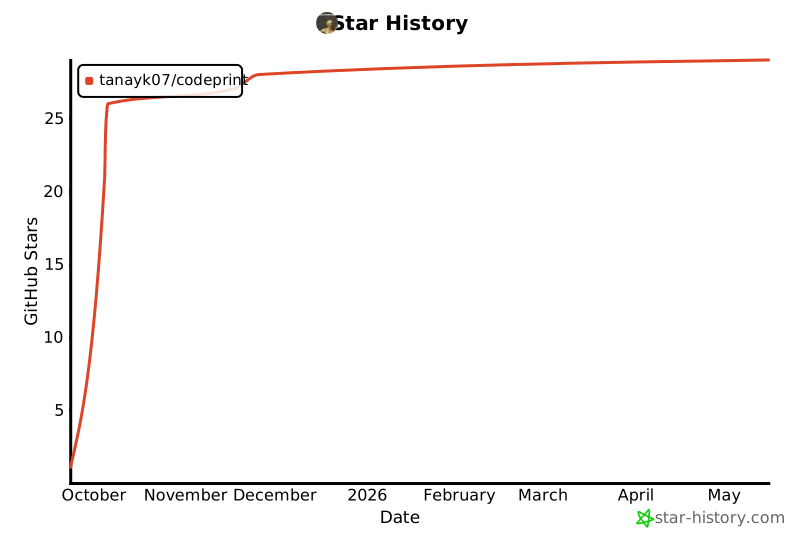
🌟 Star History
1 maintainer

Metadata
1 maintainer
Release files for codeprintio 1.0.7
For a detailed explanation of source distributions (sdists) and built distributions (wheels), please see the package formats documentation.
Source distribution (sdist)
| File | Size | Uploaded | |
|---|---|---|---|
| codeprintio-1.0.7.tar.gz | 26.9 kB | Details |
Built distribution (wheel)
| File | Interpreter | ABI | Platform | Reset |
|---|---|---|---|---|
| codeprintio-1.0.7-py3-none-any.whl | Python 3 | none | any | Details |
Total release size: 47.6 kB
Release files / codeprintio-1.0.7.tar.gz
| Download URL | codeprintio-1.0.7.tar.gz |
|---|---|
| Size | 26.9 kB |
| Tags | Source |
|
SHA-256 checksum How to use checksums |
0220ce84999810d7bacd7bfeb2771472115c64eeeb030c5bed9b12a045bce892
|
|
BLAKE2b-256 checksum How to use checksums |
70bddd860288e9ced1a063214fe394443a5e8232f7c8cde3a524f6a09cfcac06
|
| Upload date | |
|
Uploaded using Trusted Publishing? What is trusted publishing? |
No |
| Uploaded via |
twine/6.2.0 CPython/3.12.2
|
Release files / codeprintio-1.0.7-py3-none-any.whl
| Download URL | codeprintio-1.0.7-py3-none-any.whl |
|---|---|
| Size | 20.7 kB |
| Tags | Python 3 |
|
SHA-256 checksum How to use checksums |
b42c849d8fa554549d9dc326ecd10af7338065e6deab6b10773e29c3e7785350
|
|
BLAKE2b-256 checksum How to use checksums |
bf9233ea93efb64cb4d55e5005cf59eb4b27b6d763a3e5e4060f41642c085873
|
| Upload date | |
|
Uploaded using Trusted Publishing? What is trusted publishing? |
No |
| Uploaded via |
twine/6.2.0 CPython/3.12.2
|














