



Generate datasets from code for finetuning, search your codebase semantically or chat with your code from cli. Keep the vector database superfast up to date to the latest code changes.
100% local support without any dataleaks.
Built with langchain, treesitter, sentence-transformers, instructor-embedding,
faiss, lama.cpp, Ollama, Streamlit.
✨ Features
- 🗒️ Finetuning dataset generation
- export in Alpaca, conversational, instruction or completionn format
- 🔎 Semantic code search
- 💬 GPT-like chat with your codebase
- ⚙️ Synchronize vector store and latest code changes with ease
- 💻 100% local embeddings and llms
- sentence-transformers, instructor-embeddings, llama.cpp, Ollama
- 🌐 OpenAI, Azure OpenAI and Anthropic
- 🌳 Treesitter integration
🚀 Usage
Export finetuning dataset from codebase in conversational format:
codeqai dataset
Export in different format like Alpaca with:
codeqai dataset --format alpaca
Export dataset with model distillation
codeqai dataset --distillation doc
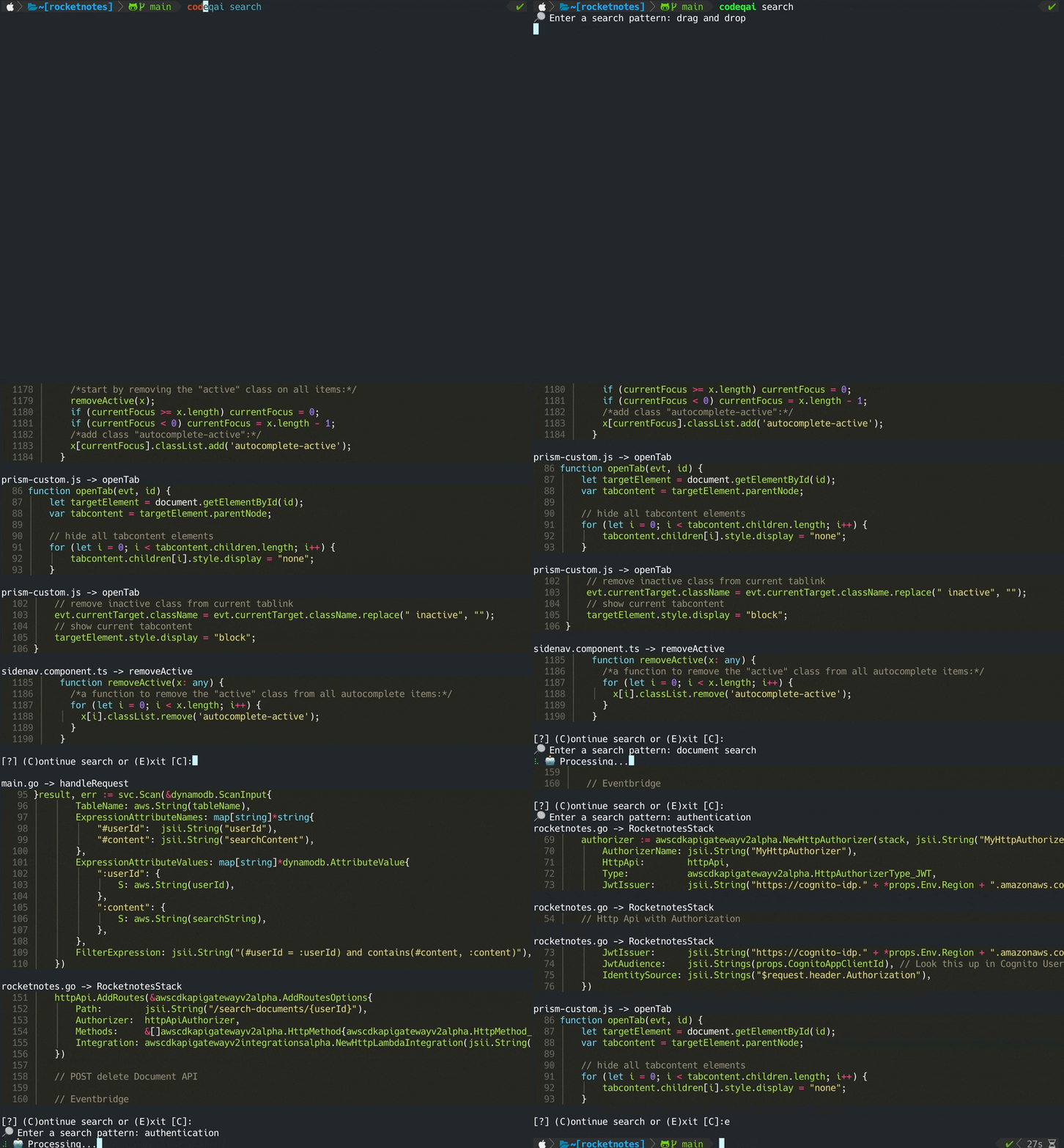
Start semantic search:
codeqai search
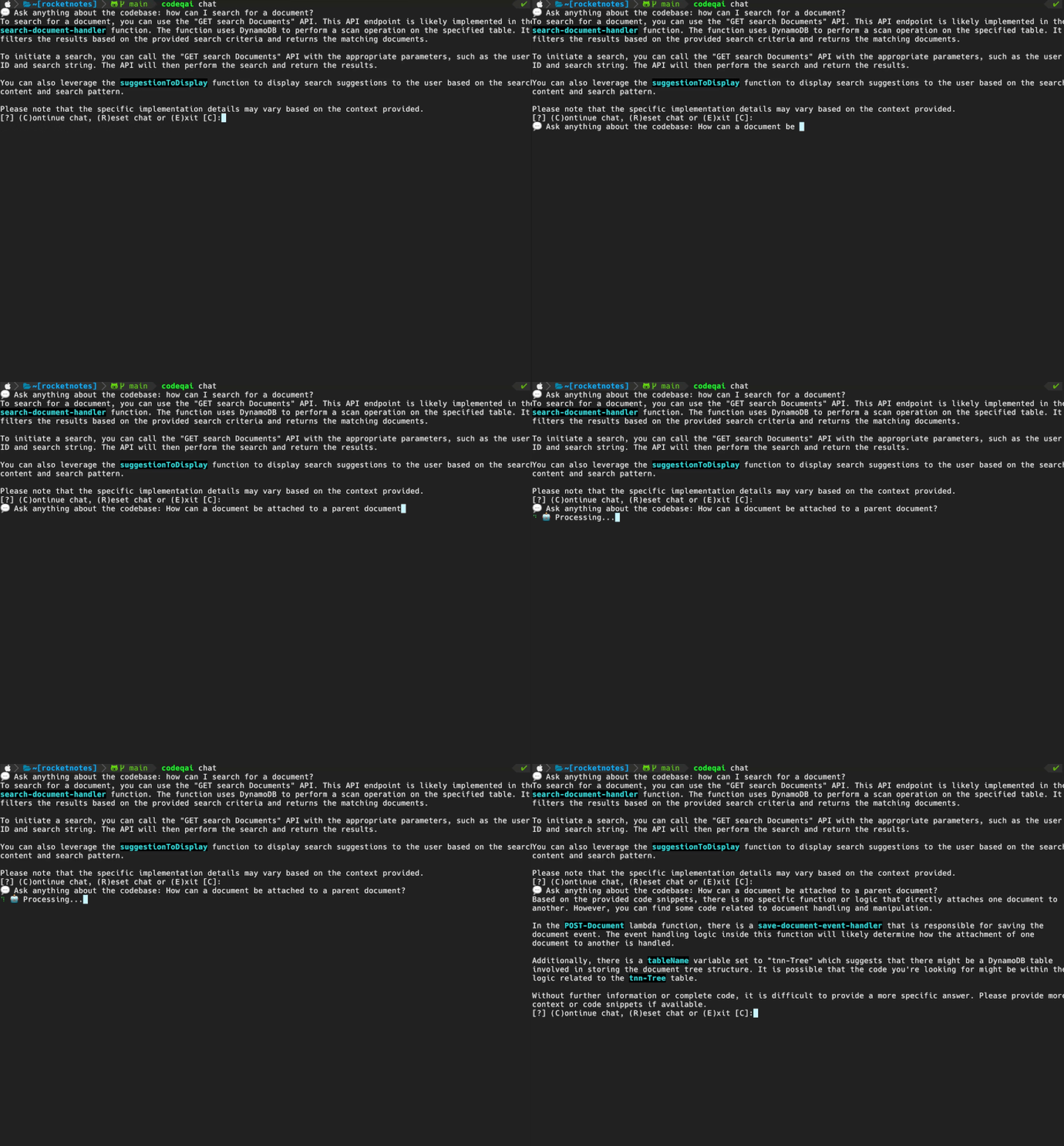
Start chat dialog:
codeqai chat
Synchronize vector store with current git checkout:
codeqai sync
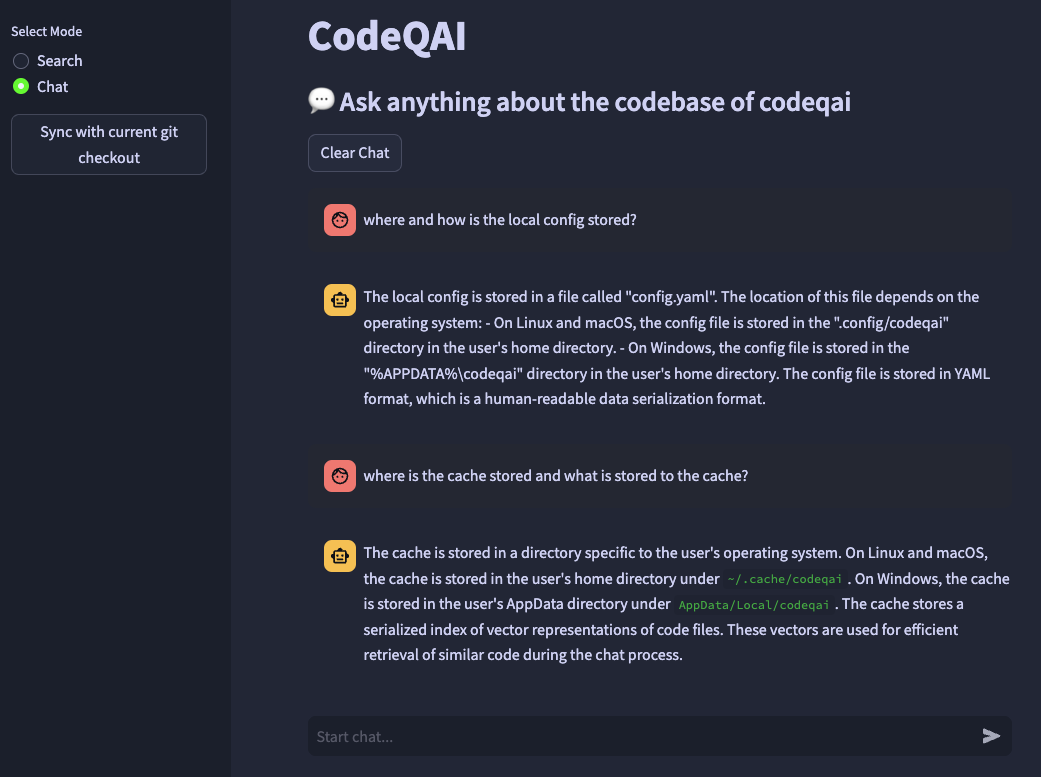
Start Streamlit app:
codeqai app
📋 Requirements
- Python >=3.9,<3.12
📦 Installation
Install in an isolated environment with pipx:
pipx install codeqai
⚠ Make sure pipx is using Python >=3.9,<3.12.
To specify the Python version explicitly with pipx, activate the desired Python version (e.g. with pyenv shell 3.X.X) and install with:
pipx install codeqai --python $(which python)
If you are still facing issues using pipx you can also install directly from source through PyPI with:
pip install codeqai
However, it is recommended to use pipx to benefit from isolated environments for the dependencies.
Visit the Troubleshooting section for solutions of known issues during installation.
🔧 Configuration
At first usage or by running
codeqai configure
the configuration process is initiated, where the embeddings and llms can be chosen.
🌐 Remote models
If remote models are used, the following environment variables are required.
If the required environment variables are already set, they will be used, otherwise you will be prompted to enter them which are then stored in ~/.config/codeqai/.env.
OpenAI
export OPENAI_API_KEY = "your OpenAI api key"
Azure OpenAI
export OPENAI_API_TYPE = "azure"
export AZURE_OPENAI_ENDPOINT = "https://<your-endpoint>.openai.azure.com/"
export OPENAI_API_KEY = "your Azure OpenAI api key"
export OPENAI_API_VERSION = "2023-05-15"
Anthropic
export ANTHROPIC_API_KEY="your Anthropic api key"
📚 Supported Languages
- Python
- Typescript
- Javascript
- Java
- Rust
- Kotlin
- Go
- C++
- C
- C#
- Ruby
💡 How it works
The entire git repo is parsed with treesitter to extract all methods with documentations and saved to a local FAISS vector database with either sentence-transformers, instructor-embeddings or OpenAI's text-embedding-ada-002.
The vector database is saved to a file on your system and will be loaded later again after further usage.
Afterwards it is possible to do semantic search on the codebase based on the embeddings model.
To chat with the codebase locally llama.cpp or Ollama is used by specifying the desired model.
For synchronization of recent changes in the repository, the git commit hashes of each file along with the vector Ids are saved to a cache.
When synchronizing the vector database with the latest git state, the cached commit hashes are compared to the current git hash of each file in the repository.
If the git commit hashes differ, the related vectors are deleted from the database and inserted again after recreating the vector embeddings.
Using llama.cpp the specified model needs to be available on the system in advance.
Using Ollama the Ollama container with the desired model needs to be running locally in advance on port 11434.
Also OpenAI or Azure-OpenAI can be used for remote chat models.
?FAQ
Where do I get models for llama.cpp?
Install the huggingface-cli and download your desired model from the model hub.
For example
huggingface-cli download TheBloke/CodeLlama-13B-Python-GGUF codellama-13b-python.Q5_K_M.gguf
will download the codellama-13b-python.Q5_K_M model. After the download has finished the absolute path of the model .gguf file is printed to the console.
🛟 Troubleshooting
-
During installation with
pipxpip failed to build package: tiktoken Some possibly relevant errors from pip install: error: subprocess-exited-with-error error: can't find Rust compilerMake sure the rust compiler is installed on your system from here.
-
During installation of
faiss× Building wheel for faiss-cpu (pyproject.toml) did not run successfully. │ exit code: 1 ╰─> [12 lines of output] running bdist_wheel ... note: This error originates from a subprocess, and is likely not a problem with pip. ERROR: Failed building wheel for faiss-cpu Failed to build faiss-cpu ERROR: Could not build wheels for faiss-cpu, which is required to install pyproject.toml-based projectsMake sure to have codeqai installed with Python <3.12. There is no faiss wheel available yet for Python 3.12.
🌟 Contributing
If you are missing a feature or facing a bug don't hesitate to open an issue or raise a PR. Any kind of contribution is highly appreciated!
To build and run the project in development mode make sure to have conda, conda-lock or poetry installed.
By using conda run:
conda env create -f environment.yml -n codeqai
or by using conda-lock run:
conda-lock install --name codeqai conda-<YOUR_PLATFORM>.lock
Activate the environment and install dependencies with:
conda activate codeqai && poetry install
By using poetry run:
poetry install && poetry shell
Run e.g. codeqai chat within development environment with:
poetry run codeqai chat
Run tests with:
poetry run pytest -s -vv
1 maintainer

Metadata
1 maintainer
Release files for codeqai 0.0.20
For a detailed explanation of source distributions (sdists) and built distributions (wheels), please see the package formats documentation.
Source distribution (sdist)
| File | Size | Uploaded | |
|---|---|---|---|
| codeqai-0.0.20.tar.gz | 30.6 kB | Details |
Built distribution (wheel)
| File | Interpreter | ABI | Platform | Reset |
|---|---|---|---|---|
| codeqai-0.0.20-py3-none-any.whl | Python 3 | none | any | Details |
Total release size: 71.3 kB
Release files / codeqai-0.0.20.tar.gz
| Download URL | codeqai-0.0.20.tar.gz |
|---|---|
| Size | 30.6 kB |
| Tags | Source |
|
SHA-256 checksum How to use checksums |
eddd2828073a7e3a832a6c2699ad88fc6f9e31f34de970b382b32771727c5c0b
|
|
BLAKE2b-256 checksum How to use checksums |
a9b5de356bc0549f20ecb0c3593d70d9382c33ee5fcb54ed15b6d77fdfef05c7
|
| Upload date | |
|
Uploaded using Trusted Publishing? What is trusted publishing? |
No |
| Uploaded via |
poetry/2.1.0 CPython/3.9.21 Linux/6.8.0-1021-azure
|
Release files / codeqai-0.0.20-py3-none-any.whl
| Download URL | codeqai-0.0.20-py3-none-any.whl |
|---|---|
| Size | 40.7 kB |
| Tags | Python 3 |
|
SHA-256 checksum How to use checksums |
06fe86731885bbb3a8235f11e3312fce14fe479d5ccb44d54ddac8743966bb0a
|
|
BLAKE2b-256 checksum How to use checksums |
7c012027d19ec188e900942bf1b4e96b0df50cc801b6c06a910962daf60a750a
|
| Upload date | |
|
Uploaded using Trusted Publishing? What is trusted publishing? |
No |
| Uploaded via |
poetry/2.1.0 CPython/3.9.21 Linux/6.8.0-1021-azure
|














