
Coder Screensaver
Animated code screensaver with syntax highlighting - displays source code as if being typed in real-time in a terminal, with an editor-like UI.
Features
- 🎨 Syntax Highlighting: Full Pygments support with 256 colors
- 🎭 Multiple Themes: Choose from any Pygments style (monokai, vim, github-dark, etc.)
- 🌈 Theme-Aware UI: Menu and status bar colors adapt to match the selected theme
- 📝 Editor-like UI: Emacs-inspired menu bar and status line
- 🔄 Auto-scrolling: Smooth scrolling as code is typed
- 🎯 Multi-language: Supports Python, C/C++, Rust, Go, JavaScript, TypeScript, Java, and more
- ⚡ Customizable Speed: Adjust typing speed with millisecond precision
- 🎬 Realistic Typing: Pauses between words for natural flow
Installation
From PyPI (once published)
pip install coder-screensaver
From Source
git clone https://github.com/sinanislekdemir/coder-screensaver.git
cd coder-screensaver
pip install -e .
Usage
Basic Usage
# Type files in current directory
coder-screensaver

# Type files in a specific directory
coder-screensaver /path/to/code

# Customize typing speed and style
coder-screensaver --delay 50 --style dracula
coder-screensaver /path/to/source
Type a specific file
coder-screensaver myfile.py
### Advanced Options

```bash
# Faster typing (10ms delay)
coder-screensaver --delay 10

# Use different syntax theme
coder-screensaver --style vim

# Custom pause between files
coder-screensaver --pause 2.0

# Combine options
coder-screensaver ~/projects/myapp --delay 20 --style github-dark --pause 1.5
Command-line Options
path: Path to source directory or file (default: current directory)-d, --delay: Delay in milliseconds between characters (default: 35)-s, --style: Pygments style name (default: monokai)-p, --pause: Pause in seconds between files (default: 1.0)--list-styles: List all available Pygments styles and exit
Available Styles
List all available Pygments themes:
coder-screensaver --list-styles
Some popular Pygments styles:
monokai(default) - Dark theme with vibrant colorsvim- Classic Vim color schemegithub-dark- GitHub's dark themedracula- Popular dark themesolarized-dark- Solarized dark variantnord- Arctic-inspired color palette
Controls
- Press
qto quit at any time
Requirements
- Python 3.8+
- Terminal with 256-color support
- Unix-like system (Linux, macOS) with curses support
How It Works
- Scans the specified directory for source files
- Uses Pygments to syntax highlight the code with your chosen theme
- Displays the code character-by-character with realistic typing animation
- Automatically scrolls and manages the display using curses
- Loops through files continuously
Examples
Demo Recording
Watch code being typed in real-time with syntax highlighting in your terminal!
Screenshot
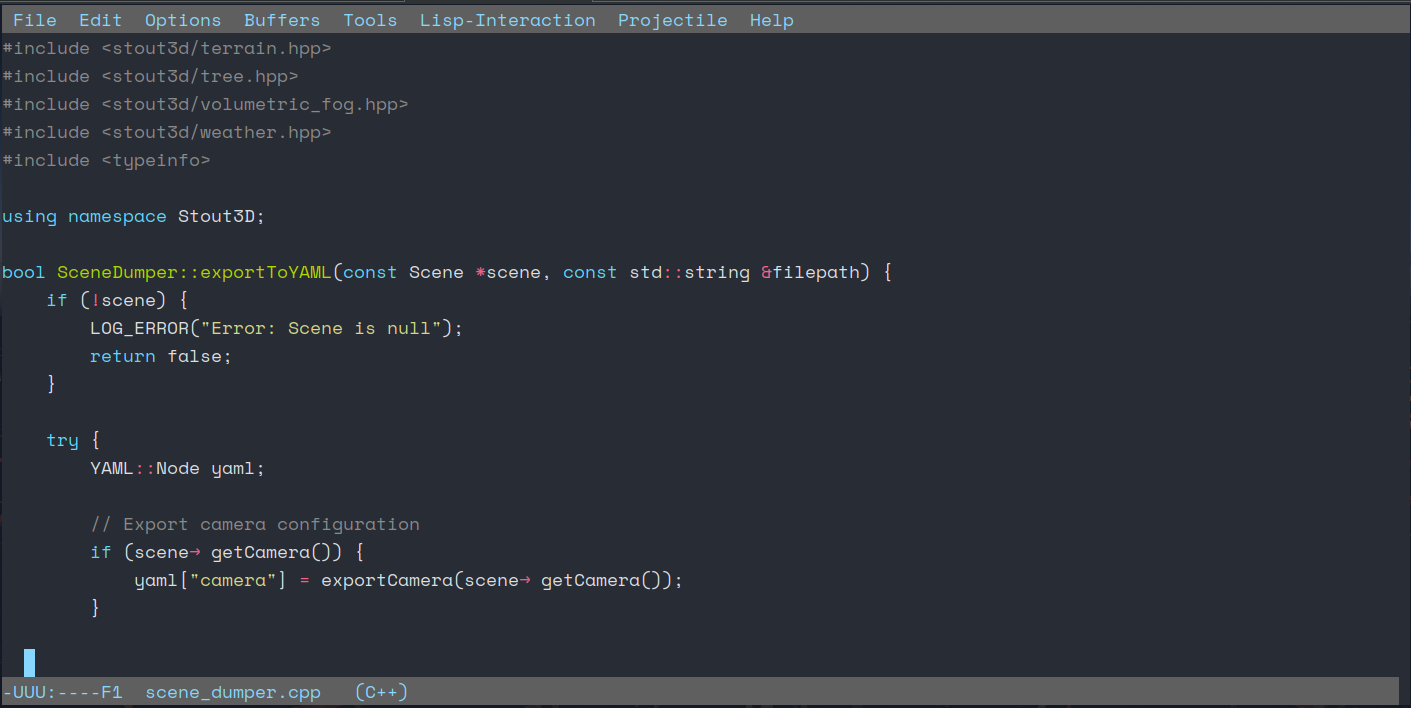
┌─────────────────────────────────────────────────────────────────┐
│ File  Edit  Options  Buffers  Tools  Lisp-Interaction  Help    │
├─────────────────────────────────────────────────────────────────┤
│ #include <iostream>                                             │
│ using namespace std;                                            │
│                                                                 │
│ int main() {                                                    │
│     string name = "world";                                      │
│     cout << "Hello " << name << endl;█                          │
│     return 0;                                                   │
│ }                                                               │
├─────────────────────────────────────────────────────────────────┤
│ -UUU:----F1  example.cpp   (C++)                               │
└─────────────────────────────────────────────────────────────────┘
License
MIT License - see LICENSE file for details
Contributing
Contributions are welcome! Please feel free to submit a Pull Request at https://github.com/sinanislekdemir/coder-screensaver
Author
Created by Sinan Islekdemir
1 maintainer

Metadata
1 maintainer
Release files for coder-screensaver 0.1.3
For a detailed explanation of source distributions (sdists) and built distributions (wheels), please see the package formats documentation.
Source distribution (sdist)
| File | Size | Uploaded | |
|---|---|---|---|
| coder_screensaver-0.1.3.tar.gz | 8.5 kB | Details |
Built distribution (wheel)
| File | Interpreter | ABI | Platform | Reset |
|---|---|---|---|---|
| coder_screensaver-0.1.3-py3-none-any.whl | Python 3 | none | any | Details |
Total release size: 16.9 kB
Release files / coder_screensaver-0.1.3.tar.gz
| Download URL | coder_screensaver-0.1.3.tar.gz |
|---|---|
| Size | 8.5 kB |
| Tags | Source |
|
SHA-256 checksum How to use checksums |
b0cb99fda6d8a086d67d2c30acd664814fc37f3551e3fa5a4c7939f96391e151
|
|
BLAKE2b-256 checksum How to use checksums |
7cf9b103e6b1af5c41d1af3e6f640665126d8511c8b95c1249505cc2460ce9c4
|
| Upload date | |
|
Uploaded using Trusted Publishing? What is trusted publishing? |
No |
| Uploaded via |
twine/6.2.0 CPython/3.13.3
|
Release files / coder_screensaver-0.1.3-py3-none-any.whl
| Download URL | coder_screensaver-0.1.3-py3-none-any.whl |
|---|---|
| Size | 8.4 kB |
| Tags | Python 3 |
|
SHA-256 checksum How to use checksums |
9881e9786cc9923e75b86dd89123bf88966c36e7854d388b7701d46ab13c3570
|
|
BLAKE2b-256 checksum How to use checksums |
5f1027f65ceb7ac608fd61759bb5bbe9f60394393be7f0db9234e68566829e17
|
| Upload date | |
|
Uploaded using Trusted Publishing? What is trusted publishing? |
No |
| Uploaded via |
twine/6.2.0 CPython/3.13.3
|














