
CodeSys Text Export
This tool exports Structured Text (ST) source code from a CodeSys/Machine Expert project with these key features:
- Creates a directory structure matching the project structure
- Each ST element (Programs, Function Blocks, Functions, etc.) gets exported to
.stfiles - For Function Blocks and Interfaces, all their sub-elements (methods, actions, properties) are kept together in the same file
For example, a Function Block called FB_Motor with methods and actions would be exported to a single FB_Motor.st file like this:
FUNCTION_BLOCK FB_Motor
VAR_INPUT
    Enable : BOOL;
    Speed : REAL;
END_VAR

VAR
    isRunning : BOOL;
    currentSpeed : REAL;
END_VAR

    METHOD Start
    VAR_INPUT
        acceleration : REAL;
    END_VAR
        isRunning := TRUE;
        currentSpeed := Speed * acceleration;
    END_METHOD

    METHOD Stop
        isRunning := FALSE;
        currentSpeed := 0;
    END_METHOD

    ACTION Update
        IF isRunning THEN
            // Update motor logic
            currentSpeed := Speed;
        END_IF
    END_ACTION

END_FUNCTION_BLOCK
Installation
-
If your Windows doesn't have python3.9 or higher installed, install it from Microsoft Store/python.org or any other source.
-
Open Command Prompt or PowerShell as administrator
- Right-click on Command Prompt/PowerShell and select "Run as administrator"
- Windows UAC prompt will appear for confirmation
-
Install the CodeSys Bridge package:
pip install codesys-bridge -
Run the bridge installation:
codesys-bridge
The installer will:
- Install into the CodeSys Script Commands directory
- Automatically detect all installed SE Machine Expert V2.x versions
- Create or update the configuration files
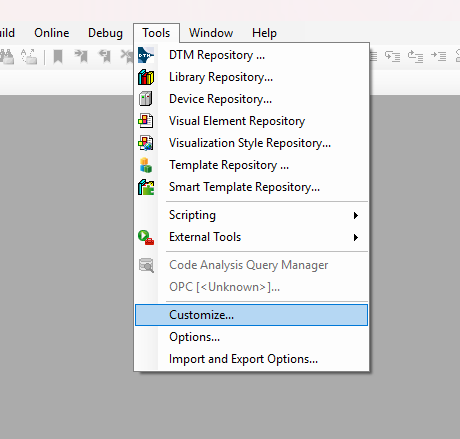
You have to restart CodeSys/ME after installation for the script icon to appear. "Text Export" should become visible in Tools -> Scripting menu.
What Gets Installed
The installer adds the following to each installation:
- Updates to
config.json- Adds or updates the CodeSys Bridge Script entry - Reference to
cs_export.py- The main bridge script
Surfacing icon for Text Export
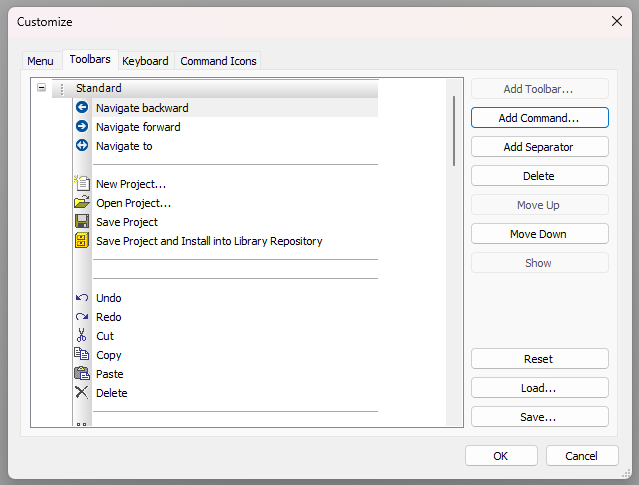
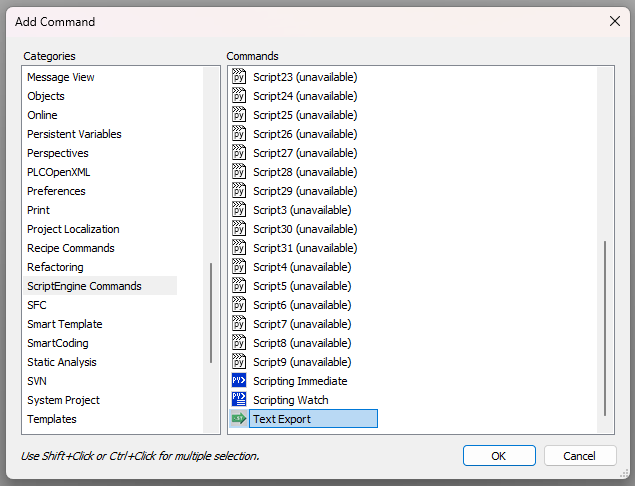
After that you should look for the new icon and add it to your toolbar.
Go to Tools -> Customize -> Add Command -> ScriptEngine Commands -> Text Export
Requirements
- Windows operating system
- Python 3.9 or higher
- Administrator privileges (for SE Machine Expert installations)
- EcoStruxure Machine Expert V2.x and/or CodeSys 3.5.x installed
Notes
- The script will automatically install to all detected V2.x versions
- Existing installations will be updated if already present
- The installation is non-destructive and will preserve other script commands
1 maintainer

Release files for codesys-bridge 0.1.5
For a detailed explanation of source distributions (sdists) and built distributions (wheels), please see the package formats documentation.
Source distribution (sdist)
| File | Size | Uploaded | |
|---|---|---|---|
| codesys_bridge-0.1.5.tar.gz | 27.5 kB | Details |
Built distribution (wheel)
| File | Interpreter | ABI | Platform | Reset |
|---|---|---|---|---|
| codesys_bridge-0.1.5-py3-none-any.whl | Python 3 | none | any | Details |
Total release size: 52.9 kB
Release files / codesys_bridge-0.1.5.tar.gz
| Download URL | codesys_bridge-0.1.5.tar.gz |
|---|---|
| Size | 27.5 kB |
| Tags | Source |
|
SHA-256 checksum How to use checksums |
e1e8c0b2aa16c9b5ded227602de3ad04e4de09c75bfa62f33489eed16ea9cbbd
|
|
BLAKE2b-256 checksum How to use checksums |
320484b4e98f074b2b8b90b03cc40bfb41884c7dbf940b0394674aab7a5f3e43
|
| Upload date | |
|
Uploaded using Trusted Publishing? What is trusted publishing? |
No |
| Uploaded via |
uv/0.5.25
|
Release files / codesys_bridge-0.1.5-py3-none-any.whl
| Download URL | codesys_bridge-0.1.5-py3-none-any.whl |
|---|---|
| Size | 25.4 kB |
| Tags | Python 3 |
|
SHA-256 checksum How to use checksums |
3e8a2b0a77fe72e8373b7d5de769ec0ec057583c773b734ce0fa41e4dce1094a
|
|
BLAKE2b-256 checksum How to use checksums |
e0a37e83e9796377af2c7269cb5aa6c00dbaea41f247539ce5b0c5c3f81df87e
|
| Upload date | |
|
Uploaded using Trusted Publishing? What is trusted publishing? |
No |
| Uploaded via |
uv/0.5.25
|














