









🧠 CodeTrace AI
The Governed Code Intelligence Layer for AI Agents — Deterministic Call Graphs, Blast Radius Verification, and Evidence-Backed Reasoning, 100% Local.
CodeTrace AI turns your codebase into a deterministic structural graph and enforces a Governed Pipeline Protocol — giving AI agents and developers verified blast radius and exact `file:line` citations. Parsing, embeddings and the graph run 100% on your machine; pair it with Ollama and nothing leaves it at all.
Website · PyPI · Blog Post
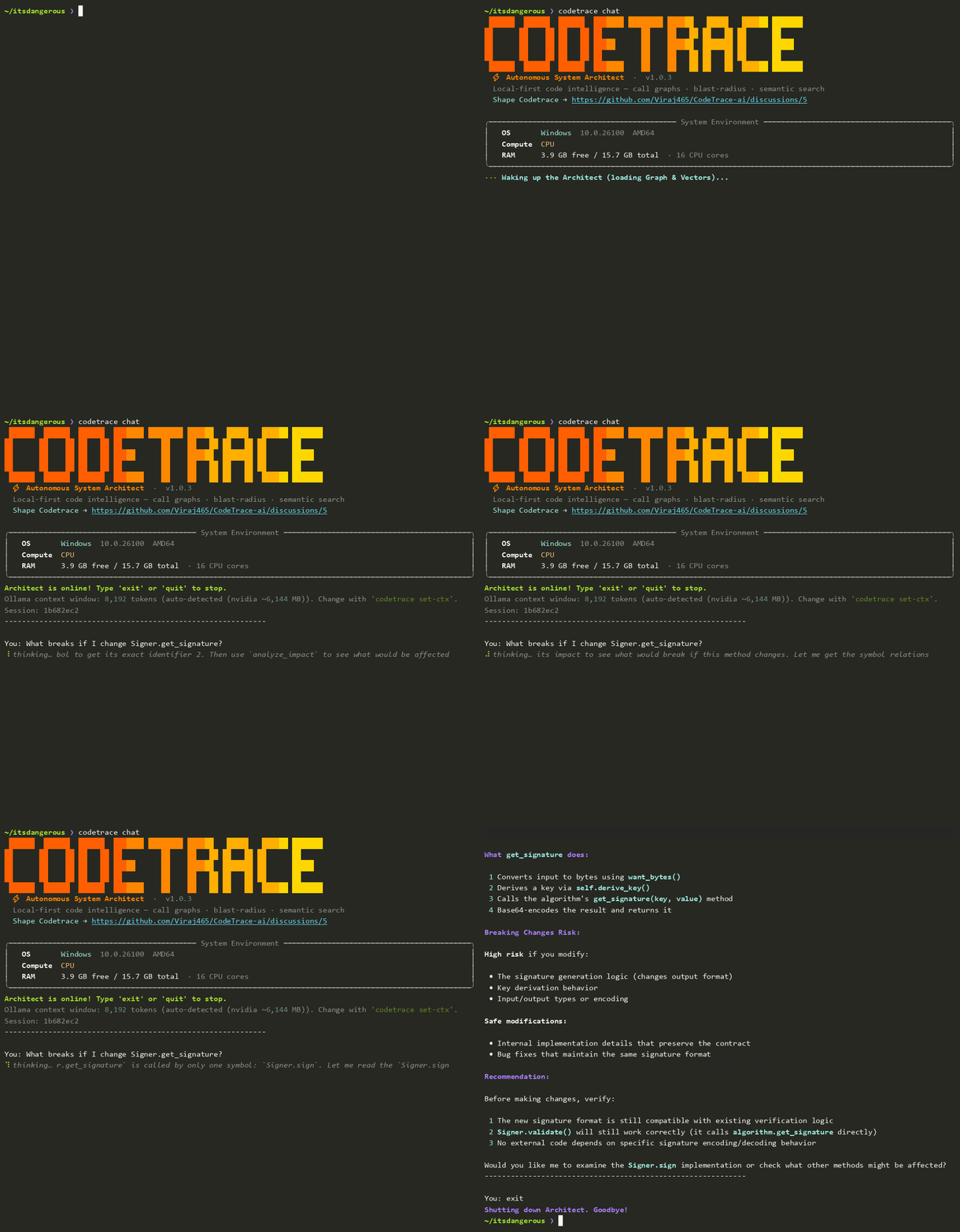
Real session, shown at 2× speed: blast-radius question on pallets/itsdangerous, answered by qwen3.5:4b via Ollama on a 6 GB laptop GPU. Nothing left the machine.
🎥 See it in Action
💡 Why CodeTrace AI?
AI coding agents break production systems because they operate on unverified assumptions. They edit functions without understanding downstream callers, fabricate plausible-sounding file paths, and suffer from the self-correction blind spot — unable to detect structural errors in their own suggestions.
CodeTrace moves AI coding from guessing to governed, deterministic execution:
- 🏛️ Governed Pipeline Protocol. Every structural claim is evidence-graded (
CONFIRMED,INFERRED,UNRESOLVED) and anchored to mandatoryfile:linecitations. The agent abstains when evidence is missing rather than hallucinating. - 💥 Runtime Blast Radius Verification. Maps exact caller/callee relationships across 21 languages using Tree-sitter ASTs so you see every affected module, test, and consumer before an edit commits.
- ✍️ Human-in-the-Loop Safe Edits. Code changes are proposed as unified diff previews with path-traversal protection — nothing writes to disk without explicit approval.
- 🎨 Provider-Agnostic Output Consistency. Built-in normalizer standardizes formatting, syntax blocks, and headings across any model — from local Ollama (7B) to frontier cloud LLMs.
- 🔒 100% Local & Air-Gapped. All parsing, vector embeddings, and graph traversal run entirely on your hardware. With Ollama (or
--offline), zero code leaves your machine; with a cloud LLM, only the snippets the agent retrieves are sent to your provider.
🚀 Installation
Requires Python 3.10–3.12
pip install codetrace-ai
uv pip install codetrace-ai
⚡ Quick Start
cd /path/to/your/project
codetrace init       # configure LLM + download models + index + register MCP
codetrace chat       # start the AI Architect session
codetrace initdoes everything in one command: configures your LLM provider, downloads embedding models, indexes your codebase, and registers the MCP server for Cursor, Claude Code, and VS Code.
✨ Features
| Feature | Description |
|---|---|
| 🔍 Autonomous Code Research | Ask anything in natural language — the agent searches, reads files, and traverses the call graph to answer with citations to exact lines |
| 🗺️ Interactive Architecture Map | codetrace visualize generates a self-contained interactive HTML graph of your entire code architecture |
| 📊 Structural Call Graph | Maps class and function definitions across 21 languages — see exactly how your application is wired |
| 🔌 Any LLM Provider | Six built-in providers plus a custom option that connects to any OpenAI- or Anthropic-compatible endpoint — just give the URL and model name |
| 💥 Blast Radius Analysis | Before editing production code, see every file, test, and consumer that will be impacted |
| ✍️ Human-in-the-Loop Edits | Proposes code changes with a rich diff preview — you approve or decline before anything is written to disk |
| ⚡ SHA-256 Delta Sync | Re-indexes only files that changed. Lightning fast on every subsequent run |
| 🔌 IDE Integration (MCP) | Connects the call graph directly into Cursor, Windsurf, or Claude Code for in-editor AI assistance |
| 📜 Persistent Chat Sessions | All conversations are saved. Resume any past session by ID, or export to Markdown |
| 🔒 100% Local & Air-Gapped | All parsing, embedding, and graph mapping happens on your machine. Zero data leaves without your consent |
| 🏛️ Governed Pipeline Protocol | Every answer is evidence-graded (CONFIRMED / INFERRED / UNRESOLVED) with mandatory file:line citations — the agent says what's missing instead of guessing |
| 🎨 Output Normalizer | Provider-agnostic response consistency layer: normalizes headings, bullet styles, code-fence tags, and spacing so the CLI renders uniformly regardless of model |
🏛️ Governed Pipeline Protocol
v1.0.3 ships a formal evidence governance layer baked into the system prompt and enforced at the agent-loop level. The agent operates under strict source-of-truth rules:
Evidence States — every claim carries one:
| State | Meaning |
|---|---|
CONFIRMED |
Established by a live tool call this session |
INFERRED |
Reasoning from confirmed evidence — always labelled "Based on the call pattern…" |
UNRESOLVED |
Insufficient or ambiguous evidence — the agent says so rather than guessing |
Structural Rules:
- No structural fact may be asserted without a tool call that session. Framework conventions and training data are not evidence.
- Every structural claim carries a
file:linecitation from tool output. No citation → no claim. - Memory (compressed summaries, prior sessions) is context, not evidence. A recalled citation is invalid until re-verified live.
- If evidence is missing: the agent states exactly what's missing and what re-indexing is required — never inventing paths, symbols, or relationships.
Investigation Protocol — applied in the narrowest sequence the question needs:
search_codebase → get_symbol_relations → read_file → analyze_impact → report
This is not just prompt engineering — it's an architectural constraint. The output normalizer enforces consistent formatting, and the token manager adapts how much context each tier gets so the governance rules actually fit in the window.
🌍 Language Support
21 languages. 17 are parsed with Tree-sitter into a full symbol + call graph; 4 config/data formats are parsed into symbols for search and structure.
| Layer | Languages |
|---|---|
| Tree-sitter (symbols + call edges) | Python · JavaScript · JSX · TypeScript · TSX · Java · C · C++ · C# · Go · Rust · PHP · Swift · Kotlin · Bash · HTML · CSS · JSON |
| Structural (symbols only) | YAML · TOML · SQL · Dockerfile |
🧠 Connecting Any LLM
Codetrace ships with six providers configured out of the box, plus a custom option for everything else.
| Provider | Notes |
|---|---|
anthropic |
Native Messages API |
openai · groq · gemini · openrouter |
OpenAI-compatible |
ollama |
Local, no API key, hardware-aware context sizing |
custom |
Any OpenAI- or Anthropic-compatible endpoint |
Using a provider that isn't listed
Pick custom during codetrace config and answer three questions — API style, base URL, and model name:
1. Choose your LLM Provider: custom
2. API style [openai/anthropic]: openai
2a. API base URL: https://api.deepseek.com/v1
2b. API key (leave blank for a local or unauthenticated endpoint): ****
3. Enter model name: deepseek-chat
Codetrace fetches the endpoint's model list automatically when it exposes one; otherwise you just type the model name.
Choosing the API style — this decides the request path, so it has to match your endpoint:
| Style | Requests go to | Give the base URL as |
|---|---|---|
openai |
{base_url}/chat/completions |
including the version path — https://api.deepseek.com/v1 |
anthropic |
{base_url}/v1/messages |
the bare host — https://api.anthropic.com |
Verified examples:
// DeepSeek
{ "provider": "custom", "api_style": "openai",
  "base_url": "https://api.deepseek.com/v1", "model_name": "deepseek-chat" }

// Self-hosted vLLM / LM Studio — no API key needed
{ "provider": "custom", "api_style": "openai",
  "base_url": "http://localhost:8000/v1", "model_name": "Qwen/Qwen2.5-Coder-32B" }

// An Anthropic-compatible gateway
{ "provider": "custom", "api_style": "anthropic",
  "base_url": "https://gateway.internal", "model_name": "claude-opus-5" }
The same shape works for Together, Fireworks, Mistral, Cerebras, DeepInfra, Nebius, corporate proxies — anything speaking either protocol. Config lives at ~/.codetrace/config.json.
🔒 Privacy-First Architecture
Codetrace can operate 100% offline with zero external dependencies:
- Local LLM: Configure any local provider via Ollama (e.g.,
llama3.2,deepseek-coder,qwen2.5-coder). - Local Embeddings: Uses HuggingFace
bge-small+e5-smallmodels, downloaded once and cached. - True Air-Gap: Transfer the HuggingFace cache (
~/.cache/huggingface/hub) via USB. Runcodetrace init --offlineto block all external calls permanently.
🛠️ CLI Command Reference
| Command | Description |
|---|---|
codetrace init [PATH] |
One-command setup: config → download models → index → register MCP |
codetrace chat |
Launch the interactive AI Architect chat loop |
codetrace chat --resume <ID> |
Resume a specific past chat session |
codetrace index <PATH or URL> |
Re-index a local directory, or clone + index a GitHub/GitLab URL (kept under ~/.codetrace/repos/; cd there and run codetrace chat) |
codetrace mcp [PATH] |
Start the Model Context Protocol (MCP) server for external IDE/agent integration |
codetrace config |
View or update your LLM provider, endpoint, and API key |
codetrace set-ctx [TOKENS] |
(Ollama) Manually set the context window (num_ctx), overriding GPU auto-detection. 0 clears it back to auto |
codetrace set-default-ctx <TOKENS> |
Fallback context window for cloud models CodeTrace doesn't recognise |
codetrace set-model-limits |
Pin --context-window / --max-output-tokens for the configured cloud model |
codetrace register-mcp [PATH] |
Re-register the MCP server with Claude Code, Cursor and VS Code for a project |
codetrace visualize |
Generate an interactive HTML architecture graph |
codetrace history |
List all past chat sessions for the current project |
codetrace export <ID> |
Export a chat session to Markdown |
Flags:
| Flag | Applies to | Description |
|---|---|---|
--offline |
init, chat |
Strict air-gapped mode (blocks all external requests) |
--fast |
init |
Use smaller embedding models for lower RAM usage |
--llm <provider> |
init |
Pre-select provider: anthropic, openai, gemini, groq, ollama, openrouter, custom |
--resume <ID> |
chat |
Resume a specific past session |
--backoff <0.25–0.9> |
set-ctx |
Fraction of the window kept each time it auto-lowers under memory pressure (0.5 = halve). Can be set on its own: codetrace set-ctx --backoff 0.75 |
In-chat commands:
/clear— Start a fresh session without exitingexit/quit— Close the chat
🤖 Agentic Tool Suite
The AI has access to 7 specialized tools it invokes autonomously:
| Tool | What it does |
|---|---|
search_codebase |
Hybrid semantic search (BGE + E5 + RRF + FlashRank reranker) |
get_symbol_relations |
Graph traversal — see callers and dependencies of any symbol |
analyze_impact |
Blast radius — find every downstream symbol affected by a change |
read_file |
Read full file content from the indexed DB snapshot |
write_file |
Propose a code change with a diff preview for your approval |
inspect_index |
List all indexed files and DB coverage metadata |
git_diff |
Run a safe, injection-protected git diff |
🔌 IDE Integration (MCP)
codetrace init automatically registers the MCP server for Claude Code, Cursor, and VS Code in the project's own config files — .mcp.json, .cursor/mcp.json, and .vscode/mcp.json — so each project's server points at that project's index. Existing entries in those files are kept; a file that isn't plain JSON (for example, one with comments) is left untouched and reported so you can add the entry by hand. Re-run codetrace register-mcp any time. These files contain absolute paths for your machine, so you may want to keep them out of version control.
Your IDE instantly gains access to all 7 tools above for in-editor AI assistance.
Running the MCP Server directly via CLI
You can also start the MCP server yourself for any indexed project. It speaks MCP over stdio, so it's meant to be launched by an IDE or agent, which then talks to it over stdin/stdout:
codetrace mcp .                         # start MCP server on current directory
codetrace mcp /path/to/project          # start MCP server on a specific project
Using Windsurf? Add it manually to your mcp.json. The server ships inside the installed package, so point at that — not at your project:
"codetrace": {
  "command": "/path/to/your/python",
  "args": [
    "/path/to/site-packages/codetrace_mcp/server.py",
    "--project",
    "/absolute/path/to/your/project"
  ]
}
Find both paths with:
python -c "import sys, codetrace_mcp, pathlib; print(sys.executable); print(pathlib.Path(codetrace_mcp.__file__).parent / 'server.py')"
📂 File Structure
After codetrace init, your project will have:
your-project/
├── .codetrace/
│   ├── chroma/                ← vector embeddings (ChromaDB)
│   ├── graph_metadata.db      ← code call graph (SQLite + NetworkX)
│   ├── sync_metadata.db       ← SHA-256 delta sync state
│   ├── chat_history.db        ← persistent chat sessions
│   └── graph_visualization.html  ← generated by `codetrace visualize`
├── src/
└── your code files
Global config is stored at ~/.codetrace/config.json
🆕 Changelog
v1.0.3 — September 2026
- ✅ NEW:
codetrace mcp [PATH]— start the MCP server (stdio) straight from the CLI, andcodetrace register-mcpto (re)register it per project for Claude Code, Cursor and VS Code - ✅ NEW: Governed Pipeline Protocol — every structural claim must carry a live
file:linecitation and is gradedCONFIRMED/INFERRED/UNRESOLVED; memory is treated as context, never as evidence - ✅ NEW: Output Normalizer — normalizes headings, bullet styles, code-fence language tags and spacing so answers render the same whichever provider you use
- ✅ NEW: The
customprovider connects to any OpenAI- or Anthropic-compatible endpoint (DeepSeek, vLLM, LM Studio, gateways). API keys are optional for local endpoints - ✅ NEW: Hardware-aware Ollama — native Ollama API, GPU memory detection (NVIDIA / Apple Silicon), automatic
num_ctxsizing, and auto-lowering under memory pressure. Tune withcodetrace set-ctx [TOKENS] --backoff 0.75 - ✅ NEW:
codetrace set-default-ctxandcodetrace set-model-limitsfor cloud models LiteLLM doesn't know - ✅ NEW: Indexing a GitHub/GitLab URL keeps the clone under
~/.codetrace/repos/, so re-indexing is incremental and you cancodetrace chatagainst it - ✅ SECURITY:
~/.codetrace/config.json(holds your API key) is now written atomically with owner-only permissions - ✅ SECURITY:
read_file/write_filepath checks useis_relative_to, so a sibling folder likeproject-secretno longer passes forproject; writes outside the project are refused before the approval prompt - ✅ FIXED:
git_diffalways returned an empty diff (the revision was passed after--, so git treatedHEADas a filename) - ✅ FIXED: Blank "Architect Error:" messages — timeouts and other empty exceptions now show a readable cause
- ✅ FIXED: Re-indexing a file dropped inbound call edges from other files; calls no longer resolve across unrelated languages
- ✅ FIXED: API-key leak detector no longer flags commit SHAs and long identifiers as keys
- ✅ FIXED:
NameError: loggerthat crashed every Ollama session at startup - ✅ FIXED: MCP auto-registration pointed at the indexed project instead of the installed package; it now registers the current interpreter
- ✅ FIXED: Gemini 400 errors from
stream_options; Gemini now always runs at temperature 1.0 - ✅ IMPROVED: Thread-safe Tree-sitter parsing, chunked ChromaDB upserts, batched FlashRank re-ranking (no more OOM on CPU-only machines), SQLite-safe chunked deletes, case-insensitive paths on Windows
- ✅ IMPROVED: Built-in ignore list (
node_modules, virtualenvs, IDE folders, …) and correct handling of nested.gitignorefiles - ✅ TESTS: First automated test suite (indexing regressions, MCP server, output normalizer, safety & config, token manager) running in CI
v1.0.2 — July 2026
- ✅ FIXED: PyPI packaging bug — 4 missing
__init__.pyfiles causedsrc/cli,src/backend,src/core/agents, andsrc/core/databaseto be silently excluded from the wheel, making the installed package non-functional - ✅ FIXED: Tree-sitter
.scmquery files were not included in the PyPI wheel, causing parser failures on a fresh install - ✅ NEW: Dynamic model context window resolution via
litellm— the token budget manager now auto-detects the correct context window for any model at runtime, eliminating the need for a hardcoded tier registry - ✅ NEW: Ollama context window detection — queries the local Ollama API to get the actual loaded context size for your model
- ✅ IMPROVED: Token counting now uses
litellm.token_counterwith provider-specific tokenizers for accurate budgeting across all models - ✅ IMPROVED: Context compression is now dynamic — automatically reduces
keep_turnsif a compressed history still exceeds the hard context limit, preventing OOM errors
v1.0.1 — June 2026
- ✅ NEW: Interactive Architecture Visualizer (
codetrace visualize) with collapsible tree, hover panels, search, and cross-folder call edges - ✅ NEW: Expanded language support — C#, Swift, Kotlin, Bash, HTML, JSON, CSS, YAML, SQL, TOML, Dockerfile (21 languages total)
- ✅ NEW: Token Budget Manager — 3-tier context window management with auto-history compression
- ✅ NEW: Multi-provider Agent Loop via pure
httpx(zero LangChain dependency) - ✅ NEW: Live model listing during
codetrace config— fetches available models from your provider's API - ✅ IMPROVED: Parallel file parsing with
ThreadPoolExecutorfor significantly faster indexing - ✅ IMPROVED: Path traversal protection on
read_fileandwrite_filetools
v0.1.2 — Initial Release
- Initial public release with Hybrid Brain engine (BGE + E5 + ChromaDB + NetworkX)
- Core agentic tool suite (
search_codebase,analyze_impact,write_file,git_diff) - MCP auto-registration for Cursor and Claude Code
- SHA-256 Smart Delta Sync
- GitHub URL cloning + indexing support
- Persistent chat sessions with
historyandexport
🤝 Contributing
We welcome contributions! See CONTRIBUTING.md for guidelines.
💬 Help shape Codetrace: Join the discussion →
📄 License
MIT License — Copyright (c) 2026 Viraaj Sawant. See LICENSE for details.
1 maintainer

Release files for codetrace-ai 1.0.3
For a detailed explanation of source distributions (sdists) and built distributions (wheels), please see the package formats documentation.
Source distribution (sdist)
| File | Size | Uploaded | |
|---|---|---|---|
| codetrace_ai-1.0.3.tar.gz | 148.6 kB | Details |
Built distribution (wheel)
| File | Interpreter | ABI | Platform | Reset |
|---|---|---|---|---|
| codetrace_ai-1.0.3-py3-none-any.whl | Python 3 | none | any | Details |
Total release size: 299.0 kB
Release files / codetrace_ai-1.0.3.tar.gz
| Download URL | codetrace_ai-1.0.3.tar.gz |
|---|---|
| Size | 148.6 kB |
| Tags | Source |
|
SHA-256 checksum How to use checksums |
2210a0b9e4df4e2b938c00ef3a0c92161d4cb4cecc7b2bda42048f6f1460692a
|
|
BLAKE2b-256 checksum How to use checksums |
4595c9e85eac59fce55d7528d0fbc92808a0abb3c6f06bac9fad1758e724ec1b
|
| Upload date | |
|
Uploaded using Trusted Publishing? What is trusted publishing? |
No |
| Uploaded via |
twine/7.0.0 CPython/3.11.14
|
Release files / codetrace_ai-1.0.3-py3-none-any.whl
| Download URL | codetrace_ai-1.0.3-py3-none-any.whl |
|---|---|
| Size | 150.5 kB |
| Tags | Python 3 |
|
SHA-256 checksum How to use checksums |
51ed997c7a4cd31c9375caa6d8c940abaea3f2233fc02ce0a7b8412805975ff2
|
|
BLAKE2b-256 checksum How to use checksums |
34838629e1c869f7f34e122b02683e602ea1f3585615194888b459431076783e
|
| Upload date | |
|
Uploaded using Trusted Publishing? What is trusted publishing? |
No |
| Uploaded via |
twine/7.0.0 CPython/3.11.14
|














