
codex-bridge-python
A lightweight Python proxy that translates the OpenAI Responses API used by Codex into the standard Chat Completions API, so Codex can work with OpenAI-compatible providers such as DashScope (Qwen), DeepSeek, Kimi, OpenRouter, Groq, xAI, and others.
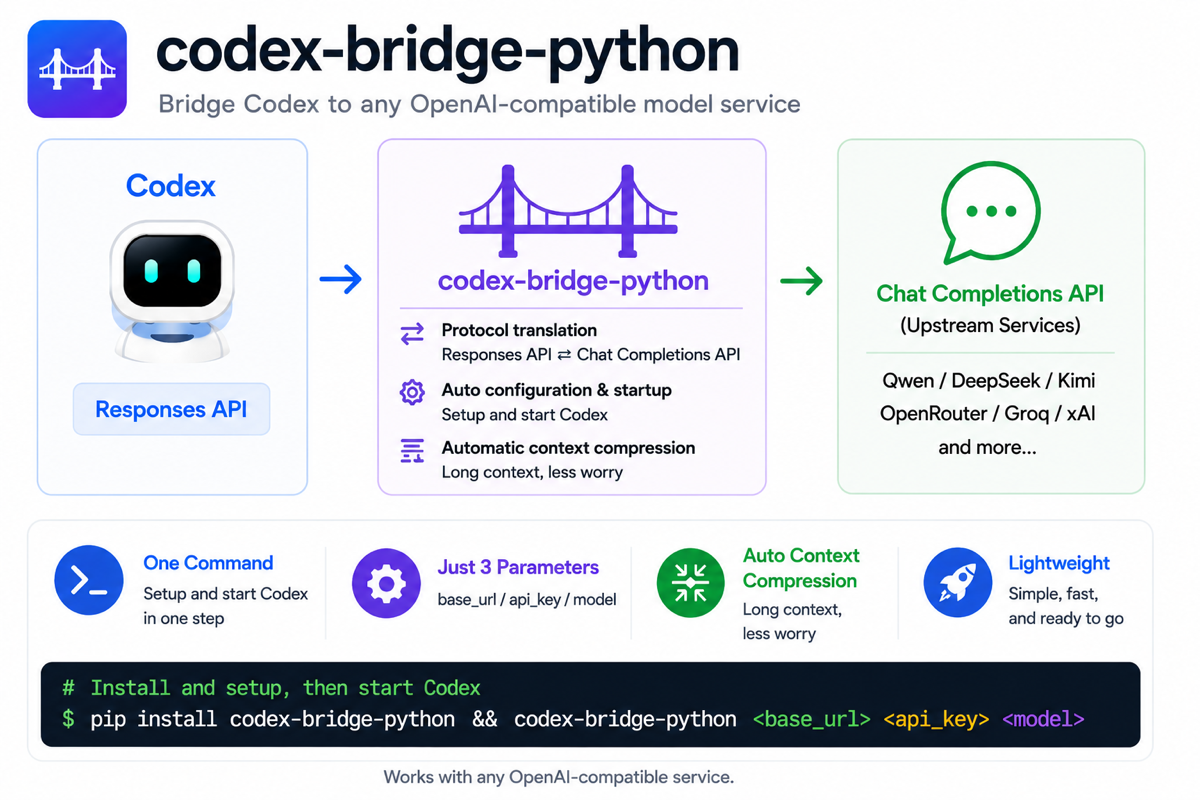
Why
Codex speaks the OpenAI Responses API. Many non-OpenAI providers expose only
the Chat Completions API. codex-bridge-python sits between Codex and your upstream
provider, translating requests and responses on the fly so you can keep using
Codex normally.
Features
- Automatic protocol conversion: translates Codex's Responses API traffic into upstream Chat Completions requests, then converts blocking and streaming responses back into the Responses API shape Codex expects.
- Three-argument Codex launch: install from PyPI, run
codex-bridge-python base_url api_key model, and start Codex through the bridge without hand-editing Codex config files. - Context and compression management: writes Codex model context settings, configures auto-compaction limits, enables request compression, and preserves saved context sizing per model.
- Session continuity: retains history for
previous_response_idso Codex conversations and tool-call turns can continue across Responses requests. - Model catalog support: normalizes
/v1/modelsresponses and maintains a local model catalog so Codex can understand upstream model metadata.
Install
Install from PyPI:
python3 -m pip install codex-bridge-python
After installation, the codex-bridge-python command is available on your PATH.
Quick Start
The simplest launch form is:
codex-bridge-python base_url api_key model
For example:
codex-bridge-python https://dashscope.aliyuncs.com/compatible-mode/v1 sk-xxxx deepseek-v4-flash
You can also pass a fourth positional argument, context_size:
codex-bridge-python base_url api_key model context_size
For example:
codex-bridge-python https://dashscope.aliyuncs.com/compatible-mode/v1 sk-xxxx deepseek-v4-flash 262144
After the first successful launch, you can run it again without arguments if
~/.codex-bridge-python/config.toml and ~/.codex-bridge-python/auth.json
already exist:
codex-bridge-python
If any required value cannot be restored from the saved config, codex-bridge-python
prints exactly which values are missing.
What this mode does
- starts
codex-bridge-pythonon127.0.0.1:5057 - stores bridge state and Codex config in
~/.codex-bridge-python - writes a minimal
config.tomlthat points Codex at the local bridge - saves your second argument into
~/.codex-bridge-python/auth.jsonand exports it asOPENAI_API_KEY - uses your third argument as the model written into Codex config and the bridge's forced upstream model
- uses your optional fourth argument as the Codex context window size
- writes
model_context_window,model_auto_compact_token_limit, and enables request compression for Codex - starts the
codexCLI as a child process in the current directory, unless you launch from~, in which case it switches the workdir to~/.codex-bridge-pythonto avoid config conflicts with~/.codex - accumulates model metadata in
~/.codex-bridge-python/model-catalog.local.jsonand only adds or refreshes the currently selected model entry while keeping existing entries
If you omit the context-window argument, codex-bridge-python first tries any saved
value for the same model, otherwise falls back to a model-name-based estimate,
and finally defaults to 128000.
Development Install
Clone the repository first:
git clone https://github.com/IP127000/codex-bridge-python.git
cd codex-bridge-python
Then install from source:
python3 -m pip install .
Build a wheel locally and install it:
python3 -m build --wheel
python3 -m pip install dist/codex_bridge_python-<version>-py3-none-any.whl
Or download a prebuilt wheel from GitHub Releases and install it directly:
python3 -m pip install /path/to/codex_bridge_python-<version>-py3-none-any.whl
For editable local development with test and release tooling:
python3 -m pip install -e ".[dev]"
Advanced Usage
The simplified launcher is the recommended path, but the original flag-based bridge mode is still available and works with the current version.
The two modes use different port behavior:
- Simplified launcher: always uses
127.0.0.1:5057 - Advanced standalone bridge mode:
--portis configurable and still defaults to4444
Start the bridge manually
You can still run codex-bridge-python as a standalone local bridge:
codex-bridge-python --upstream https://dashscope.aliyuncs.com/compatible-mode/v1 --api-key sk-xxxx --port 4448
Generate a Codex config snippet
The --print-config mode is still available:
codex-bridge-python --print-config --upstream https://dashscope.aliyuncs.com/compatible-mode/v1 --api-key sk-xxxx --port 4448
CLI Reference
| Flag | Env var | Default | Description |
|---|---|---|---|
--port |
CODEX_BRIDGE_PORT |
4444 |
Local listen port |
--upstream |
CODEX_BRIDGE_UPSTREAM |
https://openrouter.ai/api/v1 |
Upstream Chat Completions base URL |
--api-key |
CODEX_BRIDGE_API_KEY |
(empty) | API key forwarded to upstream |
--print-config |
(none) | — | Print a Codex config snippet and exit |
--force-default-model |
CODEX_BRIDGE_FORCE_DEFAULT_MODEL |
false |
Ignore the incoming request model and always forward the default model |
--default-model |
CODEX_BRIDGE_DEFAULT_MODEL |
deepseek-v4-flash |
Target model used when forced default model routing is enabled |
--max-sessions |
CODEX_BRIDGE_MAX_SESSIONS |
256 |
Maximum retained completed sessions |
--max-session-memory-mb |
CODEX_BRIDGE_MAX_SESSION_MEMORY_MB |
512 |
Approximate memory budget for retained session and reasoning state |
--session-ttl-hours |
CODEX_BRIDGE_SESSION_TTL_HOURS |
168 |
Idle session retention window in hours |
--history-store |
CODEX_BRIDGE_HISTORY_STORE |
memory |
Session backend: memory or disk |
--history-dir |
CODEX_BRIDGE_HISTORY_DIR |
.codex-bridge-python-history |
Disk history directory when history-store=disk |
Extra Environment Variables
These are supported by the implementation even though they are not exposed as CLI flags:
| Variable | Default | Description |
|---|---|---|
CODEX_BRIDGE_MODEL_MAP |
(empty) | Comma-separated model remaps such as gpt-5.4:qwen-plus |
CODEX_BRIDGE_TOOL_DENYLIST |
(empty) | Comma-separated tool names to drop before forwarding upstream |
CODEX_BRIDGE_LOG |
codex_bridge=info |
Logging level hint, for example debug, info, warning, error |
If CODEX_BRIDGE_FORCE_DEFAULT_MODEL=true, every incoming request model is
rewritten to CODEX_BRIDGE_DEFAULT_MODEL. When
CODEX_BRIDGE_DEFAULT_MODEL is unset, it defaults to deepseek-v4-flash.
Features
- Blocking responses: Converts standard Chat Completions responses into
Responses API
outputitems - Streaming: Emits Responses-style SSE events such as
response.created,response.output_text.delta,response.function_call_arguments.delta, andresponse.completed - Tool calls: Flattens Responses-style tools into Chat Completions tool schemas and round-trips returned function calls
- Namespace tools: Expands
namespacetool groups into individually callable upstream tools while preserving reversible naming - Parallel tool calls: Consecutive function calls are grouped into a single assistant turn for upstream compatibility
- Reasoning content retention: Retains provider reasoning content across tool-call turns where possible
- Session continuation: Stores translated history for
previous_response_id - Spawned child isolation: Prevents spawned subagent prompts from accidentally replaying parent history
- Model catalog proxying: Normalizes
/v1/modelsso Codex clients can consume upstream model lists consistently - Forced default model routing: Can rewrite every incoming request model to a single configured upstream model
- Config generation: Prints Codex-ready
model_catalog_jsonconfig plus a matching model catalog JSON payload from real upstream models
Session Storage
By default, codex-bridge-python keeps retained session and reasoning state in
memory.
To use disk-backed retention:
CODEX_BRIDGE_HISTORY_STORE=disk \
CODEX_BRIDGE_HISTORY_DIR=.codex-bridge-python-history \
codex-bridge-python
The disk backend writes JSON files under:
.codex-bridge-python-history/
  sessions/
  reasoning/
  turns/
Treat this directory as sensitive. It can contain prompts, tool outputs, and other conversation data.
Python API
You can also launch the bridge from Python:
from codex_bridge import start

proc = start(
    port=4448,
    upstream="https://dashscope.aliyuncs.com/compatible-mode/v1",
    api_key="sk-...",
)

# ... use Codex ...

proc.terminate()
Testing
Run the local test suite:
python3 -m pytest -q
The current tests cover:
- translation of Responses input into Chat Completions messages
- namespace tool flattening
- reasoning item handling
- image input reshaping
- streaming event sequencing
- tool-call streaming round-trip
- spawned child request isolation
Debugging
For more verbose bridge logs:
CODEX_BRIDGE_LOG=debug codex-bridge-python
Useful things to look for in logs:
- upstream model discovery
- forwarded tool names
- returned function call names
- upstream HTTP failures or parse failures
Known Scope
codex-bridge-python is focused on Codex's Responses workflow and currently proxies:
POST /v1/responsesGET /v1/models
It is not trying to be a full generic OpenAI-compatible reverse proxy for every endpoint.
1 maintainer

Metadata
1 maintainer
Release files for codex-bridge-python 0.1.5
For a detailed explanation of source distributions (sdists) and built distributions (wheels), please see the package formats documentation.
Source distribution (sdist)
| File | Size | Uploaded | |
|---|---|---|---|
| codex_bridge_python-0.1.5.tar.gz | 37.2 kB | Details |
Built distribution (wheel)
| File | Interpreter | ABI | Platform | Reset |
|---|---|---|---|---|
| codex_bridge_python-0.1.5-py3-none-any.whl | Python 3 | none | any | Details |
Total release size: 69.1 kB
Release files / codex_bridge_python-0.1.5.tar.gz
| Download URL | codex_bridge_python-0.1.5.tar.gz |
|---|---|
| Size | 37.2 kB |
| Tags | Source |
|
SHA-256 checksum How to use checksums |
d90881c0146a78431c88f0a2cdf3ca8f4daab7e423dc94295cd8a073c483c543
|
|
BLAKE2b-256 checksum How to use checksums |
79d68c730c00a6d3f85ad540d4fe451ce92bf8f115c162def08e2c5b35b78b17
|
| Upload date | |
|
Uploaded using Trusted Publishing? What is trusted publishing? |
No |
| Uploaded via |
twine/6.1.0 CPython/3.13.12
|
Release files / codex_bridge_python-0.1.5-py3-none-any.whl
| Download URL | codex_bridge_python-0.1.5-py3-none-any.whl |
|---|---|
| Size | 31.9 kB |
| Tags | Python 3 |
|
SHA-256 checksum How to use checksums |
d48cc54e369b8371b4815595073872e267abdb9e91cac7a681ba16512e2b0695
|
|
BLAKE2b-256 checksum How to use checksums |
ed08d26c94df502a0d8e2837bb2e94dd69feee0e39e4da8acf687d231b711222
|
| Upload date | |
|
Uploaded using Trusted Publishing? What is trusted publishing? |
No |
| Uploaded via |
twine/6.1.0 CPython/3.13.12
|














