
Codex Passport
Codex session notifications and quota visualization on FoloToy AI Passport, with an Android companion.
从零开始:中文一步步入门 · 中文介绍 · Python / uvx guide · Downloads
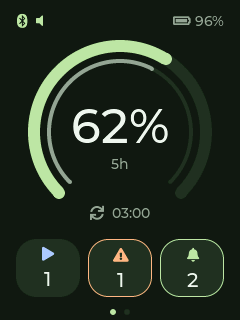
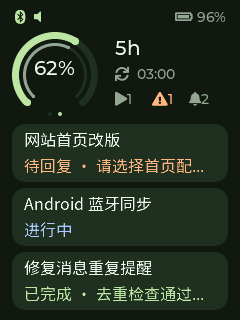
Synthetic fixtures rendered on the physical device; no account or real conversation data.
What it does
- Computer → encrypted BLE → Passport, or computer → private LAN/WireGuard → Android → encrypted BLE → Passport.
- Meaningful completion, failure, interruption, approval and input notifications across local Codex sessions. Starts and housekeeping update silently; internal guardian/memory workers are excluded.
- Optional 2.4 GHz Wi-Fi directly from Passport to a private IPv4 HTTP relay, provisioned from the paired phone. Failed synchronization falls back to phone BLE.
- Durable delivery queue, device acknowledgements, offline replay, and one active BLE sender with phone fallback.
- Remaining quota compared with remaining cycle time. Orange means faster consumption, green balanced, blue slower.
- Native 240×320 Passport dashboard and physical-button controls. Material 3 Expressive Android overview, notifications, device settings, connection pages and guided onboarding.
Phone notifications show bounded titles and summaries for up to four sessions. Passport has two pages: the original large quota dashboard and a compact quota view with the three most recent visible sessions. Progress cards show a title, current state and one short summary; there are no conversation controls. The relay orders threads by their last actual interaction: user messages, visible Codex replies or explicit input/approval requests. Tool execution, usage refreshes, reconnects and read receipts do not reorder them. Phone and Passport share this rule; historical indexing is bounded and does not replay alerts.
This version does not resume conversations, send replies or approve actions. Those stay in Codex. Hooks need existing sessions to restart after installation; incremental logs are a compatibility fallback, not a stable API or Codex Mobile push integration. Other computers need their own collectors.
Get started
The beginner guide covers tool installation, backup/app-only flashing, APK installation without ADB, relay configuration, pairing, a real notification test, startup, switching, troubleshooting and removal. It uses the verified macOS + Android + Passport setup. Linux host deployment needs platform adaptation; Windows host deployment has not been validated.
Download the ready-made Android APK and Passport firmware v0.3.1. Version 0.3.1 reduces unnecessary screen-on time and background rendering. Update the firmware for the new wake policy and the APK for the revised presets and guidance. Python 0.3.1 refreshes version metadata and documentation; the 0.3.0 relay remains compatible. Existing BLE bonds and saved settings are retained. The APK is debug-signed. Back up the device before flashing and write only the app at 0x10000 on the documented hardware layout, preserving its other partitions.
Python installation
Requires Python 3.10+ and a working, logged-in Codex CLI. Install uv, then try:
uvx --from 'codex-passport-sync==0.3.1' codex-passport --help
If your configured mirror has not synchronized this new package, add --index https://pypi.org/simple to the uvx or uv tool install command to prioritize official PyPI.
For persistent hooks, install a persistent tool environment instead:
uv tool install 'codex-passport-sync[ble]==0.3.1'
uv tool update-shell
Open a new terminal, then:
codex-passport install-hooks
export COMPUTER_LAN_IP="replace-with-this-computers-private-IP"
codex-passport serve --host "$COMPUTER_LAN_IP" --port 18765
Keep that terminal open. Configure Android's Connection page with http://YOUR_COMPUTER_IP:18765 and the contents of ~/.local/state/codex-passport/relay-token.
Allow Bluetooth permissions and enter the current six-digit Passport code in the phone's system pairing dialog.
Restart existing Codex sessions to load the hooks. The address is the relay API, not wireless ADB or a WireGuard endpoint.
Add --ble "Passport-XXXXXX" using your device's actual advertised name for computer BLE. First pairing requires the computer's OS dialog and Bluetooth permission.
The [ble] extra is required for this route. Select the sender on Android's Connection page; a failed computer connection falls back to the phone and stays there until selected again.
Do not install permanent hooks from a temporary uvx environment, whose cache can be removed.
PyPI package · Wheel downloads · All installation options and state paths
Daily controls and scope
| Control | Result |
|---|---|
| Short UP / DOWN | Switch dashboard / progress page |
| Hold UP / DOWN | Switch quota window on either page |
| Short OK while awake | Mark received notifications read; never approve an action |
| First press while asleep | Wake only |
| Double OK while awake | Toggle persistent mute, retaining unread notifications |
| Hold OK while awake | Leave Wi-Fi or reconnect BLE, preserving bonds |
Firmware supports a short chime only for new unread input/approval requests and double OK while awake to toggle mute (saved across restarts; speaker icon at the top). The first wake gesture still only wakes. Initial synchronization is silent; retries, already received batches and unmuting do not replay sounds. Chimes are at least two minutes apart; ordinary completions, failures and interruptions update silently without waking the screen.
The backlight sleeps after 30 seconds by default; brightness, timeout, volume and mute are adjustable on Android’s Device page. At 10% battery or below, brightness is capped at 20% and screen-on time at 30 seconds. Device receipts confirm settings. Encrypted BLE frames include up to three bounded session titles and summaries. Unsupported emoji/rare glyphs are omitted on the device; spaces, Latin and basic CJK characters use a bundled OFL font.
0.3.1 defaults to 35% brightness and a 30-second timeout for fresh settings. New attention notifications can wake a dark screen for about 15 seconds, at most once every five minutes; bursts never extend viewing. Normal rendering is deferred while dark, while synchronization and unread state continue. Saved preferences remain intact. The wake policy passed automated on-device timing and phone/computer BLE checks; the user verified wake-only OK and page switching. Battery savings have not been measured. See the power audit (Chinese). An authenticated private relay and paired BLE protect access; bounded phone summaries can still contain private context. Keep the relay within your private network/VPN. Do not expose its HTTP port publicly. The computer must stay awake and run the collector.
Both BLE routes, Wi-Fi synchronization, route switching, failed Wi-Fi fallback, replay and physical controls were validated. Updates do not change the selected page; progress updates stay silent unless an alert is due. Off-LAN WireGuard and battery endurance were not measured. See the validation record for the exact evidence and limitations.
Development and attribution
Build instructions · MIT license · Third-party notices
Application code is independently authored. Official FoloToy BSP, Material Components and other dependencies retain their own licenses. The reference application was studied, not copied. This is a community project, not an official OpenAI or FoloToy product.
1 maintainer

Metadata
1 maintainer
Release files for codex-passport-sync 0.3.1
For a detailed explanation of source distributions (sdists) and built distributions (wheels), please see the package formats documentation.
Source distribution (sdist)
| File | Size | Uploaded | |
|---|---|---|---|
| codex_passport_sync-0.3.1.tar.gz | 133.8 kB | Details |
Built distribution (wheel)
| File | Interpreter | ABI | Platform | Reset |
|---|---|---|---|---|
| codex_passport_sync-0.3.1-py3-none-any.whl | Python 3 | none | any | Details |
Total release size: 160.9 kB
Release files / codex_passport_sync-0.3.1.tar.gz
| Download URL | codex_passport_sync-0.3.1.tar.gz |
|---|---|
| Size | 133.8 kB |
| Tags | Source |
|
SHA-256 checksum How to use checksums |
e562288aaac54abc38ba2a2cc96c4553f8fcf620173138a34f3e396bb5b1b579
|
|
BLAKE2b-256 checksum How to use checksums |
cbd978329d684af8869209a72c62c62efcad586db94947229a9abdda95a94c49
|
| Upload date | |
|
Uploaded using Trusted Publishing? What is trusted publishing? |
No |
| Uploaded via |
uv/0.9.27 {"installer":{"name":"uv","version":"0.9.27","subcommand":["publish"]},"python":null,"implementation":{"name":null,"version":null},"distro":{"name":"macOS","version":null,"id":null,"libc":null},"system":{"name":null,"release":null},"cpu":null,"openssl_version":null,"setuptools_version":null,"rustc_version":null,"ci":null}
|
Release files / codex_passport_sync-0.3.1-py3-none-any.whl
| Download URL | codex_passport_sync-0.3.1-py3-none-any.whl |
|---|---|
| Size | 27.1 kB |
| Tags | Python 3 |
|
SHA-256 checksum How to use checksums |
2603a540917d39eed5915eb359311c252fc61debe30b2630fc596248f299389b
|
|
BLAKE2b-256 checksum How to use checksums |
b85792503f2381433eb96bedf05ba0c90fde84f27b36fb925112d0e12a33b46c
|
| Upload date | |
|
Uploaded using Trusted Publishing? What is trusted publishing? |
No |
| Uploaded via |
uv/0.9.27 {"installer":{"name":"uv","version":"0.9.27","subcommand":["publish"]},"python":null,"implementation":{"name":null,"version":null},"distro":{"name":"macOS","version":null,"id":null,"libc":null},"system":{"name":null,"release":null},"cpu":null,"openssl_version":null,"setuptools_version":null,"rustc_version":null,"ci":null}
|














