
Offline-first static analyser for Python files and notebooks.
Verified details
These details have been verified by PyPIProject links
GitHub Statistics
Maintainers

Project description
Codexray




Latest stable package: 0.1.4 (tag v0.1.4)
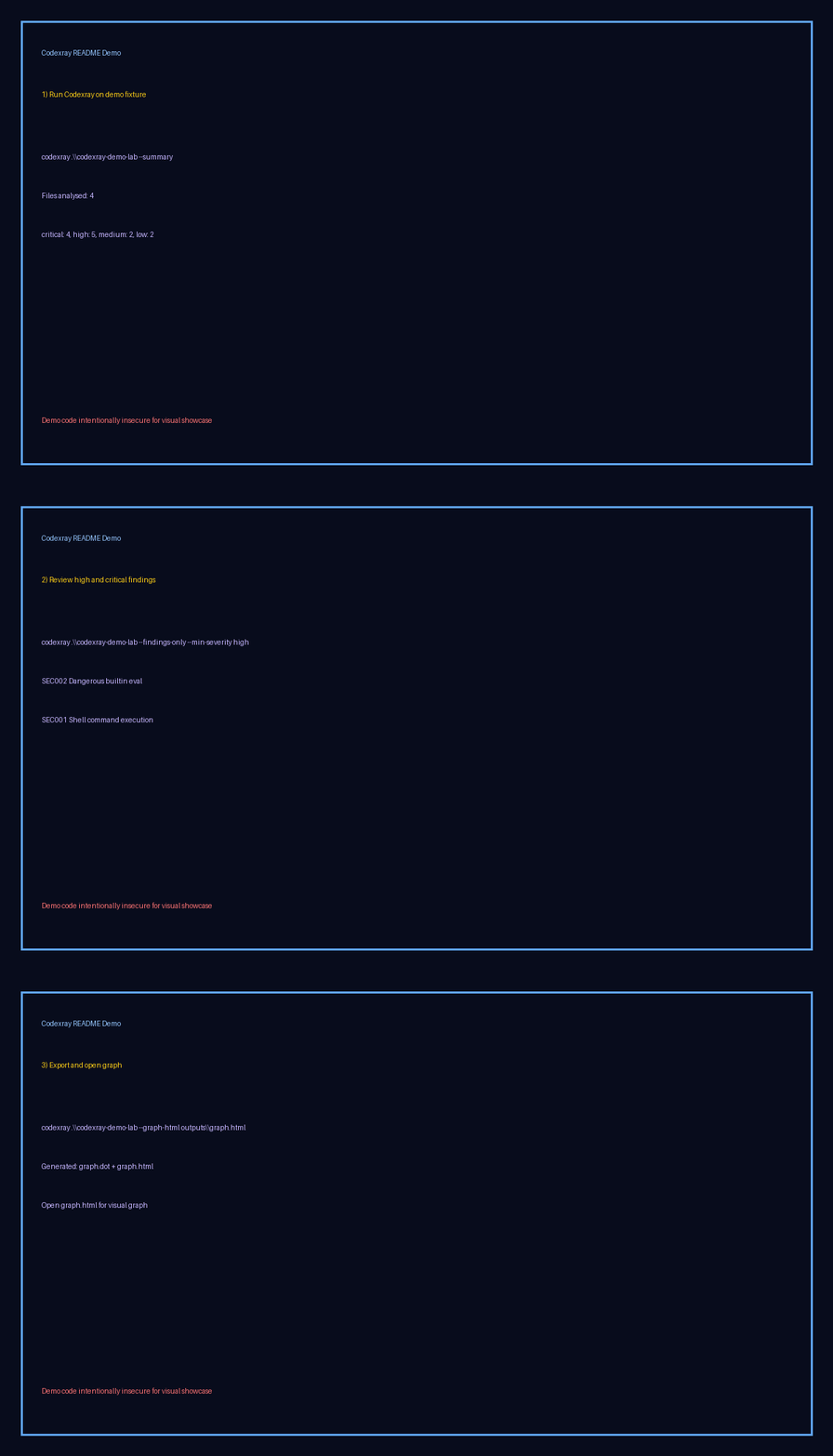
codexray "C:\path\to\database.py" --summary --findings-only --min-severity high
Codexray is an offline-first Python static analyser for .py and .ipynb files.
It helps teams inspect security risks, code quality problems, and dependency patterns
without sending source code outside the local machine.
Why Codexray?
You are about to send a notebook or script to a client and want confidence that nothing risky is hidden inside. Run Codexray first. It checks for risky patterns such as shell execution and dangerous builtins, highlights dependency concerns, and gives you a graph of call and import relationships while keeping all source analysis local to your machine.
What Codexray does
- Scans Python files and notebooks.
- Supports project-level scans, full file scans, and targeted line-range checks.
- Produces a structured JSON report.
- Builds a dependency graph view with nodes and edges.
- Flags common security risks such as shell execution and dangerous builtins.
Privacy and security behavior
- No telemetry.
- No source upload.
- Network features are disabled by default.
- Strict input limits for file size, notebook size, snippet length, and AST depth.
This tool is designed for local analysis workflows where proprietary code must stay on the client system.
Installation
pip install codexray-analyser
Quick start with CLI
Analyse a folder:
codexray ./my_project
Analyse a single file:
codexray ./my_project/app.py
Analyse a code snippet:
codexray --snippet "import os; os.system('whoami')"
Analyse only specific lines from one file:
codexray ./my_project/app.py --start-line 40 --end-line 80
Save output to JSON:
codexray ./my_project --output codexray-report.json
Print only a compact summary:
codexray ./my_project --summary
Print findings only (no graph payload):
codexray ./my_project --findings-only
Show only high and critical findings:
codexray ./my_project --findings-only --min-severity high
Export graph for Graphviz:
codexray ./my_project --graph-dot codexray-graph.dot
Export graph to an offline HTML visual:
codexray ./my_project --graph-html codexray-graph.html
Dependency graph preview
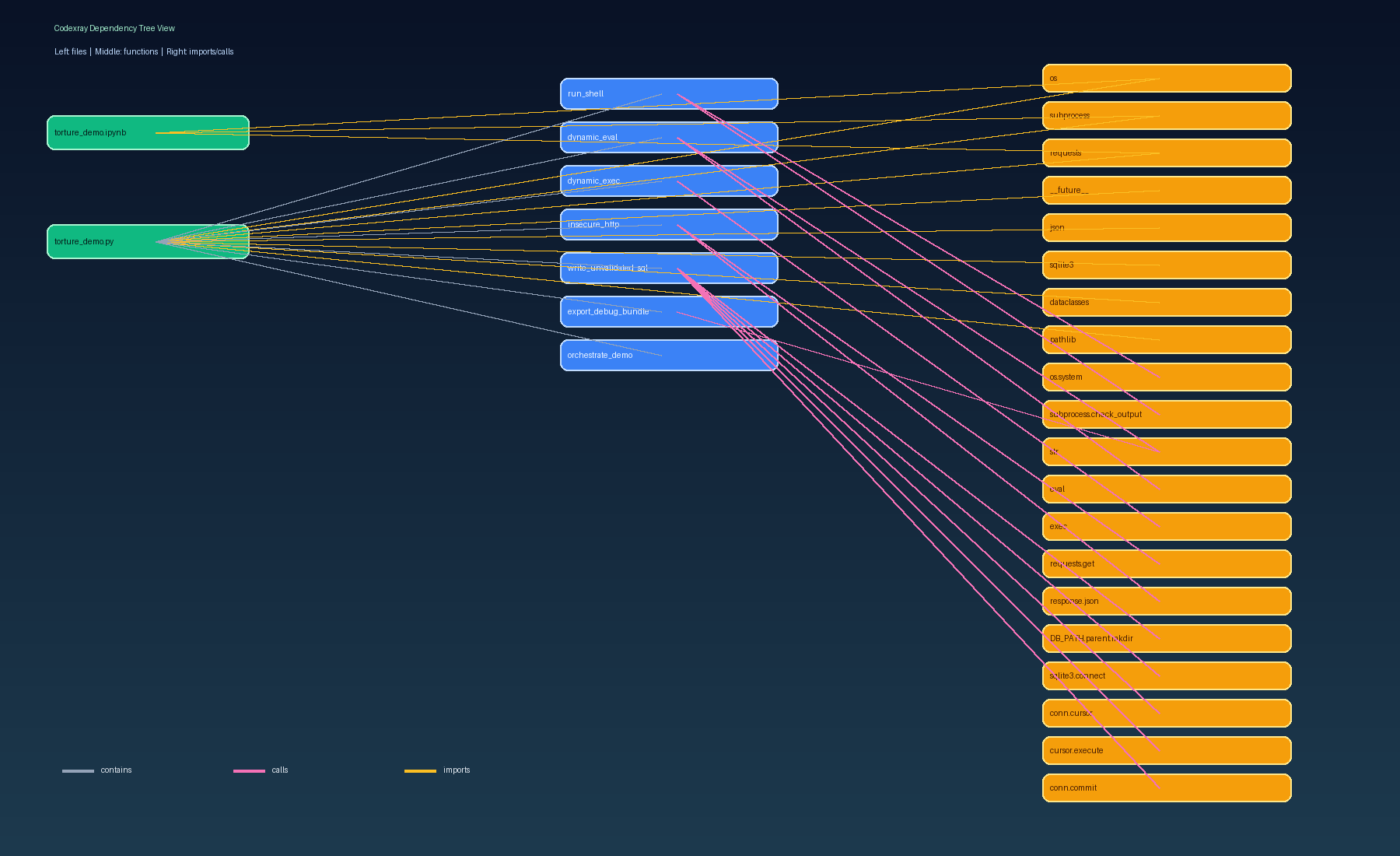
Sample graph JSON snippet:
{
  "nodes": [
    { "node_id": "file:database.py", "kind": "file", "label": "database.py" },
    { "node_id": "function:database.py:get_conn", "kind": "function", "label": "get_conn" },
    { "node_id": "import:psycopg2.connect", "kind": "import", "label": "psycopg2.connect" }
  ],
  "edges": [
    { "source": "file:database.py", "target": "function:database.py:get_conn", "relation": "contains" },
    { "source": "function:database.py:get_conn", "target": "import:psycopg2.connect", "relation": "calls" }
  ]
}
Python API usage
from codexray import analyse_file_snippet, analyse_path, analyse_snippet

project_result = analyse_path("./my_project")
snippet_result = analyse_snippet("import os\nos.system('whoami')")
range_result = analyse_file_snippet("./my_project/app.py", 20, 50)
Understanding the report
Each result returns:
findings: list of detected issues.graph: nodes and edges representing imports, files, and function relationships.metadata: run information such as analysed path and offline mode state.
Example finding shape:
{
  "rule_id": "SEC002",
  "title": "Dangerous builtin eval",
  "severity": "critical",
  "message": "Avoid eval on untrusted content.",
  "file_path": "src/app.py",
  "line": 18,
  "column": 4
}
Reading graph output
Graph output contains:
nodes: entities such as files, imports, and functionsedges: relationships such asimports,contains, andcalls- DOT export for Graphviz via
--graph-dot - offline HTML graph visual via
--graph-html
Typical use:
- Run Codexray and save JSON output.
- Load
graph.nodesandgraph.edgesinto your graph viewer. - Track dependency hotspots and risky call paths.
How to use findings to make code changes
Recommended workflow:
- Sort findings by
severity. - Fix
criticalandhighfindings first. - Re-run Codexray after each fix batch.
- Keep evidence by committing report diffs in your internal workflow.
Examples:
SEC001shell execution:- Replace dynamic shell calls with safe Python APIs.
- Avoid passing untrusted input to command execution.
SEC002dangerous builtin:- Replace
evalorexecwith safe parsing and strict allow-lists.
- Replace
DEP001unpinned dependency:- Pin versions in requirements files with
==where practical.
- Pin versions in requirements files with
Contributing
Read CONTRIBUTING.md before opening a pull request.
Security reports should follow SECURITY.md.
License
MIT. See LICENSE.
Project details
Verified details
These details have been verified by PyPIProject links
GitHub Statistics
Maintainers


Download files
Download the file for your platform. If you're not sure which to choose, learn more about installing packages.
Source Distribution
Built Distribution
Filter files by name, interpreter, ABI, and platform.
If you're not sure about the file name format, learn more about wheel file names.
Copy a direct link to the current filters
File details
Details for the file codexray_analyser-0.1.4.tar.gz.
File metadata
- Download URL: codexray_analyser-0.1.4.tar.gz
- Upload date:
- Size: 110.4 kB
- Tags: Source
- Uploaded using Trusted Publishing? Yes
- Uploaded via: twine/6.1.0 CPython/3.13.7
File hashes
| Algorithm | Hash digest | |
|---|---|---|
| SHA256 |
c64b8058fd54b1576c28c7413508586b29e2bf649320dd4ddbad041461a19383
|
|
| MD5 |
d62e6b33ca5e14318ddacadb5576882f
|
|
| BLAKE2b-256 |
0053ab0f1c7817b397c9586656c785d066896d874b018a02325f36bb7180a5a5
|
Provenance
The following attestation bundles were made for codexray_analyser-0.1.4.tar.gz:
Publisher:
publish.yml on Merlins-Sanctum/codexray-analyser
-
Statement:
-
Statement type:
https://in-toto.io/Statement/v1 -
Predicate type:
https://docs.pypi.org/attestations/publish/v1 -
Subject name:
codexray_analyser-0.1.4.tar.gz -
Subject digest:
c64b8058fd54b1576c28c7413508586b29e2bf649320dd4ddbad041461a19383 - Sigstore transparency entry: 1191969992
- Sigstore integration time:
-
Permalink:
Merlins-Sanctum/codexray-analyser@ce94f27db4fa778448f42830c6b6664d9e2621ff -
Branch / Tag:
refs/tags/v0.1.4 - Owner: https://github.com/Merlins-Sanctum
-
Access:
public
-
Token Issuer:
https://token.actions.githubusercontent.com -
Runner Environment:
github-hosted -
Publication workflow:
publish.yml@ce94f27db4fa778448f42830c6b6664d9e2621ff -
Trigger Event:
push
-
Statement type:
File details
Details for the file codexray_analyser-0.1.4-py3-none-any.whl.
File metadata
- Download URL: codexray_analyser-0.1.4-py3-none-any.whl
- Upload date:
- Size: 14.3 kB
- Tags: Python 3
- Uploaded using Trusted Publishing? Yes
- Uploaded via: twine/6.1.0 CPython/3.13.7
File hashes
| Algorithm | Hash digest | |
|---|---|---|
| SHA256 |
4ae33537234a21933cc3aa55ebb8d360fb5002987445bda9300f27e7d6d0fc43
|
|
| MD5 |
06356b16dea6d569702831367437a778
|
|
| BLAKE2b-256 |
5103b2b08e61b97bb9008113ab6da2b6c067ea1928759219e36534d2a11612cd
|
Provenance
The following attestation bundles were made for codexray_analyser-0.1.4-py3-none-any.whl:
Publisher:
publish.yml on Merlins-Sanctum/codexray-analyser
-
Statement:
-
Statement type:
https://in-toto.io/Statement/v1 -
Predicate type:
https://docs.pypi.org/attestations/publish/v1 -
Subject name:
codexray_analyser-0.1.4-py3-none-any.whl -
Subject digest:
4ae33537234a21933cc3aa55ebb8d360fb5002987445bda9300f27e7d6d0fc43 - Sigstore transparency entry: 1191969998
- Sigstore integration time:
-
Permalink:
Merlins-Sanctum/codexray-analyser@ce94f27db4fa778448f42830c6b6664d9e2621ff -
Branch / Tag:
refs/tags/v0.1.4 - Owner: https://github.com/Merlins-Sanctum
-
Access:
public
-
Token Issuer:
https://token.actions.githubusercontent.com -
Runner Environment:
github-hosted -
Publication workflow:
publish.yml@ce94f27db4fa778448f42830c6b6664d9e2621ff -
Trigger Event:
push
-
Statement type:






