
This release is a pre-release and may not be stable for production use.

codexSync
Move your Codex work safely between personal machines — chats, project lists, configuration and local state — with guarded handoff, conflict handling, verified backups and recovery.






Important Validated in practice Windows → Windows only. Linux and macOS are experimental. On Linux, process detection has been watched against a live Codex and writes are open, but no handoff to or from Linux has been tried yet (Codex's own Linux app is a preview too). On macOS reads, diagnostics and plans work, and writes stay closed until the same has been done on a Mac.
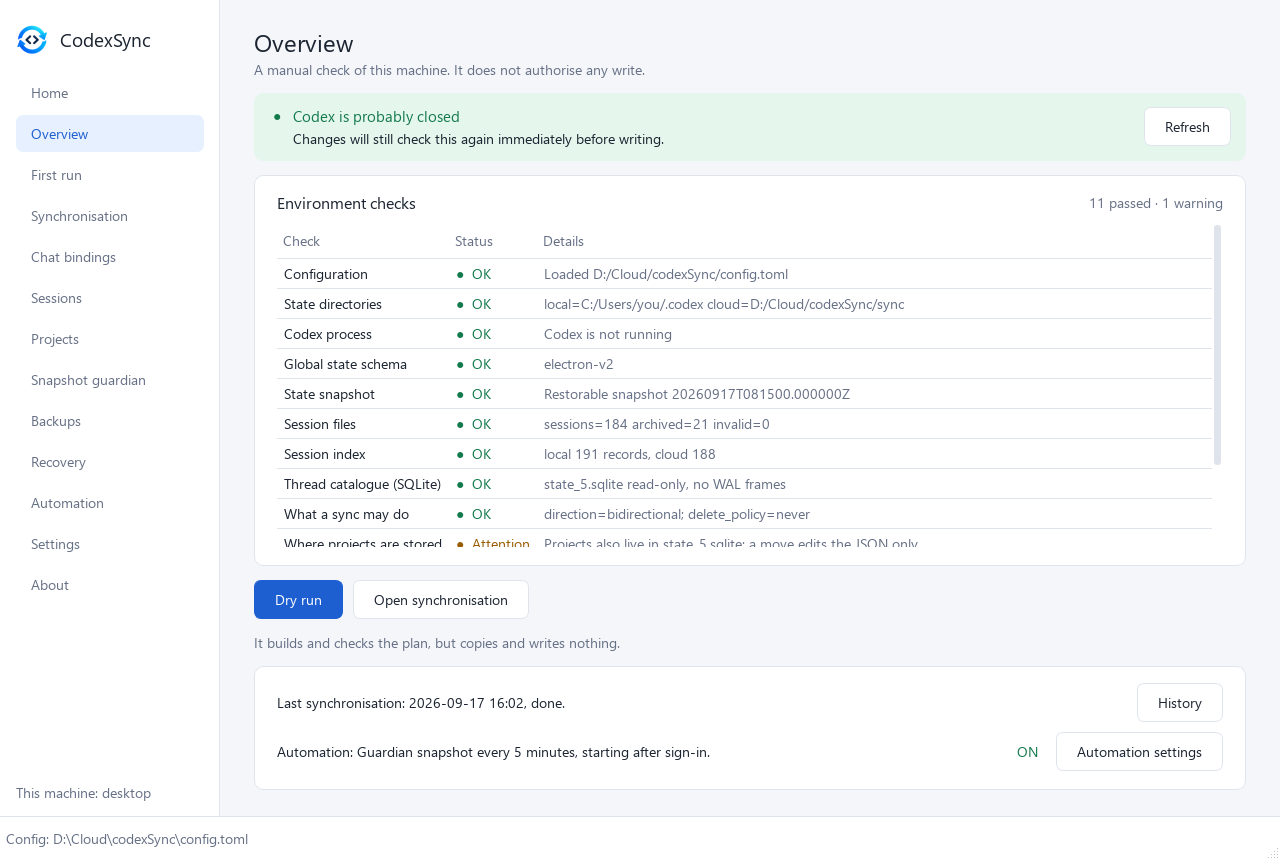
Codex keeps important working state on your machine. Putting .codex into
Dropbox, OneDrive or Syncthing is not enough: Codex may still be writing to it,
the same chat may be continued differently on two machines, and an interrupted
overwrite can destroy the very copy you needed. codexSync treats moving that
state as a guarded handoff, not as ordinary file synchronisation.
What it does
- Hands your work over between machines — one click, or on its own when Codex closes: settings, chats and the project list go to the cloud folder, the next machine loads them, and each knows what the other handed off. → Synchronisation
- Carries chats and projects — chat history, chat names and project bindings arrive where Codex looks for them, even when a project folder has another path on the other machine. A project's own files are not copied: a full sync compares the folders and says what is missing. → Projects and chats
- Never merges two histories — every session branch is classified; a chat continued on both machines keeps one whole copy, by your rule or your choice, and the other is saved. → Sessions
- Backs up before every overwrite and recovers from an interrupted write — lock, journal, verified backup. → Backups and recovery
- Checks Codex and puts it right — when Codex does not start or does not
show your chats,
codex checksays why andcodex repairfixes what it can, whoever caused it. → When Codex does not start - Guards the global state with verified snapshots taken while Codex runs,
written only outside
.codex. → Guardian - Can run on its own — the handoff watcher, copies of
.codexand periodic snapshots are ordinary tasks of your OS. → Automation
Not a Codex client and not a real-time sync. It never terminates Codex by force, and edits Codex's databases only in three narrow, backed-up ways: what it does not do.
Privacy and safety
- Local-first. codexSync has no service of its own: shared state goes only through the folder you choose.
- Your sign-in never travels.
auth.jsonand other credential files are never copied, at any depth. - Writes only while Codex is closed. When that cannot be determined, nothing is written. If you allow it, a sync asks Codex to quit first — never forcibly.
- Nothing is replaced without a verified backup, and every write is journaled, so an interrupted one can be resumed or rolled back.
Found a security or data-safety problem? See SECURITY.md.
Install
Windows, no Python needed: download codexsync-gui-…-windows-amd64.zip
(or …-arm64.zip) from Releases,
unpack it and run codexsync-gui.exe. The same executable can also run CLI
subcommands. Windows 10 (1809) or later.
With Python 3.11+, on Windows, macOS or Linux — --pre while 0.2 is an
alpha, or pip installs 0.1, and --upgrade so that an installed 0.1 is
replaced too. On macOS every read and plan works, but writes are refused
until the process detector is proven there; on Linux it has been
(platforms). On Linux the system Python refuses
pip install (PEP 668), so install into a virtual environment:
python3 -m venv ~/.venvs/codexsync && ~/.venvs/codexsync/bin/pip install --pre "codexsync[gui]"
(on Ubuntu and Debian sudo apt install python3-venv first).
python -m pip install --upgrade --pre "codexsync[gui]"    # the window and the command line
codexsync-gui                                             # on first launch, the window helps you create or open config.toml

python -m pip install --upgrade --pre codexsync           # the command line only, no dependencies
codexsync init-config --output config.toml
codexsync -c config.toml doctor
From source, and the first run step by step: installing and getting started.
Documentation
| Overview | How it works, install, first run, design principles, platforms |
| The window | All thirteen screens with screenshots |
| Command line | Every command, global options, exit codes |
| Configuration | config.toml section by section, automation |
| Synchronisation | plan and sync: comparison, conflicts, direction, deletions |
| Guardian | Snapshots of the global state, quarantine, restore, a new baseline |
| Sessions | Session branches across machines, working set, mirror, index |
| Projects and chats | Chat bindings, repair after a handoff, moving a project |
| Backups and recovery | Backups, restore, interrupted mutations, when Codex does not start |
Every page in one place: docs/. For contributors: developer documents. Release notes: CHANGELOG.md.
Status
0.2.0 alpha 1 — the first release with the window (codexsync[gui] or
codexsync-gui.exe) next to the command line. It is an alpha because 0.2
understands and changes far more of Codex's state than 0.1: it is in daily use,
and every write still goes through the lock, journal and verified backup, but it
needs more machines than ours before 0.2.0. If you use Codex on two or more
machines, please try it and tell us
what happened. Data an alpha writes stays readable by every later version.
Upgrading from 0.1. codexSync 0.2 recognises configurations created by 0.1
and upgrades them in place, from the window or with config check and
config upgrade: a few 0.1 values are refused by every command that writes,
and the upgrade shows each change before making it. Existing state is kept, and
the previous configuration is preserved in config-history/.
→ Upgrading a config
A few runtime behaviours are deliberately left unused until a controlled experiment records them — see what is not proven yet.
License
Dual-licensed: open source under GPL-3.0-or-later (LICENSE), with
a commercial path described in COMMERCIAL_LICENSE.md.
Contributions are accepted under CONTRIBUTING.md and
CLA.md.
1 maintainer

Metadata
1 maintainer
Release files for codexsync 0.2.0a1
For a detailed explanation of source distributions (sdists) and built distributions (wheels), please see the package formats documentation.
Source distribution (sdist)
| File | Size | Uploaded | Provenance | Actions |
|---|---|---|---|---|
| codexsync-0.2.0a1.tar.gz | 1.0 MB | With provenance | Details for codexsync-0.2.0a1.tar.gz |
Built distribution (wheel)
| File | Interpreter | ABI | Platform | Actions Reset |
|---|---|---|---|---|
| codexsync-0.2.0a1-py3-none-any.whl | Python 3 | none | any | Details for codexsync-0.2.0a1-py3-none-any.whl |
Total release size: 1.8 MB
Release files / codexsync-0.2.0a1.tar.gz
| Download URL | codexsync-0.2.0a1.tar.gz |
|---|---|
| Size | 1.0 MB |
| Tags | Source |
|
SHA-256 checksum How to use checksums |
b1fd12cebcf941fade0d0411f6d242970b3571c250536460f508200de9617d88
|
|
BLAKE2b-256 checksum How to use checksums |
442d67112146fe73ededb91b3fd37199d731487a20938325b2756ad2f41b14b1
|
| Upload date | |
|
Uploaded using Trusted Publishing? What is trusted publishing? |
Yes |
| Uploaded via |
twine/7.0.0 CPython/3.13.14
|
Provenance
Provenance describes where a file came from. On PyPI, provenance is shared via attestations, which provide a verifiable record of the build or publishing details. View details, limitations and caveats.


PyPI Publish Attestation
PyPI verified that this artifact, at this checksum, originated from the publisher listed below.
Signed by GitHub Actions, verified by PyPI on Oct 10, 2026.
Transparency logRelease files / codexsync-0.2.0a1-py3-none-any.whl
| Download URL | codexsync-0.2.0a1-py3-none-any.whl |
|---|---|
| Size | 781.8 kB |
| Tags | Python 3 |
|
SHA-256 checksum How to use checksums |
a707bb74274f103211bbedbfcdda349e23483f705a9e522be8a12050ea28a383
|
|
BLAKE2b-256 checksum How to use checksums |
05b09eaf1cb9e8c19ad8d0f00cff1d564e263d38aaa6be22f22ffa2eaf77f60b
|
| Upload date | |
|
Uploaded using Trusted Publishing? What is trusted publishing? |
Yes |
| Uploaded via |
twine/7.0.0 CPython/3.13.14
|
Provenance
Provenance describes where a file came from. On PyPI, provenance is shared via attestations, which provide a verifiable record of the build or publishing details. View details, limitations and caveats.
PyPI Publish Attestation
PyPI verified that this artifact, at this checksum, originated from the publisher listed below.
Signed by GitHub Actions, verified by PyPI on Oct 10, 2026.
Transparency logSecurity for codexsync 0.2.0a1
Provenance
Provenance describes where a file came from. On PyPI, provenance is shared via attestations, which provide a verifiable record of the build or publishing details. View details, limitations and caveats.
Full provenance
Both files in this release have been uploaded with provenance metadata.
Attestation for codexsync-0.2.0a1.tar.gz
PyPI Publish Attestation
PyPI verified that this artifact, at this checksum, originated from the publisher listed below.
Signed by GitHub Actions, verified by PyPI on Oct 10, 2026.
Transparency logA note on package security
PyPI is a repository for distributing packages, not a service for auditing them. While third-party security researchers and our staff do their best to detect and remove malicious packages, PyPI cannot guarantee the quality, security or suitability of any given package.
To learn more about protecting yourself from malicious actors, visit our package security documentation.














