
Coffee Agent Framework
A Python framework for building and managing AI agent workflows with support for tools, teams, and complex interactions.
Installation
pip install coffee-dot-fun
You can find the package on PyPI.
Examples
See ./example.py
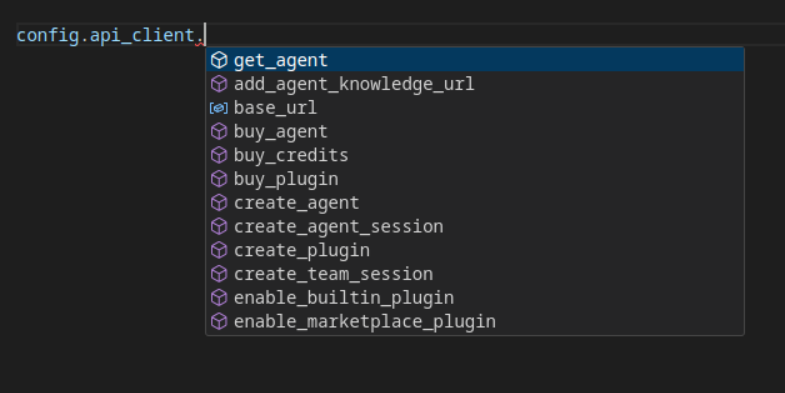
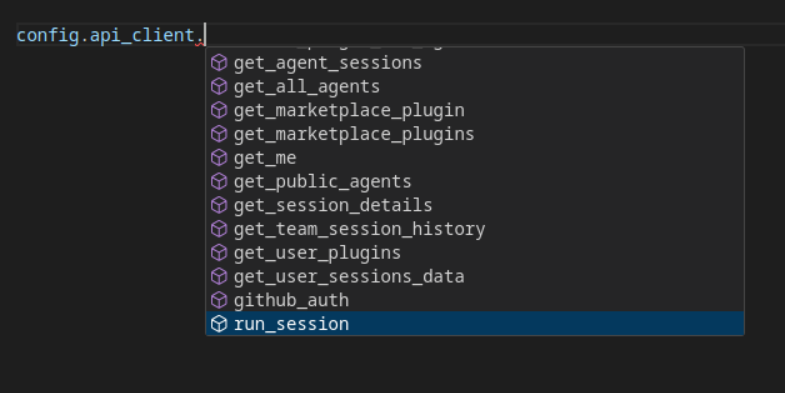
Interacting with the Coffee API
from coffee.api_client import CoffeeClient
from coffee.config import config
config.api_client = CoffeeClient(
    api_key=YOUR_API_KEY,
)
Quickstart
from coffee import Agent, CoffeeClient, config
from coffee.models import DEFAULT_MODEL

# Configure API client
config.api_client = CoffeeClient(
    api_key="your_api_key_here", base_url="https://coffee-sdk-api.fly.dev"
)
# Create a basic agent
research_agent = Agent(
    name="ResearchAgent",
    instructions=[
        "You are a research assistant specialized in web information gathering"
    ],
    tools=["duckduckgo", "web_browser"],
    model=DEFAULT_MODEL,
)
# Simple interaction
research_agent.print_message("What's the latest news about AI advancements?")
Core Concepts
Agents
Agents are autonomous units with specific capabilities:
class Agent:
    def message(self, msg: str, only_show_response: bool = True):
        ...

    def print_message(self, msg: str):
        ...
Tools
Built-in tools provide specialized capabilities:
BuiltinTools = Literal[
    "web3_essentials_tools",
    "solana_tools",
    "duckduckgo",
    "web_browser",
    "wikipedia_tools",
    # and lots more
]
Workflows
Chain multiple agents into complex workflows:
web3_workflow = (
    Workflow.build(
        Task(description="Web search", assignee=search_agent)
    )
    .add_task(Task(description="Wiki research", assignee=wiki_agent))
    .add_task(Task(description="Web3 analysis", assignee=web3_agent))
)

web3_workflow.execute_and_print("Latest blockchain trends")
Key Features
Multi-Agent Collaboration
team = Agent(
    name="TeamLead",
    instructions=["Coordinate team activities"],
    team=[research_agent, writer_agent, analysis_agent]
)
Custom Tools
Register or Purchase custom tools on the Coffee Website and use them in your agents.
class RemoteTool(BaseModel):
    name: str
    url: str
    args: dict[str, PluginArgType]
    instructions: str

    def register_tool(self):
        # Registration logic
        pass
Model Support
class OpenAI(Model):
    id: str = "gpt-4o"
    name: str = "OpenAIChat"
    provider: str = "OpenAI"

class Claude(Model):
    id: str = "claude-3-5-sonnet-20241022"
    provider: str = "Anthropic"
Advanced Configuration
Environment Setup
# Configure logging
from coffee.log import logger
logger.setLevel(logging.DEBUG)

# Custom client configuration
config.api_client = CoffeeClient(
    api_key="your_key"
)
Examples
Blog Writing Workflow
blog_workflow = Workflow.build(
    Task(description="Gather research", assignee=research_agent)
).add_task(
    Task(description="Write article", assignee=writer_agent)
)

blog_workflow.execute_and_print("Generative AI in healthcare")
1 maintainer

Metadata
1 maintainer
Release files for coffee-dot-fun 0.1.1
For a detailed explanation of source distributions (sdists) and built distributions (wheels), please see the package formats documentation.
Source distribution (sdist)
| File | Size | Uploaded | Provenance | |
|---|---|---|---|---|
| coffee_dot_fun-0.1.1.tar.gz | 9.1 kB | Without provenance | Details |
Built distribution (wheel)
| File | Interpreter | ABI | Platform | Reset |
|---|---|---|---|---|
| coffee_dot_fun-0.1.1-py3-none-any.whl | Python 3 | none | any | Details |
Total release size: 19.1 kB
Release files / coffee_dot_fun-0.1.1.tar.gz
| Download URL | coffee_dot_fun-0.1.1.tar.gz |
|---|---|
| Size | 9.1 kB |
| Tags | Source |
|
SHA-256 checksum How to use checksums |
a0ba51ef8d8c14d5e06869f49cc70a8d27c4919f1e4ae27777eb650a205fab82
|
|
BLAKE2b-256 checksum How to use checksums |
59c133bdb8410c628b76c12c303443ba14b8eebd82f2832a3404dad9c54b24ed
|
| Upload date | |
|
Uploaded using Trusted Publishing? What is trusted publishing? |
No |
| Uploaded via |
twine/6.1.0 CPython/3.9.6
|
Release files / coffee_dot_fun-0.1.1-py3-none-any.whl
| Download URL | coffee_dot_fun-0.1.1-py3-none-any.whl |
|---|---|
| Size | 10.0 kB |
| Tags | Python 3 |
|
SHA-256 checksum How to use checksums |
6de5a9fe354ddf4b082b91781c0239eec5ebeb09d3ad7fc1adb7ea476003c841
|
|
BLAKE2b-256 checksum How to use checksums |
d42d4478984db17acceea4494e507aee37dc15184591583b2240f6966952847b
|
| Upload date | |
|
Uploaded using Trusted Publishing? What is trusted publishing? |
No |
| Uploaded via |
twine/6.1.0 CPython/3.9.6
|
Security for coffee-dot-fun 0.1.1
Provenance
Provenance describes where a file came from. On PyPI, provenance is shared via attestations, which provide a verifiable record of the build or publishing details. View details, limitations and caveats.
No provenance found
None of the files in this release were uploaded with provenance metadata.
A note on package security
PyPI is a repository for distributing packages, not a service for auditing them. While third-party security researchers and our staff do their best to detect and remove malicious packages, PyPI cannot guarantee the quality, security or suitability of any given package.
To learn more about protecting yourself from malicious actors, visit our package security documentation.














