
An LLM assistant magic command for Google Colab notebooks.

Project description
colab-ask 🪄
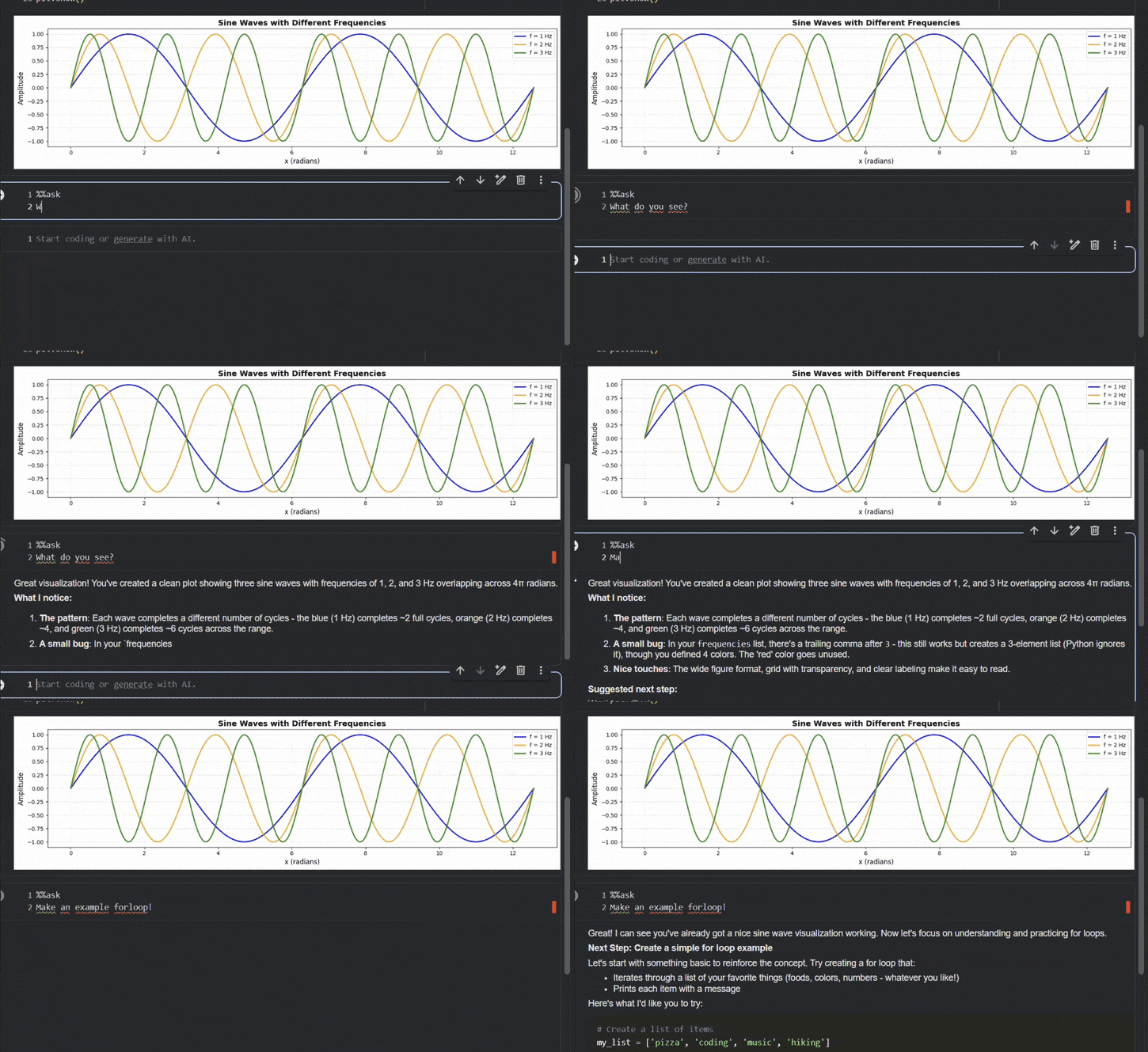
Colab-Ask is a magic command that sends your code, outputs, and even generated images (matplotlib, etc.) directly to models like Claude or GPT-4 for context-aware help.
Why use this?
- Context Aware: It sees your text and code cells, and error traces.
- Vision Capable: It can see embedded images and graphs.
- Native Integration: Lives inside Colab. No alt-tabbing to ChatGPT.
- Privacy First: Your data goes straight to the API. No middleman servers.
Prerequisites (Before you start)
- Google Colab: This extension is designed specifically for the Colab environment.
- API Keys: You need an API key for your preferred provider (OpenAI, Anthropic, Gemini, etc.).
- Click the Key Icon (Secrets) on the left sidebar in Colab.
- Add a new secret (e.g.,
ANTHROPIC_API_KEYorOPENAI_API_KEY). - Toggle "Notebook access" ON.
Quick Start
Run this in a cell to install and load the extension:
!pip install colab-ask
%load_ext colab-ask
1. The Basic Ask
Use %%ask to chat about your current notebook state.
%%ask
My training loop is stalling at epoch 5. based on the logs above, why?
2. The Vision Ask
Since colab-ask sees images, you can ask about plots:
# (After generating a matplotlib chart)
%%ask
Look at the plot above. Is the model overfitting?
Configuration
Change Model: Uses LiteLLM under the hood. Any supported model string works. Check https://docs.litellm.ai/docs/providers
%set_model claude-3-5-sonnet-20241022
Set System Prompt: Want a specific teaching style?
%%set_sys
You are a senior Python engineer. Be concise.
Focus on performance optimization and vectorized operations.
Default System Prompt
By default, colab-ask uses this system prompt:
You are an AI assistant inside a Google Colab notebook.
In your response, craft guidance on the next step, whether code related, or more strategy related.
Don't spew out all the steps at once, the user wants to go slow, they will ask for more if they need it.
The user is interested in improving their coding, and may choose to make code blocks in response to your input.
This prompt is inspired by SolveIt (the fast.ai dialog engineering environment), which emphasizes:
- Small steps: Breaking down problems incrementally
- Interactive learning: Waiting for user feedback before proceeding
- Code-focused: Encouraging hands-on implementation
Privacy & Data
- Direct Communication: Notebook data is sent directly from your browser/runtime to the LLM provider (OpenAI/Anthropic/Google).
- Zero Logs: We do not run a middleware server. We do not store your code.


Download files
Download the file for your platform. If you're not sure which to choose, learn more about installing packages.
Source Distribution
Built Distribution
Filter files by name, interpreter, ABI, and platform.
If you're not sure about the file name format, learn more about wheel file names.
Copy a direct link to the current filters
File details
Details for the file colab_ask-0.1.3.tar.gz.
File metadata
- Download URL: colab_ask-0.1.3.tar.gz
- Upload date:
- Size: 7.1 kB
- Tags: Source
- Uploaded using Trusted Publishing? No
- Uploaded via: twine/6.2.0 CPython/3.13.9
File hashes
| Algorithm | Hash digest | |
|---|---|---|
| SHA256 |
23c6925ece58859dd3e0607ac2d986d7be4a72b90b0552ae5af4a6a138bbb003
|
|
| MD5 |
5b22a46f063f2b750eb32306c6d77f42
|
|
| BLAKE2b-256 |
baa237bd00ab91740dd757af662cc1f3ba7be13ee3df5aa0ec69e4b327f40d60
|
File details
Details for the file colab_ask-0.1.3-py3-none-any.whl.
File metadata
- Download URL: colab_ask-0.1.3-py3-none-any.whl
- Upload date:
- Size: 7.4 kB
- Tags: Python 3
- Uploaded using Trusted Publishing? No
- Uploaded via: twine/6.2.0 CPython/3.13.9
File hashes
| Algorithm | Hash digest | |
|---|---|---|
| SHA256 |
deee32605fc2f236f33709668f901531d5bd456f6cc1a13f1ea2ee09b2e1f8c3
|
|
| MD5 |
411815b82cd22961262c0ed4412327ff
|
|
| BLAKE2b-256 |
858aaaa3ea50930b637e27dd8f2b196b044865c3bcb3b9fb891f6fc558ebb7a7
|






